
PLCupdater
A portable programming tool for Allen Bradley MicroLogix PLCs
Install / Use
/learn @robertlarue/PLCupdaterREADME
PLCupdater
A portable programming tool for Allen Bradley MicroLogix PLCs. Software and instruction on building the hardware are included. Credits to Archie over at sourceforge for the Allen Bradley DF1 Protocol library which I used as a starting place for this project. I forked his library to work with the Raspberry Pi and the modified version can be found in the DF1Comm repo
Features
- Upload program from PLC to handheld device and store in one of two memory slots.
- Download program from handheld device to PLC from one of two memory slots and set the PLC to run mode.
Software
Installation
You will need a network connection to your Raspberry Pi Zero before you can install packages from the internet. There are many ways of doing this. I set up mine to tunnel ethernet over usb and then share my laptop's connection. An easier way would be to get a micro USB to ethernet adapter Rasbian Jesse or greater is required and you have to install mono beforehand.
sudo apt-get install mono-complete
Then clone this repository
git clone https://github.com/robertlarue/PLCupdater.git
Hardware
Components
The following components are what I used to make my prototype but are by no means the only way you could make one of these devices. The most important components are a Raspberry Pi and a TTL to RS-232 adapter.
| Name | Qty | Cost | Subtotal | Link | |-----------------------------------------|-----|-------|----------|-------------------------------------------------------------------------------------| | Raspberry Pi Zero | 1 | $10 | $10 | https://www.adafruit.com/product/3400 | | MoPi power converter | 1 | $34 | $34 | https://shop.pimoroni.com/products/mopi-mobile-pi-power | | MAX232 TTL to RS-232 Adapter | 1 | $7 | $7 | https://www.amazon.com/uxcell-MAX232CSE-Transfer-Converter-Module/dp/B00EJ9NAKA | | 9V Battery Clip | 1 | $5 | $5 | https://www.amazon.com/uxcell-Leather-Shell-Battery-Connector/dp/B00JR6FPVW | | 25 pack of Red, Green, Yellow, Blue LED | 1 | $6 | $6 | https://www.amazon.com/microtivity-IL081-Assorted-Resistors-Colors/dp/B004JO2PVA | | LED Holders 50 pack | 1 | $6 | $6 | https://www.amazon.com/5mm-Black-Plastic-LED-Holders/dp/B00AO1SF98 | | Cables with pin connectors | 1 | $7 | $7 | https://www.amazon.com/GeeBat-Multicolored-Rainbow-Breadboard-arduino/dp/B01MFCKASX | | Project Enclosure | 1 | $7 | $7 | https://www.amazon.com/Hammond-1591BSBK-ABS-Project-Black/dp/B0002BBQUA | | 9V Battery 4 pack | 1 | $8 | $8 | https://www.amazon.com/Duracell-MN-1604-Pack-MN1604/dp/B0164F986Q | | | | Total | $82 | | |
Wiring
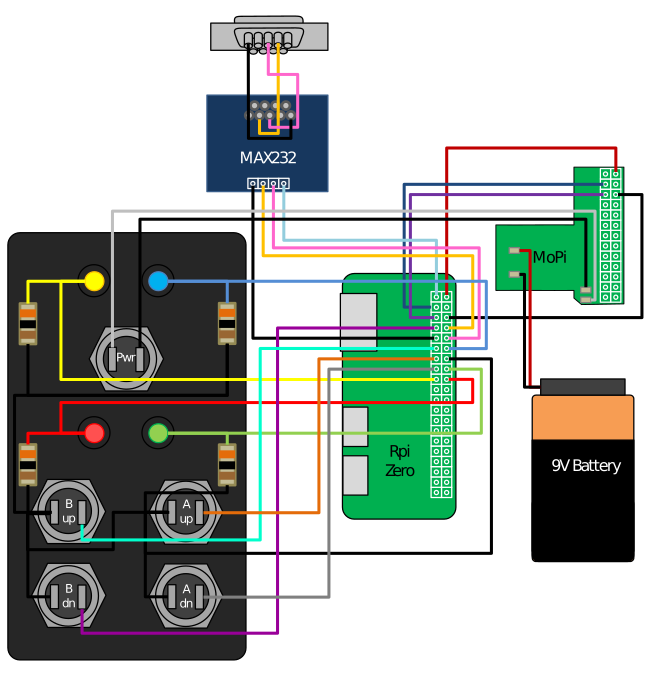
Below is how I wired up my prototype. I used the MoPi circuit to handle power management and graceful shutdown. The table is layed out with the Raspberry Pi pinout down the center and the connections to other devices on each side.
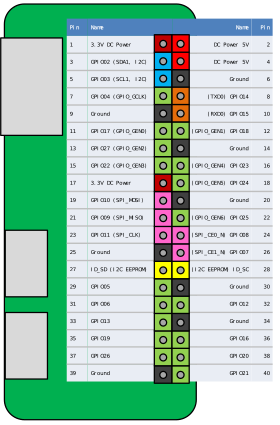
| Func | BCM | wPi | Name | Mode | Phys | Phys | Mode | Name | wPi | BCM | Func | |--------------------|-----|-----|--------|------|------|------|------|--------|-----|-----|---------------------| | MAX232 3.3V | | | 3.3V | | 1 | 2 | | 5V | | | MoPi 5V | | MoPi SDA | 2 | 8 | SDA.1 | ALT0 | 3 | 4 | | 5V | | | | | MoPi SCL | 3 | 9 | SCL.1 | ALT0 | 5 | 6 | | 0V | | | MoPi 0V | | B Down | 4 | 7 | GPIO 7 | IN | 7 | 8 | ALT0 | TxD | 15 | 14 | MAX232 TTL Tx | | MAX232 0V | | | 0V | | 9 | 10 | ALT0 | RxD | 16 | 15 | MAX232 TTL Rx | | B Up | 17 | 0 | GPIO 0 | IN | 11 | 12 | OUT | GPIO 1 | 1 | 18 | Ready (Blue LED) | | A Up | 27 | 2 | GPIO 2 | IN | 13 | 14 | | 0V | | | Buttons & Lights 0V | | A Down | 22 | 3 | GPIO 3 | IN | 15 | 16 | OUT | GPIO 4 | 4 | 23 | Success (Green LED) | | Power (Yellow LED) | | | 3.3V | | 17 | 18 | OUT | GPIO 5 | 5 | 24 | Progress (Red LED) |


Usage
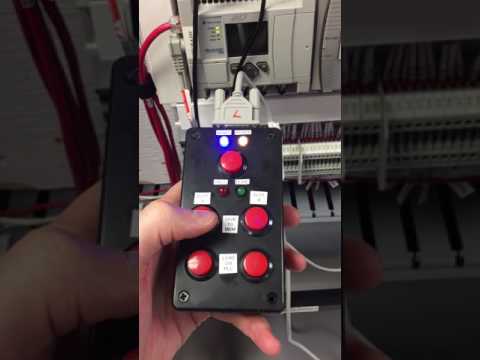
The video below shows how to use the handheld device. Hold down the power button for 3 seconds to starts up the device. When the device is ready, the blue light will turn on. To upload a program from a PLC to the device to save it, press either one of the top memory bank buttons. To download a saved program from the device to the PLC, press the down button from one of the memory banks. The device will automatically shutdown gracefully after 30 seconds or you can shut it down manually by pressing and holding the power button.
Related Skills
node-connect
349.2kDiagnose OpenClaw node connection and pairing failures for Android, iOS, and macOS companion apps
frontend-design
109.5kCreate distinctive, production-grade frontend interfaces with high design quality. Use this skill when the user asks to build web components, pages, or applications. Generates creative, polished code that avoids generic AI aesthetics.
openai-whisper-api
349.2kTranscribe audio via OpenAI Audio Transcriptions API (Whisper).
qqbot-media
349.2kQQBot 富媒体收发能力。使用 <qqmedia> 标签,系统根据文件扩展名自动识别类型(图片/语音/视频/文件)。
