
Ragpicker
Ragpicker is a Plugin based malware crawler with pre-analysis and reporting functionalities. Use this tool if you are testing antivirus products, collecting malware for another analyzer/zoo.
Install / Use
/learn @robbyFux/RagpickerREADME
Ragpicker malware crawler
Ragpicker is a Plugin based malware crawler with pre-analysis and reporting functionalities. Use this tool if you are testing antivirus products, collecting malware for another analyzer/zoo.
Many thanks to the cuckoo-sandbox team for the Architectural design ideas.
Includes code from cuckoo-sandbox (c) 2013 http://www.cuckoosandbox.org/ and mwcrawler, (c) 2012 Ricardo Dias
##Requirements
For use is Python 2.7 preferred.
###required
- unrar
- Wine for second chance with sysinternals sigcheck, RTFScan and OfficeMalScanner?
- ClamAV antivirus scanner for unpacking Malware [wiki.ubuntuusers.de ClamAV]
- requests: http://docs.python-requests.org/en/latest/
- httplib2 (HTTP client library): https://code.google.com/p/httplib2
- Yapsy - Yet Another Plugin System: http://yapsy.sourceforge.net
- Beautiful Soup parser: http://www.crummy.com/software/BeautifulSoup
- M2Crypto: http://chandlerproject.org/Projects/MeTooCrypto/
- pyasn1: http://pyasn1.sourceforge.net/
- jsonpickle: http://jsonpickle.github.io/
- exiftool: http://owl.phy.queensu.ca/~phil/exiftool/
- bitstring: https://code.google.com/p/python-bitstring/
###optional dependencies
- For matching Yara signatures use release 1.7
- Tor Anonymous Proxy
- hachoir-subfile is required for subfile: http://bitbucket.org/haypo/hachoir/wiki/hachoir-subfile
- VxCage malware samples repository: https://github.com/botherder/vxcage
- MongoDB: http://docs.mongodb.org/manual/tutorial/install-mongodb-on-ubuntu/ (Recommended miminum db version v2.6.7)
- PyMongo is required for working with MongoDB: http://api.mongodb.org/python/current
- Jinja2 Python library is required to generate HTML reports: http://jinja.pocoo.org
- AntiVir antivirus scanner [wiki.ubuntuusers.de AntiVir]
- AVG antivirus scanner [help.ubuntu.com AVG]
- BitDefender? antivirus scanner [wiki.ubuntuusers.de BitDefender]
- F-Prot antivirus scanner [wiki.ubuntuusers.de F-PROT]
##Antivirus under Linux
https://code.google.com/p/malware-crawler/wiki/LinuxAntivirus
##Ragpicker Installation
###Preparation
sudo apt-get install build-essential python-dev gcc automake libtool python-pip subversion ant
- Install YARA (http://yara.readthedocs.org/en/latest/gettingstarted.html Tested with yara-3.1.0.)
cd yara-3.1.0
./bootstrap.sh
./configure
make
sudo make install
- Install YARA Python
cd yara-python
python setup.py build
sudo python setup.py install
- Install Wine
sudo apt-get install wine
winetricks nocrashdialog
- Install MongoDB (Recommended miminum db version v2.6.7)
- http://docs.mongodb.org/manual/tutorial/install-mongodb-on-ubuntu/
sudo apt-key adv --keyserver hkp://keyserver.ubuntu.com:80 --recv 7F0CEB10
echo 'deb http://downloads-distro.mongodb.org/repo/ubuntu-upstart dist 10gen' | sudo tee /etc/apt/sources.list.d/mongodb.list
sudo apt-get update
sudo apt-get install -y mongodb-org
- Install VxCage
- http://cuckoosandbox.org/2012-11-06-vxcage.html
- https://github.com/botherder/vxcage
###Other dependencies
sudo apt-get install libimage-exiftool-perl perl-doc
sudo apt-get install clamav clamav-freshclam
sudo apt-get install unrar
sudo apt-get install python-m2crypto
sudo apt-get install python-pyasn1
###Install with pip [how install pip]:
sudo pip install requests
sudo pip install jsonpickle
sudo pip install simplejson
sudo pip install httplib2
sudo pip install yapsy
sudo pip install beautifulsoup
sudo pip install Jinja2
sudo pip install pymongo
sudo pip install hachoir-core
sudo pip install hachoir-parser
sudo pip install hachoir-regex
sudo pip install hachoir-subfile
sudo pip install bitstring
sudo pip install prettytable
##Ragpicker install
sudo mkdir /opt/ragpicker
sudo chown -R [user:group] /opt/ragpicker/
TODO gitClone (svn checkout https://malware-crawler.googlecode.com/svn/ malware-crawler)
cd malware-crawler/MalwareCrawler/
ant install
##Configuration
Ragpicker relies on three configuration files:
- config/crawler.conf: enabling Crawler modules and configuring urlBlackList (URLs not being processing)
- config/preProcessing.conf: enabling and configuring preprocessing modules
- config/processing.conf: enabling and configuring processing modules
- config/reporting.conf: enabling and configuring report modules
Via the configuration files, you can:
- Enable or disable the modules [on/off].
- If you add a custom module to Ragpicker, you have to add a entry in this file (or it won't be executed).
- You can also add additional options under the section of custom module
The results are stored with the default configuration below dumpdir/reports and dumpdir/files.
###Disable the Wine GUI crash dialog see https://code.google.com/p/malware-crawler/wiki/WineConfig
##Starting Ragpicker
To start Ragpicker use the command:
python ragpicker.py
Example: Start Ragpicker with 5 threads and logfile:
python ragpicker.py -t 5 --log-filename=./log.txt
###Usage
usage: ragpicker.py [-h] [-a] [-t THREADS] [--log-level LOG_LEVEL]
                    [--log-filename LOG_FILENAME] [--version]

    Ragpicker Malware Crawler

    optional arguments:
  -h, --help            show this help message and exit
  -a, --artwork         Show artwork
  -p PROCESSES, --processes PROCESSES
                        Number of processes (default=3, max=6)
  -u URL, --url URL     Download and analysis from a single URL
  -d DIRECTORY, --directory DIRECTORY
                        Load files from local directory
  -i, --info            Print Ragpicker config infos
  -da, --delete         Delete all stored data
  --log-level LOG_LEVEL
                        logging level, default=logging.INFO
  --log-filename LOG_FILENAME
                        logging filename
  --version             show program's version number and exit
##Stoping Ragpicker (unsave)
To stop ragpicker using the command:
./manager.py stop
#Ragpicker - System Design
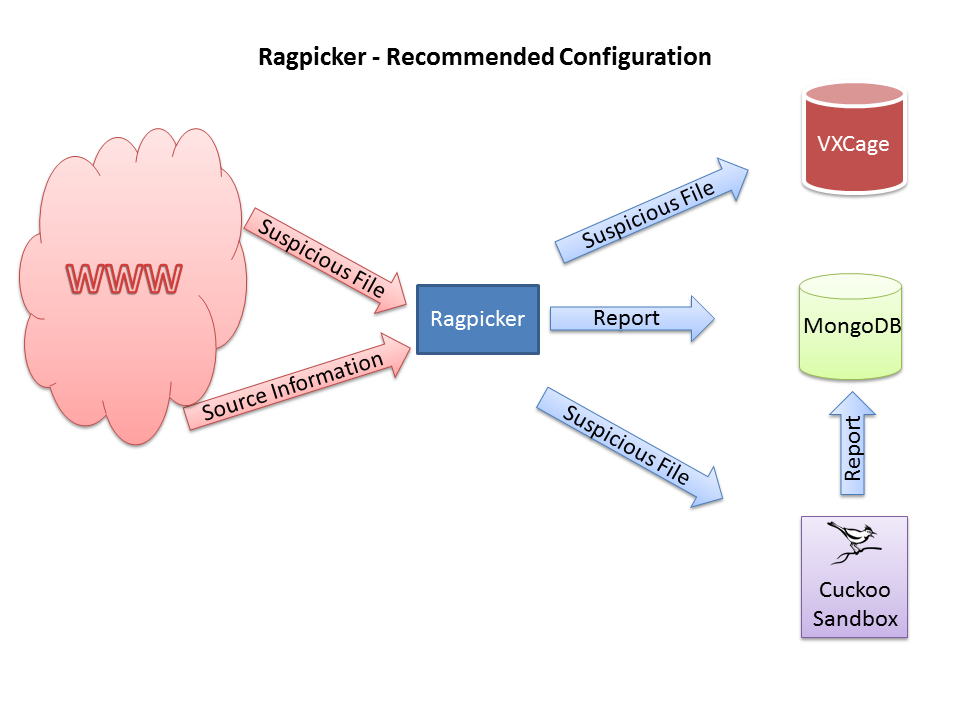
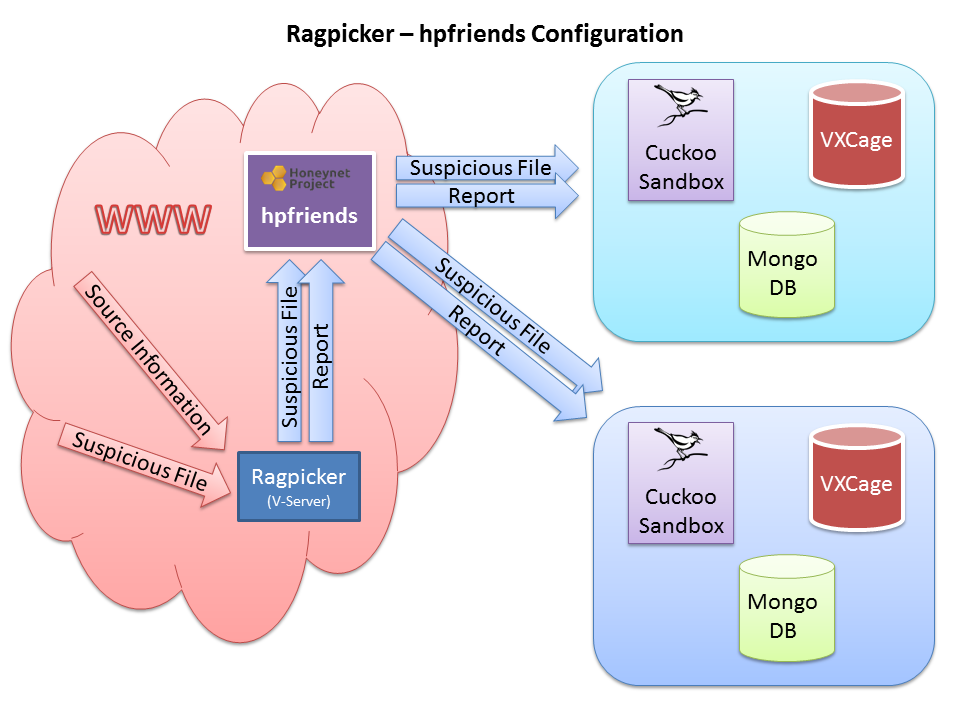
#Development
Modules must be developed as yapsy-plugin and implement yapsy.IPlugin interface. Yapsy (Yet Another Plugin System) is a simple plugin system for Python applications. You can find the yapsy documentation here: http://yapsy.sourceforge.net
The abstract classes for the modules they see under core/abstracts.py
##Used third party libraries
Third party libraries are located under the subdirectory utils.
Library | Description | Author ------------- | ------------- | ------------- python-magic | python-magic is a python interface to the libmagic file type identification library | Adam Hupp pdf-parser | Use it to parse a PDF document | Didier Stevens pdfid | Tool to test a PDF file | Didier Stevens pefile | Portable Executable reader module | Ero Carrera peutils | Portable Executable utilities module | Ero Carrera socks | SocksiPy - Python SOCKS module. | Dan-Haim hpfeeds | Generic authenticated datafeed protocol | Honeynet Project verify-sigs | Compute hashes and validate signatures | Google Inc.
##Crawler Modules
All crawler modules should be placed inside the folder at crawler/.
The crawler modules have a return-value of a map consisting of {MD5:URL}
...
md5 = hashlib.md5(url).hexdigest()
self.mapURL[md5] = url
...
Crawler modules must implement the run method.
All crawling modules have access to:
self.options: self.options is a dictionary containing all the options specified in the crawlers’s configuration section in config/crawler.conf.
For more information see: TODO CrawlerTemplate
###Preprocessing Modules
All preprocessing modules should be placed inside the folder at preProcessing/.
TODO
##Processing Modules
All processing modules should be placed inside the folder at processing/.
Every processing module will then be initialized and executed and the data returned will be appended in a data structure.
This data structure is a simply Python dictionary that includes the results produced by all processing modules identified by their identification key.
Every processing module should contain:
- A class inheriting Processing.
- A run() function.
- A self.key attribute defining the name to be used as a subcontainer for the returned data.
- A self.score attribute what the risk level determines (The value "-1" disabled this function)
Input Parameters of the method run is the class of objfile from core/objfile.py.
All processing modules have access to:
- self.options: self.options is a dictionary containing all the options specified in the processing’s configuration section in config/processing.conf.
- self.task: task information we used for example for infos["started"] = self.task["started_on"].
For more information see: TODO ProcessingTemplate
##Reporting Modules
All reporting modules should be placed inside the folder at reporting/.
Every reporting module should contain:
- A class inheriting Reporting.
- A run() function.
Input Parameters of the method run is the results dictionary from the processing and the class of objfile from core/objfile.py.
All reporting modules have access to:
- self.options: self.options is a dictionary containing all the options specified in the report’s configuration section in config/reporting.conf.
- self.task: task information we used for example for infos["started"] = self.task["started_on"].
For more information see: TODO ReportingTemplate
#Currently implemented functionalities ##CRAWLER
 |-- cleanmx                   Fetching Malware-URLs from Cleanmx RSS (http://support.clean-mx.de)
 |-- malShare                  Fetching Malware-URLs from MalShare daily list (http://www.malshare.com
