
SHRED
SHRED: 3D Shape Region Decomposition with Learned Local Operations -- SIGGRAPH Asia 2022
Install / Use
/learn @rkjones4/SHREDREADME
SHRED: 3D Shape Region Decomposition with Learned Local Operations
By R. Kenny Jones, Aalia Habib, and Daniel Ritchie
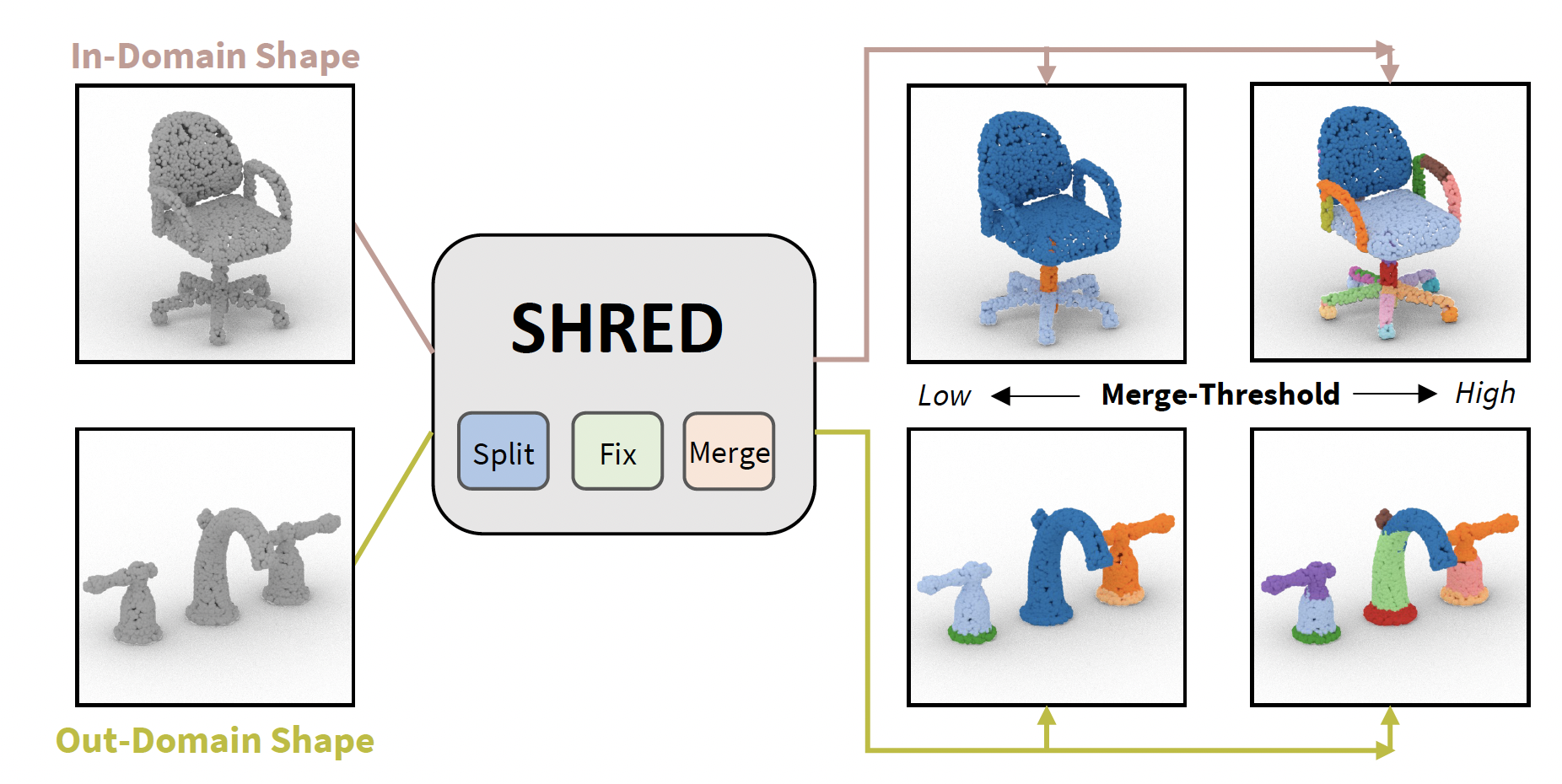
SHRED is a method for 3D SHape REgion Decomposition that consumes a 3D shape as input and uses learned local operations to produce a segmentation that approximates fine-grained part instances. A merge-threshold parameter can be adjusted to change decomposition granularity depending on the target downstream application
About the paper
Presented at Siggraph Asia 2022.
Bibtex
@article{jones2022SHRED,
  title={SHRED: 3D Shape Region Decomposition with Learned Local Operations},
  author={Jones, R. Kenny and Habib, Aalia and Ritchie, Daniel},
  journal={ACM Transactions on Graphics (TOG), Siggraph Asia 2022},
  volume={41},
  number={6},
  pages={Article 186},
  year={2022},
  publisher={ACM}
}
Set Up
To run SHRED, please take the following steps. Tested with python 3.8, cuda 11, PyTorch 1.10 and Ubuntu 20. Steps should be run from inside the code directory.
- Create a new conda environment sourced from environment.yml, by running:
conda env create -f environment.yml
- Verify the binaries for the pointNet++ models are working, details in the methods/pointnet2 folder README
To rerun our experiments, or retrain SHRED's models:
-
change the USER variable in make_dataset.py to point to a version of partNet
-
run python3 all_data_script.py -- this will generate dataset information for all categories we run experiments on
Visualizing Region Decomposition Results
We provide vis_script.py which writes region decompositions predicted by different methods to point cloud objs, where each region is given a random color.
To run vis_script.py, first download save_results.zip, put it in the code directory, and unzip it. This file holds test-set predictions for different region decomposition methods over 10k points for each shape.
Then, for instance, to visualize the first chair of the test-set for each method run:
python3 vis_script.py -inds 0 -c chair
Running SHRED on new shapes
We include checkpoints of trained SHRED models in code/def_models. To create a region decomposition for a new mesh input.obj, run the following command:
python3 shred_mesh.py input.obj out.obj -mn_mt {MT}
This will save a colored point cloud to out.obj, where each region is given a different color. MT sets the merge-threshold, if not set the default is 0.5
Evaluating SHRED on PartNet shapes
We provide evaluation logic in make_results.py to run method inference on test-set shapes from PartNet. Use the -mt flag to choose the SHRED method:
python3 make_results.py -mt srd -mn_mt 0.5 -svn {NAME}
The metric outputs of make_results.py will be written to results/ and the per-point predictions will be saved to save_results/ , where the name is set by the -svn {NAME} flag.
To test this script is working you can use the flags ' -mx 1 -indc chair -otdc , ', which will run inference for a single chair test-set shape.
Retraining SHRED networks
To retrain the split network, run:
python3 train_method.py -mt split_net -en {EXP_NAME}
To retrain the fix network, run:
python3 train_method.py -mt fix_net -en {EXP_NAME}
To retrain the merge network, run:
python3 train_method.py -mt merge_net -en {EXP_NAME}
Baseline methods
Please see README in code/methode/baselines for information on how to evaluate and retrain the baselines we compare against.
Repo Structure Overview
-
The code directory contains all code for our models and experiments. Method implementations can be found in the code/methods directory.
-
The data folder is where datasets go, after creation.
-
The hier folder contains the shape grammars from PartNet that we use to parse PartNet data.
Related Skills
node-connect
351.4kDiagnose OpenClaw node connection and pairing failures for Android, iOS, and macOS companion apps
frontend-design
110.7kCreate distinctive, production-grade frontend interfaces with high design quality. Use this skill when the user asks to build web components, pages, or applications. Generates creative, polished code that avoids generic AI aesthetics.
openai-whisper-api
351.4kTranscribe audio via OpenAI Audio Transcriptions API (Whisper).
qqbot-media
351.4kQQBot 富媒体收发能力。使用 <qqmedia> 标签,系统根据文件扩展名自动识别类型(图片/语音/视频/文件)。
