
Gdax Pocket Ui
GDAX Pocket UI
Install / Use
npx skills add rinchik/gdax-pocket-uiInstalls into whichever agent you are using.
README
GDAX Pocket UI
Simple Pocket UI built on top of the https://github.com/coinbase/gdax-node
GDAX API library, that allows you to use GDAX API's credentials for "Manual Trades On The Go".
First iteration of this application is limited to Ethereum account, but can easily be extended over to Bitcoin and other Cryptocurrencies available on Coinbase and GDAX.
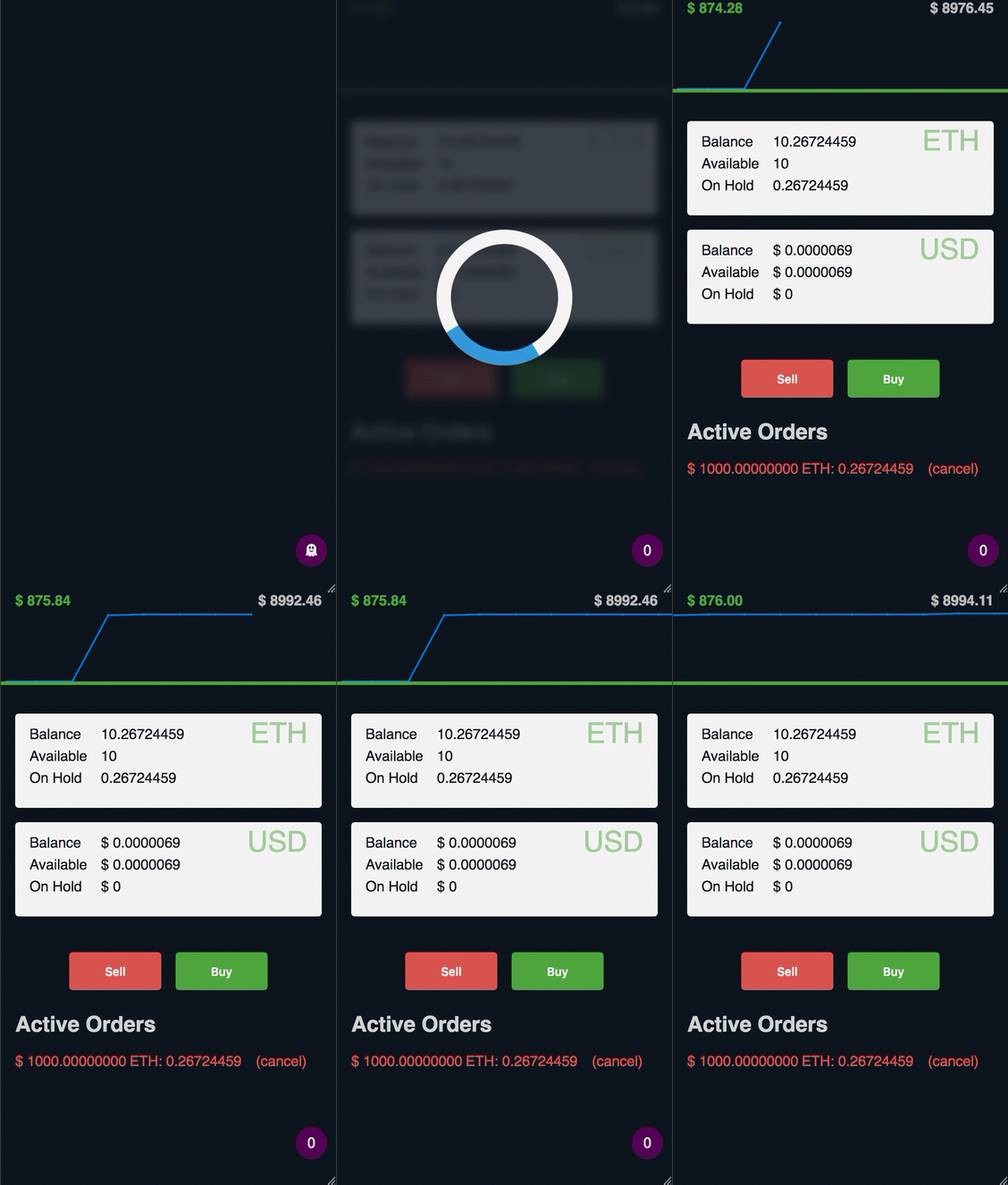
For security purposes, functionality is limited to:
-
Viewing account balances
-
Placing Sell/Buy limit orders
-
Canceling active orders
Note: For security purposes I highly recommend not to host this application on a server that is open to general public. Close it off to your local network and access it remotely only through secure VPN connection. You can find basing instructions on how to set up your personal VPN server in my article: https://blog.rinatussenov.com/personal-private-vpn-server-979cc9f0abaa
Tech Stack
UI part of this application is built purely with VanillaJS without any 3rd party libraries (except socket.io for the price-ticker).
Babel is used for transpilation, RollupJS for bundling and Jest for testing.
Server is running with ExpressJS which is an overkill and will be replaced in the future.
Running GDAX Pocket UI
Prerequisites
For security purposes, in order to run this application and access it over secure HTTPS you will have to create a self-signed certificate. It will trigger site-identity warning in browsers, but since it's a private application that is not designed to be open for general public, you can ignore this warning, the connection will still be secure.
Navigage to the encryption/ directory and run this command:
openssl req -new -newkey rsa:2048 -nodes -out mydomain.csr -keyout private.key
After following the instructions, it will generate private.key which we can now use to create our self-signed
certificate using this command:
openssl x509 -req -days 365 -in mydomain.csr -signkey private.key -out server.crt
This command has generated the certificate that later will be used by /server.js
Setting up the environment
Most of the sensitive account data is taken from the environment this application runs in. To set up your environment
take a look at the /.env_example file for all required environment names. To run it locally cp .env_example file to
.env and populate all black fields.
You can get all requred API keys from from your active GDAX account: https://www.gdax.com/settings/api.
Adding Users
This application is using Basic HTTP Auth for authentication. In order to add users, you need to edit /users.config.js
Note: In this iteration all passwords are stored in plain text, which is a security flaw, be aware of it and account for it. it will change in the future when safe password generator is added.
GDAX Pocket UI supports 2 types of users, admin and guuest. All application features are available for admin users,
active trading functionality is disabled for guest users.
Admin user example:
{
    username: 'admin',
    password: 'admin for gdax pocket ui',
    level: 'admin'
}
Guest user example:
{
    username: 'guest',
    password: 'guest account',
    level: 'guest'
}
Running the app in development mode
Install dependencies:
yarn
Build the application:
yarn build:watch
In a separate Terminal tab run application server:
yarn start:dev
Running the app in production
Build the application:
yarn build
Run application server:
yarn start:prod
Stop application server:
yarn stop:prod
Restart application server:
yarn restart:prod
GDAX Pocket UI is accessible on port :4999 on your local/remote server.
Related Skills
node-connect
385.5kDiagnose OpenClaw Android, iOS, or macOS node pairing, QR/setup code, route, auth, and connection failures.
blender-python-addon
40.5kBlender Python add-on rules for operators, panels, properties, registration, testing, and API-safe scripting
flutter-development-guidelines-cursorrules-prompt-file
40.5kCursor rules for Flutter development with MVVM architecture, Riverpod state management, Material widgets, and Dart style guidelines.
commit-push-pr
140.7kCommit, push, and open a PR
