
NativeDump
Dump lsass using only NTAPI functions by hand-crafting Minidump files (without MiniDumpWriteDump!!!)
Install / Use
/learn @ricardojoserf/NativeDumpREADME
NativeDump
NativeDump allows to dump the lsass process using only NTAPIs generating a Minidump file with only the streams needed to be parsed by tools like Mimikatz or Pypykatz (SystemInfo, ModuleList and Memory64List Streams).
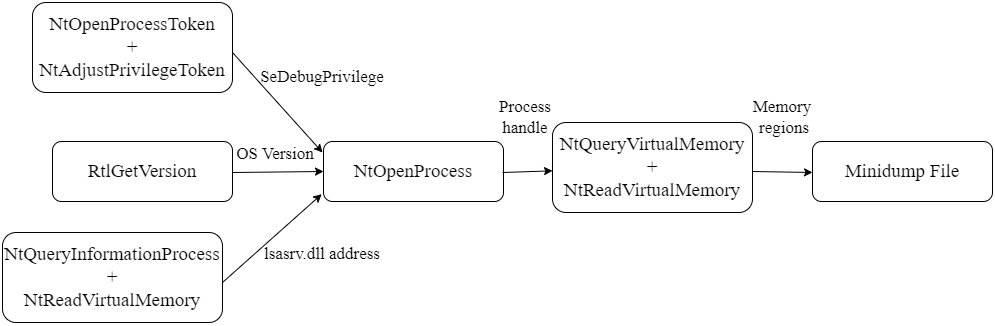
- NTOpenProcessToken and NtAdjustPrivilegeToken to get the "SeDebugPrivilege" privilege
- RtlGetVersion to get the Operating System version details (Major version, minor version and build number). This is necessary for the SystemInfo Stream
- NtQueryInformationProcess and NtReadVirtualMemory to get the lsasrv.dll address. This is the only module necessary for the ModuleList Stream
- NtOpenProcess to get a handle for the lsass process
- NtQueryVirtualMemory and NtReadVirtualMemory to loop through the memory regions and dump all possible ones. At the same time it populates the Memory64List Stream
The program has one optional argument for the output file, the default file name is "proc_<PID>.dmp":
NativeDump.exe [DUMP_FILE]
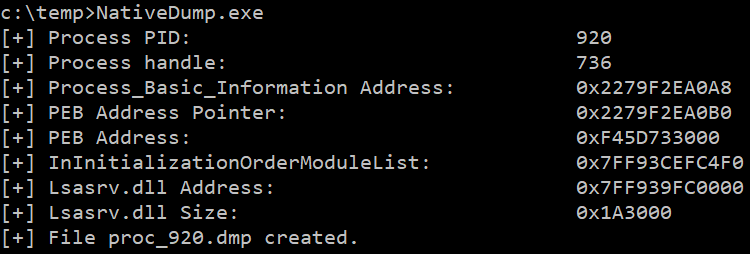
The tool has been tested against the latest Windows versions with the most common security solutions (Microsoft Defender for Endpoints, CrowdStrike...) and works fine, but stealthiness will depend on the "flavour" you choose: use uncommon languages and customize the binaries for the best results! However, it does not work if PPL is enabled ~~or PEB structure is not readable~~. Update: Now it is possible to execute the programs without reading the PEB, check the peb-unreadable branch :)
Some benefits of this technique are:
- It does not use the well-known dbghelp!MinidumpWriteDump function
- It only uses functions from Ntdll.dll, so it is possible to bypass API hooking by remapping the library
- The Minidump file does not have to be written to disk, you can transfer its bytes (encoded or encrypted) to a remote machine
You can find the project in different "flavours" (or languages):
-
main - .NET basic implementation (this branch)
-
python-flavour - Python implementation with 3 ntdll.dll overwrite methods + Exfiltrate to remote machine
-
golang-flavour - Golang implementation with 3 ntdll.dll overwrite methods + Exfiltrate to remote machine
-
c-flavour - C/C++ implementation with 3 ntdll.dll overwrite methods
-
bof-flavour - BOF file with 3 ntdll.dll overwrite methods
-
rust-flavour - Rust implementation by @safedv
-
crystal-flavour - Crystal implementation with ntdll.dll overwrite capabilities
-
nim-flavour - Nim implementation with ntdll.dll overwrite capabilities
Other interesting branches using .NET:
-
remote - Exfiltrate to remote machine + 3 ntdll.dll overwrite methods + Dynamic function resolution + String AES encryption + XOR-encoding Minidump content
-
all-modules - Get the information for all modules (not only lsasrv.dll)
-
peb-unreadable - Implementation without reading lsass' PEB structure + 3 ntdll.dll overwrite methods
Technique in detail: Creating a minimal Minidump file
After reading Minidump undocumented structures, its structure can be summed up to:
- Header: Information like the Signature ("MDMP"), the location of the Stream Directory and the number of streams
- Stream Directory: One entry for each stream, containing the type, total size and location in the file of each one
- Streams: Every stream contains different information related to the process and has its own format
- Regions: The actual bytes from the process from each memory region which can be read
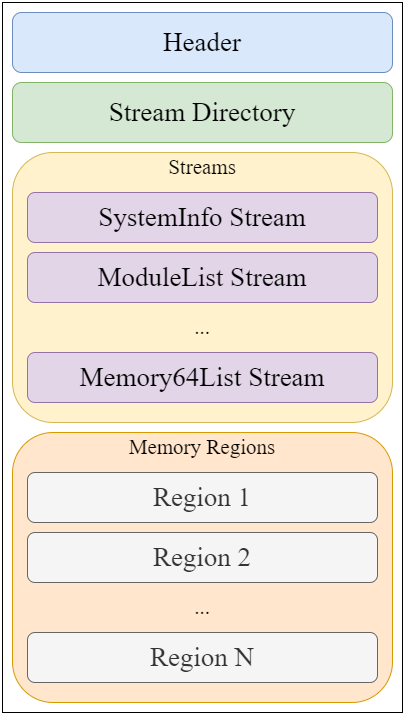
I created a parsing tool which can be helpful: MinidumpParser. We will focus on creating a valid file with only the necessary values for the header, stream directory and the only 3 streams needed for a Minidump file to be parsed by Mimikatz/Pypykatz: SystemInfo, ModuleList and Memory64List Streams.
A. Header
The header is a 32-bytes structure which can be defined in C# as:
public struct MinidumpHeader
{
    public uint Signature;
    public ushort Version;
    public ushort ImplementationVersion;
    public ushort NumberOfStreams;
    public uint StreamDirectoryRva;
    public uint CheckSum;
    public IntPtr TimeDateStamp;
}
The required values are:
- Signature: Fixed value 0x504d44d ("MDMP" string)
- Version: Fixed value 0xa793 (Microsoft constant MINIDUMP_VERSION)
- NumberOfStreams: Fixed value 3, the three Streams required for the file
- StreamDirectoryRVA: Fixed value 0x20 or 32 bytes, the size of the header
B. Stream Directory
Each entry in the Stream Directory is a 12-bytes structure so having 3 entries the size is 36 bytes. The C# struct definition for an entry is:
public struct MinidumpStreamDirectoryEntry
{
    public uint StreamType;
    public uint Size;
    public uint Location;
}
The field "StreamType" represents the type of stream as an integer or ID, some of the most relevant are:
| ID | Stream Type | | :-------- | :------- | | 0x00 | UnusedStream | | 0x01 | ReservedStream0 | | 0x02 | ReservedStream1 | | 0x03 | ThreadListStream | | 0x04 | ModuleListStream | | 0x05 | MemoryListStream | | 0x06 | ExceptionStream | | 0x07 | SystemInfoStream | | 0x08 | ThreadExListStream | | 0x09 | Memory64ListStream | | 0x0A | CommentStreamA | | 0x0B | CommentStreamW | | 0x0C | HandleDataStream | | 0x0D | FunctionTableStream | | 0x0E | UnloadedModuleListStream | | 0x0F | MiscInfoStream | | 0x10 | MemoryInfoListStream | | 0x11 | ThreadInfoListStream | | 0x12 | HandleOperationListStream | | 0x13 | TokenStream | | 0x16 | HandleOperationListStream |
C. SystemInformation Stream
First stream is a SystemInformation Stream, with ID 7. The size is 56 bytes and will be located at offset 68 (0x44), after the Stream Directory. Its C# definition is:
public struct SystemInformationStream
{
    public ushort ProcessorArchitecture;
    public ushort ProcessorLevel;
    public ushort ProcessorRevision;
    public byte NumberOfProcessors;
    public byte ProductType;
    public uint MajorVersion;
    public uint MinorVersion;
    public uint BuildNumber;
    public uint PlatformId;
    public uint UnknownField1;
    public uint UnknownField2;
    public IntPtr ProcessorFeatures;
    public IntPtr ProcessorFeatures2;
    public uint UnknownField3;
    public ushort UnknownField14;
    public byte UnknownField15;
}
The required values are:
- ProcessorArchitecture: 9 for 64-bit and 0 for 32-bit Windows systems
- Major version, Minor version and the BuildNumber: Hardcoded or obtained through kernel32!GetVersionEx or ntdll!RtlGetVersion (we will use the latter)
D. ModuleList Stream
Second stream is a ModuleList stream, with ID 4. It is located at offset 124 (0x7C) after the SystemInformation stream and it will also have a fixed size, of 112 bytes, since it will have the entry of a single module, the only one needed for the parse to be correct: "lsasrv.dll".
The typical structure for this stream is a 4-byte value containing the number of entries followed by 108-byte entries for each module:
public struct ModuleListStream
{
    public uint NumberOfModules;
    public ModuleInfo[] Modules;
}
As there is only one, it gets simplified to:
public struct ModuleListStream
{
    public uint NumberOfModules;
    public IntPtr BaseAddress;
    public uint Size;
    public uint UnknownField1;
    public uint Timestamp;
    public uint PointerName;
    public IntPtr UnknownField2;
    public IntPtr UnknownField3;
    public IntPtr UnknownField4;
    public IntPtr UnknownField5;
    public IntPtr UnknownField6;
    public IntPtr UnknownField7;
    public IntPtr UnknownField8;
    public IntPtr UnknownField9;
    public IntPtr UnknownField10;
    public IntPtr UnknownField11;
}
The required values are:
- NumberOfStreams: Fixed value 1
- BaseAddress: Using psapi!GetModuleBaseName or a combination of ntdll!NtQueryInformationProcess and ntdll!NtReadVirtualMemory (we will use the latter)
- Size: Obtained adding all memory region sizes since BaseAddress until one with a size of 4096 bytes (0x1000), the .text section of other library
- PointerToName: Unicode string structure for the "C:\Windows\System32\lsasrv.dll" string, located after the stream itself at offset 236 (0xEC)
E. Memory64List Stream
Third stream is a Memory64List stream, with ID 9. It is located at offset 298 (0x12A), after the ModuleList stream and the Unicode string, and its size depends on the number of modules.
public struct Memory64ListStream
{
    public ulong NumberOfEntries;
    pub
Related Skills
node-connect
337.4kDiagnose OpenClaw node connection and pairing failures for Android, iOS, and macOS companion apps
frontend-design
83.2kCreate distinctive, production-grade frontend interfaces with high design quality. Use this skill when the user asks to build web components, pages, or applications. Generates creative, polished code that avoids generic AI aesthetics.
openai-whisper-api
337.4kTranscribe audio via OpenAI Audio Transcriptions API (Whisper).
commit-push-pr
83.2kCommit, push, and open a PR
