
RetroBlaster
Software and firmware files for the RetroBlaster cart programmer/dumper
Install / Use
/learn @retrostage/RetroBlasterREADME
RetroBlaster
Software and firmware files for the RetroBlaster, RetroBlaster 2.0, and the RetroBlaster Mini programmer/dumper. <br /> The original RetroBlaster and RetroBlaster 2.0 are discontinued, but the RetroBlaster Mini is now available at the RetroStage Store! <br /> <br /> Be sure to visit the Wiki for the User Guide! <br /> <br /> DOWNLOAD LATEST VERSIONS:
Download RetroBlaster Software (latest)
Download RetroBlaster Mini Firmware (latest)
RetroBlaster 2.0C or 2.0D Latest Firmware Downloads ONLY (right-click and "save link as"):
Download RetroBlaster 2.0D firmware
Download RetroBlaster 2.0C firmware
IMPORTANT!!
For original RetroBlaster, RetroBlaster 2.0C or 2.0D users, check what hardware revision you have BEFORE downloading a firmware update. Choosing the wrong file could result in a bricked device that will need to be shipped back to RetroStage to fix.
The hardware version is always written at the top-right corner on the RetroBlaster circuit board itself.
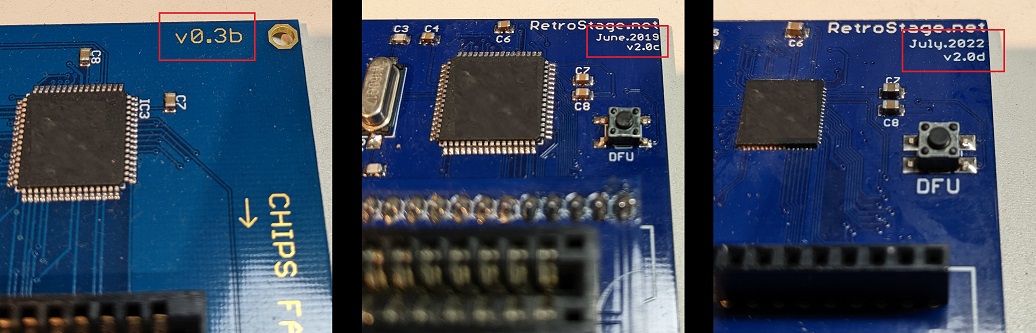
FOR WINDOWS 10 (and up) USERS on RetroBlaster 2.0D hardware
If you're on Windows 10, and have the RetroBlaster 2.0D hardware revision of the RetroBlaster, you will need to download the usbFix.bat program and run it as Administrator (right click the file and select Run as administrator). Follow the prompts. This file is located in the Hardware 2.0D firmware folder on this repo. This will fix the USB descriptor error that some users were seeing, and it seems to be specific to Windows 10. An alternate download link here
OTHER DOWNLOADS and TUTORIALS
N64 SRAM save convertor (converts cartridge SRAM save files from RetroBlaster dumps into emulator compatible .sra files): https://www.dropbox.com/s/99jvh3e5mj08onw/ED64-Saveswap.zip?dl=0
Firmware updating YouTube tutorial for RetroBlaster 2.0 (outdated, see Wiki for newest): https://www.youtube.com/watch?v=4ylNR73qHHQ
How to remove cartridge adapters safely on RetroBlaster 2.0 (without bending pins) : https://www.youtube.com/watch?v=ztO-3DqHu1M
Related Skills
node-connect
338.0kDiagnose OpenClaw node connection and pairing failures for Android, iOS, and macOS companion apps
frontend-design
83.4kCreate distinctive, production-grade frontend interfaces with high design quality. Use this skill when the user asks to build web components, pages, or applications. Generates creative, polished code that avoids generic AI aesthetics.
openai-whisper-api
338.0kTranscribe audio via OpenAI Audio Transcriptions API (Whisper).
commit-push-pr
83.4kCommit, push, and open a PR
