
SwiftLint
A tool to enforce Swift style and conventions.
Install / Use
/learn @realm/SwiftLintREADME
SwiftLint
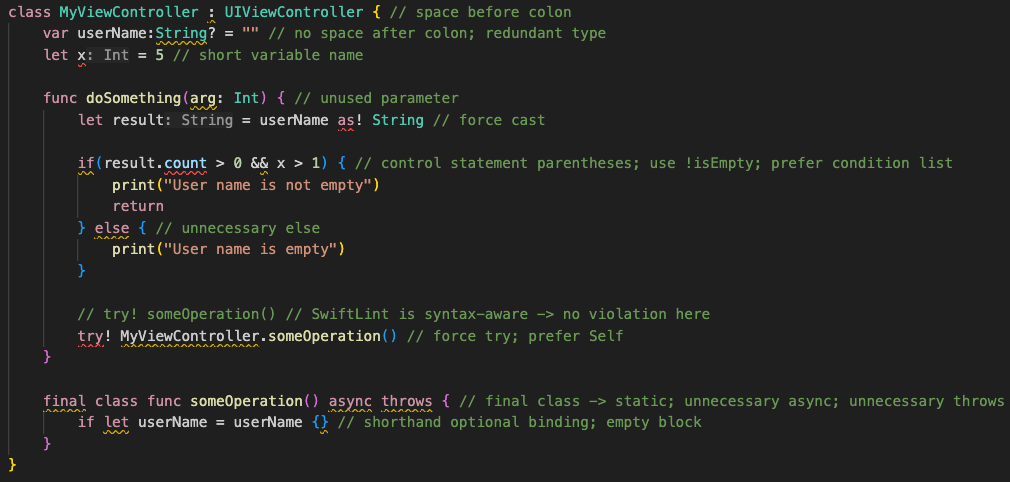
A tool to enforce Swift style and conventions, loosely based on the now archived GitHub Swift Style Guide. SwiftLint enforces the style guide rules that are generally accepted by the Swift community. These rules are well described in popular style guides like Kodeco's Swift Style Guide.
SwiftLint rules are predominantly based on SwiftSyntax. Some rules still hook into Clang and SourceKit to access type information.



This project adheres to the Contributor Covenant Code of Conduct. By participating, you are expected to uphold this code.
Video Introduction
To get a high-level overview of SwiftLint, we encourage you to watch this presentation recorded January 9th, 2017 by JP Simard (transcript provided):
Installation
Swift Package Manager
SwiftLint can be used as a command plugin or a build tool plugin.
Add
.package(url: "https://github.com/SimplyDanny/SwiftLintPlugins", from: "<version>")
to your Package.swift file to consume the latest release of SwiftLint
automatically or pin the dependency to a specific version:
.package(url: "https://github.com/SimplyDanny/SwiftLintPlugins", exact: "<version>")
Therein, replace <version> with the desired minimum or exact version.
[!NOTE] Consuming the plugins directly from the SwiftLint repository comes with several drawbacks. To avoid them and reduce the overhead imposed, it's highly recommended to consume the plugins from the dedicated SwiftLintPlugins repository, even though plugins from the SwiftLint repository are also absolutely functional. If the plugins from SwiftLint are preferred, just use the URL
https://github.com/realm/SwiftLintin the package declarations above.However, SwiftLintPlugins facilitates plugin adoption massively. It lists some of the reasons that drive the plugins as provided by SwiftLint itself very troublesome. Since the plugin code and the releases are kept in sync, there is no difference in functionality between the two, but you spare yourself a lot of time and trouble using the dedicated plugins repository.
This document assumes you're relying on SwiftLintPlugins.
Xcode Package Dependency
Use the following link to add SwiftLint as a Package Dependency to an Xcode project:
https://github.com/SimplyDanny/SwiftLintPlugins
Homebrew
brew install swiftlint
CocoaPods
Add the following to your Podfile:
pod 'SwiftLint'
This will download the SwiftLint binaries and dependencies in Pods/ during
your next pod install execution and will allow you to invoke it via
${PODS_ROOT}/SwiftLint/swiftlint in your Script Build Phases.
Installing via Cocoapods also enables pinning to a specific version of SwiftLint rather than simply the latest (which is the case with Homebrew).
Note that this will add the SwiftLint binaries, its dependencies' binaries, and
the Swift binary library distribution to the Pods/ directory, so checking in
this directory to SCM such as Git is discouraged.
Mint
mint install realm/SwiftLint
Bazel
Put this in your MODULE.bazel:
bazel_dep(name = "swiftlint", version = "0.52.4", repo_name = "SwiftLint")
Or put this in your WORKSPACE:
load("@bazel_tools//tools/build_defs/repo:http.bzl", "http_archive")

http_archive(
    name = "build_bazel_rules_apple",
    sha256 = "390841dd5f8a85fc25776684f4793d56e21b098dfd7243cd145b9831e6ef8be6",
    url = "https://github.com/bazelbuild/rules_apple/releases/download/2.4.1/rules_apple.2.4.1.tar.gz",
)

load(
    "@build_bazel_rules_apple//apple:repositories.bzl",
    "apple_rules_dependencies",
)

apple_rules_dependencies()

load(
    "@build_bazel_rules_swift//swift:repositories.bzl",
    "swift_rules_dependencies",
)

swift_rules_dependencies()

load(
    "@build_bazel_rules_swift//swift:extras.bzl",
    "swift_rules_extra_dependencies",
)

swift_rules_extra_dependencies()

http_archive(
    name = "SwiftLint",
    sha256 = "c6ea58b9c72082cdc1ada4a2d48273ecc355896ed72204cedcc586b6ccb8aca6",
    url = "https://github.com/realm/SwiftLint/releases/download/0.52.4/bazel.tar.gz",
)

load("@SwiftLint//bazel:repos.bzl", "swiftlint_repos")

swiftlint_repos()

load("@SwiftLint//bazel:deps.bzl", "swiftlint_deps")

swiftlint_deps()
Then you can run SwiftLint in the current directory with this command:
bazel run -c opt @SwiftLint//:swiftlint
Pre-Built Package
Download SwiftLint.pkg from the
latest GitHub release and
run it.
From Source
Make sure the build tool Bazel and a
recent Swift toolchain are
installed and all tools are discoverable in your PATH.
To build SwiftLint, clone this repository and run make install.
Setup
[!IMPORTANT] While it may seem intuitive to run SwiftLint before compiling Swift source files to exit a build early when there are lint violations, it is important to understand that SwiftLint is designed to analyze valid source code that is compilable. Non-compiling code can very easily lead to unexpected and confusing results, especially when executing with
--fix/--autocorrectcommand line arguments.
Build Tool Plugins
SwiftLint can be used as a build tool plugin for both Swift Package projects and Xcode projects.
The build tool plugin determines the SwiftLint working directory by locating the topmost config file within the package/project directory. If a config file is not found therein, the package/project directory is used as the working directory.
The plugin throws an error when it is unable to resolve the SwiftLint working directory. For example, this will occur in Xcode projects where the target's Swift files are not located within the project directory.
To maximize compatibility with the plugin, avoid project structures that require
the use of the --config option.
Swift Package Projects
[!NOTE] Requires installing via Swift Package Manager.
Build tool plugins run when building each target. When a project has multiple targets, the plugin must be added to the desired targets individually.
To do this, add the plugin to the target(s) to be linted as follows:
.target(
    ...
    plugins: [.plugin(name: "SwiftLintBuildToolPlugin", package: "SwiftLintPlugins")]
),
Swift Package Command Plugin
[!NOTE] Requires installing via Swift Package Manager.
The command plugin enables running SwiftLint from the command line as follows:
swift package plugin swiftlint
Xcode Projects
[!NOTE] Requires installing via Xcode Package Dependency.
Build tool plugins run as a build phase of each target. When a project has multiple targets, the plugin must be added to the desired targets individually.
To do this, add the SwiftLintBuildToolPlugin to the Run Build Tool Plug-ins
phase of the Build Phases for the target(s) to be linted.
[!TIP] When using the plugin for the first time, be sure to trust and enable it when prompted. If a macros build warning exists, select it to trust and enable the macros as well.
For unattended use (e.g. on CI), package plugin and macro validations can be disabled with either of the following:
-
Using
xcodebuildoptions:-skipPackagePluginValidation -skipMacroValidation -
Setting Xcode defaults:
defaults write com.apple.dt.Xcode IDESkipPackagePluginFingerprintValidatation -bool YES
defaults write com.apple.dt.Xcode IDESkipMacroFingerprintValidation -bool YES
[!IMPORTANT] The unattended use options bypass Xcode's validation dialogs and implicitly trust all plugins and macros, which has security implications.
Unexpected Xcode Project Structures
Project structures where SwiftLint's configuration file is located outside of the package/project directory are not directly supported by the build tool plugin. This is because it isn't possible to pass arguments to build tool plugins (e.g., passing the config file path).
If your project structure doesn't wo
Related Skills
node-connect
330.3kDiagnose OpenClaw node connection and pairing failures for Android, iOS, and macOS companion apps
frontend-design
81.3kCreate distinctive, production-grade frontend interfaces with high design quality. Use this skill when the user asks to build web components, pages, or applications. Generates creative, polished code that avoids generic AI aesthetics.
openai-whisper-api
330.3kTranscribe audio via OpenAI Audio Transcriptions API (Whisper).
commit-push-pr
81.3kCommit, push, and open a PR
