
Navigator.lua
Code analysis & navigation plugin for Neovim. Navigate codes like a breeze🎐 Exploring LSP and 🌲Treesitter symbols a piece of 🍰 Take control like a boss 🦍
Install / Use
/learn @ray-x/Navigator.luaREADME
Navigator
-
Source code analysis and navigate tool
-
Easy code navigation, view diagnostic errors, see relationships of functions, variables
-
A plugin combines the power of LSP and 🌲🏡 Treesitter together. Not only provides a better highlight but also help you analyse symbol context effectively.
-
ctags fuzzy search & build ctags symbols
Here are some examples:
Example: Javascript closure
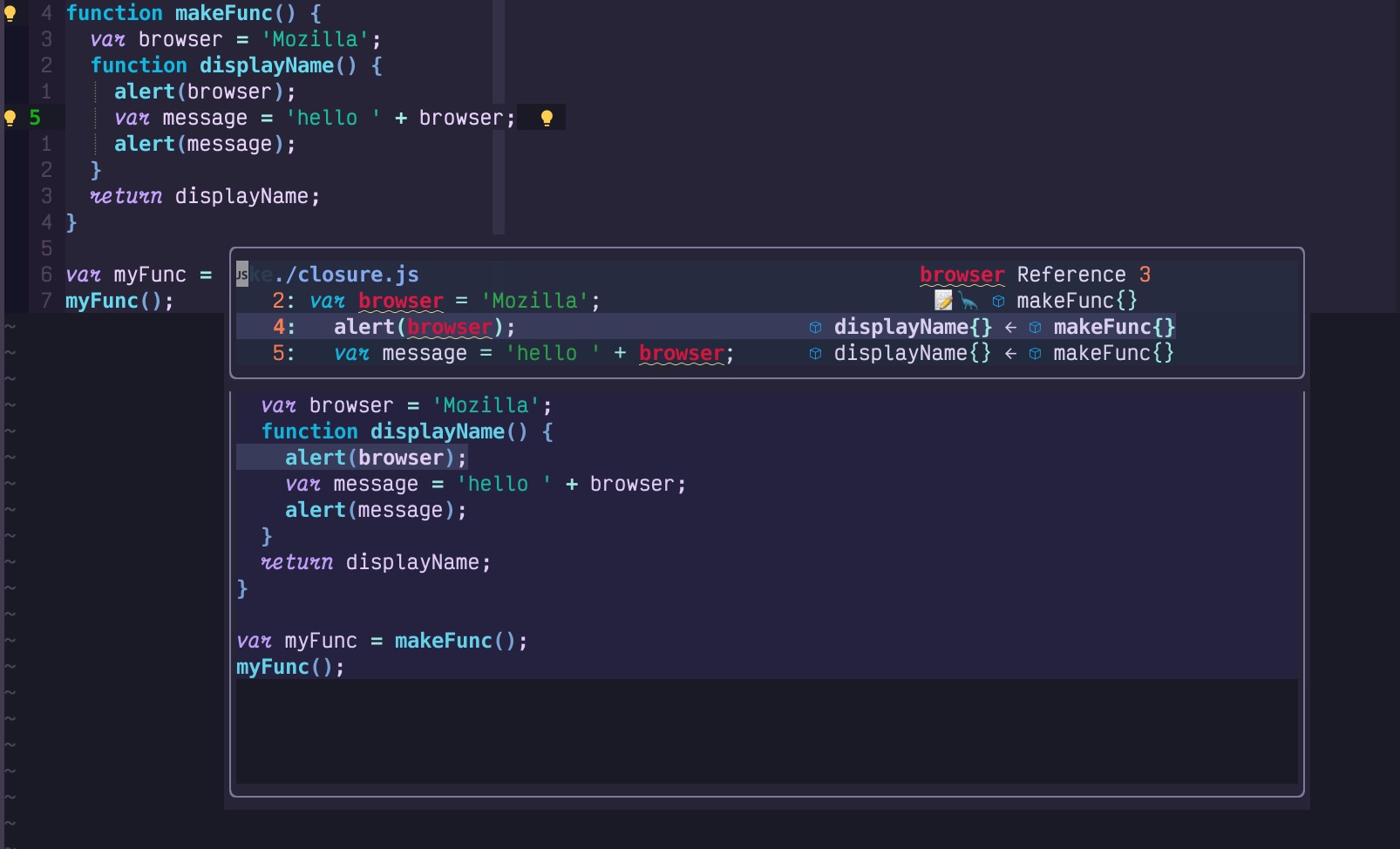
The screenshot below shows javascript call tree 🌲 for variable browser within a closure. This feature parallels the
LSP 'incoming & outgoing calls' feature. It is designed for the symbol analysis.
Explanation:
- The topmost entry in the floating window indicates there are 3 references for the symbol <span style="color:red"> browser </span> within closure.js
- The first reference of browser is an assignment, an emoji 📝 indicates the value is modified in this line. In many cases, we search for references to find out when the value changed.
- The second reference of
browseris inside functiondisplayNameanddisplayNamesit insidemakeFunc, So you will seedisplayName{} <- makeFunc{} - The next occurrence of
browseris located within the functiondisplayName, which is nested insidemakeFunc. Hence, the display readsdisplayName{} <- makeFunc{}. - The final reference is akin to the previous one, except that since
browserappears on the right side of the=, its value remains unaltered, and consequently, no emoji is displayed.
Example: C++ definition
C++ example: search reference and definition
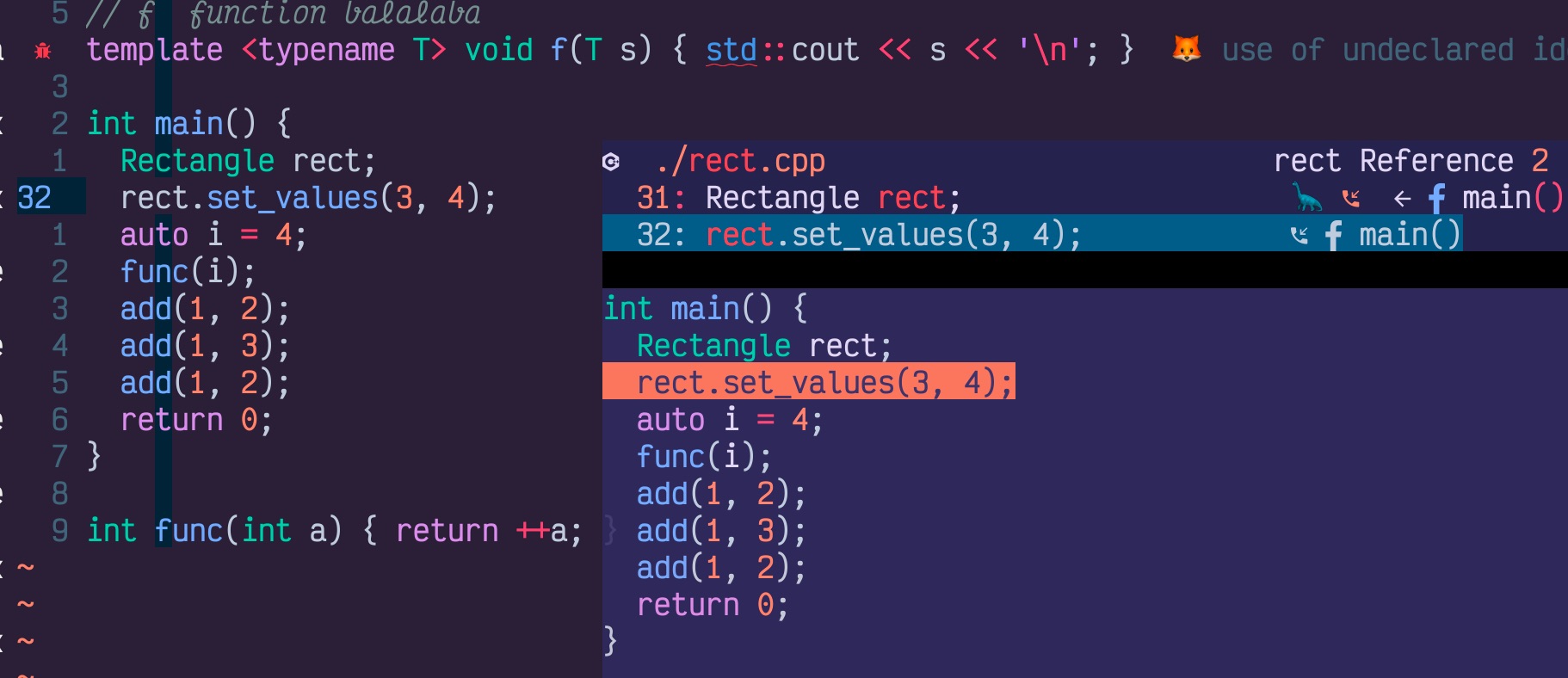
You may find a 🦕 dinosaur(d) on the line of Rectangle rect, which means there is a definition (d for def) of rect in
this line.
<- f main() means the definition is inside function main().
Features
-
LSP easy setup. Support the most commonly used lsp clients setup. Dynamic lsp activation based on buffer type. This also enables you to handle workspace with mixed types of codes (e.g. Go + javascript + yml).
-
Out of box experience. 10 lines of minimum init.lua can turn your neovim into a full-featured LSP & Treesitter powered IDE
-
UI with floating windows, navigator provides a visual way to manage and navigate through symbols, diagnostic errors, references etc. It covers all features(handler) provided by LSP from commonly used search reference, to less commonly used search for interface implementation.
-
Async (Luv async thread and tasks) request with lsp.buf_request for better performance
-
Treesitter symbol search. It is handy for large files (Some of LSP e.g. lua_ls, there is a 100kb file size limitation?). Also as LSP trying to hide details behind, Treesitter allows you to access all AST semantics.
-
FZY search with either native C (if gcc installed) or Lua-JIT
-
LSP multiple symbols highlight/marker and hop between document references
-
Grouping references/implementation/incoming/outgoing based on file names.
-
Treesitter based variable/function context analysis. It is 10x times faster compared to purely rely on LSP. In most of the case, it takes treesitter less than 4 ms to read and render all nodes for a file of 1,000 LOC.
-
The first plugin, IMO, allows you to search in all treesitter symbols in the workspace.
-
Optimize display (remove trailing bracket/space), display the caller of reference, de-duplicate lsp results (e.g reference in the same line). Using treesitter for file preview highlighter etc
-
ccls call hierarchy (Non-standard
ccls/callAPI) supports -
Advanced folding capabilities:
- Incorporates a tailored folding algorithm based on treesitter & LSP_fold, providing a user experience comparable to
Visual Studio Code.
- Visible Closing Brackets: Ensures that end or closing brackets stay visible even when code is folded.
- Collapsible Comments: Allows users to fold and unfold comment sections.
- Fold Indicator: Displays indicators for lines that are folded.
- Highlighted Folded Lines: Applies syntax highlighting to folded lines (supported in Neovim v0.10.x+).
- Incorporates a tailored folding algorithm based on treesitter & LSP_fold, providing a user experience comparable to
Visual Studio Code.
-
Treesitter symbols sidebar, LSP document symbol sidebar. Both with preview and folding
-
Calltree: Display and expand Lsp incoming/outgoing calls hierarchy-tree with sidebar
-
Fully support LSP CodeAction, CodeLens, CodeLens action. Help you improve code quality.
-
Lazy loader friendly
Why a new plugin
I'd like to go beyond what the system is offering.
Similar projects / special mentions
- nvim-lsputils
- nvim-fzy
- fuzzy
- lspsaga
- fzf-lsp lsp with fzf as gui backend
- nvim-treesitter-textobjects
- inc-rename.nvim
Showcases and Screenshots
For more showcases, please check showcases.md
Install
Require nvim-0.9 or above, nightly (0.10 or greater) preferred
You can remove your lspconfig setup and use this plugin. The plugin depends on lspconfig and guihua.lua, which provides GUI and fzy support(migrate from romgrk's project).
Plug 'neovim/nvim-lspconfig'
Plug 'ray-x/guihua.lua', {'do': 'cd lua/fzy && make' }
Plug 'ray-x/navigator.lua'
Note: Highly recommend: 'nvim-treesitter/nvim-treesitter'
Packer
use({
    'ray-x/navigator.lua',
    requires = {
        { 'ray-x/guihua.lua', run = 'cd lua/fzy && make' },
        { 'neovim/nvim-lspconfig' },
    },
})
Setup
Easy setup BOTH lspconfig and navigator with one liner. Navigator covers around 20 most used LSP setup.
lua require'navigator'.setup()
Sample vimrc turning your neovim into a full-featured IDE
call plug#begin('~/.vim/plugged')

Plug 'neovim/nvim-lspconfig'
Plug 'ray-x/guihua.lua', {'do': 'cd lua/fzy && make' }
Plug 'ray-x/navigator.lua'

" Plug 'hrsh7th/nvim-cmp' and other plugins you commenly use...

" optional, if you need treesitter symbol support
Plug 'nvim-treesitter/nvim-treesitter', {'do': ':TSUpdate'}

call plug#end()

" No need for require('lspconfig'), navigator will configure it for you
lua <<EOF
require'navigator'.setup()
EOF
You can remove your lspconfig.lua and use the hooks of navigator.lua. As the navigator will bind keys and handler for you. The LSP will be loaded lazily based on filetype.
A treesitter only mode. In some cases LSP is buggy or not available, you can also use treesitter standalone
call plug#begin('~/.vim/plugged')

Plug 'ray-x/guihua.lua', {'do': 'cd lua/fzy && make' }
Plug 'ray-x/navigator.lua'

" Plug 'hrsh7th/nvim-compe' and other plugins you commenly use...

" optional, if you need treesitter symbol support
Plug 'nvim-treesitter/nvim-treesitter', {'do': ':TSUpdate'}
" optional:
Plug 'nvim-treesitter/nvim-treesitter-refactor' " this provides "go to def" etc

call plug#end()

lua <<EOF
require'navigator'.setup()
EOF
Work with nvim-cmp and nvim-autopairs
The buffer type of navigator floating windows is guihua I would suggest disable guihua for autocomplete. e.g.
require('nvim-autopairs').setup{
disable_filetype = { "TelescopePrompt" , "guihua", "guihua_rust", "clap_input" },

if vim.o.ft == 'clap_input' and vim.o.ft == 'guihua' and vim.o.ft == 'guihua_rust' then
  require'cmp'.setup.buffer { completion = {enable = false} }
end

-- or with autocmd
vim.cmd("autocmd FileType guihua lua require('cmp').setup.buffer { enabled = false }")
vim.cmd("autocmd FileType guihua_rust lua require('cmp').setup.buffer { enabled = false }")

...
}
All configure options
Nondefault configuration example:
require'navigator'.setup({
  debug = false, -- log output, set to true and log path: ~/.cache/nvim/gh.log
                 -- slowdownd startup and some actions
  width = 0.75, -- max width ratio (number of cols for the floating window) / (window width)
  height = 0.3, -- max list window height, 0.3 by default
  preview_height = 0.35, -- max height of preview windows
  border = {"╭", "─", "╮", "│", "╯", "─", "╰", "│"}, -- border style, can be one of 'none', 'single', 'double',
                                                     -- 'shadow', or a list of chars which defines the border
  on_attach = function(client, bufnr) -- no longer supported for nvim > 0.
Related Skills
node-connect
339.3kDiagnose OpenClaw node connection and pairing failures for Android, iOS, and macOS companion apps
frontend-design
83.9kCreate distinctive, production-grade frontend interfaces with high design quality. Use this skill when the user asks to build web components, pages, or applications. Generates creative, polished code that avoids generic AI aesthetics.
openai-whisper-api
339.3kTranscribe audio via OpenAI Audio Transcriptions API (Whisper).
commit-push-pr
83.9kCommit, push, and open a PR
