
Go.nvim
G'day Nvimer, Joyful Gopher: Explore the Feature-Packed Go Plugin for Neovim
Install / Use
/learn @ray-x/Go.nvimREADME
go.nvim
A modern go neovim plugin based on treesitter, nvim-lsp, dap debugger and AI. It is written in Lua and async as much as possible. PR & Suggestions are welcome.
The plugin covers most features required for a gopher.
LSP & Navigation
- gopls commands: fillstruct, organize imports, list modules/packages, gc_details, generate, change signature, etc.
- All GoToXxx (reference, implementation, definition, doc, peek code/doc, etc.) via gopls/lspconfig. Check navigator.lua for a floating UI experience
- Show interface implementations with virtual text
- Inlay hints (gopls 0.9+; enabled by default in 0.10+)
- CodeLens & CodeAction support
Build, Test & Coverage
- Async build/make/test with libuv job wrapper
- Test with
go test, gotestsum, or ginkgo — including floaterm support - Generate unit tests with gotests (table-driven, testify)
- Test coverage: run coverage, display signs, and show function metrics
- Smart build-tag detection for debug/test runs (e.g.
//go:build integration)
Code Generation & Refactoring
GoIfErr,GoFillStruct,GoFillSwitch,GoFixPlurals,GoGenReturn— powered by treesitter/go ASTGoImpl— generate interface method stubsGoEnum— generate enum helpersGoJson2Struct— convert JSON/YAML to Go structsGoMockGen— generate mocks with mockgenGoNew— create files/projects from templates (includinggonew)- Struct tag management with
gomodifytags
Formatting & Linting
- Format via LSP (gopls) or CLI (
gofumpt,goimports) - Lint with golangci-lint (v2) — LSP diagnostics or async background checks
Debugging
- Dlv debug with nvim-dap and nvim-dap-ui — zero-config Go adapter included
- Load VSCode
launch.jsonconfigurations
AI-Powered
GoAI— natural-language command dispatcher (translates natural-language into go.nvim commands via Copilot/OpenAI).GoCmtAI— generate doc comments with AI for the declaration at cursorGoDocAI— AI-powered documentation: find symbols by vague name and generate rich docs from sourceGoCodeReview— AI code review for files, selections, or diffs; results populate the quickfix listGoAIChat— ask questions about Go code with AI; auto-includes function context and LSP references
Documentation & Navigation
GoDoc/GoDocBrowser— view docs in a float or browserGoCheat— cheat sheets from cheat.shGoAlt/GoAltV/GoAltS— switch between test and implementation filesGoPkgOutline/GoPkgSymbols— package-level symbol outlines
Comments & Docs
- Auto-generate doc comments for packages, functions, structs, and interfaces (suppresses golint warnings)
Module & Workspace
GoModTidy,GoModVendor,GoGet,GoWork, etc.Gomvp— rename/move packagesGoVulnCheck— run govulncheck for vulnerability scanning
Syntax & Snippets
- Treesitter-based syntax highlighting and textobjects
- Treesitter highlight injection for SQL, JSON,
go template, andgohtmltmpl - Feature-rich LuaSnip snippets included
Project & Configuration
- Per-project setup via
.gonvim/init.luaorlaunch.json - Async jobs with libuv throughout
Installation
Use your favorite package manager to install. The dependency treesitter main branch (and optionally, treesitter-objects) should be
installed the first time you use it. Also Run TSInstall go to install the go parser if not installed yet. sed is
recommended to run this plugin.
lazy.nvim
{
  "ray-x/go.nvim",
  dependencies = {  -- optional packages
    "ray-x/guihua.lua",
    "neovim/nvim-lspconfig",
    "nvim-treesitter/nvim-treesitter",
  },
  opts = function()

    require("go").setup(opts)
    local format_sync_grp = vim.api.nvim_create_augroup("GoFormat", {})
    vim.api.nvim_create_autocmd("BufWritePre", {
      pattern = "*.go",
      callback = function()
      require('go.format').goimports()
      end,
      group = format_sync_grp,
    })
    return {
      -- lsp_keymaps = false,
      -- other options
    }
  end,
  event = {"CmdlineEnter"},
  ft = {"go", 'gomod'},
  build = ':lua require("go.install").update_all_sync()' -- if you need to install/update all binaries
}
The go.nvim load speed is fast and you can enable it by default <img width="479" alt="image" src="https://user-images.githubusercontent.com/1681295/218074895-5182c791-8649-46ad-b18e-8eb1af8c0ffa.png">
Make sure the $GOPATH/bin path is added to your $PATH environment variable. To check this you can run
echo $PATH | grep "$GOPATH/bin"
If nothing shows up, you can add the following to your shell config file:
export PATH=$PATH:$GOPATH/bin
Add format in your vimrc (or lazy.nvim config function).
lua <<EOF
local format_sync_grp = vim.api.nvim_create_augroup("GoFormat", {})
vim.api.nvim_create_autocmd("BufWritePre", {
  pattern = "*.go",
  callback = function()
   require('go.format').goimports()
  end,
  group = format_sync_grp,
})

EOF
To startup/setup the plugin
require('go').setup()
Refer to advance-setup on more installation info.
Screenshots
Add comments
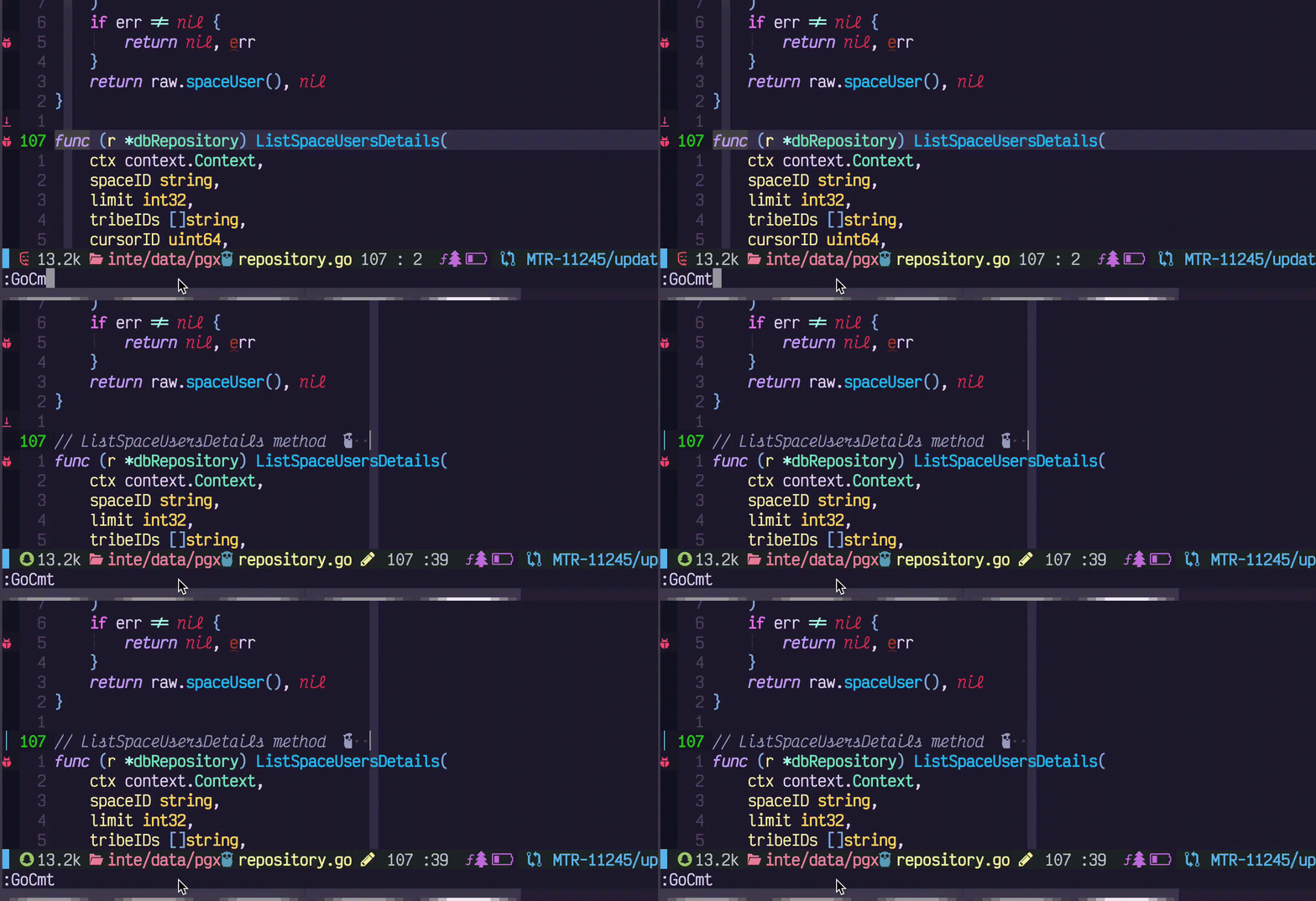
Add/Remove tags

GoTest in floating term

Use:
:GoTermClose
To close the floating term.
SQL/JSON Highlight injection
<img width="718" alt="image" src="https://user-images.githubusercontent.com/1681295/227125827-538c5f3f-298d-4ae1-8762-42dfb92e79f3.png">Inlay hints
<img width="491" alt="image" src="https://user-images.githubusercontent.com/1681295/240350775-a1d92c06-66d2-4e4b-9225-538cf1a201b2.png">Usage & Demo
For detailed command usage, demos, screenshots, and examples, see the Usage Guide.
Quick links: Code Format | Build & Test | Debug | AI Code Review | AI Chat | GoImpl | GoDoc | Tags | Mock | All commands
Commands
Check commands.lua on all the commands provided
Gopls commands
Check gopls.lua on all the gopls commands provided, some of them are not exposed to user, but you can still use it in your lua setup.
- list_imports
- add_import
- list_packages
- tidy
- change_signature
- ...
Configuration
For the full default configuration with all options, see the Default Configuration in the Advanced Setup guide.
Minimal setup:
require('go').setup()
To enable AI features:
require('go').setup({
  ai = {
    enable = true,
    provider = 'copilot', -- or 'openai'
  },
})
To use gopls setup provided by go.nvim:
require('go').setup({
  lsp_cfg = true,
})
Project setup
go.nvim allow you override your setup by a project file. Put .gonvim/init.lua in your root folder. It is a small lua
script and will be run durning go.setup(). The return value is used to override go.nvim setup. The sample project
setup. You can check the youtube video here on how to use this feature.
-- .gonvim/init.lua project config

return {
  go = "go", -- set to go1.18beta1 if necessary
  goimports = "gopls", -- if set to 'gopls' will use gopls format, also goimports
  gofmt = "gofumpt", -- if set to gopls will use gopls format
  null_ls_document_formatting_disable = true
}
This will override your global go.nvim setup
Advanced Setup
For LSP/gopls configuration, text objects, LuaSnip snippets, mason-lspconfig integration, null-ls, treesitter highlighting, and sample vimrc, see the Advanced Setup Guide.
Other plugins that you may like
Running plugin test / github action locally
If you'd like to commit to this project, and would like to run unit tests, you can run the following command:
XDG_CONFIG_HOME=/tmp/nvim-test make localtestfile
this will run the following commands in headless mode
make setup # install plenary etc
nvim --headless
Related Skills
node-connect
346.4kDiagnose OpenClaw node connection and pairing failures for Android, iOS, and macOS companion apps
xurl
346.4kA CLI tool for making authenticated requests to the X (Twitter) API. Use this skill when you need to post tweets, reply, quote, search, read posts, manage followers, send DMs, upload media, or interact with any X API v2 endpoint.
frontend-design
107.2kCreate distinctive, production-grade frontend interfaces with high design quality. Use this skill when the user asks to build web components, pages, or applications. Generates creative, polished code that avoids generic AI aesthetics.
openai-whisper-api
346.4kTranscribe audio via OpenAI Audio Transcriptions API (Whisper).
