
DalliPay
Integrating XRPL into Accounting Systems
Install / Use
/learn @radynamics/DalliPayREADME
DalliPay
This project enables interoperability between ISO 20022 file formats and cryptocurrency payments. It aims to facilitate sending and processing received crypto payments within existing financial software's ISO 20022 capabilities.
As a payer you can import pain.001 xml files and transform payment instructions into cryptocurrency payments. For every transaction you like to send using cryptocurrency you must define a cryptocurrency address (receiver wallet) for a given iban or proprietary account number.
As a payee you can fetch received cryptocurrency payments from your wallet and transform received payments into camt.054 xml format.
Latest releases for various platforms are available in releases section. Visit www.dallipay.com for more information.
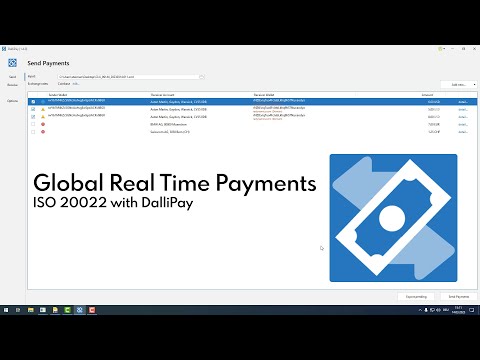
Demo (YouTube)
Supported crypto ledgers (cryptocurrencies)
Supported formats
Following formats for sending payments are tested. Other ISO 20022 versions may also work.
- ISO 20022 pain.001.001.03
- ISO 20022 pain.001.001.09
- ABA (Australian Bankers Association)
- CSV text file (see pain.001.001.03_USD_EUR.csv in testfiles)
Following ISO 20022 formats for received payments are available for export.
- camt.053.001.08
- camt.054.001.02
- camt.054.001.04
- camt.054.001.09
Persisted data
Your private key (wallet secret) is not persisted and only used while sending payments. Configuration and settings are stored in user.home/DalliPay or %APPDATA%\DalliPay on windows.
We are not able to restore your password for persisted data. Your persisted data will be lost.
Never send us or anyone else your private key (wallet secret). Doing so will allow the receiver to transfer all your funds.
DalliPay console parameters
For better integration into business processes following console parameters are available.
Sending payments (pain.001)
-a              pain001ToCrypto         Action to perform
-in             <file path>             Input pain.001 xml file containing payment instructions
-wallet         <wallet address>        Wallet used as sender
-n              test, live              Testnet or Livenet
-p              <password>              Password for silent login. If not set a login screen is shown.

Examples:
- java -jar DalliPay.jar -a pain001ToCrypto -in C:\demo\UBS_20210603_00001.xml -n test
- DalliPay.exe -a pain001ToCrypto -in C:\demo\UBS_20210603_00001.xml -n test
Receiving payments (camt.054)
-a              cryptoToCamt054         Action to perform
-out            <file path>             Output camt.054 xml file
-wallet         <wallet address>        Wallet used as source
-n              test, live              Testnet or Livenet
-from           20220521101200          Transactions from in format yyyyMMddHHmmss (last 7 days if omitted)
-until          20220509070800          Transactions until in format yyyyMMddHHmmss (now if omitted)
-p              <password>              Password for silent login. If not set a login screen is shown.

Examples:
- java -jar DalliPay.jar -a cryptoToCamt054 -out C:\temp\test.xml -wallet rPdvC6ccq8hCdPKSPJkPmyZ4Mi1oG2FFkT
- DalliPay.exe -a cryptoToCamt054 -out C:\temp\test.xml -wallet rPdvC6ccq8hCdPKSPJkPmyZ4Mi1oG2FFkT
Run demo on Testnet
Sending payments (pain.001)
- Create wallet with secret on XRPL Testnet xrpl.org Faucets
- Click globe icon on top right of the window to switch to Testnet
- On tab 'Send' select an ISO 20022 pain.001 XML file as source
- Click into cells 'Sender Wallet' and 'Receiver Wallet' to define sender and receivers
- 'Sender Wallet' is your own wallet where payments are sent from
- 'Receiver Wallet' is the wallet address of shown 'Receiver Account'. Ask your creditor for his wallet address.
- After solving possible issues, press 'Send Payments'
- After sending, green checkmarks per row indicate success
- Click 'detail...' for more information
- In detail window click 'show ledger transaction...' near 'Booked' to open transaction in ledger explorer
Receiving payments (camt.054)
- On tab 'Receive' enter a receiver wallet
- Click globe icon on top right of the window to switch between Livenet and Testnet
- Adjust filter if needed and press 'Refresh'
- On Testnet maybe only recent transactions are available
- Click into cells 'Sender Account' and 'Receiver Account' to define sender and receivers
- 'Sender Account' is the bank account of shown 'Sender Wallet'. Enter your debtor's bank account or use 'Sender Wallet' as bank account
- 'Receiver Account' is your own bank account
- Press 'Export' to export payments as ISO 20022 camt.054 XML file
Related Skills
valuecell
10.3kValueCell is a community-driven, multi-agent platform for financial applications.
beanquery-mcp
45Beancount MCP Server is an experimental implementation that utilizes the Model Context Protocol (MCP) to enable AI assistants to query and analyze Beancount ledger files using Beancount Query Language (BQL) and the beanquery tool.
onekey-gateway
44OneKey Agent Gateway access to Commercial APIs, Skills, MCPs Build once and Ship 10× faster. For devs & builders, A unified API registry to serve and distribute across all agent formats—CLI, REST, MCP, and Skills—eliminating multiple builds. Access 30+ categories like search, image, finance, and 3D Rendering, register, and monetize APIs 10× faster
Payment Integration
Implement Stripe payment processing for robust, PCI-compliant payment flows including checkout, subscriptions, and webhooks.
