
Geoip2fast
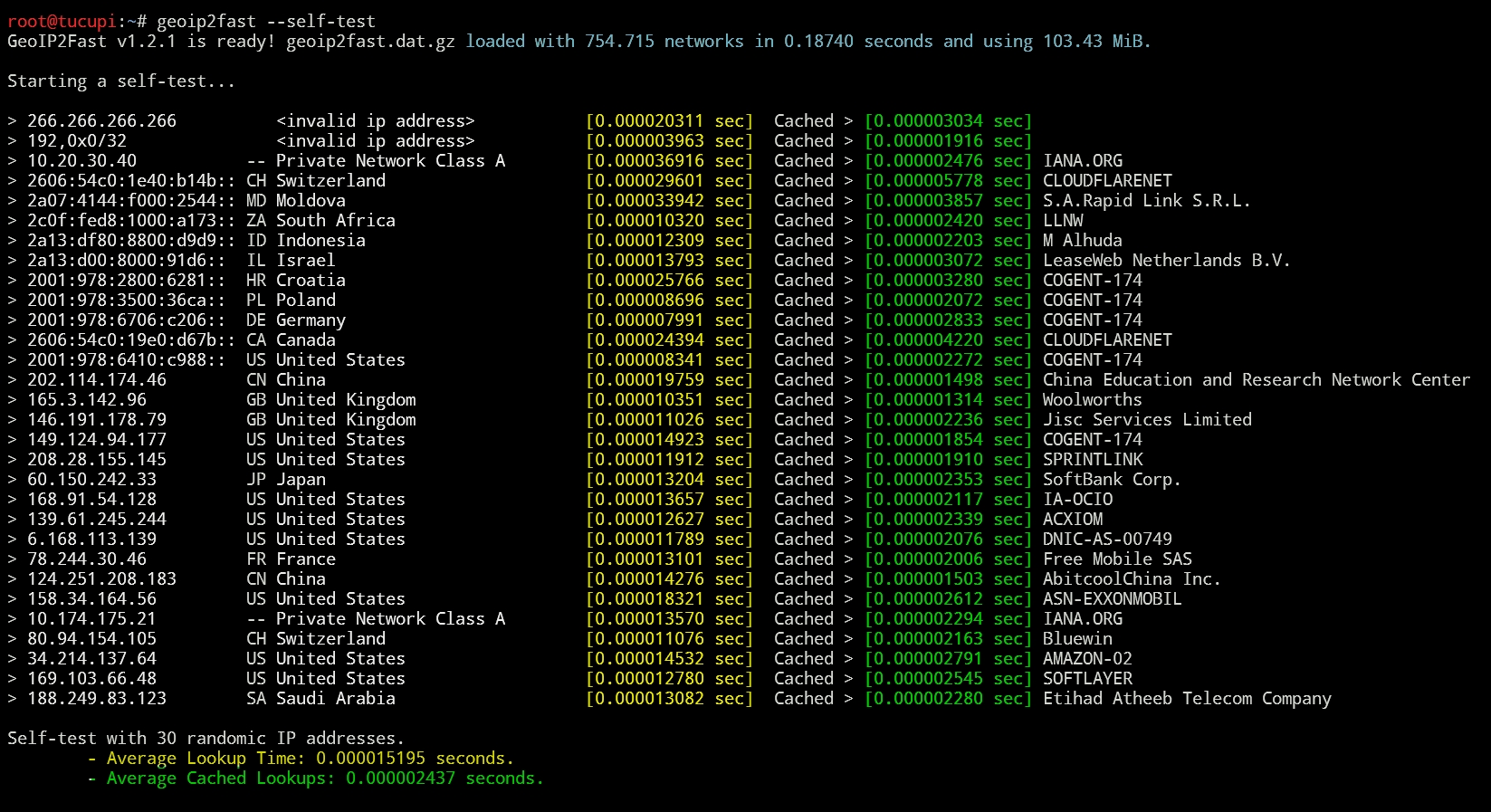
GeoIP2Fast is the fastest GeoIP2 country/city/asn lookup library. A search takes less than 0.00003 seconds. It has its own data file updated twice a week with Maxmind-Geolite2-CSV and is Pure Python!
Install / Use
/learn @rabuchaim/Geoip2fastREADME
GeoIP2Fast v1.2.2
GeoIP2Fast is the fastest GeoIP2 country/city/asn lookup library. A search takes less than 0.00003 seconds. It has its own data file updated with Maxmind-Geolite2-CSV, supports IPv4 and IPv6, works on Python3, Pypy3 and is Pure Python!
With it´s own datafile (geoip2fast.dat.gz), can be loaded into memory in ~0.07 seconds and has a small footprint for all data, so you don´t need to make requests to any webservices or connect to an external database. And it works on Linux, Windows and MacOS!
And now you can download .dat.gz from your own application or via the command line. See more at Update your database automatically
GeoIP2Fast returns ASN NAME, COUNTRY ISO CODE, COUNTRY NAME, CITY NAME/STATE/DISTRICT and CIDR. There is no external dependencies, you just need the geoip2fast.py file and the desired data file .dat.gz. The lookup speed is the same for any data file.
Country and ASN databases with IPv4 and IPv6
| Download Content | File Name | File Size | Load Time | RAM Footprint |
| ---------- | :---------: | ---------: | --------: | ---------: |
| Country IPv4 | geoip2fast.dat.gz | 1.2 MiB | ~0.04 sec | ~22.0 MiB |
| Country IPv4+IPv6 | geoip2fast-ipv6.dat.gz | 1.8 MiB | ~0.07 sec | ~41.0 MiB |
| Country+ASN IPv4 | geoip2fast-asn.dat.gz | 2.3 MiB | ~0.08 sec | ~40.0 MiB |
| Country+ASN IPv4+IPv6 | geoip2fast-asn-ipv6.dat.gz | 3.1 MiB | ~0.15 sec | ~97.0 MiB |
City and ASN databases with IPv4 and IPv6
City databases are not included in the pip installation package, if you want to:
- download them manually from DAT Files LATEST Release
- or create them yourself using
geoip2dat.py. City data already includes country data. - or download using the new function GeoIP2Fast.update_all() read more below
| Download Content | File Name | File Size | Load Time | RAM Footprint |
| ---------- | :---------: | ---------: | --------: | ---------: |
| City IPv4 | geoip2fast-city.dat.gz | 12 MiB | ~0.50 sec | ~270.0 MiB |
| City IPv4+IPv6 | geoip2fast-city-ipv6.dat.gz | 14 MiB | ~0.60 sec | ~400.0 MiB |
| City+ASN IPv4 | geoip2fast-city-asn.dat.gz | 13 MiB | ~0.60 sec | ~310.0 MiB |
| City+ASN IPv4+IPv6 | geoip2fast-city-asn-ipv6.dat.gz | 17 MiB | ~0.70 sec | ~430.0 MiB |
If you are using pypy3, the loading time will increase a little, but the speed will be a little faster and the memory footprint will be lower.
The new v1.2.X databases are not compatible with versions equal to or older than v1.1.X, and vice versa, obviously. The last version with support only for countries and ASN only is v1.1.X, which is still available with this command line: pip install geoip2fast==1.1.10.
What's new in v1.2.2 - 20/Jun/2024
- DAT files updated with MAXMIND:GeoLite2-CSV_20240618
- Removed the line "sys.tracebacklimit = 0" that was causing some problems
  in Django. This line is unnecessary (https://github.com/rabuchaim/geoip2fast/issues/10)
- Maxmind inserted a new field into the CSV files called "is_anycast", and this broke
  geoip2dat.py CSV reader. Insertion of the new field in the list of "fields" of
  the CSV reader that generates the .dat.gz files so that they can be updated.

- There are 2 reduced versions available for you to copy and paste
  into your own code without any dependencies and fast as always!
  Check these files in your library path:
    - geoip2fastmin.py (429 lines)
    - geoip2fastminified.py (183 lines)
  It's in testing, but please open an issue if you have any problems
  with either of these 2 versions.

- Removed functools.lru_cache. It is very useful when you have a function
  that is repeated several times but takes a long time, which is not the
  case of GeoIP2Fast where functions take milliseconds. On each call,
  functools checks whether the value is already cached or not, and this
  takes time. And we noticed that without functools and using the processor
  and operating system's own cache makes GeoIP2Fast much faster without it
  even if you are searching for an IP for the first time.
  You can run tests and you will see that without functools.lru_cache
  it is faster. If you want to use lru_cache, you can uncomment the
  respective lines of code. There are 5 lines commented with @functools.lru_cache

- As requested, 2 new methods to return a coverage of IPv4 and IPv6.
    def get_ipv4_coverage()->float
    def get_ipv6_coverage()->float

- New function get_database_info() that returns a dictionary with
  detailed information about the data file currently in use.

- Made some adjustments to the --missing-ips and --coverage functions.

- Now you can specify the data filename to be used on geoip2fast cli:
    geoip2fast geoip2fast-ipv6.dat.gz --self-test
    geoip2fast 9.9.9.9,1.1.1.1,2a10:8b40:: geoip2fast-asn-ipv6.dat.gz

- New functions to generate random IP addresses to be used in tests.
  Returns a list if more than 1 IP is requested, otherwise returns a
  string with only 1 IP address. If you request an IPv6 and the database
  loaded does not have IPv6 data, returns False. And the fuction of
  private address, returns an random IPv4 from network 10.0.0.0/8 or
  172.16.0.0/12 or 192.168.0.0/16.
    def generate_random_private_address(self,num_ips=1)->string or a list
    def generate_random_ipv4_address(self,num_ips=1)->string or a list
    def generate_random_ipv6_address(self,num_ips=1)->string or a list

- Put some flowers
Installation
pip install geoip2fast
DAT files updates
- You can create your own dat.gz file using geoip2dat.py file.
- You can also download the latest dat files that are updated automatically on Tuesdays and Fridays
- And you can update the dat files downloading from our releases repository, via code or via command line.
How does it work?
GeoIP2Fast has 4 datafiles included. Tha main file is geoip2fast.dat.gz with support Country lookups and only IPv4. Usually, these files are located into the library directory (/usr/local/lib/python3.XX/dist-packages/geoip2fast), but you can place it into the same directory of your application. The library automatically checks both paths, And the directory of your application overlaps the directory of the library. You can use an specific location also.
The bisect() function is used together with some ordered lists of integers to search the Network/CountryCode (Yes! an IP address has an integer representation, try to ping this number: ping 134744072 or this ping 2130706433 ).
If GeoIP2Fast does not have a network IP address that was requested, a "not found in database" error will be returned. Unlike many other libraries that when not finding a requested network, gives you the geographical location of the network immediately below. The result is not always correct.
Data file updates are made available twice a week in our github releases. Files with City data and IPv6 support can also be downloaded there.
There are network gaps in the files we use as a source of data, and these missing networks are probably addresses that those responsible have not yet declared their location. Of all IPv4 on the internet (almost 4.3 billions IPs), our coverage is around 99.64% and we do not have information on approximately 15 million of them (~0,36%). It must be remembered that the geographical accuracy is the responsibility of the network block owners. If the owner (aka ASN) of the XXX.YYY.ZZZ.D/24 network range declares that his network range is located at "Foo Island", we must believe that an IP address of that network is there.
<br>Don't go to Foo Island visit a girl you met on the internet just because you looked up her IP on GeoIP2Fast and the result indicated that she is there.
Quick Start
Once the object is created, GeoIP2Fast loads automatically all needed data into memory. The lookup function returns an object called GeoIPDetail. And you can get the values of it's properties just calling the name of proprerty: result.ip, result.country_code, result.country_name, result.city.name, result.city.subsubdivision_code, result.city.subsubdivision_name, result.cidr, result.is_private, result.asn_name,result.asn_cidr and result.elapsed_time. Or use the function to_dict() to get the result as a dict. You can get values like result.to_dict()['country_code']
When using it as a Python library, if you want to load a file other than geoip2fast.dat.gz, you simply create the object by typing the name of the file you want to work with. The library first looks for the given file in the current directory and then in the library directory. If desired, you can directly
Related Skills
node-connect
337.4kDiagnose OpenClaw node connection and pairing failures for Android, iOS, and macOS companion apps
claude-opus-4-5-migration
83.2kMigrate prompts and code from Claude Sonnet 4.0, Sonnet 4.5, or Opus 4.1 to Opus 4.5
frontend-design
83.2kCreate distinctive, production-grade frontend interfaces with high design quality. Use this skill when the user asks to build web components, pages, or applications. Generates creative, polished code that avoids generic AI aesthetics.
model-usage
337.4kUse CodexBar CLI local cost usage to summarize per-model usage for Codex or Claude, including the current (most recent) model or a full model breakdown. Trigger when asked for model-level usage/cost data from codexbar, or when you need a scriptable per-model summary from codexbar cost JSON.
