
Buffettsbot
★ Buffettsbot is scalable unit-tested API for payment and subscription renewal to a private Telegram channels using crypto payments in TRC-20 USDT with blockchain transaction hash validation and built using Amazon Web Services, Docker, Python, Django Rest Framework, PostgreSQL, Redis, Nginx, Gunicorn, Celery, Pytest, Linux Ubuntu, Secure Socket Lay
Install / Use
/learn @r3v5/BuffettsbotREADME
Buffetsbot
★ Buffetsbot is robust API for payment and renewal private subscriptions on closed community of investors in Telegram using crypto payments in TRC-20 USDT with blockchain transaction hash validation and built using Amazon Web Services, Docker, Python, Django Rest Framework, PostgreSQL, Redis, Nginx, Gunicorn, Celery, Pytest, Linux Ubuntu, Secure Socket Layer.
<a name="readme-top"></a>
<!-- PROJECT LOGO --> <br /> <div align="center"> <a href="https://github.com/r3v5/buffetts-on-crows-subscriptions-api"> <img src="https://raw.githubusercontent.com/r3v5/buffetts-on-crows-subscriptions-api/main/buffet.jpg" alt="Logo" width="80" height="80"> </a> <h3 align="center">Buffetsbot API</h3> <p align="center"> Documentation for Buffetsbot API Rest protocol <br /> </p> </div> <!-- TABLE OF CONTENTS --> <details> <summary>Table of Contents</summary> <ol> <li> <a href="#about-the-project">About The Project</a> <ul> <li><a href="#system-design-overview">System Design Overview</a></li> <li><a href="#system-design-in-depth">System Design In Depth</a></li> <li><a href="#built-with">Built With</a></li> </ul> </li> <li> <a href="#getting-started">Getting Started</a> <ul> <li><a href="#installation">Installation</a></li> </ul> </li> <li><a href="#contact">Contact</a></li> </li> </ol> </details> <!-- ABOUT THE PROJECT -->About The Project
Buffettsbot API provides a system for payments and renewals private subscriptions on closed community of investors in Telegram using crypto payments in TRC-20 USDT with blockchain transaction hash validation and notification system to stay connected with customers
Here's why: • Simplify subscription management through a robust API with integration in Telegram.
• Ensure reliable data handling and easy integration.
• Provide a clear and concise API documentation for developers.
<p align="right">(<a href="#about-the-project">back to top</a>)</p>System Design Overview
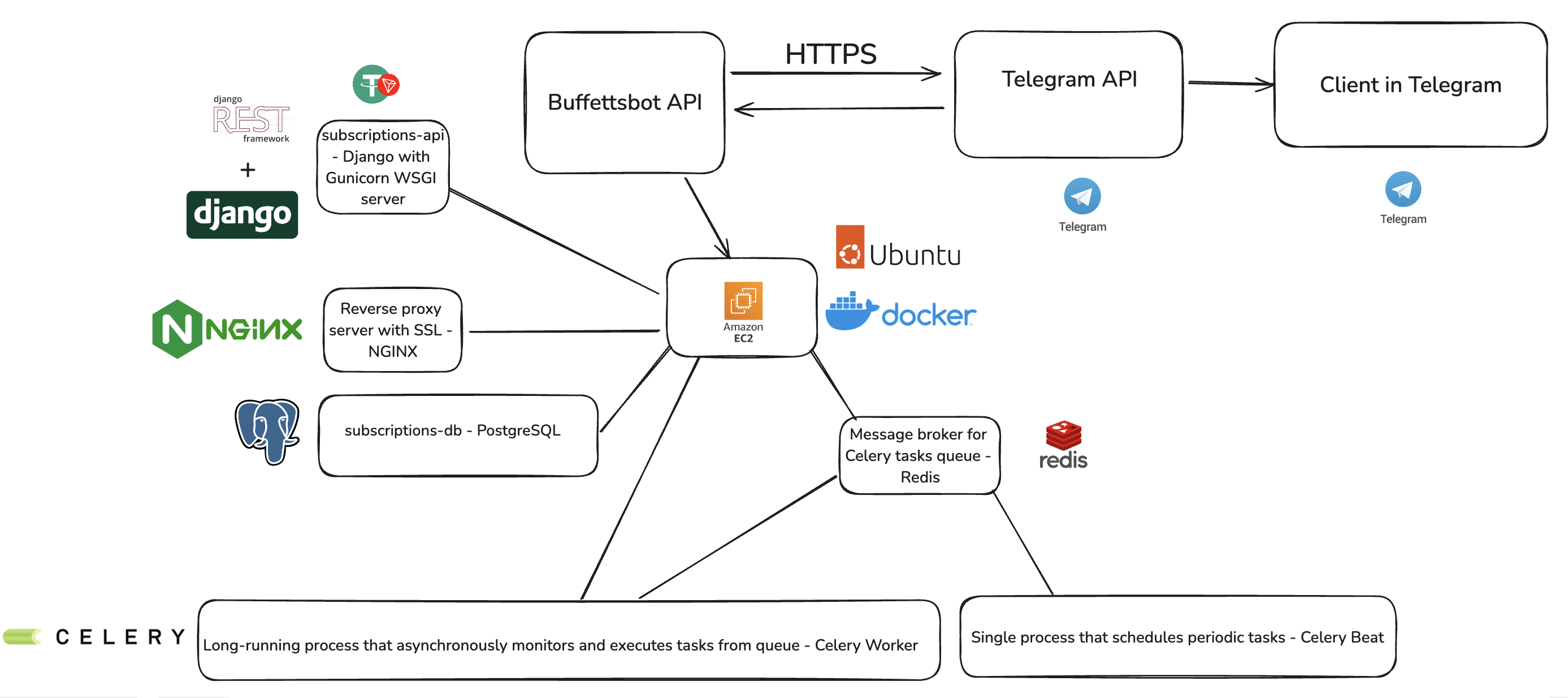
System Design In Depth
System Design Architecture for Buffettsbot
1. Backend (Django Rest Framework) • Views: Handles API requests and serves responses: TelegramUserAPIView and SubscriptionAPIView, • Serializers: TelegramUserSerializer, PostSubscriptionSerializer, GetSubscriptionSerializer
• Models: TelegramUser, Plan, Subscription
• Subscription Management:
POST- http://127.0.0.1:1337/api/v1/subscriptions/
Request Body: {"telegram_username": "<USERNAME-OF-TELEGRAM-USER>", "plan": "1 month", "transaction_hash": "<TRANSACTION-HASH-OF-TRC-20-BLOCKCHAIN-TRANSFER>"}
GET - http://127.0.0.1:1337/api/v1/subscriptions/?telegram_username="<USERNAME-OF-TELEGRAM-USER>"
• User Management:
POST - http://127.0.0.1:1337/api/v1/users/
Request Body: {"chat_id": <ID-OF-USER-TELEGRAM-CHAT-ID>, "telegram_username": "<USERNAME-OF-TELEGRAM-USER>"}
• External API Integration: Connects to external services like TRON API for transaction info.
• Celery Task Queue for notification system and deleting expired subscriptions:
# Configure Celery Beat

app.conf.beat_schedule = {

"delete_expired_subscriptions": {

"task": "subscription_service.tasks.delete_expired_subscriptions",

"schedule": crontab(minute=0, hour=0),

},

"notify_about_expiring_subscriptions_1_day": {

"task": "subscription_service.tasks.notify_about_expiring_subscriptions_1_day",

"schedule": crontab(minute=0, hour=0),

},

"notify_about_expiring_subscriptions_3_days": {

"task": "subscription_service.tasks.notify_about_expiring_subscriptions_3_days",

"schedule": crontab(minute=0, hour=0),

},

"notify_about_expiring_subscriptions_7_days": {

"task": "subscription_service.tasks.notify_about_expiring_subscriptions_7_days",

"schedule": crontab(minute=0, hour=0),

},

}


app.autodiscover_tasks()
2. Database (PostgreSQL)
Buffettsbot Database Overview
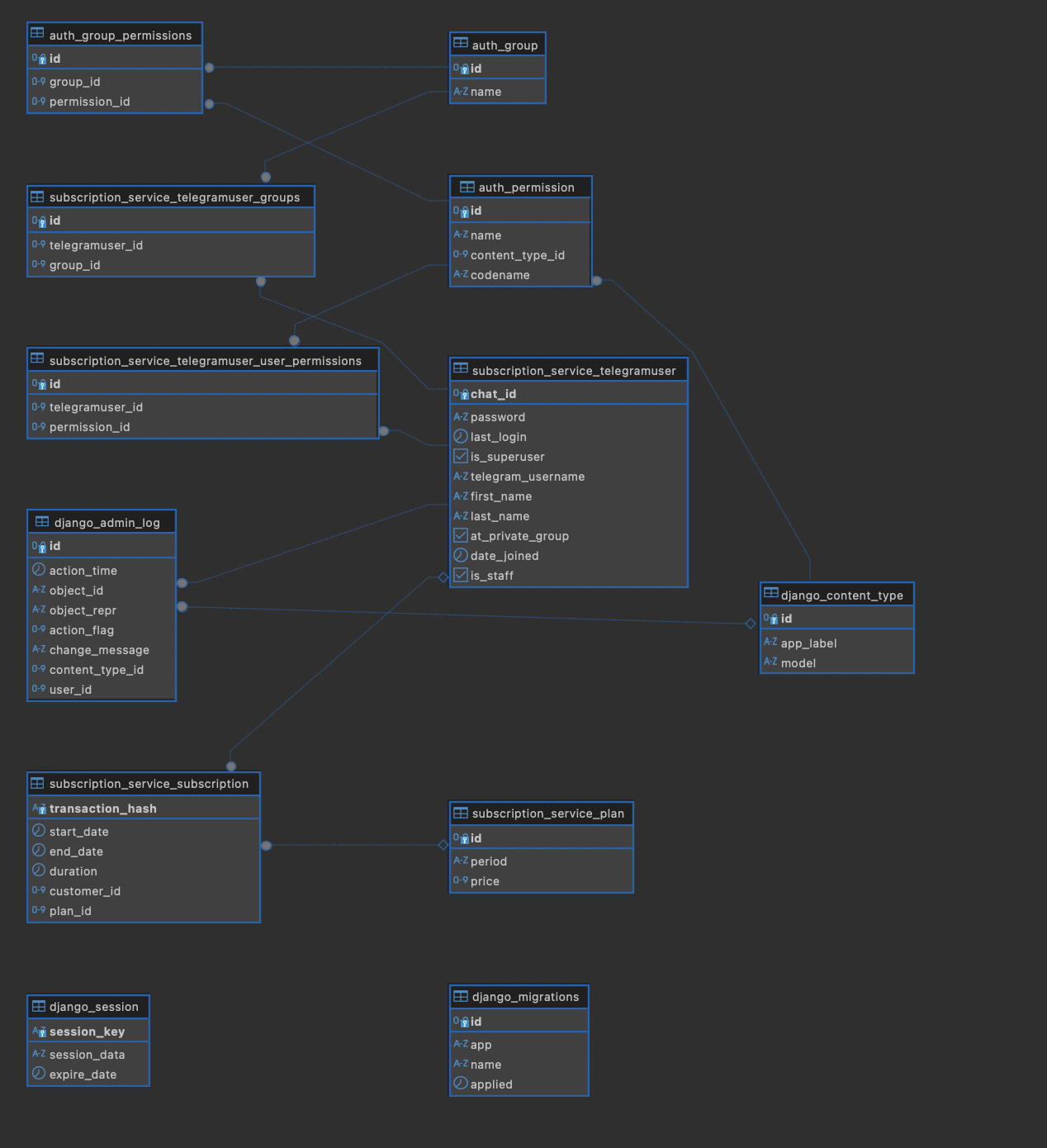 • Tables:
-
TelegramUser: Stores data about user
- Fields:
chat_id: Integer, Primary Key, uniquetelegram_username: Stringfirst_name: Stringlast_name: Stringat_private_group: Boolean, Flag to indicate if user added to private group or notdate_joined: DateTime, Timestamp of joining the systemis_staff: Boolean, Flag to indicate if it's staff member or not
- Fields:
-
Plan: Stores subscription plan details
- Fields:
id: Integer, Primary Keyperiod: CharField, Represents the subscription period with choices (e.g., “1 month”, “3 months”, “6 months”, “1 year”)price: Integer, The cost of the plan in dollars/USDT
- Fields:
-
Subscription: Represents a user’s subscription to a plan
- Fields:
-
customer: OneToOneField, ForeignKey to the TelegramUser model, representing the user associated with the subscription. Can be null or blank. -
plan: ForeignKey, Links to the Plan model, indicating the plan the user has subscribed to. Can be null or blank. -
transaction_hash: CharField, Unique identifier for the transaction, serves as the primary key. Cannot be null or blank. -
start_date: DateTimeField, The start date of the subscription. Defaults to the current time. -
end_date: DateTimeField, The end date of the subscription, calculated based on the duration. Can be null or blank. -
duration: DurationField, The duration of the subscription, calculated based on the plan period. Cannot be null or blank.
-
- Fields:
3. External Services
• TRON API:
• Endpoint: Used for fetching transaction information.
• Integration: Connected via HTTP requests from the Django backend.
• Telegram API:
• Endpoint: For interacting with the Telegram Bot (e.g., sending notifications).
4. Deployment & Infrastructure
• Docker Containers: Used for containerizing the Django application, PostgreSQL database, NGINX reverse proxy server, Redis as message broker and Celery workers that are long-running processes that constantly monitor the task queues for new work and Celery Beat that a single process that schedules periodic tasks
• Docker Compose: Manages multi-container Docker applications.
• Cloud Provider: AWS, EC2 Linux Ubuntu instance
Built With
<a href="https://skillicons.dev"> <img src="https://skillicons.dev/icons?i=python,django,linux,ubuntu,docker,postgres,redis,nginx,aws" /> </a> <p align="right">(<a href="#about-the-project">back to top</a>)</p> <!-- GETTING STARTED -->Getting Started
Installation
-
Get a free API Key at https://docs.tronscan.org/ to connect to Tron blockchain
-
Clone the repo
https://github.com/r3v5/buffettsbot -
Navigate to the project directory
cd buffettsbot -
Create a .env.dev file
DEBUG=1 SECRET_KEY=foo DJANGO_ALLOWED_HOSTS=localhost 127.0.0.1 [::1] SQL_ENGINE=django.db.backends.postgresql SQL_DATABASE=subscriptions-db-dev SQL_USER=tg-admin SQL_PASSWORD=tg-admin SQL_HOST=subscriptions-db SQL_PORT=5432 DATABASE=postgres POSTGRES_USER=tg-admin POSTGRES_PASSWORD=tg-admin POSTGRES_DB=subscriptions-db-dev CELERY_BROKER_CONNECTION_RETRY_ON_STARTUP=True API_ENDPOINT=https://apilist.tronscanapi.com/api/transaction-info?hash API_KEY=<YOUR-API-KEY> STAS_TRC20_WALLET_ADDRESS=<YOUR-TRC-20-WALLET> TELEGRAM_BOT_TOKEN=<YOUR-TELEGRAM-BOT-TOKEN>`` -
In settings.py comment these variables
#SECURE_PROXY_SSL_HEADER = ("HTTP_X_FORWARDED_PROTO", "https")
#CSRF_TRUSTED_ORIGINS = os.environ.get("CSRF_TRUSTED_ORIGINS").split(" ")
- Start building docker containers and run:
docker compose -f docker-compose.dev.yml up --build
- Make migrations, apply them and collect staticfiles::
docker compose -f docker-compose.dev.yml exec subscriptions-api python manage.py makemigrations
docker compose -f docker-compose.dev.yml exec subscriptions-api python manage.py migrate
docker compose -f docker-compose.dev.yml exec subscriptions-api python manage.py collectstatic --no-input --clear
- Run tests:
docker compose -f docker-compose.dev.yml exec subscriptions-api pytest
- Create superuser and then navigate to http://localhost:1337/tgadmin/login/?next=/tgadmin/:
docker compose -f docker-compose.dev.yml exec subscriptions-api python manage.py createsuperuser
- In admin panel you can create plans and prices for subscriptions and manage your subscribers :)
Contact
Ian Miller - linkedin
Project Link: https://github.com/r3v5/buffettsbot
<p align="right">(<a href="#about-the-project">back to top</a>)</p>