
Eynollah
Document Layout Analysis
Install / Use
/learn @qurator-spk/EynollahREADME
Eynollah
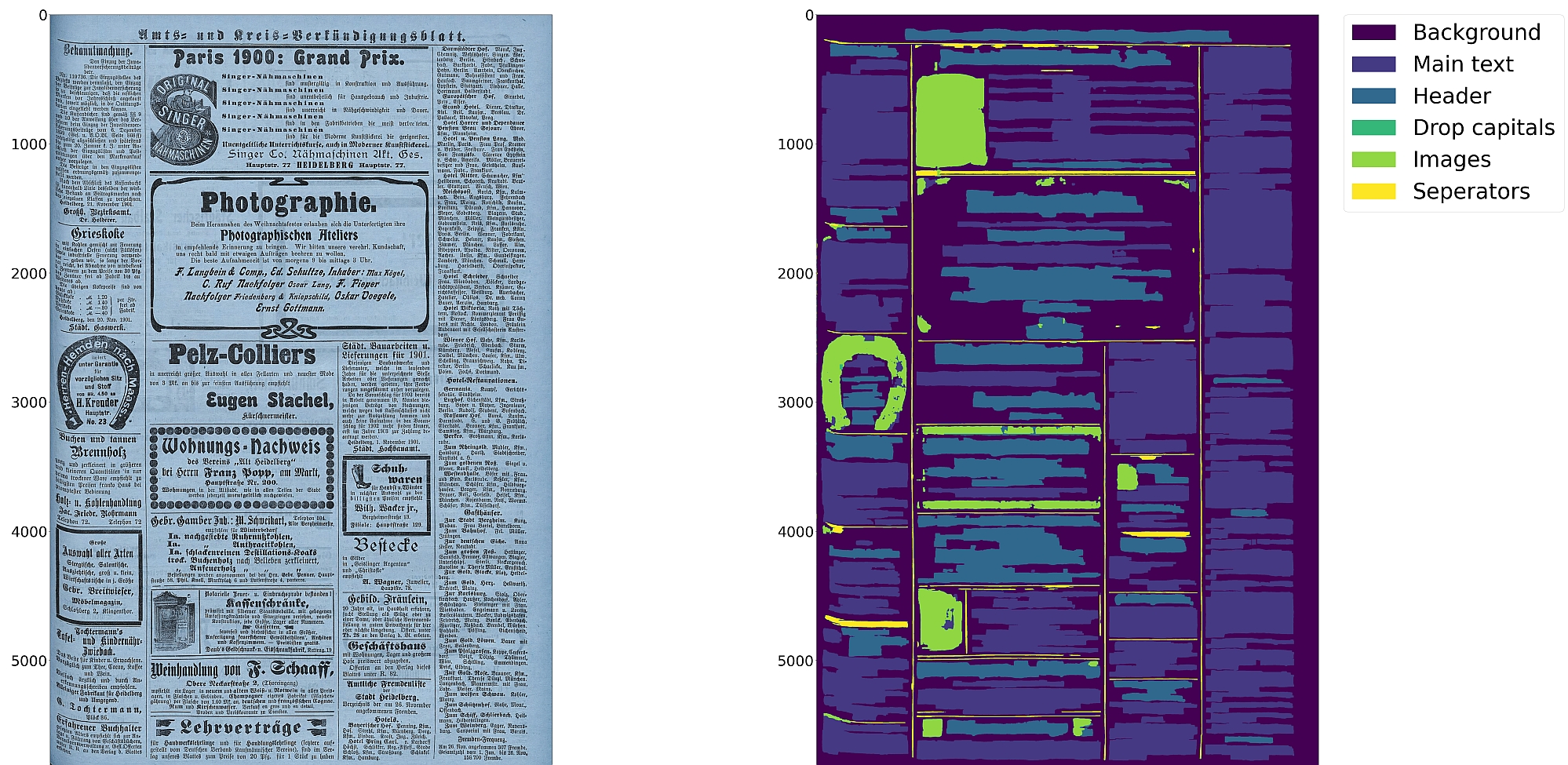
Document Layout Analysis, Binarization and OCR with Deep Learning and Heuristics






Features
- Document layout analysis using pixelwise segmentation models with support for 10 segmentation classes:
- background, page border, text region, text line, header, image, separator, marginalia, initial, table
- Textline segmentation to bounding boxes or polygons (contours) including for curved lines and vertical text
- Document image binarization with pixelwise segmentation or hybrid CNN-Transformer models
- Text recognition (OCR) with CNN-RNN or TrOCR models
- Detection of reading order (left-to-right or right-to-left) using heuristics or trainable models
- Output in PAGE-XML
- OCR-D interface
:warning: Development is focused on achieving the best quality of results for a wide variety of historical documents using a combination of multiple deep learning models and heuristics; therefore processing can be slow.
Installation
Python 3.8-3.11 with Tensorflow <2.13 on Linux are currently supported.
For (limited) GPU support the CUDA toolkit needs to be installed.
A working config is CUDA 11.8 with cuDNN 8.6.
You can either install from PyPI
pip install eynollah
or clone the repository, enter it and install (editable) with
git clone git@github.com:qurator-spk/eynollah.git
cd eynollah; pip install -e .
Alternatively, you can run make install or make install-dev for editable installation.
To also install the dependencies for the OCR engines:
pip install "eynollah[OCR]"
# or
make install EXTRAS=OCR
Docker
Use
docker pull ghcr.io/qurator-spk/eynollah:latest
When using Eynollah with Docker, see docker.md.
Models
Pretrained models can be downloaded from Zenodo or Hugging Face.
For model documentation and model cards, see models.md.
Training
To train your own model with Eynollah, see train.md and use the tools in the train folder.
Usage
Eynollah supports five use cases:
- layout analysis (segmentation),
- binarization,
- image enhancement,
- text recognition (OCR), and
- reading order detection.
Some example outputs can be found in examples.md.
Layout Analysis
The layout analysis module is responsible for detecting layout elements, identifying text lines, and determining reading order using heuristic methods or a pretrained model.
The command-line interface for layout analysis can be called like this:
eynollah layout \
  -i <single image file> | -di <directory containing image files> \
  -o <output directory> \
  -m <directory containing model files> \
     [OPTIONS]
The following options can be used to further configure the processing:
| option | description |
|-------------------|:--------------------------------------------------------------------------------------------|
| -fl | full layout analysis including all steps and segmentation classes (recommended) |
| -tab | apply table detection |
| -ae | apply enhancement (the resulting image is saved to the output directory) |
| -as | apply scaling |
| -cl | apply contour detection for curved text lines instead of bounding boxes |
| -ib | apply binarization (the resulting image is saved to the output directory) |
| -ep | enable plotting (MUST always be used with -sl, -sd, -sa, -si or -ae) |
| -ho | ignore headers for reading order dectection |
| -si <directory> | save image regions detected to this directory |
| -sd <directory> | save deskewed image to this directory |
| -sl <directory> | save layout prediction as plot to this directory |
| -sp <directory> | save cropped page image to this directory |
| -sa <directory> | save all (plot, enhanced/binary image, layout) to this directory |
| -thart | threshold of artifical class in the case of textline detection. The default value is 0.1 |
| -tharl | threshold of artifical class in the case of layout detection. The default value is 0.1 |
| -ncu | upper limit of columns in document image |
| -ncl | lower limit of columns in document image |
| -slro | skip layout detection and reading order |
| -romb | apply machine based reading order detection |
| -ipe | ignore page extraction |
If no further option is set, the tool performs layout detection of main regions (background, text, images, separators and marginals). The best output quality is achieved when RGB images are used as input rather than greyscale or binarized images.
Additional documentation can be found in usage.md.
Binarization
The binarization module performs document image binarization using pretrained pixelwise segmentation models.
The command-line interface for binarization can be called like this:
eynollah binarization \
  -i <single image file> | -di <directory containing image files> \
  -o <output directory> \
  -m <directory containing model files>
Image Enhancement
TODO
OCR
The OCR module performs text recognition using either a CNN-RNN model or a Transformer model.
The command-line interface for OCR can be called like this:
eynollah ocr \
  -i <single image file> | -di <directory containing image files> \
  -dx <directory of xmls> \
  -o <output directory> \
  -m <directory containing model files> | --model_name <path to specific model>
The following options can be used to further configure the ocr processing:
| option | description |
|-------------------|:-------------------------------------------------------------------------------------------|
| -dib | directory of binarized images (file type must be '.png'), prediction with both RGB and bin |
| -doit | directory for output images rendered with the predicted text |
| --model_name | file path to use specific model for OCR |
| -trocr | use transformer ocr model (otherwise cnn_rnn model is used) |
| -etit | export textline images and text in xml to output dir (OCR training data) |
| -nmtc | cropped textline images will not be masked with textline contour |
| -bs | ocr inference batch size. Default batch size is 2 for trocr and 8 for cnn_rnn models |
| -ds_pref | add an abbrevation of dataset name to generated training data |
| -min_conf | minimum OCR confidence value. OCR with textline conf lower than this will be ignored |
Reading Order Detection
R
Related Skills
node-connect
334.9kDiagnose OpenClaw node connection and pairing failures for Android, iOS, and macOS companion apps
frontend-design
82.3kCreate distinctive, production-grade frontend interfaces with high design quality. Use this skill when the user asks to build web components, pages, or applications. Generates creative, polished code that avoids generic AI aesthetics.
openai-whisper-api
334.9kTranscribe audio via OpenAI Audio Transcriptions API (Whisper).
commit-push-pr
82.3kCommit, push, and open a PR
