
Cmd2
cmd2 - quickly build feature-rich and user-friendly interactive command line applications in Python
Install / Use
/learn @python-cmd2/Cmd2README



<a href="https://discord.gg/RpVG6tk"><img src="https://img.shields.io/badge/chat-on%20discord-7289da.svg" alt="Chat"></a>
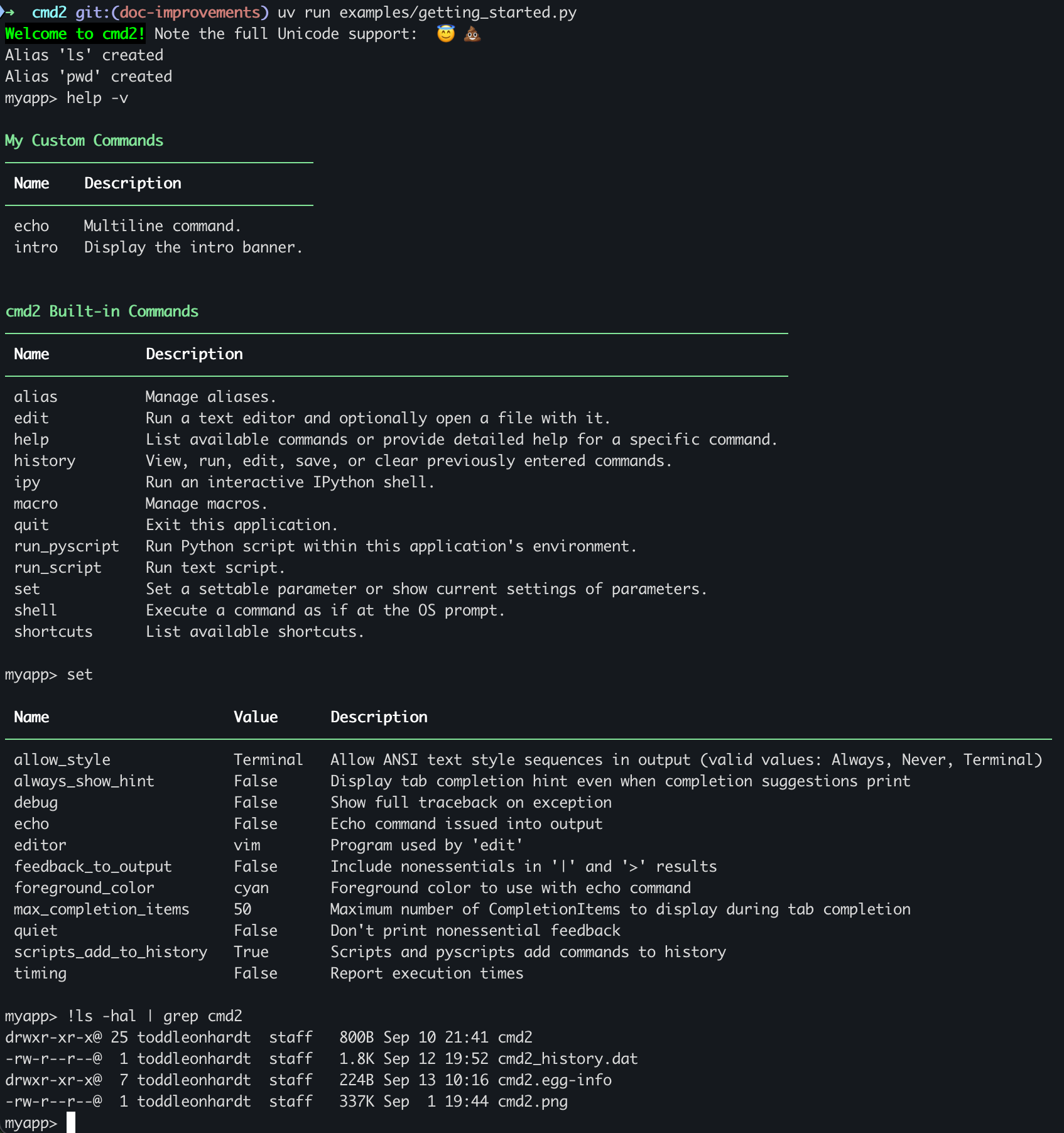
cmd2 is a tool for building interactive command line applications in Python. Its goal is to make it quick and easy for developers to build feature-rich and user-friendly interactive command line applications. It provides a simple API which is an extension of Python's built-in cmd module. cmd2 provides a wealth of features on top of cmd to make your life easier and eliminates much of the boilerplate code which would be necessary when using cmd.
:warning:
cmd23.xhas been released and there are some significant backwards incompatibilities from version2.x. Please see the Migration Guide for tips on upgrading fromcmd22.x to 3.x.
The developers toolbox
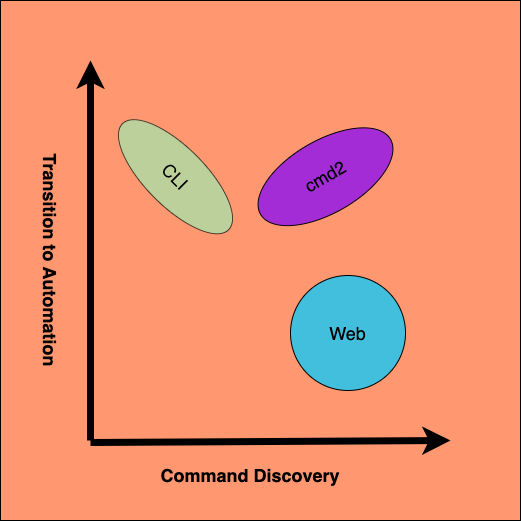
When creating solutions developers have no shortage of tools to create rich and smart user
interfaces. System administrators have long been duct taping together brittle workflows based on a
menagerie of simple command line tools created by strangers on github and the guy down the hall.
Unfortunately, when CLIs become significantly complex the ease of command discoverability tends to
fade quickly. On the other hand, Web and traditional desktop GUIs are first in class when it comes
to easily discovering functionality. The price we pay for beautifully colored displays is complexity
required to aggregate disparate applications into larger systems. cmd2 fills the niche between
high ease of command discovery applications and smart
workflow automation systems.
The cmd2 framework provides a great mixture of both worlds. Application designers can easily
create complex applications and rely on the cmd2 library to offer effortless user facing help and
extensive tab completion. When users become comfortable with functionality, cmd2 turns into a
feature rich library enabling a smooth transition to full automation. If designed with enough
forethought, a well implemented cmd2 application can serve as a boutique workflow tool. cmd2 pulls
off this flexibility based on two pillars of philosophy:
- Tab Completion
- Automation Transition
Philosophy
<a href="https://imgflip.com/i/63h03x"><img src="https://i.imgflip.com/63h03x.jpg" title="made at imgflip.com" width="70%" height="%70"/></a>
Deep extensive tab completion and help text generation based on the argparse library create the first pillar of 'ease of command discovery'. The following is a list of features in this category.
- Great tab completion of commands, subcommands, file system paths, and shell commands.
- Custom tab completion for user designed commands via simple function overloading.
- Tab completion from
persistent_history_filesources added with very little friction. - Automatic tab completion of
argparseflags and optional arguments. - Path completion easily enabled.
- When all else fails, custom tab completion based on
choices_providercan fill any gaps.
<a href="https://imgflip.com/i/66t0y0"><img src="https://i.imgflip.com/66t0y0.jpg" title="made at imgflip.com" width="70%" height="70%"/></a>
cmd2 creates the second pillar of 'ease of transition to automation' through alias/macro creation, command line argument parsing and execution of cmd2 scripting.
- Flexible alias and macro creation for quick abstraction of commands.
- Text file scripting of your application with
run_script(@) and_relative_run_script(@@) - Powerful and flexible built-in Python scripting of your application using the
run_pyscriptcommand
Installation
On all operating systems, the latest stable version of cmd2 can be installed using pip:
pip install -U cmd2
cmd2 works with Python 3.10+ on Windows, macOS, and Linux. It is pure Python code with few 3rd-party dependencies. It works with both conventional CPython and free-threaded variants.
For information on other installation options, see Installation Instructions in the cmd2 documentation.
Documentation
The latest documentation for cmd2 can be read online here: https://cmd2.readthedocs.io/en/latest/
It is available in HTML, PDF, and ePub formats.
The best way to learn the cmd2 api is to delve into the example applications located in source under examples.
Tutorials
- cmd2 example applications
- Basic cmd2 examples to demonstrate how to use various features
- Advanced Examples
- More complex examples that demonstrate more features about how to put together a complete application
- Cookiecutter Templates from community
- Basic cookiecutter template for cmd2 application : https://github.com/jayrod/cookiecutter-python-cmd2
- Advanced cookiecutter template with external plugin support : https://github.com/jayrod/cookiecutter-python-cmd2-ext-plug
Hello World
#!/usr/bin/env python
"""A simple cmd2 application."""
import cmd2


class FirstApp(cmd2.Cmd):
    """A simple cmd2 application."""

    def do_hello_world(self, _: cmd2.Statement):
        self.poutput('Hello World')


if __name__ == '__main__':
    import sys

    c = FirstApp()
    sys.exit(c.cmdloop())
Found a bug?
If you think you've found a bug, please first read through the open Issues. If you're confident it's a new bug, go ahead and create a new GitHub issue. Be sure to include as much information as possible so we can reproduce the bug. At a minimum, please state the following:
cmd2version- Python version
- OS name and version
- What you did to cause the bug to occur
- Include any traceback or error message associated with the bug
Projects using cmd2
| Application Name | Description | Organization or Author | | --------------------------------------------------------------- | ------------------------------------------------------------------------------------------------------------------------------- | --------------------------------------------------------------------- | | CephFS Shell | The Ceph File System, or CephFS, is a POSIX-compliant file system built on top of Ceph’s distributed object store | ceph | | garak | LLM vulnerability scanner that checks if an LLM can be made to fail in a way we don't want | NVIDIA | | medusa | Binary instrumentation framework that that automates processes for the dynamic analysis of Android and iOS Applications | Ch0pin | | InternalBlue | Bluetooth experimentation framework for Broadcom and Cypress chips | Secure Mobile Networking Lab | | SCCMHunter | A post-ex tool built to streamline identifying, profiling, and attacking SCCM related assets in an Active Directory domain | Garret Foster | | Unipacker | Automatic and platform-independent unpacker for Windows binaries based on emulation | unipacker | | Frankenstein | Broadcom and Cypress firmware emulation for fuzzing and further full-stack debugging | Secure Mobile Networking Lab | | Poseidon | Leverages software-defined networks (SDNs) to acquire and then feed network traffic to a number of machine learning techniques. | Faucet SDN | | DFTimewolf
Related Skills
node-connect
346.4kDiagnose OpenClaw node connection and pairing failures for Android, iOS, and macOS companion apps
claude-opus-4-5-migration
107.2kMigrate prompts and code from Claude Sonnet 4.0, Sonnet 4.5, or Opus 4.1 to Opus 4.5
frontend-design
107.2kCreate distinctive, production-grade frontend interfaces with high design quality. Use this skill when the user asks to build web components, pages, or applications. Generates creative, polished code that avoids generic AI aesthetics.
model-usage
346.4kUse CodexBar CLI local cost usage to summarize per-model usage for Codex or Claude, including the current (most recent) model or a full model breakdown. Trigger when asked for model-level usage/cost data from codexbar, or when you need a scriptable per-model summary from codexbar cost JSON.
