
Pysheds
Simple and fast watershed delineation in python
Install / Use
/learn @pysheds/PyshedsREADME
pysheds 


🌎 Simple and fast watershed delineation in python.
Documentation
Read the docs here 📖.
Media
Hatari Labs - Elevation model conditioning and stream network delineation with python and pysheds <sup>:uk:</sup>
Hatari Labs - Watershed and stream network delineation with python and pysheds <sup>:uk:</sup>
Gidahatari - Delimitación de límite de cuenca y red hidrica con python y pysheds <sup>:es:</sup>
Earth Science Information Partners - Pysheds: a fast, open-source digital elevation model processing library <sup>:uk:</sup>
Example usage
Example data used in this tutorial are linked below:
- Elevation: elevation.tiff
- Terrain: impervious_area.zip
- Soil Polygons: soils.zip
Additional DEM datasets are available via the USGS HydroSHEDS project.
Read DEM data
# Read elevation raster
# ----------------------------
from pysheds.grid import Grid

grid = Grid.from_raster('elevation.tiff')
dem = grid.read_raster('elevation.tiff')
import numpy as np
import matplotlib.pyplot as plt
from matplotlib import colors
import seaborn as sns

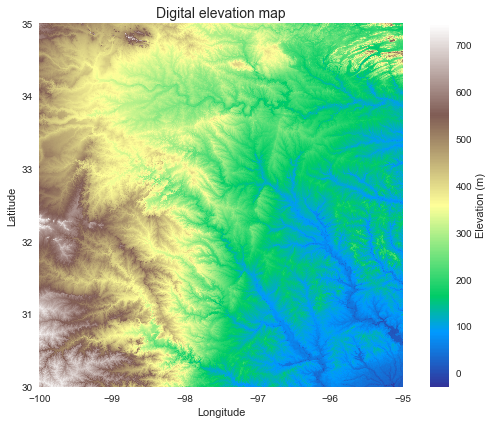
fig, ax = plt.subplots(figsize=(8,6))
fig.patch.set_alpha(0)

plt.imshow(dem, extent=grid.extent, cmap='terrain', zorder=1)
plt.colorbar(label='Elevation (m)')
plt.grid(zorder=0)
plt.title('Digital elevation map', size=14)
plt.xlabel('Longitude')
plt.ylabel('Latitude')
plt.tight_layout()
Condition the elevation data
# Condition DEM
# ----------------------
# Fill pits in DEM
pit_filled_dem = grid.fill_pits(dem)

# Fill depressions in DEM
flooded_dem = grid.fill_depressions(pit_filled_dem)

# Resolve flats in DEM
inflated_dem = grid.resolve_flats(flooded_dem)
Elevation to flow direction
# Determine D8 flow directions from DEM
# ----------------------
# Specify directional mapping
dirmap = (64, 128, 1, 2, 4, 8, 16, 32)

# Compute flow directions
# -------------------------------------
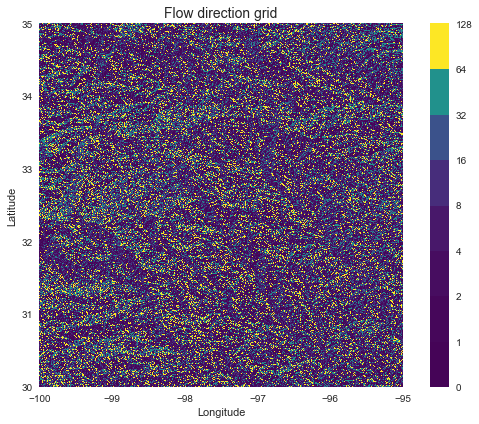
fdir = grid.flowdir(inflated_dem, dirmap=dirmap)
fig = plt.figure(figsize=(8,6))
fig.patch.set_alpha(0)

plt.imshow(fdir, extent=grid.extent, cmap='viridis', zorder=2)
boundaries = ([0] + sorted(list(dirmap)))
plt.colorbar(boundaries= boundaries,
             values=sorted(dirmap))
plt.xlabel('Longitude')
plt.ylabel('Latitude')
plt.title('Flow direction grid', size=14)
plt.grid(zorder=-1)
plt.tight_layout()
Compute accumulation from flow direction
# Calculate flow accumulation
# --------------------------
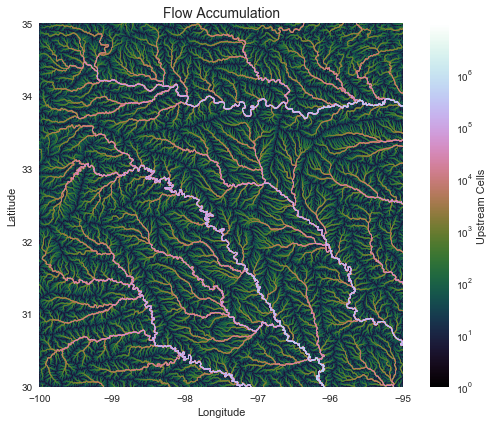
acc = grid.accumulation(fdir, dirmap=dirmap)
fig, ax = plt.subplots(figsize=(8,6))
fig.patch.set_alpha(0)
plt.grid('on', zorder=0)
im = ax.imshow(acc, extent=grid.extent, zorder=2,
               cmap='cubehelix',
               norm=colors.LogNorm(1, acc.max()),
               interpolation='bilinear')
plt.colorbar(im, ax=ax, label='Upstream Cells')
plt.title('Flow Accumulation', size=14)
plt.xlabel('Longitude')
plt.ylabel('Latitude')
plt.tight_layout()
Delineate catchment from flow direction
# Delineate a catchment
# ---------------------
# Specify pour point
x, y = -97.294, 32.737

# Snap pour point to high accumulation cell
x_snap, y_snap = grid.snap_to_mask(acc > 1000, (x, y))

# Delineate the catchment
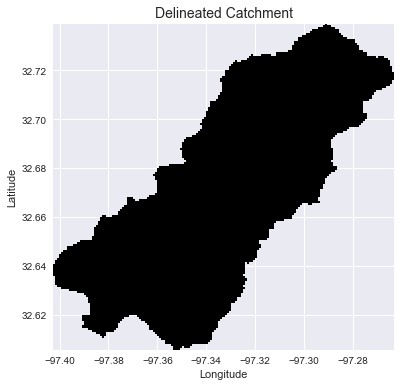
catch = grid.catchment(x=x_snap, y=y_snap, fdir=fdir, dirmap=dirmap,
                       xytype='coordinate')

# Crop and plot the catchment
# ---------------------------
# Clip the bounding box to the catchment
grid.clip_to(catch)
clipped_catch = grid.view(catch)
# Plot the catchment
fig, ax = plt.subplots(figsize=(8,6))
fig.patch.set_alpha(0)

plt.grid('on', zorder=0)
im = ax.imshow(np.where(clipped_catch, clipped_catch, np.nan), extent=grid.extent,
               zorder=1, cmap='Greys_r')
plt.xlabel('Longitude')
plt.ylabel('Latitude')
plt.title('Delineated Catchment', size=14)
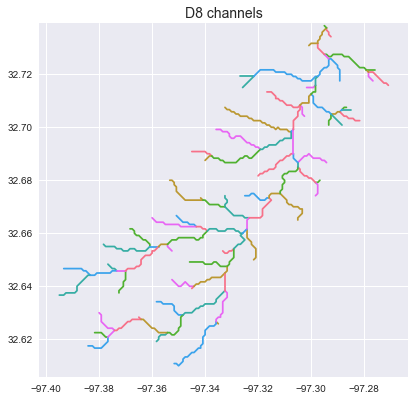
Extract the river network
# Extract river network
# ---------------------
branches = grid.extract_river_network(fdir, acc > 50, dirmap=dirmap)
sns.set_palette('husl')
fig, ax = plt.subplots(figsize=(8.5,6.5))

plt.xlim(grid.bbox[0], grid.bbox[2])
plt.ylim(grid.bbox[1], grid.bbox[3])
ax.set_aspect('equal')

for branch in branches['features']:
    line = np.asarray(branch['geometry']['coordinates'])
    plt.plot(line[:, 0], line[:, 1])

_ = plt.title('D8 channels', size=14)
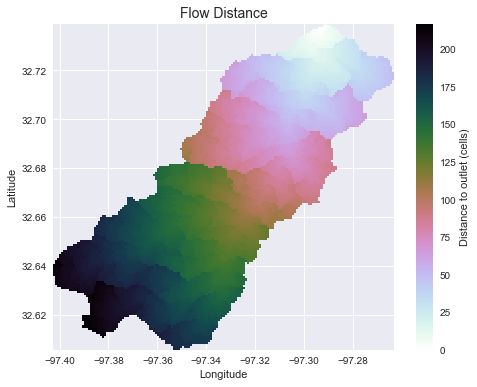
Compute flow distance from flow direction
# Calculate distance to outlet from each cell
# -------------------------------------------
dist = grid.distance_to_outlet(x=x_snap, y=y_snap, fdir=fdir, dirmap=dirmap,
                               xytype='coordinate')
fig, ax = plt.subplots(figsize=(8,6))
fig.patch.set_alpha(0)
plt.grid('on', zorder=0)
im = ax.imshow(dist, extent=grid.extent, zorder=2,
               cmap='cubehelix_r')
plt.colorbar(im, ax=ax, label='Distance to outlet (cells)')
plt.xlabel('Longitude')
plt.ylabel('Latitude')
plt.title('Flow Distance', size=14)
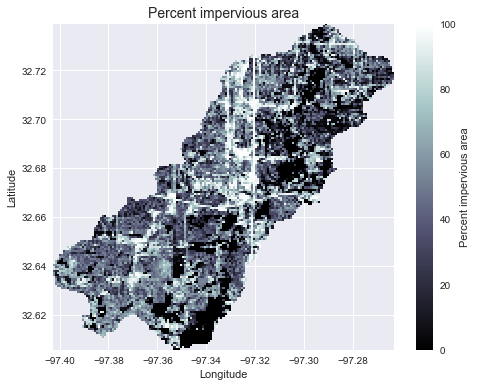
Add land cover data
# Combine with land cover data
# ---------------------
terrain = grid.read_raster('impervious_area.tiff', window=grid.bbox,
                           window_crs=grid.crs, nodata=0)
# Reproject data to grid's coordinate reference system
projected_terrain = terrain.to_crs(grid.crs)
# View data in catchment's spatial extent
catchment_terrain = grid.view(projected_terrain, nodata=np.nan)
fig, ax = plt.subplots(figsize=(8,6))
fig.patch.set_alpha(0)
plt.grid('on', zorder=0)
im = ax.imshow(catchment_terrain, extent=grid.extent, zorder=2,
               cmap='bone')
plt.colorbar(im, ax=ax, label='Percent impervious area')
plt.xlabel('Longitude')
plt.ylabel('Latitude')
plt.title('Percent impervious area', size=14)
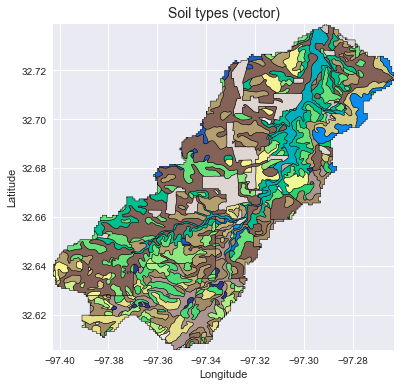
Add vector data
# Convert catchment raster to vector and combine with soils shapefile
# ---------------------
# Read soils shapefile
import pandas as pd
import geopandas as gpd
from shapely import geometry, ops
soils = gpd.read_file('soils.shp')
soil_id = 'MUKEY'
# Convert catchment raster to vector geometry and find intersection
shapes = grid.polygonize()
catchment_polygon = ops.unary_union([geometry.shape(shape)
                                     for shape, value in shapes])
soils = soils[soils.intersects(catchment_polygon)]
catchment_soils = gpd.GeoDataFrame(soils[soil_id],
                                   geometry=soils.intersection(catchment_polygon))
# Convert soil types to simple integer values
soil_types = np.unique(catchment_soils[soil_id])
soil_types = pd.Series(np.arange(soil_types.size), index=soil_types)
catchment_soils[soil_id] = catchment_soils[soil_id].map(soil_types)
fig, ax = plt.subplots(figsize=(8, 6))
catchment_soils.plot(ax=ax, column=soil_id, categorical=True, cmap='terrain',
                     linewidth=0.5, edgecolor='k', alpha=1, aspect='equal')
ax.set_xlim(grid.bbox[0], grid.bbox[2])
ax.set_ylim(grid.bbox[1], grid.bbox[3])
plt.xlabel('Longitude')
plt.ylabel('Latitude')
ax.set_title('Soil types (vector)', size=14)
Convert from vector to raster
soil_polygons = zip(catchment_soils.geometry.values, catchment_soils[soil_id].values)
soil_raster = grid.rasterize(soil_polygons, fill=np.nan)
fig, ax = plt.subplots(figsize=(8, 6))
plt.imshow(soil_raster, cmap='terrain', extent=grid.extent, zorder=1)
boundaries = np.unique(soil_raster[~np.isnan(soil_raster)]).astype(int)
plt.colorbar(boundaries=boundaries,
             values=boundaries)
ax.set_xlim(grid.bbox[0], grid.bbox[2])
ax.set_ylim(grid.bbox[1], grid.bbox[3])
plt.xlabel('Longitude')
plt.ylabel('Latitude')
ax.set_title('Soil types (r
