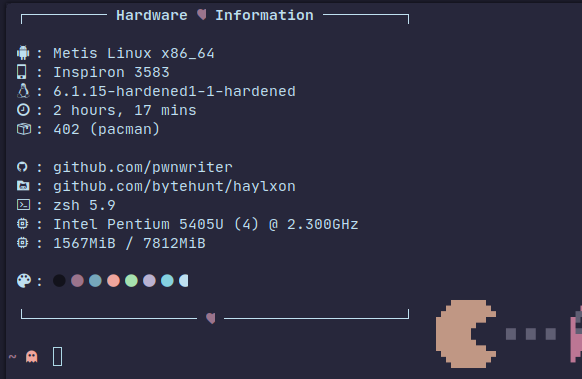
Haylxon
⚡ Blazing-fast tool to grab screenshots of your domain list right from terminal.
Install / Use
/learn @pwnwriter/HaylxonREADME
Haylxon 🔥🦀
SHOOT BEFORE THE BLINK || Haylxon, A tool embodying the K1SS philosophy that allows you to take screenshots of webpages/URLs at lightning-fast speeds using chromes Headless feature, means, you'd be needing a chromium based browser for it to work.
Built from the ground up for ease of use, performance, beautiful ui and portability in mind. 💖
<p align="left"><a href="https://github.com/pwnwriter/haylxon/releases"><img src="https://img.shields.io/github/v/release/pwnwriter/haylxon?style=flat&labelColor=56534b&color=c1c1b6&logo=GitHub&logoColor=white" alt="GitHub Release"></a>
<a href="https://crates.io/crates/hxn/"><img src="https://img.shields.io/crates/v/hxn?style=flat&labelColor=56534b&color=c1c1b6&logo=Rust&logoColor=white" alt="Crate Release"></a>
<a href="https://github.com/pwnwriter/haylxon/blob/main/LICENSE"><img src="https://img.shields.io/badge/License-MIT-white.svg" alt="MIT LICENSE"></a>
<a href="https://twitter.com/intent/tweet?text=Guys,%20Check%20out%20haylxon%20-%20A%20blazingly%20fast%20tool%20to%20grab%20screenshots%20of%20website%2FURL%20from%20terminal%20written%20in%20Rust!%20&url=https%3A%2F%2Fgithub.com%2Fpwnwriter%2Fhaylxon"><img alt="Twitter Share" src="https://img.shields.io/twitter/url/https/github.com/pwnwriter/haylxon.svg?style=social"></a>


Table of contents 📔
<a name="features"></a>
Features 🍙
- Fast:
Hxnis designed to be fast, all credits goes to therustlang. 🦀 - Portable: You can use
haylxonon both*nix&windows. - Ease: This tool is designed to be very user friendly as there are very few options but does all the required works that one expects.👨🎨
- Simple: As always
Keeping It Simple and Stupid
<a name="installation"></a>
Installation 📩
<details> <summary><code>🪄 Binary </code></summary> - Manual: You can directly download the binary from releases of your arch and run it.
- One liner: Run this one liner script
wget -qO- "$(curl -qfsSL "https://api.github.com/repos/pwnwriter/haylxon/releases/latest" | jq -r '.assets[].browser_download_url' | grep -Ei "$(uname -m).*$(uname -s).*musl" | grep -v "\.sha")" | tar -xzf - --strip-components=1 && ./hxn -h
git clone --depth=1 https://github.com/pwnwriter/haylxon --branch=main
cd haylxon
cargo build --release
Then go to release dir and ./hxn or move the binary to your any $PATH for instant access from anywhere.
-
Using crates.io
cargo install hxn -
Using binstall
cargo binstall hxnNote ⚠️ This requires a working setup of rust/cargo & binstall.
sudo/doas pacman -Syyy hxn
paru/yay -S haylxon-git
# Build from source and run
nix run github:pwnwriter/haylxon
# without flakes:
nix-env -iA nixpkgs.haylxon
# with flakes:
nix profile install nixpkgs#haylxon
<a name="action"></a>
Hxn in action 🚀
I'm using brave browser for all the demonstration. You can use any chromium based browsers.
-
<details> <summary><code> Single url </code></summary>
hxn -b $(which brave) -u https://example.com
-
<details> <summary><code> Multiple urls from file </code></summary>
hxn -b $(which brave) -f urls.txt
-
<details> <summary><code> Read urls from stdin </code></summary>
cat urls.txt | hxn -b $(which brave) --stdin
-
<details> <summary><code> Custom dimensions </code></summary>
cat urls.txt | hxn -b $(which brave) -x 144 -y 400 --stdin
-
<details> <summary><code> With ports </code></summary>
hxn -b $(which brave) -f urls.txt --ports 8080,8081
-
<details> <summary><code> Arbitrary javascript </code></summary>
hxn -b $(which brave) -u <url> --javascript "javascript code here"
-
<details> <summary><code> Fullpage screenshots </code></summary>
hxn -b $(which brave) -u https://example.com --fullpage
-
<details> <summary><code> Screenshot format </code></summary>
hxn -b $(which brave) -u https://example.com --screenshot-type jpeg
-
<details> <summary><code> Proxy </code></summary>
hxn -b $(which brave) -u https://example.com --proxy socks5://127.0.0.1:9050
-
<details> <summary><code> Custom user agent </code></summary>
hxn -b $(which brave) -f urls.txt --user-agent "random"
-
<details> <summary><code> JSON output </code></summary>
hxn -b $(which brave) -f urls.txt --json
-
<details> <summary><code> Silent mode </code></summary>
hxn -b $(which brave) -f urls.txt --silent
-
<details> <summary><code> Timeout and delay </code></summary>
hxn -b $(which brave) -f urls.txt --timeout 200 --delay 5
-
<details> <summary><code> Parallel tabs </code></summary>
hxn -b $(which brave) -f urls.txt --tabs 8
-
<details> <summary><code> Accept invalid certs </code></summary>
hxn -b $(which brave) -f urls.txt --accept-invalid-certs
-
<details> <summary><code> hxn in termux </code></summary>
Install dependencies -
pkg install tur-repo -y ; pkg install chromium -y
ln -s "$PREFIX/bin/chromium-browser" "$PREFIX/bin/chromium"
<a name="benchmarking"></a>
Benchmarking ⚡
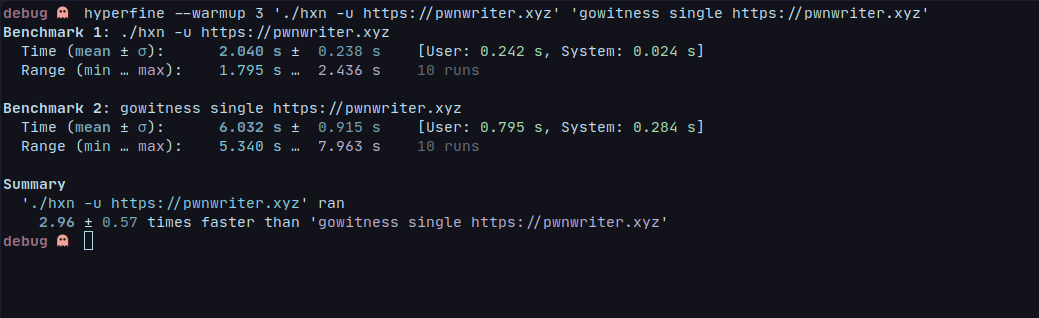
The below is a comparison between similar project gowitness, tested on my pentium processor.
<a name="contribution"></a>
Contribution 🤝
Contributions are welcome! You can suggest features, report bugs, fix issues via issues or pull requests. Help with code documentation and spreading the word about HAYLXON(hxn) is appreciated! 😎
<a name="support"></a>
Support 💌
I am a student currently attending university. I like working for Open Source in my free time. If you find my tool or work beneficial, please consider supporting me via KO-FI or ESEWA* (Nepal only), Or by leaving a star ⭐ ; I'll appreciate your action :)
<a name="see"></a>
Also see 👀
Kanha:- A web-app pentesting suite written in rust 🦀gowitness:- A golang, web screenshot utility using Chrome Headless
<a name="faq"></a>
FAQ 🥶
- How do you use
hxn?- I use hxn to automate tasks. For example, I needed to test a website on GitHub Actions before deploying. Using hxn, I took screenshots and uploaded it to
0x0.stto verify it met my requirements. - When i have a list of sub(domains) to test.
- I use hxn to automate tasks. For example, I needed to test a website on GitHub Actions before deploying. Using hxn, I took screenshots and uploaded it to
<a name="license"></a>
License 🔐
Licensed under the MIT LICENSE
Related Skills
himalaya
343.1kCLI to manage emails via IMAP/SMTP. Use `himalaya` to list, read, write, reply, forward, search, and organize emails from the terminal. Supports multiple accounts and message composition with MML (MIME Meta Language).
node-connect
343.1kDiagnose OpenClaw node connection and pairing failures for Android, iOS, and macOS companion apps
frontend-design
90.0kCreate distinctive, production-grade frontend interfaces with high design quality. Use this skill when the user asks to build web components, pages, or applications. Generates creative, polished code that avoids generic AI aesthetics.
coding-agent
343.1kDelegate coding tasks to Codex, Claude Code, or Pi agents via background process