
fli
Google Flights MCP, CLI and Python Library
Install / Use
claude mcp add punitarani -- npx -y github:punitarani/fliIf the server publishes to npm under a different name, use that package instead — check the repo README.
MCP Server
Model Context Protocol server
Quality Score
Category
Development & EngineeringSupported Platforms
Skill content
View source on GitHub🛫 Fli - Flight Search MCP Server and Library

A powerful Python library that provides programmatic access to Google Flights data with an elegant CLI interface. Search flights, find the best deals, and filter results with ease.
🚀 What makes
flispecial? Unlike other flight search libraries that rely on web scraping, Fli directly interacts with Google Flights' API through reverse engineering. This means:
- Fast: Direct API access means faster, more reliable results
- Zero Scraping: No HTML parsing, no browser automation, just pure API interaction
- Reliable: Less prone to breaking from UI changes
- Modular: Extensible architecture for easy customization and integration
MCP Server
pipx install flights

# Run the MCP server on STDIO
fli-mcp

# Run the MCP server over HTTP (streamable)
fli-mcp-http  # serves at http://127.0.0.1:8000/mcp/
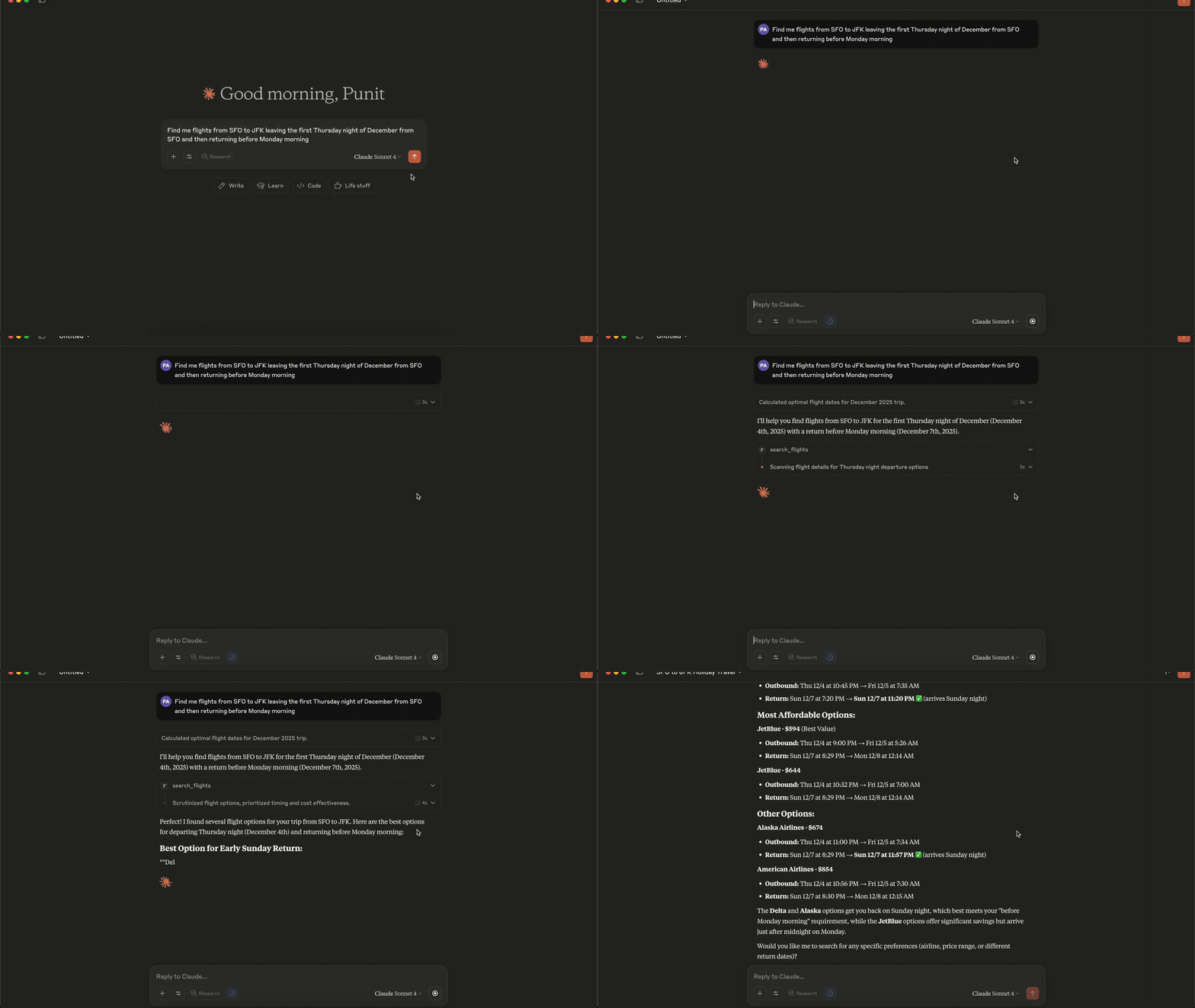
Connecting to Claude Desktop
{
  "mcpServers": {
    "fli": {
      "command": "/Users/<user>/.local/bin/fli-mcp"
    }
  }
}
Note: Replace
<user>with your actual username. You can also find the path to the MCP server by runningwhich fli-mcpin your terminal.
MCP Tools Available
The MCP server provides two main tools:
| Tool | Description |
|----------------------|-------------------------------------------------------------|
| search_flights | Search for flights on a specific date with detailed filters |
| search_dates | Find the cheapest travel dates across a flexible date range |
search_flights Parameters
| Parameter | Type | Description |
|---------------------|--------|-------------------------------------------------------------|
| origin | string | Departure airport IATA code(s) — comma-separated for multi |
| destination | string | Arrival airport IATA code(s) — comma-separated for multi |
| departure_date | string | Travel date in YYYY-MM-DD format |
| return_date | string | Return date for round trips (optional) |
| cabin_class | string | ECONOMY, PREMIUM_ECONOMY, BUSINESS, or FIRST |
| max_stops | string | ANY, NON_STOP, ONE_STOP, or TWO_PLUS_STOPS |
| departure_window | string | Time window in 'HH-HH' format (e.g., '6-20') |
| airlines | list | Filter by airline codes (e.g., ['BA', 'AA']) |
| exclude_airlines | list | Airline IATA codes to exclude (e.g., ['DL', 'B6']) |
| alliance | list | Restrict to alliances: ONEWORLD, SKYTEAM, STAR_ALLIANCE |
| exclude_alliance | list | Alliance names to exclude from results |
| min_layover | int | Minimum layover duration in minutes (multi-stop only) |
| max_layover | int | Maximum layover duration in minutes (multi-stop only) |
| currency | string | ISO 4217 code (e.g. 'EUR', 'JPY') — flows to curr= param |
| language | string | BCP-47 language code (e.g. 'en-GB') — flows to hl= param |
| country | string | ISO 3166-1 alpha-2 country code (e.g. 'GB') for gl= param |
| sort_by | string | CHEAPEST, DURATION, DEPARTURE_TIME, or ARRIVAL_TIME |
| passengers | int | Number of adult passengers |
search_dates Parameters
| Parameter | Type | Description |
|---------------------|--------|-------------------------------------------------------------|
| origin | string | Departure airport IATA code(s) — comma-separated for multi |
| destination | string | Arrival airport IATA code(s) — comma-separated for multi |
| start_date | string | Start of date range in YYYY-MM-DD format |
| end_date | string | End of date range in YYYY-MM-DD format |
| trip_duration | int | Trip duration in days (for round-trips) |
| is_round_trip | bool | Whether to search for round-trip flights |
| cabin_class | string | ECONOMY, PREMIUM_ECONOMY, BUSINESS, or FIRST |
| max_stops | string | ANY, NON_STOP, ONE_STOP, or TWO_PLUS_STOPS |
| departure_window | string | Time window in 'HH-HH' format (e.g., '6-20') |
| airlines | list | Filter by airline codes (e.g., ['BA', 'AA']) |
| exclude_airlines | list | Airline IATA codes to exclude |
| alliance | list | Restrict to alliances: ONEWORLD, SKYTEAM, STAR_ALLIANCE |
| exclude_alliance | list | Alliance names to exclude |
| min_layover | int | Minimum layover duration in minutes |
| max_layover | int | Maximum layover duration in minutes |
| currency | string | ISO 4217 currency code (e.g. 'EUR', 'JPY') |
| language | string | BCP-47 language code (e.g. 'en-GB') |
| country | string | ISO 3166-1 alpha-2 country code (e.g. 'GB') |
| sort_by_price | bool | Sort results by price (lowest first) |
| passengers | int | Number of adult passengers |
Quick Start
pip install flights
# Install using pipx (recommended for CLI)
pipx install flights

# Get started with CLI
fli --help
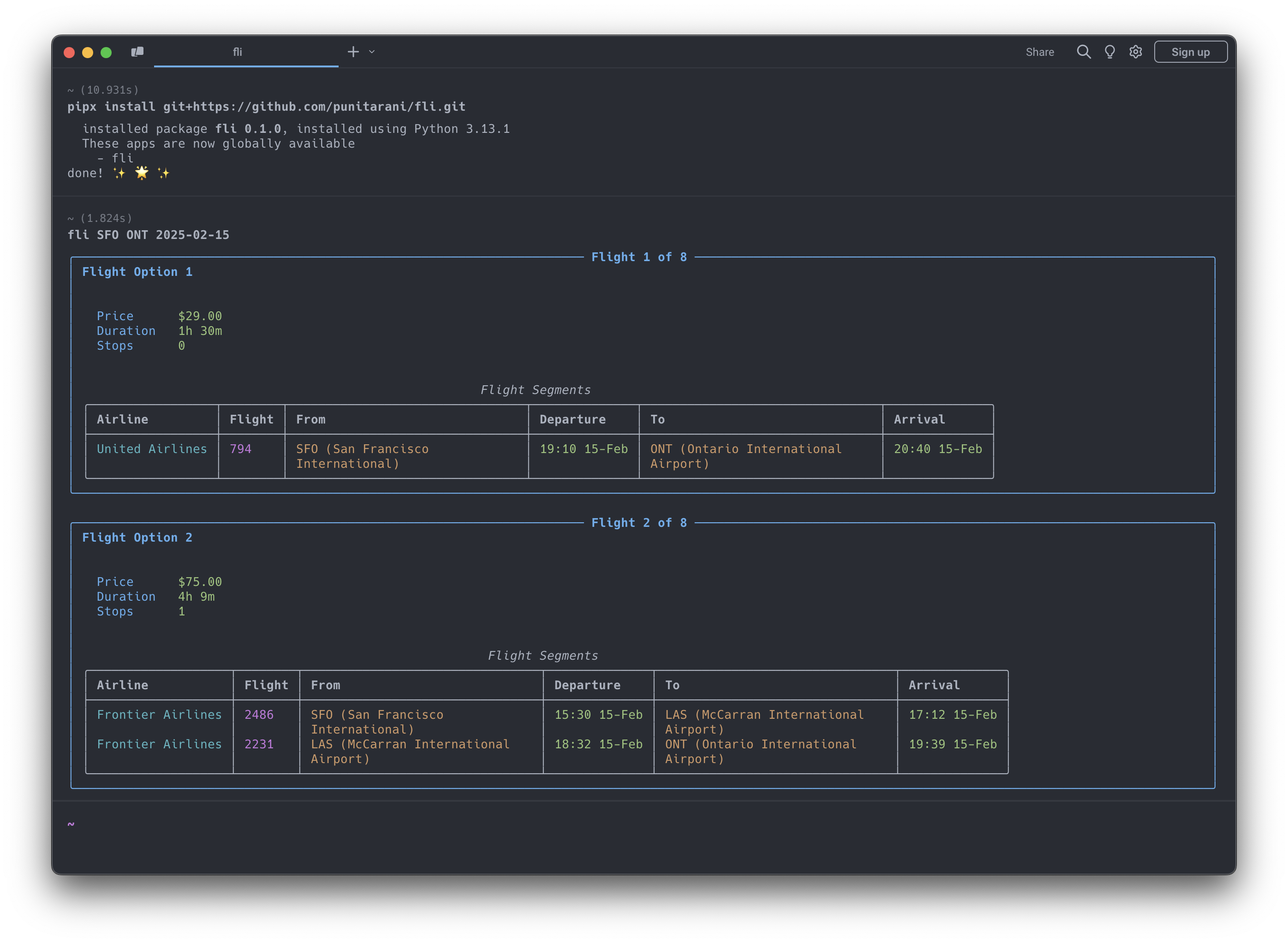
Features
-
🔍 Powerful Search
- One-way flight searches
- Multi-city flight searches
- Flexible departure times
- Multi-airline support
- Cabin class selection
- Stop preferences
- Custom result sorting
-
💺 Cabin Classes
- Economy
- Premium Economy
- Business
- First
-
🎯 Smart Sorting
- Price
- Duration
- Departure Time
- Arrival Time
-
🛡️ Built-in Protection
- Rate limiting
- Automatic retries
- Comprehensive error handling
- Input validation
CLI Usage
Search for Flights
# Basic flight search
fli flights JFK LHR 2026-10-25

# Advanced search with filters
fli flights JFK LHR 2026-10-25 \
    --time 6-20 \             # Departure time window (6 AM - 8 PM)
    --airlines BA,KL \        # Airlines (British Airways, KLM)
    --class BUSINESS \        # Cabin class
    --stops NON_STOP \        # Non-stop flights only
    --sort DURATION           # Sort by duration

# Alliance + exclude + locale (May-2026 filter additions)
fli flights JFK LHR 2026-10-25 \
    --alliance ONEWORLD \
    --exclude-airlines AA \
    --min-layover 90 \
    --max-layover 360 \
    --currency EUR --language en-GB --country GB
⚠️ Experimental
--format jsonis experimental. The JSON schema may change while the machine-readable CLI contract settles.# Return machine-readable flight results fli flights JFK LHR 2026-10-25 --format json
Find Cheapest Dates
# Basic date search
fli dates JFK LHR

# Advanced search with date range
fli dates JFK LHR \
    --from 2026-01-01 \
    --to 2026-02-01 \
    --monday --friday      # Only Mondays and Fridays
⚠️ Experimental
--format jsonis experimental for date searches as well.# Return machine-readable date search results fli dates JFK LHR --from 2026-01-01 --to 2026-02-01 --format json
Multi-city Search
# Two-leg multi-city trip
fli multi --leg SEA,HKG,2026-12-26 --leg PEK,SEA,2027-01-02

# Three-leg multi-city trip with filters
fli multi \
    -l SEA,NRT,2026-12-26 \
    -l NRT,HKG,2026-12-30 \
    -l HKG,SEA,2027-01-05 \
    --class BUSINESS \
    --stops 0
CLI Options
Flights Command (fli flights)
| Option | Description | Example |
|-------------------------|--------------------------------------------|----------------------------------|
| --return, -r | Return date | 2026-10-30 |
| --time, -t | Departure time window | 6-20 |
| --airlines, -a | Airline IATA codes | BA,KL |
| --exclude-airlines, -A | Airline IATA codes to exclude | DL,B6 |
| --alliance | Restrict to alliance(s) | ONEWORLD, SKYTEAM |
| --exclude-alliance | Alliance(s) to exclude | STAR_ALLIANCE |
| --min-layover | Minimum layover (minutes) | 90 |
| --max-layover | Maximum layover (minutes) | 360 |
| --currency | ISO 4217 currency code | EUR, JPY |
| --language | BCP-47 language code (Google hl=) | en-GB |
| --country | ISO 3166-1 alpha-2 country (gl=) | GB |
| --class, -c | Cabin class | ECONOMY, BUSINESS |
| --stops, -s | Maximum stops | NON_STOP, ONE_STOP |
| --sort, -o | Sort results by | CHEAPEST, DURATION |
| --format | Output format | text, json |
Dates Command (fli dates)
| Option | Description | Example |
|-------------------------|--------------------------------------------|--------------------------|
| --from | Start date | 2026-01-01 |
| --to | End date | 2026-02-01 |
| --duration, -d | Trip duration in days | 3 |
| --round, -R | Round-trip search | (flag) |
| --airlines, -a | Airline IATA codes | BA,KL |
| --exclude-airlines, -A| Airline IATA codes to exclude | DL,B6 |
| --alliance | Restrict to alliance(s) | ONEWORLD |
| --exclude-alliance | Alliance(s) to exclude | STAR_ALLIANCE |
| --min-layover | Minimum layover (minutes) | 90 |
| --max-layover | Maximum layover (minutes) | 360 |
| --currency | ISO 4217 currency code | EUR, JPY |
| --language | BCP-47 language code | en-GB |
| --country | ISO 3166-1 alpha-2 country | GB |
| --class, -c | Cabin class | ECONOMY, BUSINESS |
| --stops, -s | Maximum stops | NON_STOP, ONE_STOP |
| --time | Departur
Truncated for display — read the full file on GitHub.
Related Skills
Agent-Reach
84.2kGive your AI agent eyes to see the entire internet. Read & search Twitter, Reddit, YouTube, GitHub, Bilibili, XiaoHongShu — one CLI, zero API fees.
headroom
73.4kCompress tool outputs, logs, files, and RAG chunks before they reach the LLM. 20% fewer tokens for coding agents, 60-95% fewer tokens for JSON, same answers. Library, proxy, MCP server.
ruflo
73.0k🌊 The original agent harness. Deploy intelligent multi-player swarms, coordinate autonomous workflows, and build conversational AI systems. Features adaptive memory, self-learning intelligence, federation, vector RAG integration, and native Claude Code / Codex / Hermes and many more Integrated
career-ops
72.3kOpen-source AI job search: scan job portals, evaluate listings into a structured A-H report with a global 1-5 score, tailor your CV, track applications — runs locally in your AI coding CLI (Claude Code, Codex, OpenCode, Antigravity…)
