
Syntux
The generative UI library for the web.
Install / Use
/learn @puffinsoft/SyntuxREADME
https://github.com/user-attachments/assets/c85de55d-21f3-43ff-8bd3-d6ede2171447
Features
- ⚡ Streamable - display UI as you generate.
- 🎨 Custom Components - use your own React components.
- 💾 Cacheable - reuse generated UIs with new values.
- 🔄 Reactive - update the UI programmatically.
How does it work? syntux generates a JSON-DSL to represent the UI, known as the React Interface Schema. The specifics are in the FAQ below.
<h3 align="center" margin="0"><a href="https://docs.getsyntux.com/">➡️ view documentation</a></h3>Table of Contents
API
<i>syntux</i> is built for React and Next.js.
One component is all you need:
const valueToDisplay = {
    "username": "John",
    "email": "john@gmail.com",
    "age": 22
}

<GeneratedUI
    model={anthropic('claude-sonnet-4-5')}
    value={valueToDisplay}
    hint="UI should look like..."
/>
syntux takes the value into consideration and designs a UI to best display it. value can be anything; an object, array or primitive.
[!TIP] If you are passing in a large array as a value, or an object with untrusted input, use the
skeletonizeproperty. See the explanation.
Installation
In the root of your project:
$ npx getsyntux@latest
This will automatically install the required components in the lib/getsyntux folder.
We use the Vercel AI SDK to provide support for all LLM providers. To install the model providers:
$ npm i ai
$ npm i @ai-sdk/anthropic (if you're using Claude)
Examples
Basic Example
Generate a simple UI with a hint:
import { GeneratedUI } from "@/lib/getsyntux/GeneratedUI";
import { createAnthropic } from "@ai-sdk/anthropic";

/* this example uses Claude, but all models are supported! */
const anthropic = createAnthropic({ apiKey: ... })

export default function Home(){
    const valueToDisplay = { ... };
    return <GeneratedUI model={anthropic("claude-sonnet-4-5")} value={valueToDisplay} hint="UI should look like..." />
}
Caching
Cache generated UI based on a user ID:
const cache: Map<number, string> = new Map(); // user id → UI schema

export default function Home() {
  const userID = 10;
  const valueToDisplay = { ... };

  return (
    <GeneratedUI
      cached={cache.get(userID)}
      onGenerate={(result) => {
        cache.set(userID, result);
      }}

      model={anthropic("claude-sonnet-4-5")}
      value={valueToDisplay}
    />
  );
}
Custom components
Use your own components, or someone else's (a library):
import { CustomOne, CustomTwo } from "@/my_components";

export default function Home() {
  const valueToDisplay = { ... };

  return (
    <GeneratedUI
      components={[{
          name: "Button",
          props: "{ color: string, text: string }",
          component: CustomOne,
        }, {
          name: "Input",
          props: "{ initial: string, disabled: boolean }",
          component: CustomTwo,
          context: "Creates an input field with an (initial) value. Can be disabled.",
        }]}

        model={anthropic("claude-sonnet-4-5")}
        value={valueToDisplay}
    />
  );
}
Note: the components array above can be generated automatically with npx getsyntux generate-defs <component.tsx>. See the documentation.
Make sure components are marked with "use client".
Regenerate UI (reactivity)
The useSyntux hook allows you to modify the user interface after it has been generated.
See documentation#reactivity. It's extremely simple.
Customize animation
By default, new elements fade in from below when mounted.
This motion cannot yet be customized. However, the duration and offset can, using the animate property:
<GeneratedUI
    model={anthropic("claude-sonnet-4-5")}
    value={valueToDisplay}
    animate={{
        offset: 10, // pixels
        duration: 100 // ms
    }}
/>
In order to disable the animation, set offset to 0 or duration to 0.
FAQ
<details> <summary>How expensive is generation?</summary>syntux is highly optimized to save tokens. See here for a cost estimation table and an explanation.
</details> <details> <summary>How does generation work? (Does it generate source code?)</summary>Generated UIs must be secure, reusable and cacheable.
As such, syntux does not generate source code. It generates a schema for the UI, known as a "React Interface Schema" (RIS). See the question below to get a better understanding.
This schema is tailored to the value that you provide. It is then hydrated by syntux and rendered.
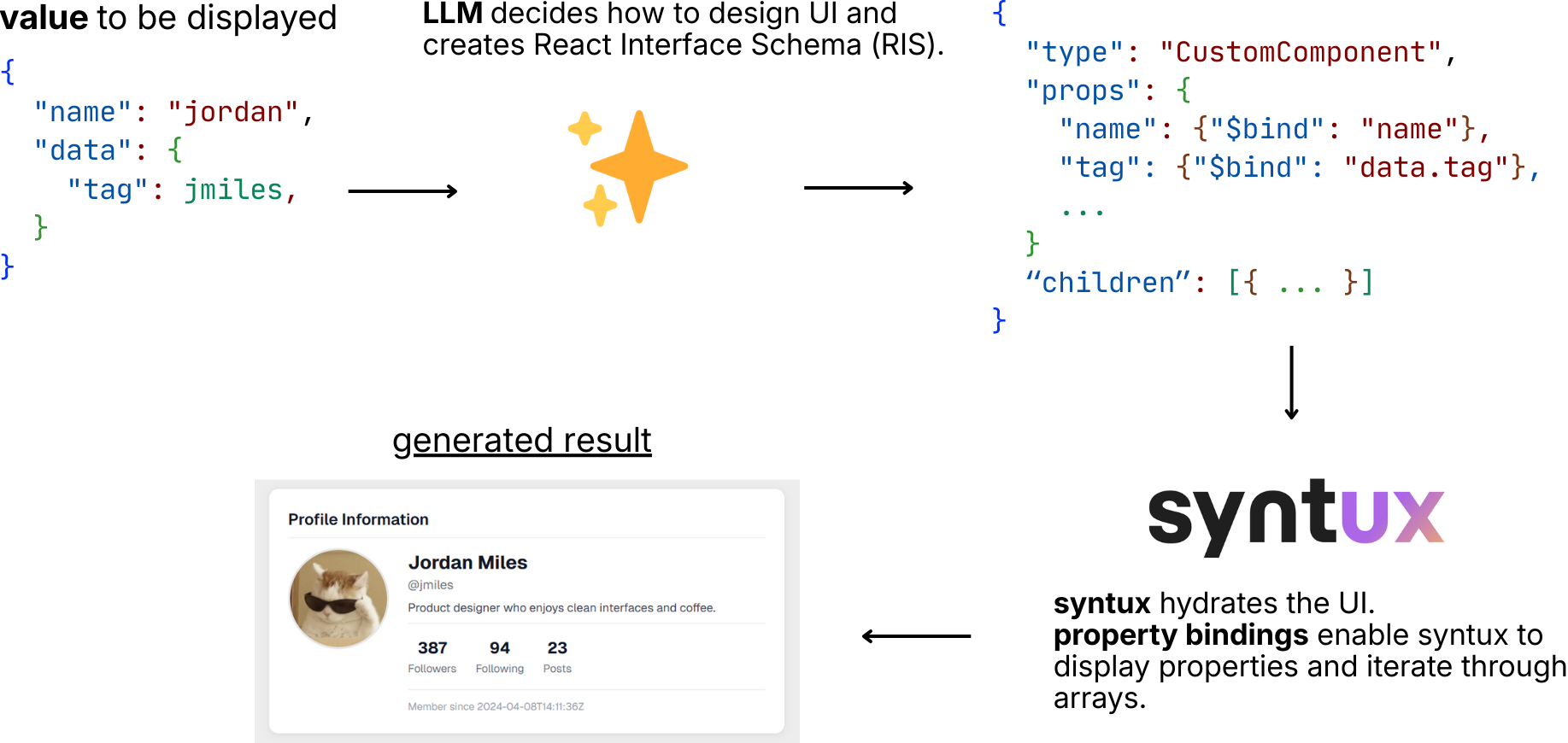
The generated UI is determined by the React Interface Schema (see the above question).
Thus, if the same schema is provided, the same UI will be generated.
For simplicity, the schema is simply a string. It is up to you how you wish to store it; in memory, in a file, in a database etc,.
Use the onGenerate and cached properties to retrieve/provide a cached schema respectively.
Generating state is an anti-pattern and leads to poorly performing, insecure applications.
If you need to handle state, wrap non-stateful components in stateful ones, then pass those as custom components to syntux.
</details> <details> <summary>What does the React Interface Schema look like?</summary>It's a list of JSON objects, each delimited by a newline. Each object contains information about the element/component, props, and an id and parentId.
The RIS does not hardcode values. It binds to properties of the value and has built-in iterators (with the type field), making it reusable and token-efficient (for arrays).
Originally (pre-v0.2.x), the schema was a deep JSON tree. However, post-v0.2.x it was switched to a flat JSON list, as this allows for the UI to be built progressively (streamed).
As such, the id and parentId fields are used to construct the tree as-you-go.
Below is an example:
{"id":"loop_1", "parentId":"root", "type":"__ForEach__", "props":{"source":"authors"}}
{"id":"card_1", "parentId":"loop_1", "type":"div", "props":{"className":"card"}, "content": {"$bind": "$item.name"}}
To get a better understanding, or to implement your own parser, see the spec.
</details>syntux is open source software, licensed under the MIT license.
Related Skills
node-connect
337.3kDiagnose OpenClaw node connection and pairing failures for Android, iOS, and macOS companion apps
frontend-design
83.2kCreate distinctive, production-grade frontend interfaces with high design quality. Use this skill when the user asks to build web components, pages, or applications. Generates creative, polished code that avoids generic AI aesthetics.
openai-whisper-api
337.3kTranscribe audio via OpenAI Audio Transcriptions API (Whisper).
commit-push-pr
83.2kCommit, push, and open a PR
