SalomeToCalculix
No description available
Install / Use
/learn @psicofil/SalomeToCalculixREADME
© Lucio Gomez, April 2016
© Ihor Mirzov, August 2019
Distributed under GNU General Public License v3.0
<br/><br/>
How to use | Screenshots | Videos | Your help | TODO | For developers
<br/><br/>
Salome to CalculiX mesh exporter
Outputs a Salome mesh to CalculiX .inp file. Generates temporary UNV file and converts it to INP format. For now two converters are available:
- unical3, Otto-Ernst Bernhardi, August 2011
- unv2ccx, Ihor Mirzov, August 2019
Now script supports multiple mesh processing.
<br/><br/>
How to use
List of needed files:
- salome2ccx.py - main script
- salome2ccx.ui - GUI form for the main script
- converters - converters binaries for Linux and Windows
How to use:
- Prior running the script update variables cgx_bin and script_dir in the code.
- In Salome select the mesh you wish to export.
- Run script salome2ccx.py from the Mesh module (Ctrl+T or File->Load Script...)
To be able to open conversion result in CalculiX CGX, configure path to executable in the script. Default path is /usr/local/bin/cgx (Linux).
See folder tests for list of successfully converted models.
<br/><br/>
Screenshots
INP mesh successfully exported from Salome to CalculiX Advanced Environment:

<br/><br/>
Videos
Old version Youtube video:
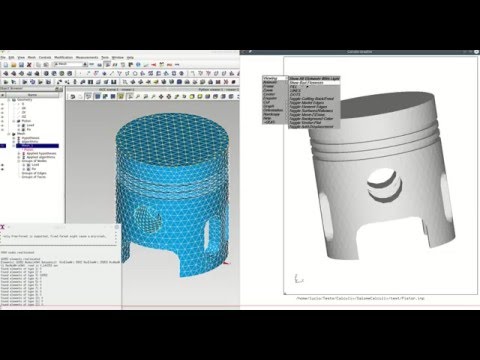
<br/><br/>
Your help
Please, you may:
- Star this project.
- Simply use this software and ask questions.
- Share your models and screenshots.
- Report problems by posting issues.
- Do something from the TODO-list.
<br/><br/>
TODO
-
Add logging output to the Salome python console.
-
Debug 'Delete edges and faces' feature.
<br/><br/>
For developers
Here could be found sources and binaries for the unv2ccx converter.
To compile unical converter in Windows you'll need gcc from Cygwin. File cygwin1.dll is used by unical3.exe. In linux use command:
gcc unical3.c -o unical3
GUI uses PyQt library. The script shouldn't be mixed with Python 3, because Salome API uses Python 2.