
Owlviz
A Protégé Desktop plugin that provides a graphical representation of the class hierarchy in an OWL ontology.
Install / Use
/learn @protegeproject/OwlvizREADME
OWLViz
A Protégé plug-in that provides a graphical representation of the class hierarchy in an OWL ontology. Once the plug-in is installed (see instructions below) you can activate the OWLViz tab using the following menu: Window -> Tabs -> OwlViz.
<img src="https://raw.githubusercontent.com/protegeproject/github-wiki-resources/master/owlviz/README/owlviz-screenshot.png" alt="OWLViz Screenshot" width="650px"/>Installation
By default OWLViz comes together with Protégé installation bundle. Any new release of the plugin will be automatically updated using Protégé auto-update mechanism. Before running the plugin, you must install GraphViz which is a third-party library that is available for free.
GraphViz Dependency
Go to GraphViz download page and select your operating system to start downloading.
- Ubuntu: http://www.graphviz.org/Download_linux_ubuntu.php
- Windows: http://www.graphviz.org/Download_windows.php
- Mac OS: http://www.graphviz.org/Download_macos.php
Note: For Mac OS version newer than Mountain Lion (OSX >10.8) you can use Homebrew package manager. Once you have Homebrew installed into your machine, install GraphViz using the command: brew install graphviz
Troubleshooting
DOT Error
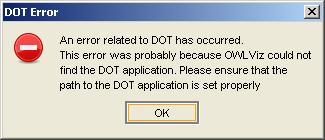
"An error related to DOT has occurred. This error was probably because OWL Viz could not find the DOT application. Please ensure that the path to the DOT application is set properly"
If you got this error message, it means that OWLViz failed to locate GraphViz installation directory in your computer. To solve this problem please ensure GraphViz was installed properly in your computer, using the instruction above. If you have already installed GraphViz then open Protégé and go to Preferences... menu and select OWLViz tab.
<img src="https://raw.githubusercontent.com/protegeproject/github-wiki-resources/master/owlviz/README/owlviz-pref.png" alt="OWLViz Preference" width="450px"/>Then add the correct path of your GraphViz installation in "Dot Application Path" field.
