
Interactsh
An OOB interaction gathering server and client library
Install / Use
/learn @projectdiscovery/InteractshREADME
Interactsh is an open-source tool for detecting out-of-band interactions. It is a tool designed to detect vulnerabilities that cause external interactions.
Features
- DNS/HTTP(S)/SMTP(S)/LDAP Interaction
- IPv4 and IPv6 support
- CLI / Web / Burp / ZAP / Docker client
- AES encryption with zero logging
- Automatic ACME based Wildcard TLS w/ Auto Renewal
- DNS Entries for Cloud Metadata service
- Dynamic HTTP Response control
- Self-Hosted Interactsh Server
- Multiple domain support (self-hosted)
- NTLM/SMB/FTP(S)/RESPONDER Listener (self-hosted)
- Wildcard / Protected Interactions (self-hosted)
- Customizable Index / File hosting (self-hosted)
- Customizable Payload Length (self-hosted)
- Custom SSL Certificate (self-hosted)
Interactsh Client
Usage
interactsh-client -h
This will display help for the tool. Here are all the switches it supports.
Usage:
  ./interactsh-client [flags]

Flags:
INPUT:
   -s, -server string  interactsh server(s) to use (default "oast.pro,oast.live,oast.site,oast.online,oast.fun,oast.me")

CONFIG:
   -config string                           flag configuration file (default "$HOME/.config/interactsh-client/config.yaml")
   -n, -number int                          number of interactsh payload to generate (default 1)
   -t, -token string                        authentication token to connect protected interactsh server
   -pi, -poll-interval int                  poll interval in seconds to pull interaction data (default 5)
   -nf, -no-http-fallback                   disable http fallback registration
   -cidl, -correlation-id-length int        length of the correlation id preamble (min 3, default 20)
   -cidn, -correlation-id-nonce-length int  length of the correlation id nonce (min 3, default 13)
   -sf, -session-file string                store/read from session file

FILTER:
   -m, -match string[]   match interaction based on the specified pattern
   -f, -filter string[]  filter interaction based on the specified pattern
   -dns-only             display only dns interaction in CLI output
   -http-only            display only http interaction in CLI output
   -smtp-only            display only smtp interactions in CLI output

UPDATE:
   -up, -update                 update interactsh-client to latest version
   -duc, -disable-update-check  disable automatic interactsh-client update check

OUTPUT:
   -o string                         output file to write interaction data
   -json                             write output in JSONL(ines) format
   -ps, -payload-store               enable storing generated interactsh payload to file
   -psf, -payload-store-file string  store generated interactsh payloads to given file (default "interactsh_payload.txt")
   -v                                display verbose interaction

DEBUG:
   -version            show version of the project
   -health-check, -hc  run diagnostic check up
Interactsh CLI Client
Interactsh Cli client requires go1.20+ to install successfully. Run the following command to get the repo -
go install -v github.com/projectdiscovery/interactsh/cmd/interactsh-client@latest
Configure PDCP_API_KEY With Interactsh CLI Client
Get your free api key by signing up at https://cloud.projectdiscovery.io
You can configure your PDCP_API_KEY in two ways:
- To configure the API key interactively, run the following command:
./interactsh-client -auth - If you prefer to pass the API key directly, use the -auth option followed by your API key:
./interactsh-client -auth=<pdcp-api-key>
Default Run
This will generate a unique payload that can be used for OOB testing with minimal interaction information in the output.
$ interactsh-client

    _       __                       __       __
   (_)___  / /____  _________ ______/ /______/ /_
  / / __ \/ __/ _ \/ ___/ __ '/ ___/ __/ ___/ __ \
 / / / / / /_/  __/ /  / /_/ / /__/ /_(__  ) / / /
/_/_/ /_/\__/\___/_/   \__,_/\___/\__/____/_/ /_/ v0.0.5

        projectdiscovery.io

[INF] Listing 1 payload for OOB Testing
[INF] c23b2la0kl1krjcrdj10cndmnioyyyyyn.oast.pro

[c23b2la0kl1krjcrdj10cndmnioyyyyyn] Received DNS interaction (A) from 172.253.226.100 at 2021-26-26 12:26
[c23b2la0kl1krjcrdj10cndmnioyyyyyn] Received DNS interaction (AAAA) from 32.3.34.129 at 2021-26-26 12:26
[c23b2la0kl1krjcrdj10cndmnioyyyyyn] Received HTTP interaction from 43.22.22.50 at 2021-26-26 12:26
[c23b2la0kl1krjcrdj10cndmnioyyyyyn] Received DNS interaction (MX) from 43.3.192.3 at 2021-26-26 12:26
[c23b2la0kl1krjcrdj10cndmnioyyyyyn] Received DNS interaction (TXT) from 74.32.183.135 at 2021-26-26 12:26
[c23b2la0kl1krjcrdj10cndmnioyyyyyn] Received SMTP interaction from 32.85.166.50 at 2021-26-26 12:26
Session File
interactsh-client with -sf, -session-file flag can be used store/read the current session information from user defined file which is useful to resume the same session to poll the interactions even after the client gets stopped or closed.
$ interactsh-client -sf interact.session

    _       __                       __       __
   (_)___  / /____  _________ ______/ /______/ /_
  / / __ \/ __/ _ \/ ___/ __ '/ ___/ __/ ___/ __ \
 / / / / / /_/  __/ /  / /_/ / /__/ /_(__  ) / / /
/_/_/ /_/\__/\___/_/   \__,_/\___/\__/____/_/ /_/ 1.0.3

        projectdiscovery.io

[INF] Listing 1 payload for OOB Testing
[INF] c23b2la0kl1krjcrdj10cndmnioyyyyyn.oast.pro

[c23b2la0kl1krjcrdj10cndmnioyyyyyn] Received DNS interaction (A) from 172.253.226.100 at 2021-26-26 12:26
[c23b2la0kl1krjcrdj10cndmnioyyyyyn] Received DNS interaction (AAAA) from 32.3.34.129 at 2021-26-26 12:26
[c23b2la0kl1krjcrdj10cndmnioyyyyyn] Received HTTP interaction from 43.22.22.50 at 2021-26-26 12:26
[c23b2la0kl1krjcrdj10cndmnioyyyyyn] Received DNS interaction (MX) from 43.3.192.3 at 2021-26-26 12:26
[c23b2la0kl1krjcrdj10cndmnioyyyyyn] Received DNS interaction (TXT) from 74.32.183.135 at 2021-26-26 12:26
[c23b2la0kl1krjcrdj10cndmnioyyyyyn] Received SMTP interaction from 32.85.166.50 at 2021-26-26 12:26
Verbose Mode
Running the interactsh-client in verbose mode (v) to see the whole request and response, along with an output file to analyze afterwards.
$ interactsh-client -v -o interactsh-logs.txt

    _       __                       __       __
   (_)___  / /____  _________ ______/ /______/ /_
  / / __ \/ __/ _ \/ ___/ __ '/ ___/ __/ ___/ __ \
 / / / / / /_/  __/ /  / /_/ / /__/ /_(__  ) / / /
/_/_/ /_/\__/\___/_/   \__,_/\___/\__/____/_/ /_/ 1.0.3

    projectdiscovery.io

[INF] Listing 1 payload for OOB Testing
[INF] c58bduhe008dovpvhvugcfemp9yyyyyyn.oast.pro

[c58bduhe008dovpvhvugcfemp9yyyyyyn] Received HTTP interaction from 103.22.142.211 at 2021-09-26 18:08:07
------------
HTTP Request
------------

GET /favicon.ico HTTP/2.0
Host: c58bduhe008dovpvhvugcfemp9yyyyyyn.oast.pro
Referer: https://c58bduhe008dovpvhvugcfemp9yyyyyyn.oast.pro
User-Agent: Mozilla/5.0 (Macintosh; Intel Mac OS X 10_15_7) AppleWebKit/537.36 (KHTML, like Gecko) Chrome/93.0.4577.82 Safari/537.36


-------------
HTTP Response
-------------

HTTP/1.1 200 OK
Connection: close
Content-Type: text/html; charset=utf-8
Server: oast.pro

<html><head></head><body>nyyyyyy9pmefcguvhvpvod800ehudb85c</body></html>
Using Self-Hosted server
Using the server flag, interactsh-client can be configured to connect with a self-hosted Interactsh server, this flag accepts single or multiple server separated by comma.
interactsh-client -server hackwithautomation.com
We maintain a list of default Interactsh servers to use with interactsh-client:
- oast.pro
- oast.live
- oast.site
- oast.online
- oast.fun
- oast.me
Default servers are subject to change/rotate/down at any time, thus we recommend using a self-hosted interactsh server if you are experiencing issues with the default server.
Using Protected Self-Hosted server
Using the token flag, interactsh-client can connect to a self-hosted Interactsh server that is protected with authentication.
interactsh-client -server hackwithautomation.com -token XXX
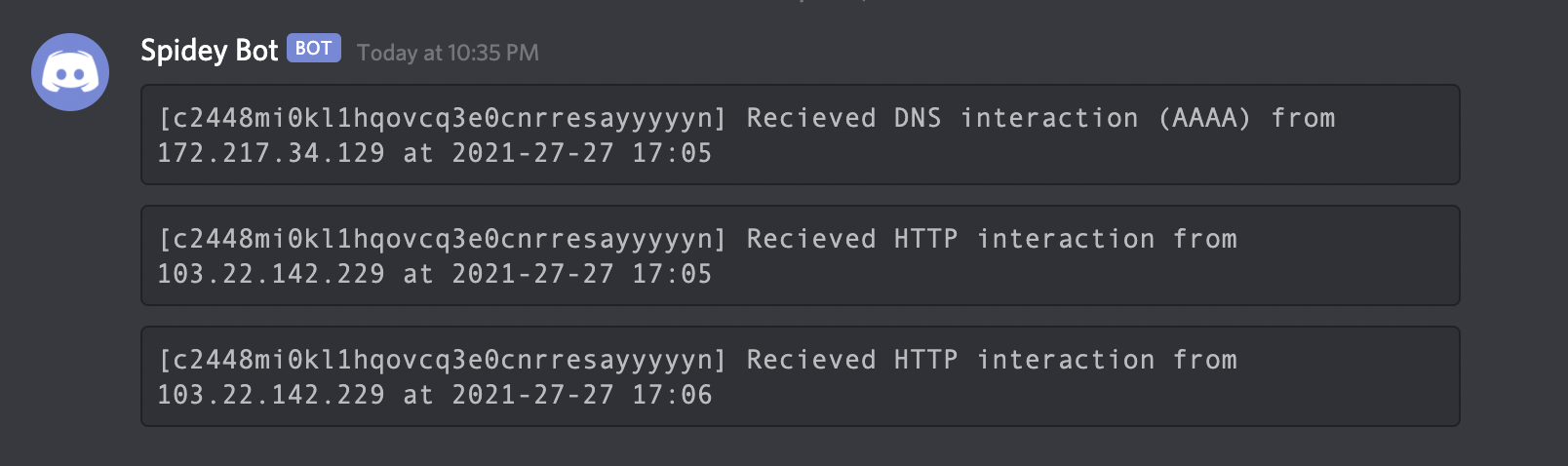
Using with Notify
If you are away from your terminal, you may use notify to send a real-time interaction notification to any supported platform.
interactsh-client | notify
Interactsh Web Client
Interactsh-web is a free and open-source web client that
