
30daysofnode
I'll be starting a 30 days of code mainly focused on the backend part. I'll make sure that I will code at least 1 hour a day and consistently updating my progress.
Install / Use
/learn @probablysamir/30daysofnodeREADME
30 Days of N(c)ode
I will be learning and coding NodeJS for 30 days and I will be updating daily about my progress and understanding.
Resources
I'll be posting more and more resources I encounter in my journey. Also I've placed reference links in the documentation too so that you can visit there for a deeper understanding.
For now, these are the resources I'm following:
You can manually scroll to check my progress or click these links directly to navigate:
- Day 1
- Day 2
- Day 3
- Day 4
- Day 5
- Day 6
- Day 7
- Day 8
- Day 9
- Day 10
- Day 11
- Day 12
- Day 13
- Day 14
- Day 15
- Day 16
- Day 17
- Day 18
- Day 19
- Day 20
- Day 21
- Day 22
- Day 23
- Day 24
- Day 25
- Day 26
- Day 27
- Day-28
- Day-29
- Day-30
Day 1
Server
Server is a software or hardware device that accepts and responds made over a network. The device that makes the request, and receives a response from the server, is called a client.

The client requests the server for some data and the server responds to the request.
Advantages of using a server
-
Efficient storage and delivery of information
-
Customized user experience
-
Controlled access to content
-
Notifications and communications
HTTP
HTTP ( Hypertext Transfer Protocol ) is an application layer protocol in the Internet protocol suite model for distributed, collaborative, hypermedia information systems. It is used to send and receive webpages and files on the internet.
It was initially made to set certain rules and regulations for the transfer of HTML ( Hypertext Markup Language ) files.
Day 2
Creating a simple server using Node.js
Let us create some constants first to import http and fs.
const http = require('http');
const fs = require('fs');
To create a server, we create a constant which uses createServer function from http to create a server. The createServer() takes two arguments: req and res. req is the request made and res is the response sent from the server.
const server = http.createServer((req,res)=>{
    console.log('I am called everytime the browser makes a request');
    res.setHeader('Content-Type','text/html'); // informs the browser that the response is a html file.
    res.write('<h1>Hi there!!<h1>'); // this is the response text
    res.end();
});
Now we make sure that the server is listening to the desired port.
server.listen takes three arguments portnumber, host and callback function
server.listen(3000, "localhost", () => console.log("server is loading on port 3000"));
To run the server, store the code in a js file ( in my case server.js ). You can then run it using :
node server.js
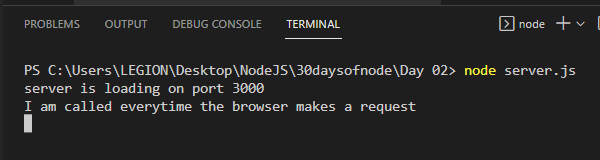
or you can run it using nodemon.
nodemon is a module that develop node.js based applications by automatically restarting the node application when file changes in the directory are detected. To run the file using nodemon, you have to first install it if you haven't.
To install nodemon:
npm install -g nodemon
you can then run the server.js by:
nodemon server.js
Displaying a html file
In order to display a html instead of just plain html line using res.write() we read the file first using fs.readfile()
To read a file using fs.readfile():
let path = './pages/index.html'

fs.readFile(path, (err, fileData) => {
   if (err) console.log(err);
   else {
       res.write(fileData);
       res.end();
    });
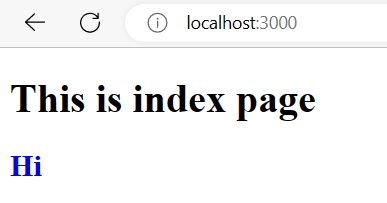
we can replace res.write(fileData) and res.end() with just res.end(fileData) if we only have to write one response.
So alternatively the above can be shortened as:
let path = './pages/index.html'

fs.readFile(path, (err, fileData) => {
    err ? console.log(err) : res.end(fileData);
  });
We can also serve other various types content types. To serve a JSON file we can do:
  let jsonResponse = {
    status: 200,
    message: "successful",
    result: ["sunday", "monday", "tuesday", "wednesday", "thursday", "friday", "saturday"],
    code: 2000,
  };
  res.write(JSON.stringify(jsonResponse));
  res.end();
To serve an audio file we can write:
res.setHeader("Content-Type", "audio/mp3");
let rStream = fs.createReadStream("./Day02_dumps/music.mp3");
rStream.pipe(res);
Here we created a readable stream to read the file and then pipe it to the response because res.write() has to load the whole file before sending it to client but by using a readable stream and piping it to the response, you can avoid loading the entire file into memory and instead stream it to the client in chunks, which is more memory-efficient.
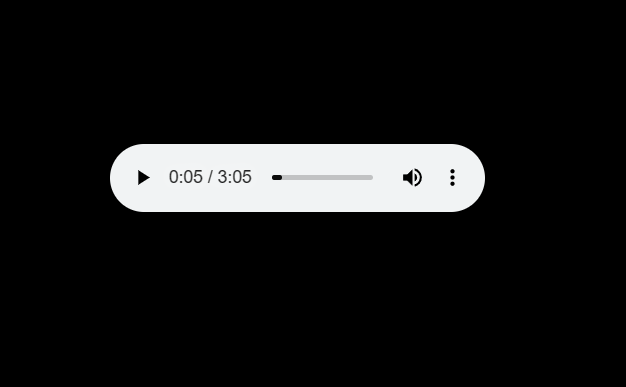
The audio file after served looks like this. Note that you should not use res.end when your'e using readable stream.
Day 3
Status Codes
Whenever a server gets a request and sends back the response, it sends back a status code to inform if the HTTP request was successfully completed.
The status code responses are grouped into five groups:
- Informational responses (
100-199) - Successful responses (
200-299) - Redirection responses (
300-399) - Client error responses (
400-499) - Server error responses (
500-599)
The most commonly used status codes are:
-
200 OK- The Request succeeded -
301 Moved Permanently- The URL of the requested resource has been changed permanently. The new URL is given in the response. -
307 Temporary Redirect- The server sends this response to direct the client to get the requested resource at another URI with the same method that was used in the prior request -
304 Permanent Redirect- This means that the resource is now permanently located at another URI, specified by theLocation:HTTP Response header. -
400 Bad Request- The server cannot or will not process the request due to something that is perceived to be a client error (e.g., malformed request syntax, invalid request message framing, or deceptive request routing). -
401 Unauthorized- The client must authenticate itself to get the requested response. -
403 Forbidden- The client does not have access rights to the content; that is, it is unauthorized, so the server is refusing to give the requested resource. Unlike401 Unauthorized, the client's identity is known to the server. -
404 Not Found- The server cannot find the requested resource. Most likely, the user has entered an incorrect URL. -
500 Internal Server Error- The server has encountered a situation it does not know how to handle. -
502 Bad Gateway- This error response means that the server, while working as a gateway to get a response needed to handle the request, got an invalid response. -
503 Service Unavailable- This error response means that the server, while working as a gateway to get a response needed to handle the request, got an invalid response.
We can send back a status code with a response by simply assigning value to res.statusCode
You can know more about status codes by checking mdn docs or by simply clicking here
Creating different paths for different pages
We can create different paths for different pages by using conditional statement ( switch-case here ).
let path = "./pages";
switch (req.url) {
  case "/":
    path += "/index.html";
    res.statusCode = 200;
    break;
  case "/about-us":
    path += "/about.html";
    res.statusCode = 200;
    break;
  default:
    path += "/404.html";
    res.statusCode = 404;
}
Note that we also implemented the status code here. Since .pages/index.html and .pages/about.html are valid paths so we set it's status code to 200 which means that the request succeeded but if the entered url is something else then we send back the 404.html that says the URL is incorrect and we set it's status code to 404.
Sometimes we need to change the url of a page and to ensure that the client doesn't get a 404 error when they enter the old URL, we create redirects. In the above scenario let us suppose that localhost:3000/about-us is changed to localhost:3000/about we then create the redirection by changing the initial case and adding another one. Let us first change the initial case to:
case "/about":
      path += "/about.html";
      res.statusCode = 200;
      break;
we then add the case for the old URL:
case "/about-me":
  res.statusCode = 301;
  res.setHeader("Location", "/about");
  res.end();
We set the respose header Location: to the new location i.e. /about and then send a status code of 301 Moved Permanently to inform that the URL of the requested resource has been changed permanently and he new URL is given in the response.
Day 4
The Node Architecture
Node.JS runtime has several dependencies but the most important ones are Javscript V8 engine and libuv. It also has other dependecies like http
Related Skills
node-connect
347.2kDiagnose OpenClaw node connection and pairing failures for Android, iOS, and macOS companion apps
frontend-design
108.0kCreate distinctive, production-grade frontend interfaces with high design quality. Use this skill when the user asks to build web components, pages, or applications. Generates creative, polished code that avoids generic AI aesthetics.
openai-whisper-api
347.2kTranscribe audio via OpenAI Audio Transcriptions API (Whisper).
qqbot-media
347.2kQQBot 富媒体收发能力。使用 <qqmedia> 标签,系统根据文件扩展名自动识别类型(图片/语音/视频/文件)。

Security Score
Audited on Jul 14, 2025