
Massspring
A 3D mass-spring real world simulator with more types of forces(gravity, electricity, spring, collision, ...)
Install / Use
/learn @pooya-shams/MassspringREADME
massspring
Author : Pooya Shams kolahi
Inspired by Saeed Sarkarati
Brief
using this library you can create great simulations of most of physical environments which can be calculated precisely. you can create many types of objects from which "mass" and "spring" are main ones.
more on project homepage on github and README
license
licensed under MIT License. you can freely use and modify this package, but please let me know if you are doing something interesting.
Installation
you can install the package via pip:
pip install massspring
for user-only installation use --user switch:
pip install --user massspring
if you have massspring installed and you are wishing to upgrade, you can upgrade via --upgrade switch:
pip install --upgrade massspring
all combined:
pip install --user --upgrade massspring
usage
you can import the library by using the following code (it is recommended to import as m or ms)
import massspring as m
mass
mass is the only type of object you can create right now.
you can create a mass object by using the mass class. you can learn more about the arguments and their usage in the mass class document
m1 = m.mass(x=0, y=0, z=0, vx=0, vy=0, vz=0, m=10, r=10, q=0, moveable=False, solid=True, bound=True, gravitational=False, resistible=False, electrical=False, conductive=False, color=(0, 255, 0), visible=True)
parameters meanings are explained here.
parameters / attributes:
- x, y, z are the object's position.
- vx, vy, vz are the object's velocity.
- fx, fy, fz are the sum of forces applied to the object. they will be added by calling the set_force method in each force's object to the force's masses (m1, m2).
- m is mass of object.
- r is radius of object (each mass is consumed as a sphere).
- q is electrical charge of the object.
- moveable means if the object can move or not.
- solid means if the object can hit other objects or not.
- bound means if the object stays in the screen or not.
- gravitational means if the object is affected by gravity force or not.
- resistible means if the object is affected by air resistance force or not.
- electrical means if the object is affected by other objects' electrical force and can affect them by electrical force or not.
- conductive means if the object will share electrical charge with others or not.
- color is the objects default color. visible means if the object is seen or not.
force
there are five types of forces (technically force subclass) you can create:
1.gravity
2.electricity
3.spring
4.collision
5.air resistance
gravity
the gravity class provides a gravity force between two masses according to the "Newton's law of universal gravitation" which you can see bellow:
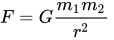
more information is available at Newton's law of universal gravitation wikipedia page.
you can create a gravity force between two masses using the code bellow:
g1 = m.gravity(m1=m1, m2=m2)
(m1 and m2 are the two mass objects between which you want to set gravity force.)
electricity
the electricity class provides an electricity force between two masses according to the "Coulomb's law" (the vector version) which you can see bellow:
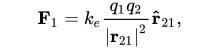
more information is available at Coulomb's law wikipedia page.
you can create an electricity force between two masses using the code bellow:
e1 = m.electricity(m1=m1, m2=m2)
(m1 and m2 are the two mass objects between which you want to set electricity force.)
spring
spring can also be known as an object. However, spring class is a subclass of force class. So technically spring is a force. the force will be calculated using the "Hooke's law":

more information is available on Hooke's law wikipedia page.
you can create a spring object by using the spring class. you can learn more about the arguments and their usage in the spring class document.
s1 = m.spring(k=1500000, l=0, m1=m1, m2=m2, color=(255, 0, 0), visible=True)
collision
uses the conservation of momentum and kinetic energy and the equations presented at the Elastic Collision wikipedia page.
c1 = m.collision(m1=m1, m2=m2)
air resistance
the air_resistance class provides an air_resistance force for an object according to drag equation shown bellow.

where:
- Fd is the drag force, which is by definition the force component in the direction of the flow velocity,
- p is the mass density of the fluid,
- u is the flow velocity relative to the object,
- A is the reference area, and
- Cd is the drag coefficient – a dimensionless coefficient related to the object's geometry and taking into account both skin friction and form drag. In general, Cd depends on the Reynolds number.
more information is available at Drag equation and Drag wikipedia page.
you can manually create an air resistance force for an object using the code bellow:
ar = m.air_resistance(m1=m1)
mainloop
after creating all of the objects and forces you want, you should call the mainloop function which is an infinite while loop and ends when the user closes the window or presses the ESCape button.
arguments are:
1.speed: the more this number is the faster your program runs. it will decrease the number of frames in which the screen will be updated(increases the space between them).
2.FPS: sets the fps parameter for the pygame.time.Clock().tick(FPS) function. the less this number is the less your cpu will be under pressure.
3.frame: it's a function which will be called every frame of the program.
4.*args: the arguments you want to give to the frame function.
m.mainloop(speed=2, FPS=0, frame=None, *args)
network
in version 1.2.0 there is a new functionality available instead of mainloop. in the new networklib.py file you can find a bunch of functions that can help in running your massspring-based module through network. some of them are explained bellow.
start_server_mainloop
this function is the main function that you run instead of massspring.mainloop and runs the mainloop just like massspring.mainloop does but with a little difference that now it is available through the network. you can pass it a couple of arguments that control how it works.
the first three are related to massspring: the massspring module that you imported and used yourself, the args to the mainloop under that massspring module which is called inside this function, and also kwargs to the mainloop.
the fourth argument is a function called client_handler it lets you define your own function that will be used to communicate over the net. However you can use the predefined functions in networklib too.
the last two arguments are the host and port which are going to be used for the server socket to bind to. if set to None, the default host name and port are gonna be used which are "localhost:7783".
handle_client
this function is the default client handler suggested by networklib.
handle_client takes two arguments itself: the client socket which is going to be used to communicate to the clients connecting to the server, and a request analyser function that takes the requests sent from clients and returns the desired answer.
However, you might have noticed that according to the type hints in the start_server_mainloop taking two arguments is not allowed, so there is also a wrapper function called handle_client_wrapper that returns a function that works just like handle_client but takes just one argument which is the client socket and uses the request analyser passed into the wrapper as the second argument for handle_client.
analyse_request
analyse_request is the default request analyser suggested by networklib.
it takes three arguments (which are not allowed in the handle_client function but there is also a wrapper for that too): the request that came from client socket, the mass_lis and the spring_lis from massspring.
the handle client just accepts functions that take one argument and can not use this analyse_request function so there is a wrapper function called analyse_request_wrapper that takes two arguments, mass_lis and spring_lis, and returns a function that takes just one argument, the request, and uses analyse_request with the mass_lis and spring_lis passed to the wrapper function.
encode/decode mass/spring positions
these functions are the default functions used by analyse_request to encode/decode all the mass/spring positions into a *bytes objec
