
Chillout
Reduce CPU usage by non-blocking async loop and psychologically speed up in JavaScript
Install / Use
/learn @polygonplanet/ChilloutREADME
chillout.js
Reduce CPU usage by non-blocking asynchronous loop and psychologically speed up to improve the user experience in JavaScript.


Table of contents
- Overview
- Installation
- Compatibility
- async / await
- Benchmarks
- API
- Comparison Table
- Contributing
- License
Overview
Unlike general accelerate way of the "to shorten the processing time physically", chillout.js speed up the JavaScript loops psychologically by reduce CPU usage and release resources to improve user experience.
In order to improve slow processing
We feel stress when page load or processing is slow and the screen is lagging. Moreover, there is a risk that the machine will down due to overheating because it can't keep up CPU cooling when continues running the heavy-load application with high CPU utilization rate.
How to reduce CPU load in JavaScript?
Most of the slow processing is caused by looping that have deep nested looping.
If we think simply, it should wait for a little time like "sleep" in the looping, but we can't wait, because JavaScript have not "sleep" function. Then how to sleep in JavaScript? We can sleep by using setTimeout or process.nextTick with Promise in "asynchronous" processing.
Speed up the JavaScript loops psychologically not physically
We can feel like "fast" or "interesting" psychologically by relieving user stress, even if the processing is slow if your application or game will used by humans not AI.
About chillout.js
Provides asynchronous iteration functions that have a Promise based interface and it can run with low CPU usage.
In most cases, you can reduce the CPU usage by using the non-blocking loop of chillout.js API instead native JavaScript loops in your code, but you need to change it to asynchronous loops.
Chillout.js adds a little delay on each iteration if the processing is slow to maintain the CPU stability, and it continues iterate without delay if processing is fast. Therefore, it will realize friendly processing for your machine. And, it can execute JavaScript without "Warning: Unresponsive Script" alert in the browser.
Chillout.js is a standalone library, and you can use it in the most of JavaScript environments (Browser, Electron, Node.js etc.).
Installation
npm
$ npm install chillout
CDN
chillout.js is available on jsdelivr.com and cdnjs.com.
Usage
var chillout = require('chillout');

chillout.forEach([1, 2, 3], function(value) {
  console.log(value);
}).then(function() {
  console.log('done');
});

// 1
// 2
// 3
// 'done'
Object chillout is defined in the global scope if running in the browser window. ( window.chillout )
Compatibility
The limiting factor for browser/node support is the use of Promise.
You can use es6-shim or other Promise polyfills.
async / await
You can write more simply using by async/await syntax.
Because all APIs in chillout.js return Promise, it is easy to handle with async/await.
Benchmarks
Benchmarks the ForStatement and chillout.repeat.
function heavyProcess() {
  var v;
  for (var i = 0; i < 5000; i++) {
    for (var j = 0; j < 5000; j++) {
      v = i * j;
    }
  }
  return v;
}
ForStatement
var time = Date.now();
for (var i = 0; i < 1000; i++) {
  heavyProcess();
}
var processingTime = Date.now() - time;
console.log(processingTime);
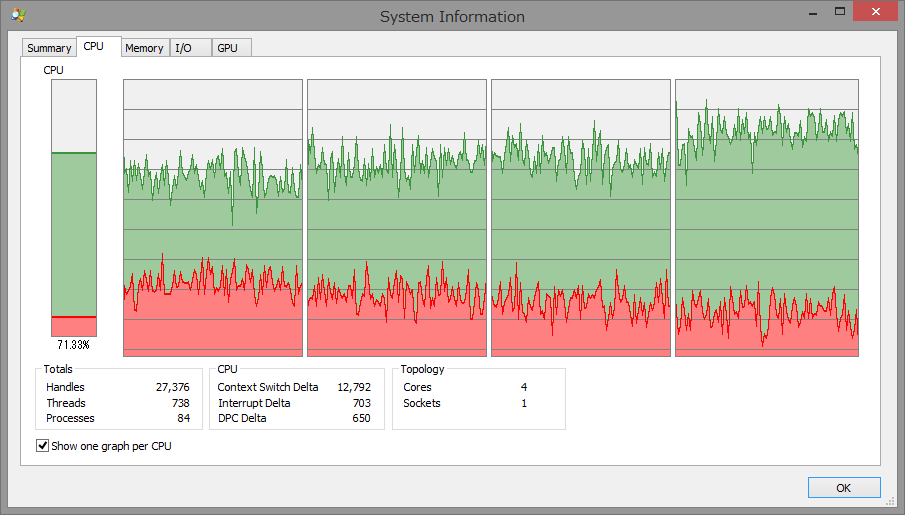
- Processing time: 107510ms.
- CPU usage on Node process (Average): 97.13%
chillout.repeat
var time = Date.now();
chillout.repeat(1000, function(i) {
  heavyProcess();
}).then(function() {
  var processingTime = Date.now() - time;
  console.log(processingTime);
});
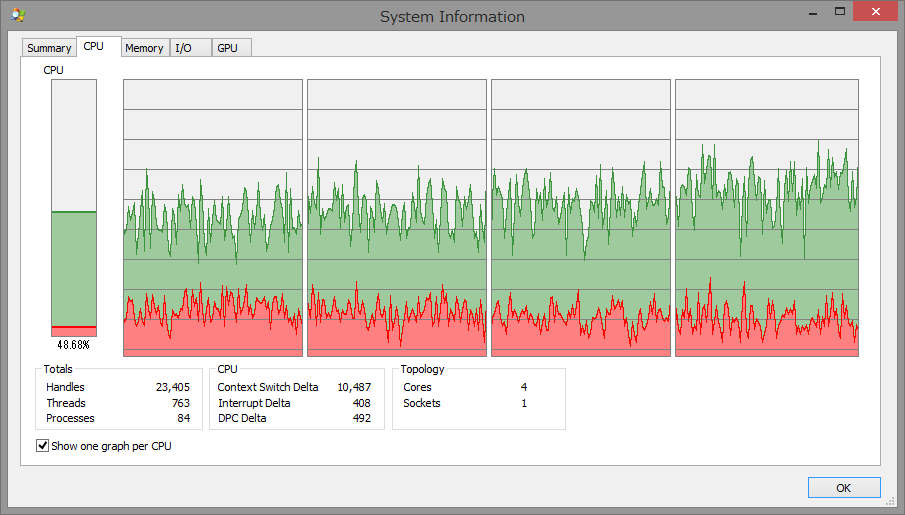
- Processing time: 138432ms.
- CPU usage on Node process (Average): 73.88%
Benchmark Result
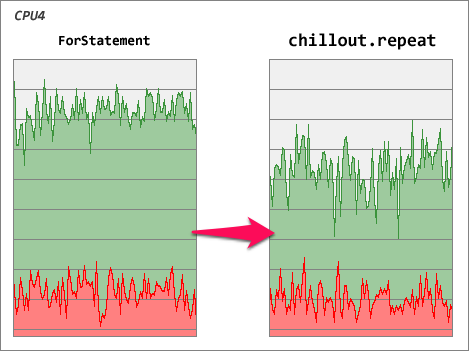
| | ForStatement | chillout.repeat | | ------------------------------------ | ------------:| ---------------:| | Processing time | 107510ms. | 138432ms. | | CPU usage on Node process (Average) | 97.13% | 73.88% |
You can confirm that chillout.repeat is running on a more low CPU usage than ForStatement.
chillout.js can run JavaScript in a natural speed with low CPU usage, but processing speed will be a bit slow.
One of the most important thing of performance in JavaScript, that is not numeric speed, but is to execute without causing stress to the user experience.
(Benchmarks: chillout v3.1.2, Windows8.1 / Intel(R) Atom(TM) CPU Z3740 1.33GHz)
Run Benchmark
You can test benchmark with npm run benchmark.
API
forEach
Executes a provided function once per array or object element.
The iteration will break if the callback function returns chillout.StopIteration, or an error occurs.
This method can be called like JavaScript Array forEach.
- chillout.forEach ( obj, callback [, context ] )
- @param {array|object} obj Target array or object
- @param {function} callback Function to execute for each element, taking three arguments:
- value: The current element being processed in the array/object
- key: The key of the current element being processed in the array/object
- obj: The array/object that
forEachis being applied to
- @param {object} [context] Value to use as
thiswhen executing callback - @return {promise} Return new Promise
Example of array iteration:
var values = ['a', 'b', 'c'];

chillout.forEach(values, function(value, key, obj) {
  console.log(value);
}).then(function() {
  console.log('done');
});

// 'a'
// 'b'
// 'c'
// 'done'
Example of object iteration:
var values = {
  a: 1,
  b: 2,
  c: 3
};

chillout.forEach(values, function(value, key, obj) {
  console.log(key + ':' + value);
}).then(function() {
  console.log('done');
});

// 'a:1'
// 'b:2'
// 'c:3'
// 'done'
Example iteration using async / await:
Output all file contents, and finally output 'done'.
async function getFileContents(url) {
  const response = await fetch(url);
  return response.text();
}

// Passing an async function as a callback in chillout.forEach
async function logFiles() {
  const files = ['/file1.txt', '/file2.txt', '/file3.txt'];
  await chillout.forEach(files, async url => {
    const contents = await getFileContents(url);
    console.log(contents);
  });
  console.log('done');
}

logFiles();
repeat
Executes a provided function the specified number times.
The iteration will break if the callback function returns chillout.StopIteration, or an error occurs.
This method can be called like JavaScript for statement.
- chillout.repeat ( count, callback [, context ] )
- @param {number|object} count The number of times or object for execute the function
Following parameters are available if specify object:- start: The number of start
- step: The number of step
- done: The number of done
- @param {function} callback Function to execute for each times, taking one argument:
- i: The current number
- @param {object} [context] Value to use as
thiswhen executing callback - @return {promise} Return new Promise
- @param {number|object} count The number of times or object for execute the function
Example of specify number:
chillout.repeat(5, function(i) {
  console.log(i);
}).then(function() {
  console.log('done');
});

// 0
// 1
// 2
// 3
// 4
// 'done'
Example of specify object:
chillout.repeat({ start: 10, step: 2, done: 20 }, function(i) {
  console.log(i);
}).then(function() {
  console.log('done');
});

// 10
// 12
// 14
// 16
// 18
// 'done'
Example iteration using async / await:
Output the user data from /api/users/0 to api/users/9, and finally output 'done'.
async function getUser(userId) {
  const response = await fetch(`/api/users/${userId}`);
  return response.json();
}

// Passing an async function as a callback in chillout.repeat
async function logUsers() {
  await chillout.repeat(10, async i => {
    const user = await getUser(i);
    console.log(user);
  });
  console.log('done');
}

logUsers();
until
Executes a provided function until the callback returns chillout.StopIteration, or an error occurs.
This method can be called like JavaScript while (true) { ... } statement.
- chillout.until ( callback [, context ] )
- @param {function} callback The function that is executed for each iteration
- @param {object}
