
Arttime
arttime is a CLI application that blends beauty of ASCII / text art with functionality of clock / timer / pattern-based time manager in terminal ⏰
Install / Use
/learn @poetaman/ArttimeREADME

Contents
<!-- Created by https://github.com/ekalinin/github-markdown-toc -->arttime
Beauty of text-art meets functionality of a feature-rich clock / timer / pattern-based time manager in terminal. In addition to its functional/productivity features, arttime brings curated text-art to otherwise artless terminal emulators of starving developers and other users who can use terminal. It is a cross-platform application with native notifications/sounds that runs well on macOS, Linux, BSD Unixes, and Windows WSL.
Arttime is rooted in Unix philosophy. You can also feed keystrokes into it from a file, pipe<sup>[1]</sup>, string or unrelated process instead of just typing them; control gets cleanly transferred to your keyboard when the respective file, pipe, or string ends. Among other features, this allows using arttime to display dynamic information like system metrics, weather, stock market feed, and etc using a simple external feeder program. <sup>[1]</sup> Note: Check the most portably functional syntax for pipes involving arttime at arttime wiki.
Purpose/features
- Bring curated text/ascii art to artless terminals, currently 500+ high-quality ASCII, ANSI, PETSCII, Unicode text art to choose from
- Provide a feature-rich alarm timer/time manager for commandline.
- Set multiple timers, supports specifying delta in time (like
1h 30mfrom now) or absoulte time (likeDec 22 2:45PM EST). - Configurable pattern-based time management: Set a repeating pattern of times to get notifications at. This makes Pomodoro Technique just one of billions of patterns possible for time management, and makes you set a pattern that works for you. Entire time management program can be paused+delayed and un-paused by pressing a key (
p). Note: for now even absolute goals like1PMget delayed, in future users will be able to override that. - Or just loop forever or N number of times over a set of timers. Example: get a notification every day at 8AM; 12PM; 5PM.
- Show deltas in time which are hard to track: 1) time since arttime started, 2) time pending for upcoming timer (press
ito see all timers), 3) time passed since last timer expired. - Interactively switch time zones.
- Fully configurable text-based progress bar shows what percentage of the timer is complete/pending
- History saves last 1000 timers/time management programs
- Set multiple timers, supports specifying delta in time (like
- Native desktop notifications for timer, notification identifies the instance of arttime it came from
- Provide users with 1 line of text under art to share their mind, like on a thought board
- Support animated text art: flip-flop between two related ascii arts every second
- Support productivity: mindful suspension (
Ctrl-z) and continuation (fg). Doesn't occupy terminal screen or consume power while suspended, but still shows correct elapsed time when continued. - Provide a publishing platform for text artists (text art is meant for terminals, not museums)
- Works on macOS out of the box. No need to install homebrew, developer tools. Zero dependencies!
- Works on other Unixes like Linux/BSD with only zsh as the dependency
- For consistent art & message display in multiple applications, a script
artprintis also available in the same directory asarttime. - Multiple ways to select text art: 1) random; 2) by name (with completion hints); 3) via fzf, if it is installed (not required though)
- Away timer: start arttime or reset (press
r) arttime's timers before putting computer to sleep or moving away from screen. Be greeted by a beautiful text art, and know how much time you spent away from computer when you get back to computer again. And no, it doesn't consume power when computer is sleeping. - Feed keystrokes from anywhere: Unlike most interactive applications, arttime provides first-class support for feeding keystrokes from all imaginable sources: string, file, pipe, or unrelated process. This enables many exciting features. To begin, press
kfrom within arttime to see many pre-installed examples, and read more details in arttime's manual$ arttime -mand arttime wiki: feed keys from anywhere. Among other features, this allows using arttime to display dynamic information like system metrics, weather, stock market feed, and etc using a simple external feeder program. - Expressive timers: Associate different art, color, and message with your timers. This makes your timers more expressive, and personalized. To check preinstalled examples: press
k, typetimerand pressTab. - History, completion, globbing, search: All prompts store 1000 unique previous values in history, just press
Up/Downarrows on the prompt to scroll history. More keybindings listed in arttime wiki: Modes and keybindings - Storyboards: Quickly create an art storyboard by sequencing art from arttime's collection. To check preinstalled examples: press
k, typestory(orlearn) and pressTab. - Best for privacy: Unlike commercial apps that connect to internet, track your activity and send/sell your data, arttime runs solely on your computer. It does not connect to internet, does not look at or track your data, and does not send any data outside your computer. Unlike binaries, arttime is a human-readable text file that can always be reviewed.
- Secure: Unlike most other interactive software projects which rely on multiple 3rd-party packages that are hard to audit, this project relies on what comes pre-installed on Unix-style operating systems like macOS/Linux. Optional features rely on packages which are standard for respective OS. This makes it much more secure compared to other software out there.
Note: arttime is tuned to consume less power and memory. It uses only about ~0.1% of CPU time while running, and only around 6MB of RAM in steady state on my machine.
Call for artists
Much good ascii art was created during web 1.0, but the artform declined after that. arttime intends to be a platform/repository for hosting/displaying ascii/ansi art, as ascii/ansi does have its natural home on a terminal (instead of a wall of an arts museum). In doing so it also encourages sharing art, a not so common drift with the arrival of NFTs (where monkey stickers are being priced at hundreds of thousands of US dollars). The repository already provides a curated library of good ascii art (mixed at times with computer-generated text version of digital images). If you are a text artist, or find a treasure trove of libre ascii/text art, please feel free to leave a link to the work in arttime discussions.
What does and doesn't constitute text art?
- Does: Manually typed/composed text in some text editor/program, this is most text art in the collection.
- Does: Output of a manually coded algorithm (not AI) that generates text art. Check the work of artist with initials
D.H.in this repository, example: gravity (D.H. 1992), concentricfield (D.H. 1991), globe (D.H. 1991). - Doesn't: Output of a program that converts digital image (jpeg, etc) to a similar looking text version. Such art does sparingly exist in the collection of this repository, though it is only to show how arttime can be used. It is not a priority for curation, unless there is a strong reason.
- Doesn't: AI generated "text art", its not a priority for curation here.
Screenshots
-
Default start page.
<img width="1016" alt="Screenshot 2023-02-09 at 1 19 25 PM" src="https://user-images.githubusercontent.com/71736629/217941620-4fd18160-4364-4f08-aa8d-936bb2bf7743.png">$ arttime -
Default art.
<img width="1019" alt="Screen Shot 2022-05-21 at 10 17 59 PM" src="https://user-images.githubusercontent.com/71736629/169680963-0cd5027d-5e21-4d3e-8eda-c21939f5d89d.png">$ arttimethen pressh, orarttime --nolearn -
Animated art clock:
$ arttime --nolearn -a military -b military2 -t "Say no to wars, yes to peace" --ac 4. Note: animation works only if a-art and b-art file height is same, which it is for many related arts.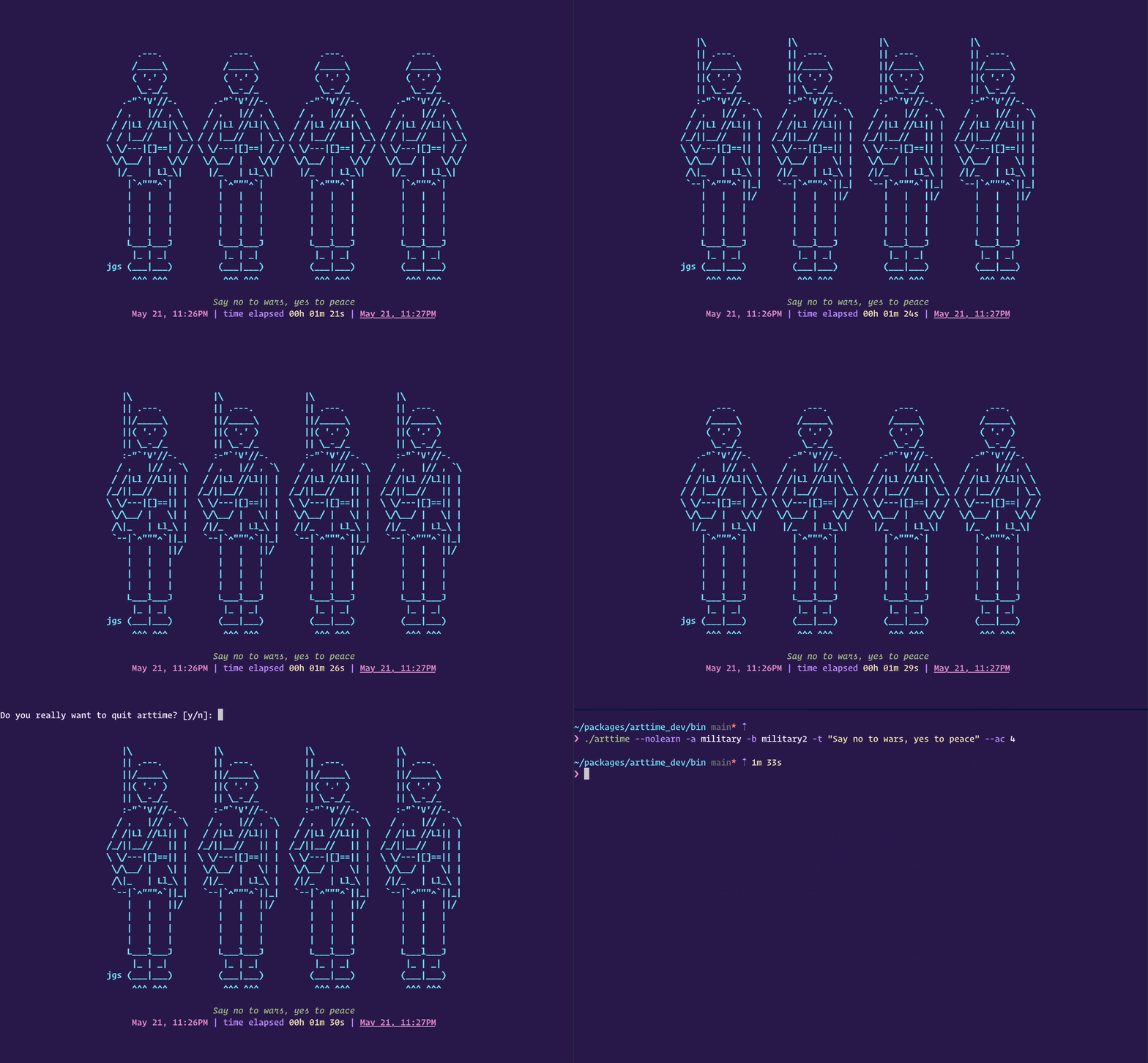
-
Another animated art clock.
$ arttime --nolearn -a kissingcats -b kissingcats2 -t "Since we found love within, we don't bother rats - Wise cats" --ac 3. Note: transparency is an artifact of one's terminal emulator application.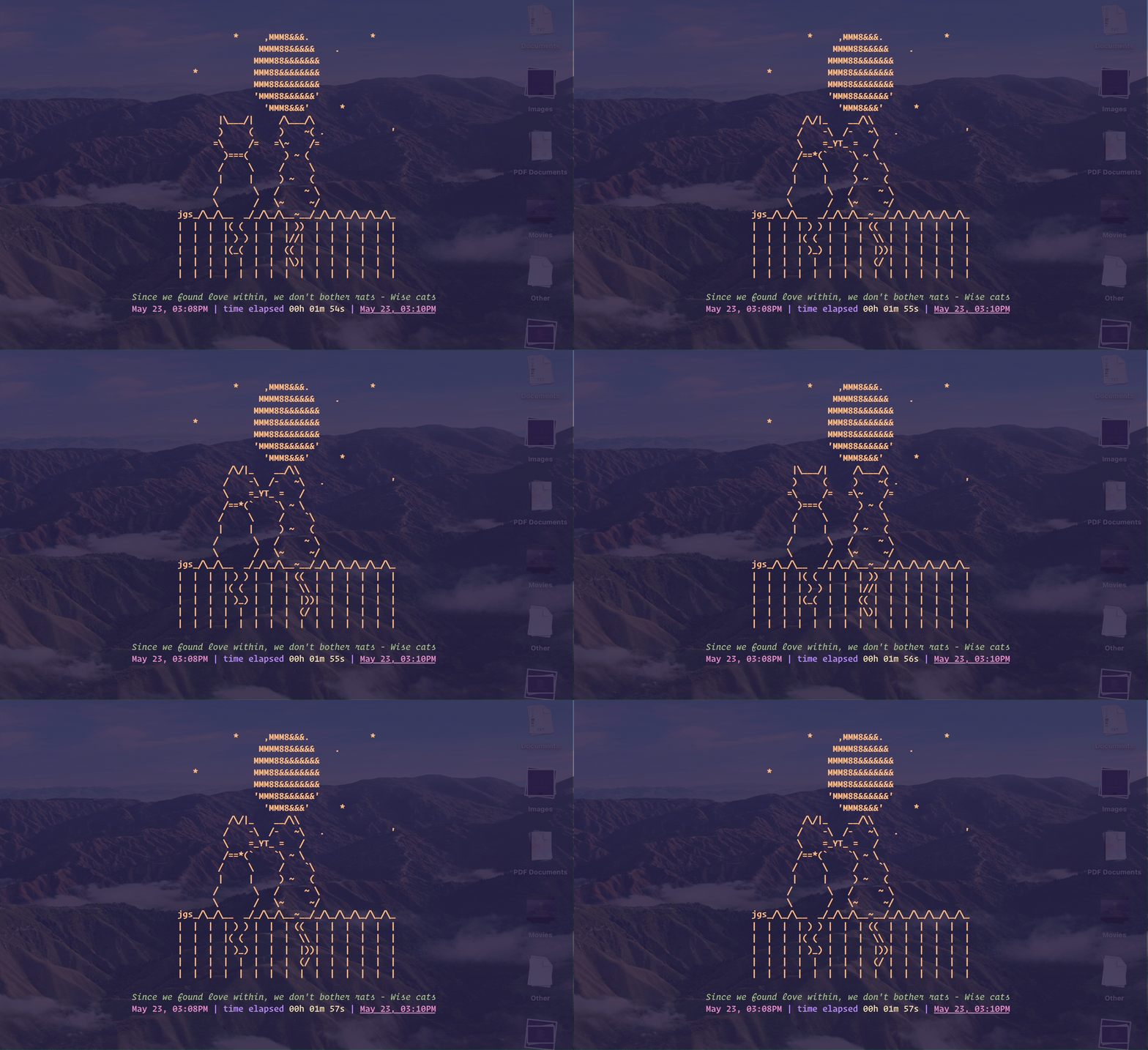
-
Timer and notification. ``arttime --nol
Related Skills
node-connect
337.3kDiagnose OpenClaw node connection and pairing failures for Android, iOS, and macOS companion apps
frontend-design
83.2kCreate distinctive, production-grade frontend interfaces with high design quality. Use this skill when the user asks to build web components, pages, or applications. Generates creative, polished code that avoids generic AI aesthetics.
openai-whisper-api
337.3kTranscribe audio via OpenAI Audio Transcriptions API (Whisper).
commit-push-pr
83.2kCommit, push, and open a PR
