
Healslut
Crossplatform tool to trigger a vibrator or toy based on screen content
Install / Use
/learn @playfulkittykat/HealslutREADME
Healslut
Introduction
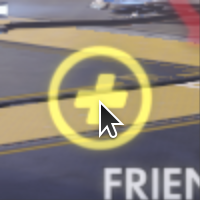
Healslut is a desktop application that activates intimate hardware (eg. a vibrator) in response to what is displayed on your screen. For example, when Mercy, from Overwatch, is using her healing beam, the game displays a cross icon slightly below and to the left of the center of the screen. When that icon is displayed, healslut will turn the toy on!
Disclaimer
Healslut may be detected as a cheat or hack program. Use healslut at your own risk. You may get banned. You have been warned.
That said, healslut does not perform any code injection, nor does it send any input to any games. On Windows, healslut uses the Desktop Duplication API (DXGI) to capture the screen. DXGI is one of the interfaces used by OBS Studio.
Requirements
At minimum, healslut will require a supported toy and a Bluetooth adapter to connect to it. Most modern laptops have a Bluetooth adapter built-in, but many desktops don't. USB Bluetooth adapters are relatively commonplace, and should work with healslut.
Supported Hardware
This tool is very new, and barely tested. The following hardware has been confirmed to at least somewhat work:
Theoretically, however, any Bluetooth toy/device supported by the Buttplug Sex Toy Control Project should work. Reports of functional (or not so functional) devices are welcome!
Installation
Windows
Grab the latest MSI installer from the Releases page.
Ubuntu
No precompiled packages are provided yet.
Configuration
Picking a Target
Picking a target to trigger your device requires a bit of trial and error. The following steps work for Mercy from Overwatch, but should be adaptable to any game.
Taking a Screenshot
The first step is to take a screenshot of the game, in the state you want to target.
- Open Overwatch, and enter the Practice Range.
- Choose Mercy.
- Engage your healing beam on a friendly robot.
- Without disengaging the beam, press the Print Screen (
PrtScr) button. - Exit Overwatch.
Overwatch handles saving screenshots automatically. If your game does not, after pressing Print Screen, open Paint (included with Windows) and paste the image, then save it.
Choosing the Target
After capturing a screenshot, you need to identify where on the screen healslut should focus.
- Open healslut, and choose
Set Target.... - Navigate to the screenshot and open it. Overwatch on Windows 10 saves screenshots in
C:\\Users\\YOURUSERNAME\\Documents\\Overwatch\\ScreenShots\\Overwatch. - Click on the center of the healing icon as shown below.
Isolating the Target
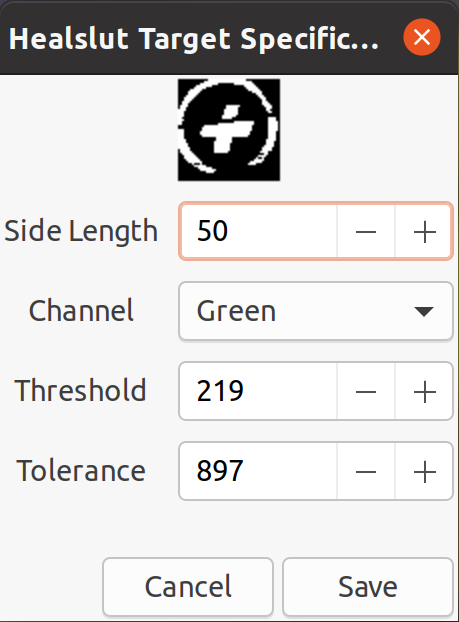
Clicking on the icon should open the specification window. The goal of these options is to isolate the icon (in grey/white) clearly on top of a black background.
- Side Length: How large of a box should healslut pay attention to.
- Channel: What component of the image is most important. If you don't see a preview, make sure to set this option to something. The channel determines what is the foreground, and what is the background.
- Threshold: Channel value that distinguishes foreground from background. Adjust this to get a clear silhouette of the target symbol in white and grey against a black background.
- Tolerance: How many mismatched pixels are allowed when looking for the symbol. Larger number are more forgiving, but may trigger more false positives.
The following values seem to work well for Mercy, but your mileage may vary:
Compiling from Source
Windows
- Install GTK3 from https://github.com/wingtk/gvsbuild
- Install
pkg-configinto the MSYS2 from (1) - Then do the following in a Visual Studio Native Tools Command Prompt:
set PATH=%PATH%;C:\gtk-build\gtk\x64\release\bin;C:\msys64\usr\bin
cargo build
Ubuntu
Install Rust, then:
sudo apt install libudev-dev libusb-1.0-0-dev libgtk-3-dev
cargo build
sudo setcap cap_net_raw+eip target/debug/healslut  # Required for bluetooth
Related Skills
qqbot-channel
348.5kQQ 频道管理技能。查询频道列表、子频道、成员、发帖、公告、日程等操作。使用 qqbot_channel_api 工具代理 QQ 开放平台 HTTP 接口,自动处理 Token 鉴权。当用户需要查看频道、管理子频道、查询成员、发布帖子/公告/日程时使用。
docs-writer
100.3k`docs-writer` skill instructions As an expert technical writer and editor for the Gemini CLI project, you produce accurate, clear, and consistent documentation. When asked to write, edit, or revie
model-usage
348.5kUse CodexBar CLI local cost usage to summarize per-model usage for Codex or Claude, including the current (most recent) model or a full model breakdown. Trigger when asked for model-level usage/cost data from codexbar, or when you need a scriptable per-model summary from codexbar cost JSON.
Design
Campus Second-Hand Trading Platform \- General Design Document (v5.0 \- React Architecture \- Complete Final Version)1\. System Overall Design 1.1. Project Overview This project aims t
