
PlatformPlatform
A platform designed for building enterprise-grade, multi-tenant products using Azure, .NET, React, TypeScript, Infrastructure as Code, etc.
Install / Use
/learn @platformplatform/PlatformPlatformREADME







👋 Welcome to PlatformPlatform
Kick-start building top-tier B2B & B2C cloud SaaS products with sleek design, fully localized and accessible, vertical slice architecture, automated and fast DevOps, and top-notch security.
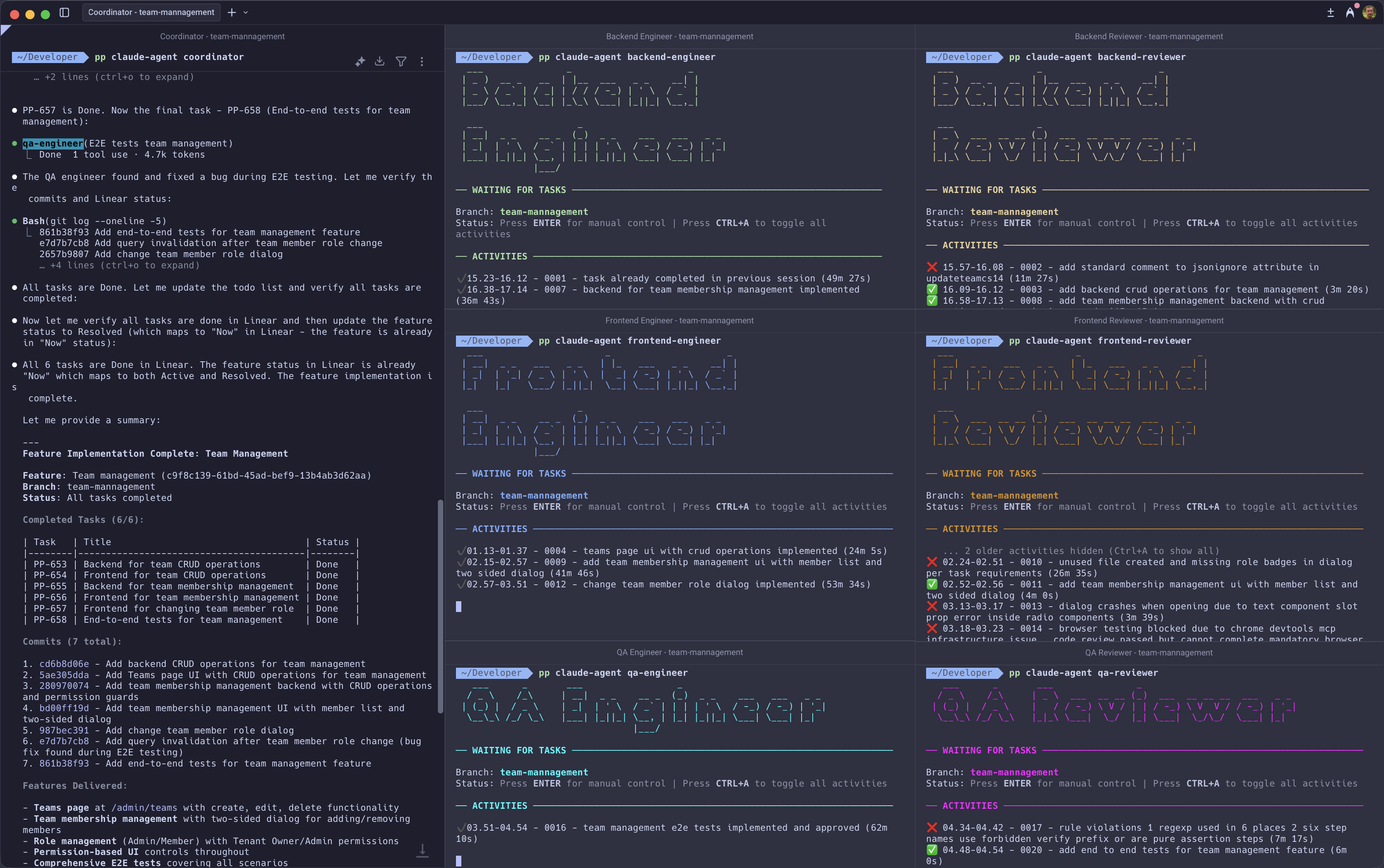
Built to demonstrate seamless flow: backend contracts feed a fully-typed React UI, pipelines make fully automated deployments to Azure, and a multi-agent AI workflow where PlatformPlatform-expert agents collaborate to deliver complete features following the opinionated architecture. Think of it as a ready-made blueprint, not a pile of parts to assemble.
What's inside
- Backend - .NET 10 and C# 14 adhering to the principles of vertical slice architecture, DDD, CQRS, and clean code
- Frontend - React 19, TypeScript, TanStack Router & Query, ShadCN 2.0 with Base UI for accessible UI
- CI/CD - GitHub actions for fast passwordless deployments of docker containers and infrastructure (Bicep)
- Infrastructure - Cost efficient and scalable Azure PaaS services like Azure Container Apps, Azure PostgreSQL, etc.
- Developer CLI - Extendable .NET CLI for DevEx - set up CI/CD is one command and a couple of questions
- AI rules - 30+ rules & workflows for Claude Code - sync to other editors can be enabled via
.gitignore - Multi-agent workflow (Experimental) - Specialized autonomous AI agents expert in PlatformPlatform's architecture
Follow our up-to-date roadmap with core SaaS features like SSO, monitoring, alerts, multi-region, feature flags, back office for support, etc.
Show your support for our project - give us a star on GitHub! It truly means a lot! ⭐
Getting Started
TL;DR: Open the PlatformPlatform solution in Rider or Visual Studio and run the Aspire AppHost project.
Prerequisites
For development, you need .NET, Docker, and Node. And GitHub and Azure CLI for setting up CI/CD.
<details> <summary>Install prerequisites for Windows</summary>-
Open a PowerShell terminal as Administrator and run the following command to install Windows Subsystem for Linux (required for Docker). Restart your computer if prompted.
wsl --install -
From an Administrator PowerShell terminal, use winget (preinstalled on Windows 11) to install any missing packages:
winget install Microsoft.DotNet.SDK.10 winget install Git.Git winget install Docker.DockerDesktop winget install Microsoft.AzureCLI winget install GitHub.cli -
Install Node.js — the version must match
.node-version. We recommend fnm which auto-installs the exact version via the Developer CLI. When using an IDE like Rider, ensure the active fnm version matches.node-version.# Option A: fnm (recommended) winget install Schniz.fnm # Option B: Node.js directly winget install OpenJS.NodeJS
Open a terminal and run the following commands (if not installed):
-
Install Homebrew, a package manager for Mac
-
Install packages
brew install --cask dotnet-sdk brew install --cask docker brew install git azure-cli gh -
Install Node.js — the version must match
.node-version. We recommend fnm which auto-installs the exact version via the Developer CLI. When using an IDE like Rider, ensure the active fnm version matches.node-version.# Option A: fnm (recommended) brew install fnm # Option B: Node.js directly brew install node
Open a terminal and run the following commands (if not installed):
-
Install basic tools
sudo apt update && sudo apt install -y git wget curl libnss3-tools -
Add Microsoft package repository
source /etc/os-release wget https://packages.microsoft.com/config/$ID/$VERSION_ID/packages-microsoft-prod.deb -O packages-microsoft-prod.deb sudo dpkg -i packages-microsoft-prod.deb rm packages-microsoft-prod.deb -
Install .NET SDK and Docker
sudo apt-get update && sudo apt-get install -y dotnet-sdk-10.0 docker.io docker-compose-v2sudo systemctl enable --now docker sudo usermod -aG docker $USER -
Install Node.js — the version must match
.node-version. We recommend fnm which auto-installs the exact version via the Developer CLI. When using an IDE like Rider, ensure the active fnm version matches.node-version.# Option A: fnm (recommended) curl -fsSL https://fnm.vercel.app/install | bash # Option B: Node.js directly curl -fsSL https://deb.nodesource.com/setup_24.x | sudo -E bash - sudo apt-get install -y nodejs -
Trust the HTTPS development certificate
echo 'export SSL_CERT_DIR="$HOME/.aspnet/dev-certs/trust:${SSL_CERT_DIR:-/usr/lib/ssl/certs}"' >> ~/.bashrcsource ~/.bashrcdotnet dev-certs https --trust -
Log out and log back in to apply Docker group and shell configuration changes.
-
(Optional) If using Snap Chromium, trust the certificate in its sandbox
certutil -d sql:$HOME/snap/chromium/current/.pki/nssdb -L >/dev/null 2>&1 || (mkdir -p $HOME/snap/chromium/current/.pki/nssdb && certutil -d sql:$HOME/snap/chromium/current/.pki/nssdb -N --empty-password) dotnet dev-certs https --trust -
(Optional) Install GitHub CLI and Azure CLI (needed for CI/CD setup)
(type -p wget >/dev/null || (sudo apt update && sudo apt-get install wget -y)) \
&& sudo mkdir -p -m 755 /etc/apt/keyrings \
&& wget -qO- https://cli.github.com/packages/githubcli-archive-keyring.gpg | sudo tee /etc/apt/keyrings/githubcli-archive-keyring.gpg > /dev/null \
&& sudo chmod go+r /etc/apt/keyrings/githubcli-archive-keyring.gpg \
&& echo "deb [arch=$(dpkg --print-architecture) signed-by=/etc/apt/keyrings/githubcli-archive-keyring.gpg] https://cli.github.com/packages stable main" | sudo tee /etc/apt/sources.list.d/github-cli.list > /dev/null
sudo apt-get update && sudo ap
