
Ctsms
Phoenix CTMS - the ultimative CTMS/PRS/CDMS.
Install / Use
/learn @phoenixctms/CtsmsREADME
 <a href="https://codespaces.new/phoenixctms/ctsms"><img src="https://github.com/codespaces/badge.svg" height="20" alt="Open in GitHub Codespaces"></a>
Phoenix CTMS
Phoenix CTMS is a large web application combining capabilities of database software used in clinical research in one modular system.
- PRS (Patient Recruitment System)
- CTMS (Clinical Trial Management System)
- CDMS (Clinical Data Management System)
This unmatched feature set is geared to support all operational and regulatory requirements of the clinical front end in academic research, at CROs (Contract Research Organisations) and hospitals conducting clinical studies of any phase.
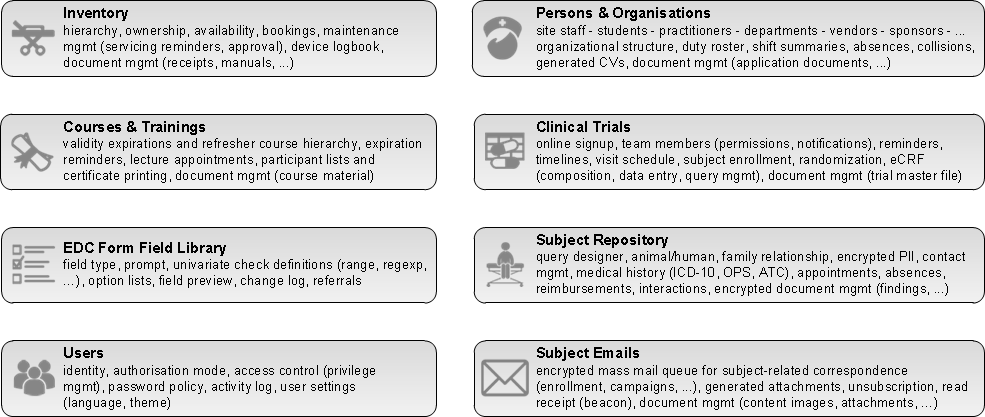
After years of collaborative development with trial sites at the Medical University of Graz, the Phoenix CTMS now becomes publicly available (LGPL 2.1). It could be the perfect choice if you e.g.
- need a private, encrypted subject database for PII (personally identifyable information), to complement your existing CDMS
- need a solution to comply with upcoming EU-GDPR (General Data Protection Regulation)
- want to operate a secure online signup portal for subject candidates
- want a CDMS that gives you unlimited Javascript form scripting support (server- and browserside)
- need to deal with large eCRFs (electronic case report forms)
- want to try a serious open source alternative for eCRFs
- need to formulate complex ad-hoc database queries to list matching subject candidates using set operations
- conduct several trials in parallel and need to organize site staff and resources
- need a software to implement various processes for ICH GCP (good clinical practice) compliance
- want a turn-key system that’s operational out-of-the-box, instead of integrating multiple systems
This GitHub repository contains all tiers of the main JEE web application. Transient artifacts generated using AndroMDA are excluded.
Build and Install
- Prepare a vanilla Debian Bullseye Linux instance (ie. from debian-11.2.0-amd64-netinst.iso):
- 2 vCPUs, 4-8 GB RAM and 10-20 GB disk should be fine for a test environment
- Select basic packages only (no database or webserver)
- The procedure was also successfully tested with latest Ubuntu
-
Open a terminal and run the installer to automatically download, build and configure your Phoenix CTMS:
sudo apt-get -y install wget ca-certificates
wget https://raw.githubusercontent.com/phoenixctms/install-debian/master/install.sh -O ~/install.sh
chmod 755 ~/install.sh
sudo ~/install.sh
The procedure will require internet connectivity to download from debian, maven, cpan mirros and github. It will take around 1-2 hours to complete.
-
You can now open a browser and log into the system using the link and credentials printed at last.
-
If desired, populate the system with demo data:
sudo -u ctsms /ctsms/dbtool.sh --load_demo_data
Related Skills
ui-ux-pro-max-skill
59.1kAn AI SKILL that provide design intelligence for building professional UI/UX multiple platforms
ui-ux-pro-max-skill
59.1kAn AI SKILL that provide design intelligence for building professional UI/UX multiple platforms
onlook
25.0kThe Cursor for Designers • An Open-Source AI-First Design tool • Visually build, style, and edit your React App with AI
Figma-Context-MCP
14.2kMCP server to provide Figma layout information to AI coding agents like Cursor
