
HAMRonization
Parse multiple Antimicrobial Resistance Analysis Reports into a common data structure
Install / Use
/learn @pha4ge/HAMRonizationREADME





hAMRonization
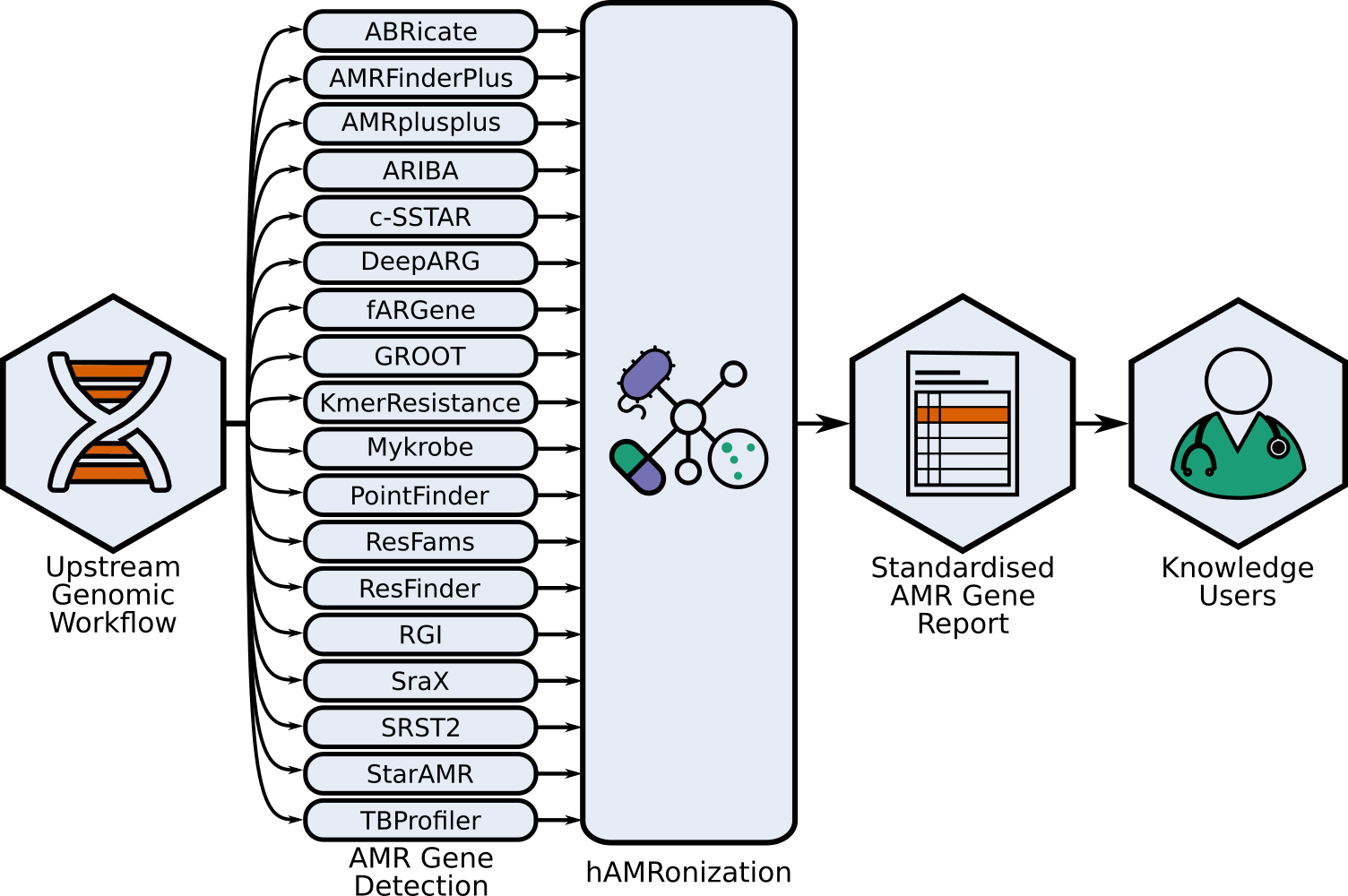
This repo contains the hAMRonization module and CLI parser tools combine the outputs of 17 disparate antimicrobial resistance gene detection tools into a single unified format.
This is an implementation of the hAMRonization AMR detection specification scheme which supports gene presence/absence resistance and mutational resistance (if supported by the underlying tool).
This supports a variety of summary options including an interactive summary.
Installation
This tool requires python>=3.9 and pandas and the latest release can be installed directly from pip, conda, docker, this repository, or from the galaxy toolshed:
pip install hAMRonization


Or
conda create --name hamronization --channel conda-forge --channel bioconda hamronization


Or to install and run using docker, podman, singularity:
docker pull docker.io/finlaymaguire/hamronization:latest
docker run --rm docker.io/finlaymaguire/hamronization:latest hamronize --help
Or to install the latest development version:
git clone https://github.com/pha4ge/hAMRonization
pip install hAMRonization
Alternatively, hAMRonization can also be installed and used in galaxy via the galaxy toolshed.
Usage
NOTE: Only the output format used in the "last updated" version of the AMR prediction tool has been tested for accuracy. Older tool versions or updates which lead to a change in output format may not work. In theory, this should only be a problem with major version changes but not all tools follow semantic versioning. If you encounter any issues with newer tool versions then please create an issue in this repository.
usage: hamronize <tool> <options>

Convert AMR gene detection tool output(s) to hAMRonization specification format

options:
  -h, --help            show this help message and exit
  -v, --version         show program's version number and exit

Tools with hAMRonizable reports:
  {abricate,amrfinderplus,amrplusplus,ariba,csstar,deeparg,fargene,groot,kmerresistance,resfams,resfinder,mykrobe,rgi,srax,srst2,staramr,tbprofiler,summarize}
    abricate            hAMRonize abricate's output report i.e., OUTPUT.tsv
    amrfinderplus       hAMRonize amrfinderplus's output report i.e., OUTPUT.tsv
    amrplusplus         hAMRonize amrplusplus's output report i.e., gene.tsv
    ariba               hAMRonize ariba's output report i.e., OUTDIR/OUTPUT.tsv
    csstar              hAMRonize csstar's output report i.e., OUTPUT.tsv
    deeparg             hAMRonize deeparg's output report i.e.,
                        OUTDIR/OUTPUT.mapping.ARG
    fargene             hAMRonize fargene's output report i.e., retrieved-
                        genes-*-hmmsearched.out
    groot               hAMRonize groot's output report i.e., OUTPUT.tsv (from `groot
                        report`)
    kmerresistance      hAMRonize kmerresistance's output report i.e., OUTPUT.res
    resfams             hAMRonize resfams's output report i.e., resfams.tblout
    resfinder           hAMRonize resfinder's JSON output report (use -j to produce)
    mykrobe             hAMRonize mykrobe's output report i.e., OUTPUT.json
    rgi                 hAMRonize rgi's output report i.e., OUTPUT.txt or
                        OUTPUT_bwtoutput.gene_mapping_data.txt
    srax                hAMRonize srax's output report i.e., sraX_detected_ARGs.tsv
    srst2               hAMRonize srst2's output report i.e., OUTPUT_srst2_report.tsv
    staramr             hAMRonize staramr's output report i.e., resfinder.tsv
    tbprofiler          hAMRonize tbprofiler's output report i.e., OUTPUT.results.json
    summarize           Provide a list of paths to the reports you wish to summarize
To look at a specific tool e.g. abricate:
>hamronize abricate -h
usage: hamronize abricate <options>

Applies hAMRonization specification to output from abricate (OUTPUT.tsv)

positional arguments:
  report                Path to tool report

optional arguments:
  -h, --help            show this help message and exit
  --format FORMAT       Output format (tsv or json)
  --output OUTPUT       Output location
  --analysis_software_version ANALYSIS_SOFTWARE_VERSION
                        Input string containing the analysis_software_version for abricate
  --reference_database_version REFERENCE_DATABASE_VERSION
                        Input string containing the reference_database_version for abricate
Therefore, hAMRonizing abricates output:
hamronize abricate ../test/data/raw_outputs/abricate/report.tsv --reference_database_version 3.2.5 --analysis_software_version 1.0.0 --format json
To parse multiple reports from the same tool at once just give a list of reports as the argument, and they will be concatenated appropriately (i.e. only one header for tsv)
hamronize rgi --input_file_name rgi_report --analysis_software_version 6.0.0 --reference_database_version 3.2.5 test/data/raw_outputs/rgi/rgi.txt test/data/raw_outputs/rgibwt/Kp11_bwtoutput.gene_mapping_data.txt
You can summarize hAMRonized reports regardless of format using the 'summarize' function:
> hamronize summarize -h
usage: hamronize summarize <options> <list of reports>

Concatenate and summarize AMR detection reports

positional arguments:
  hamronized_reports    list of hAMRonized reports

optional arguments:
  -h, --help            show this help message and exit
  -t {tsv,json,interactive}, --summary_type {tsv,json,interactive}
                        Which summary report format to generate
  -o OUTPUT, --output OUTPUT
                        Output file path for summary
This will take a list of report and create single sorted report in the specified format just containing the unique entries across input reports. This can handle mixed json and tsv hamronized report formats.
hamronize summarize -o combined_report.tsv -t tsv abricate.json ariba.tsv
The interactive summary option will produce an html file that can be opened within the browser for navigable data exploration (feature developed with @alexmanuele).
Using within scripts
Alternatively, hAMRonization can be used within scripts (the metadata must contain the mandatory metadata that is not included in that tool's output, this can be checked by looking at the CLI flags in hamronize <tool> --help):
import hAMRonization
metadata = {"analysis_software_version": "1.0.1", "reference_database_version": "2019-Jul-28"}
parsed_report = hAMRonization.parse("abricate_report.tsv", metadata, "abricate")
The parsed_report is then a generator that yields hAMRonized result objects from the parsed report:
for result in parsed_report:
      print(result)
Alternatively, you can use the .write attribute to export all results left in the generator to a file (if a filepath isn't provided, this will write to stdout).
parsed_report.write('hAMRonized_abricate_report.tsv')
You can also output a json formatted hAMRonized report:
parsed_report.write('all_hAMRonized_abricate_report.json', output_format='json')
If you want to write multiple reports to one file, this .write method can accept append_mode=True to append rather than overwrite the output file and not include the header (in tsv format).
parsed_report.write('all_hAMRonized_abricate_report.tsv', append_mode=True)
Implemented Parsers
Currently implemented parsers and the last tool version for which they have been validated:
- abricate: last updated for v1.0.0
- amrfinderplus: last updated for v4.0.3
- amrplusplus: last updated for c6b097a
- ariba: last updated for v2.14.6
- csstar: last updated for v2.1.0
- deeparg: last updated for v1.0.2
- fargene: last updated for v0.1
- groot: last updated for v1.1.2
- kmerresistance: late updated for v2.2.0
- mykrobe: last updated for v0.8.1
- ~pointfinder~ (removed, PointFinder is now integrated in ResFinder)
- resfams: last updated for hmmer v3.3.2
- resfinder: last updated for v4.6.0
- [rgi](hAMRonization/R
