Keepasshttp
KeePass plugin to expose password entries securely (256bit AES/CBC) over HTTP
Install / Use
/learn @pfn/KeepasshttpREADME
KeePassHttp
is a plugin for KeePass 2.x and provides a secure means of exposing KeePass entries via HTTP for clients to consume.
This plugin is primarily intended for use with PassIFox for Mozilla Firefox and chromeIPass for Google Chrome.
Features
- returns all matching entries for a given URL
- updates entries
- secure exchange of entries
- notifies user if entries are delivered
- user can allow or deny access to single entries
- works only if the database is unlocked
- request for unlocking the database if it is locked while connecting
- searches in all opened databases (if user activates this feature)
- Whenever events occur, the user is prompted either by tray notification or requesting interaction (allow/deny/remember).
System requirements
- KeePass 2.17 or higher
- For Windows: Windows XP SP3 or higher
- For Linux: installed mono
- For Mac: installed mono | it seems to fully support KeePassHttp, but we cannot test it
Windows installation using Chocolatey
- Install using Chocolatey with
choco install keepass-keepasshttp - Restart KeePass if it is currently running to load the plugin
Non-Windows / Manual Windows installation
- Download KeePassHttp
- Copy it into the KeePass directory
- default directory in Ubuntu14.04: /usr/lib/keepass2/
- default directory in Arch: /usr/share/keepass
- Set chmod 644 on file
KeePassHttp.plgx - On linux systems you maybe need to install mono-complete:
$ apt-get install mono-complete(in Debian it should be enough to install the packages libmono-system-runtime-serialization4.0-cil and libmono-posix2.0-cil)
- Tips to run KeePassHttp on lastest KeePass 2.31: install packages
sudo apt-get install libmono-system-xml-linq4.0-cil libmono-system-data-datasetextensions4.0-cil libmono-system-runtime-serialization4.0-cil mono-mcs
- Restart KeePass
KeePassHttp on Linux and Mac
KeePass needs Mono. You can find detailed installation instructions on the official page of KeePass.
Perry has tested KeePassHttp with Mono 2.6.7 and it appears to work well. With Mono 2.6.7 and a version of KeePass lower than 2.20 he could not get the plgx file to work on linux. If the plgx file does also not work for you, you can try the two DLL files KeePassHttp.dll and Newtonsoft.Json.dll from directory mono which should work for you.
With newer versions of Mono and KeePass it seems that the plgx file works pretty fine. More information about it are contained in the following experience report.
Experience report by dunkelfuerst
Just wanted to let you know, I'm running Fedora 18, which currently uses mono v2.10.8:
> mono-core.x86_64                       2.10.8-3.fc18                     @fedora
> mono-data.x86_64                       2.10.8-3.fc18                     @fedora
> mono-data-sqlite.x86_64                2.10.8-3.fc18                     @fedora
> mono-extras.x86_64                     2.10.8-3.fc18                     @fedora
> mono-mvc.x86_64                        2.10.8-3.fc18                     @fedora
> mono-wcf.x86_64                        2.10.8-3.fc18                     @fedora
> mono-web.x86_64                        2.10.8-3.fc18                     @fedora
> mono-winforms.x86_64                   2.10.8-3.fc18                     @fedora
> mono-winfx.x86_64                      2.10.8-3.fc18                     @fedora
I have no problems using "KeePassHttp.plgx". I simply dropped the .plgx-file in my KeePass folder, and it works.
I'm currently using KeePass v2.22.
Nevertheless, until KeePass v2.21 I used the 2 suggested .dll's and it worked fine too.
Usually I only use chromeIPass, but I did a short test with PassIFox and seems to be working just fine.
Configuration and Options
KeePassHttp works out-of-the-box. You don't have to explicitely configure it.
- KeePassHttp stores shared AES encryption keys in "KeePassHttp Settings" in the root group of a password database.
- Password entries saved by KeePassHttp are stored in a new group named "KeePassHttp Passwords" within the password database.
- Remembered Allow/Deny settings are stored as JSON in custom string fields within the individual password entry in the database.
Settings in KeePassHttp options.
You can open the options dialog with menu: Tools > KeePassHttp Options
The options dialog will appear:
General tab
- show a notification balloon whenever entries are delivered to the inquirer.
- returns only the best matching entries for the given url, otherwise all entries for a domain are send.
- e.g. of two entries with the URLs http://example.org and http://example.org/, only the second one will returned if the requested URL is http://example.org/index.html
- if the active database in KeePass is locked, KeePassHttp sends a request to unlock the database. Now KeePass opens and the user has to enter the master password to unlock the database. Otherwise KeePassHttp tells the inquirer that the database is closed.
- KeePassHttp returns only these entries which match the scheme of the given URL.
- given URL: https://example.org --> scheme: https:// --> only entries whose URL starts with https://
- sort found entries by username or title.
- removes all shared encryption-keys which are stored in the currently selected database. Every inquirer has to reauthenticate.
- removes all stored permissions in the entries of the currently selected database.
Advanced tab
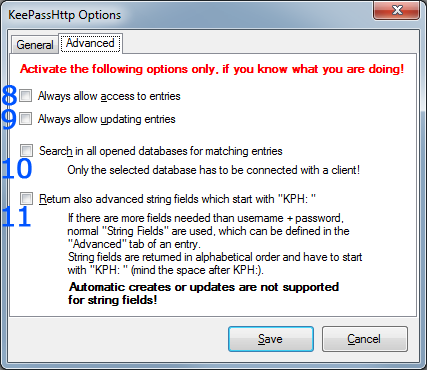
- KeePassHttp no longer asks for permissions to retrieve entries, it always allows access.
- KeePassHttp no longer asks for permission to update an entry, it always allows updating them.
- Searching for entries is no longer restricted to the current active database in KeePass but is extended to all opened databases!
- Important: Even if another database is not connected with the inquirer, KeePassHttp will search and retrieve entries of all opened databases if the active one is connected to KeePassHttp!
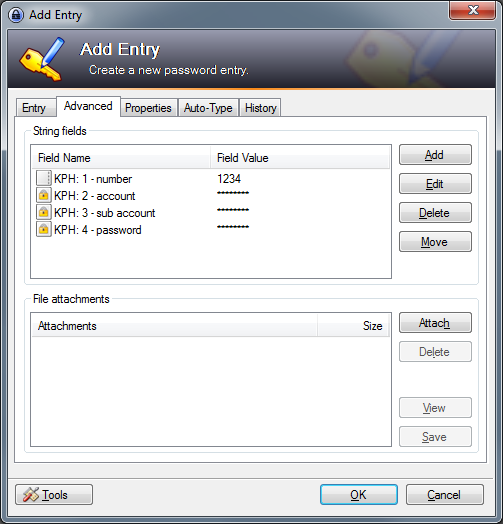
- if activated KeePassHttp also search for string fields which are defined in the found entries and start with "KPH: " (note the space after colon). The string fields will be transfered to the client in alphabetical order. You can set string fields in the tab Advanced of an entry.
<img src="https://raw.github.com/pfn/keepasshttp/master/documentation/images/advanced-string-fields.png" alt="advanced tab of an entry" width="300px" />
Tips and Tricks
Support multiple URLs for one username + password
This is already implemented directly in KeePass.
-
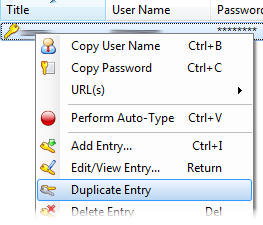
Open the context menu of an entry by clicking right on it and select Duplicate entry:
<img src="https://raw.github.com/pfn/keepasshttp/master/documentation/images/keepass-context-menu.png" alt="context-menu-entry" /> -
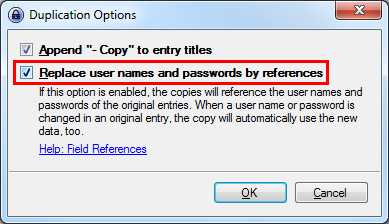
Check the option to use references for username and password:
<img src="https://raw.github.com/pfn/keepasshttp/master/documentation/images/keepass-duplicate-entry-references.png" alt="mark checkbox references" width="300px" /> -
You can change the title, URL and evertything of the copied entry, but not the username and password. These fields contain a Reference Key which refers to the master entry you copied from.
Troubleshooting
First: If an error occures it will be shown as notification in system tray or as message box in KeePass.
Otherwise please check if it could be an error of the client you are using. For passIFox and chromeIPass you can report an error here.
If you are having problems with KeePassHttp, please tell us at least the following information:
- version of KeePass
- version of KeePassHttp
- error message (if available)
- used clients and their versions
- URLs on which the problem occur (if available)
HTTP Listener error message
Maybe you get the following error message:
<img src="https://raw.github.com/pfn/keepasshttp/master/documentation/images/http-listener-error.png" alt="http listener error" width="300px" />
In old versions the explaining first part of the message does not exist!
This error occurs because you have multiple copies of KeePassHttp in your KeePass directory! Please check all PLGX- and DLL-files in your KeePass directory and all sub-directories whether they are a copy of KeePassHttp.
Note: KeePass does not detect plugins by filename but by extension! If you rename KeePassHttp.plgx to HelloWorld.plgx it is still a valid copy of KeePassHttp.
If you really have only one copy of KeePassHttp in your KeePass directory another application seems to use port 19455 to wait for signals. In this case try to stop