Taskline
Tasks, boards & notes for the command-line habitat
Install / Use
/learn @perryrh0dan/TasklineREADME
Description
By utilizing a simple and minimal usage syntax, that requires a flat learning curve, Taskline enables you to effectively manage your tasks and notes across multiple boards from within your terminal. All data is written atomically to the storage in order to prevent corruptions. At the moment there are two storage modules. The Local storage module where your task and are never shared with anyone or anything, or the firestore module, where your tasks are saved in your firestore database and can be shared across all your devices. Deleted items are automatically archived and can be inspected or restored at any moment.
Visit the contributing guidelines to learn more on how to translate taskline or this document into more languages.
Come over to Gitter or Twitter to share your thoughts on the project.
Highlights
This project was heavily inspired by taskbook. Due to the lack of some critical features mentioned below, I decided to rewrite the complete app in a more modern approach.
Original
- Organize tasks & notes to boards
- Board & timeline views
- Priority & favorite mechanisms
- Search & filter items
- Archive & restore deleted items
- Lightweight & fast
- Data written atomically to storage
- Custom storage location
- Progress overview
- Simple & minimal usage syntax
- Update notifications
- Configurable through
~/.taskline.json - Data is stored in JSON file at
~/.taskline/storage
New
- Modular data storage.
- Firestore module to save data in google firestore.
- Sync tasks across all your devices with firestore.
- Replaced Meow with commander.js
- Advanced duedate functionality
- Display loadingspinner while fetching network requests
- Custom color themes
- New list filter attributes
- Possibility to use id ranges
- Possibility to cancel tasks
- Possibility to rearrange item ids
- Timetracking for tasks
- Multilanguage support
Coming
- Subtask functionality
- Functionality to download and upload local storage to firestore
- More unit tests
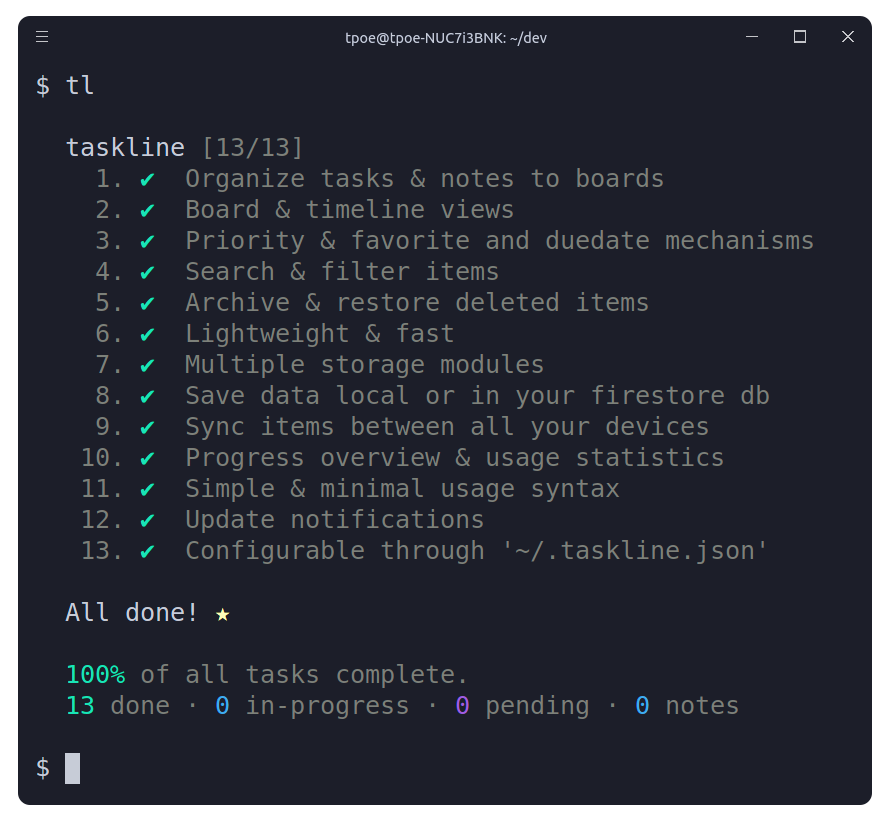
View highlights in a taskline board.
Contents
- Description
- Highlights
- Install
- Usage
- Views
- Configuration
- Before Flight
- Flight Manual
- Themes
- Languages
- Development
- Team
- License
Install
Yarn
yarn global add @perryrh0dan/taskline
NPM
npm install --global @perryrh0dan/taskline
Snapcraft
snap install taskline
snap alias taskline tl # set alias
Note: Due to the snap's strictly confined nature, both the storage & configuration files will be saved under the $SNAP_USER_DATA environment variable instead of the generic $HOME one.
Usage
> tl --help
Usage: tl [command] [options]

Tasks, boards & notes for the command-line habitat

Options:
  -V, --version                   output the version number
  -h, --help                      output usage information

Commands:
  archive|a                       Display archived items
  begin|b <ids>                   Start/pause task
  cancel <ids>                    Cancel/revive task
  check|c <ids>                   Check/uncheck task
  clear                           Delete all checked items
  copy|y <ids>                    Copy description to clipboard
  delete|d <ids>                  Delete item
  due <ids> <dueDate>             Update duedateof task
  edit|e <id> <description>       Edit item description
  find|f <terms>                  Search for items
  list|l <terms>                  List items by attributes
  move|m <ids> <board>            Move item between boards
  note|n [options] <description>  Create note
  priority|p <id> <priority>      Update priority of task
  restore|r <ids>                 Restore items from archive
  star|s <ids>                    Star/unstar item
  task|t [options] <description>  Create task
  timeline|i                      Display timeline view
  refactor                        Rearrange the IDs of all items

Detailed description under: https://github.com/perryrh0dan/taskline#flight-manual
Views
Board View
Invoking taskline without any options will display all saved items grouped into their respective boards.
<div align="center"> <img alt="Boards" width="70%" src="media/header-boards.png"/> </div>Timeline View
In order to display all items in a timeline view, based on their creation date, the --timeline / -i option can be used.
Configuration
To configure taskline navigate to the ~/.taskline.json file and modify any of the options to match your own preference. To reset back to the default values, simply delete the config file from your home directory.
The following illustrates all the available options with their respective default values.
{
  "language": "en",
  "tasklineDirectory": "~",
  "displayCompleteTasks": true,
  "displayProgressOverview": true,
  "storageModule": "local",
  "firestoreConfig": {
    "type": "",
    "project_id": "",
    "private_key_id": "",
    "private_key": "",
    "client_email": "",
    "client_id": "",
    "auth_uri": "",
    "token_uri": "",
    "auth_provider_x509_cert_url": "",
    "client_x509_cert_url": ""
  },
  "dateformat": "dd.mm.yyyy HH:MM",
  "theme": {
    "colors": {
      "pale": "grey",
      "error": "red",
      "task": {
        "priority": {
          "medium": "yellow",
          "high": "red"
        }
      },
      "icons": {
        "note": "blue",
        "success": "green",
        "star": "yellow",
        "progress": "blue",
        "pending": "magenta",
        "canceled": "red"
      }
    }
  }
}
In Detail
tasklineDirectory
- Type:
String - Default:
~
Filesystem path where the storage will be initialized, i.e: /home/username/the-cloud or ~/the-cloud
If left undefined the home directory ~ will be used and taskline will be set-up under ~/.taskline/ .
displayCompleteTasks
- Type:
boolean - Default:
true
Display tasks that are marked as complete.
displayProgressOverview
- Type:
boolean - Default:
true
Display progress overview below the timeline and board views.
storageModule
- Type:
Enum - Default:
local - Values:
local,firestore,git
Choice of storage module. Currently there are three modules local , firestore and git . For the firestore module the firestoreConfig is needed.
Note:
To enable syncing across devices or with a remote server, your Git storage repository must be connected to a remote (such as GitHub, GitLab, or Bitbucket).
If no remote is configured, changes will only be saved locally and will not sync globally.
firestoreConfig
- Type:
Google Dienstkontoschlüssel - Default:
Empty
Configuration of the firestore module.
dateformat
- Type:
String - Default:
dd.mm.yyyy HH:MM
Dateformat used for duedate.
theme
Customize colors of all texts and icons. Available are all foreground colors of chalk. More information under Themes
Before flight
When you want to use the local storage module there is no further configuration need. When you want to use the firestore module follow this steps:
Setup Firestore
- Create a new Project on the google cloud platform.
- Create a new service account for this project.
- Download the authorization.json file and insert all the lines to the corresponding lines in the taskline configuration.
or follow this instruction page.
Flight Manual
The following is a minor walkthrough containing a set of examples on how to use taskline. In case you spotted an error or think that an example is not to clear enough and should be further improved, please feel free to open an issue or pull request.
Create Task
To c