
Mixmap
interactive webgl mapping library emphasizing direct access to the rendering pipeline
Install / Use
/learn @peermaps/MixmapREADME
mixmap
interactive webgl maps emphasizing direct access to the rendering pipeline
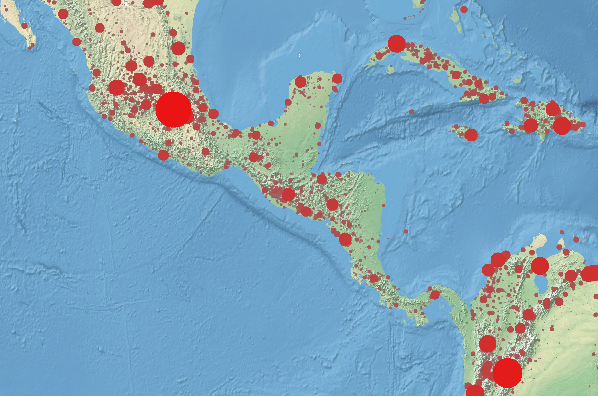
mixmap provides basic plumbing for webgl cartography and then gets out of your way. You have direct control over loading data, mapping geometry to a cartographic projection in your vertex shader, and coloring your maps in the fragment shader.
mixmap supplies a bounding box layer model. As the bounding box changes, mixmap will call your code to request bounding box manifests at the appropriate zoom level and mixmap will call your code again to handle adding and removing geometry.
- direct access to fragment and vertex shaders
- directly set attributes and uniforms
- use whatever cartographic projections you want
- use whatever coordinate systems you want
- avoids webgl context overload by sharing a single scissored webgl context
- designed to work with modern frameworks or raw html
- specifically tested to work with vdom/domdiff libraries (react, choo)
You can have dozens of inline maps on a single page!
Internally mixmap uses regl and regl-component for setting up webgl and managing the webgl context. If the webgl context is lost because the root DOM nodes are detached from the DOM, mixmap will set everything back to where it was when the nodes are inserted back onto the page.
A large part of the mixmap api passes through to the regl API, so it might be best to learn regl first.
project status
Early release. Many interfaces subject to change (subject to semver of course) and many parts are not as optimized as they ought to be.
example
This demo uses 3 levels of tiles from 10m-ne2 and renders the population data from cities1000 over top. There are 138398 cities with over 1000 people, which for webgl is no big deal.
You can view this demo on:
- https://ipfs.io/ipfs/QmTTbHTnijEYYBk4UX6SJVbsL1AjWcN52DwS3D3rH172hv
- https://substack.neocities.org/mixmap/demos/ne2srw-cities.html
- dat://81e8ab9b6944e5263ff517be5e9c002446a8a881eff74c1df9ad3fbd6d875da2 (open in beaker browser)
To download the public domain tiles for yourself there are many options, using ipfs, dat, or http mirrors:
ipfs get -o ne2srw /ipfs/QmV5PLazMsBk8bRhRAyDhNuJt9N19cjayUSDvw8DKxSmFzdat clone dat://db9c54fd4775da34109c9afd366cac5d3dff26c6a3902fc9c9c454193b543cbb ne2srw- https://ipfs.io/ipfs/QmV5PLazMsBk8bRhRAyDhNuJt9N19cjayUSDvw8DKxSmFz
- https://ne2srw-tiles-substack.hashbase.io/
To get the cities1000 data:
ipfs get -o cities1000.json /ipfs/QmaWnPUwrd4DjG2zsGMrjgttqGHcTJrEBCPvM47PLSLZ9Adat clone dat://ee15f68b43230825cf9a7c8e9f61a77df5bdceeccdb9ea67e4aac23dfd8e5b80 cities1000 && mv cities1000/cities1000.json .- https://ipfs.io/ipfs/QmaWnPUwrd4DjG2zsGMrjgttqGHcTJrEBCPvM47PLSLZ9A
- https://cities1000-lon-lat-elev-substack.hashbase.io/
To run the demo, you can use budo:
$ budo map.js
var mixmap = require('mixmap')
var regl = require('regl')
var glsl = require('glslify')
var resl = require('resl')

var mix = mixmap(regl, { extensions: ['oes_element_index_uint'] })
var map = mix.create()

var drawTile = map.createDraw({
  frag: glsl`
    precision highp float;
    #pragma glslify: hsl2rgb = require('glsl-hsl2rgb')
    uniform float id;
    uniform sampler2D texture;
    varying vec2 vtcoord;
    void main () {
      float h = mod(id/8.0,1.0);
      float s = mod(id/4.0,1.0)*0.5+0.25;
      float l = mod(id/16.0,1.0)*0.5+0.25;
      vec3 c = hsl2rgb(h,s,l);
      vec4 tc = texture2D(texture,vtcoord);
      gl_FragColor = vec4(c*(1.0-tc.a)+tc.rgb*tc.a,0.5+tc.a*0.5);
    }
  `,
  vert: `
    precision highp float;
    attribute vec2 position;
    uniform vec4 viewbox;
    uniform vec2 offset;
    uniform float zindex;
    attribute vec2 tcoord;
    varying vec2 vtcoord;
    void main () {
      vec2 p = position + offset;
      vtcoord = tcoord;
      gl_Position = vec4(
        (p.x - viewbox.x) / (viewbox.z - viewbox.x) * 2.0 - 1.0,
        (p.y - viewbox.y) / (viewbox.w - viewbox.y) * 2.0 - 1.0,
        1.0/(1.0+zindex), 1);
    }
  `,
  uniforms: {
    id: map.prop('id'),
    zindex: map.prop('zindex'),
    texture: map.prop('texture')
  },
  attributes: {
    position: map.prop('points'),
    tcoord: [0,1,0,0,1,1,1,0] // sw,se,nw,ne
  },
  elements: [0,1,2,1,2,3],
  blend: {
    enable: true,
    func: { src: 'src alpha', dst: 'one minus src alpha' }
  }
})

var manifest = require('./ne2srw/tiles.json')
var tiles = [ {}, {}, {} ]
manifest.forEach(function (file,id) {
  var level = Number(file.split('/')[0])
  var bbox = file.split('/')[1].replace(/\.jpg$/,'').split('x').map(Number)
  tiles[level][id+'!'+file] = bbox
})

map.addLayer({
  viewbox: function (bbox, zoom, cb) {
    zoom = Math.round(zoom)
    if (zoom < 2) cb(null, tiles[0])
    else if (zoom < 4) cb(null, tiles[1])
    else cb(null, tiles[2])
  },
  add: function (key, bbox) {
    var file = key.split('!')[1]
    var level = Number(file.split('/')[0])
    var prop = {
      id: Number(key.split('!')[0]),
      key: key,
      zindex: 2 + level,
      texture: map.regl.texture(),
      points: [
        bbox[0], bbox[1], // sw
        bbox[0], bbox[3], // se
        bbox[2], bbox[1], // nw
        bbox[2], bbox[3]  // ne
      ]
    }
    drawTile.props.push(prop)
    map.draw()
    resl({
      manifest: { tile: { type: 'image', src: 'ne2srw/'+file } },
      onDone: function (assets) {
        prop.texture = map.regl.texture(assets.tile)
        map.draw()
      }
    })
  },
  remove: function (key, bbox) {
    drawTile.props = drawTile.props.filter(function (p) {
      return p.key !== key
    })
  }
})

var drawCities = map.createDraw({
  frag: glsl`
    precision highp float;
    #pragma glslify: hsl2rgb = require('glsl-hsl2rgb')
    varying float population;
    void main () {
      if (length(gl_PointCoord.xy-0.5) > 0.5) discard;
      vec3 c = hsl2rgb(
        0.0, pow(population/1000.0,0.065)-1.0, 0.5
      );
      gl_FragColor = vec4(c,1);
    }
  `,
  vert: `
    precision highp float;
    attribute vec3 position;
    uniform vec4 viewbox;
    uniform vec2 offset;
    uniform float zoom;
    varying float population;
    void main () {
      vec2 p = position.xy + offset;
      population = max(1000.0,position.z);
      float z = 1.0-pow(population/1000.0,0.065);
      gl_PointSize = pow(population,0.4)*pow(zoom,1.2)*0.01;
      gl_Position = vec4(
        (p.x - viewbox.x) / (viewbox.z - viewbox.x) * 2.0 - 1.0,
        (p.y - viewbox.y) / (viewbox.w - viewbox.y) * 2.0 - 1.0,
        z, 1);
    }
  `,
  primitive: 'points',
  attributes: {
    position: map.prop('position')
  },
  count: map.prop('count')
})
resl({
  manifest: {
    cities: { type: 'text', src: 'cities1000.json', parser: JSON.parse }
  },
  onDone: function (assets) {
    drawCities.props.push({
      position: assets.cities,
      count: assets.cities.length
    })
  }
})

window.addEventListener('keydown', function (ev) {
  if (ev.code === 'Equal') {
    map.setZoom(Math.min(6,Math.round(map.getZoom()+1)))
  } else if (ev.code === 'Minus') {
    map.setZoom(map.getZoom()-1)
  }
})

document.body.appendChild(mix.render())
document.body.appendChild(map.render({ width: 600, height: 400 }))
In this demo, there are two draw calls: one for tile data and one for city dots. The tiles are set up as a layer, but the city dots are always visible and on top so they don't need to be managed as a layer.
The draw objects each have a .props array where properties bound into the regl
setup by map.prop('name') can be defined.
With the background tile layer, as the viewbox changes, the viewbox handler
function returns different sets of candidate bounding boxes to perform
intersections with the current viewbox. The boxes that match are passed to the
add function and old ones are culled in remove. The map data in add is
appended to the drawTile.props array.
api
var mixmap = require('mixmap')
var mix = mixmap(require('regl'), opts)
Create a new mixmap instance given a regl interface and some opts that
will be passed to the regl constructor.
There should only be one mix instance per-page because this interface creates
a full-page canvas that the logical sub-canvases for each map is scissored out
of.
var element = mix.render()
Return a root html element with a full-screen canvas inside.
This root element can re-establish itself as needed, so it is safe to use with
virtual dom and dom-diffing libraries: you can call .render() whenever your
state changes.
var map = mix.create(opts)
Create a new map instance with a scissored rendering context.
opts.viewbox- set the viewbox. default:[-180,-90,+180,+90]opts.backgroundColor- default:[1,1,1,1](white)opts.pickfb- options to create the picking framebuffer
To do picking with floating point rgba data, do:
var map = mix.create({
  pickfb: { colorFormat: 'rgba', colorType: 'float32' }
})
and if you use floating point framebuffer data you'll need to enable the
oes_texture_float extension:
var mix = mixmap(regl, {
  extensions: [ 'oes_element_index_uint', 'oes_texture_float' ]
})
var element = map.render(opts)
Return an html element to hold a map on the page given:
opts.widthopts.heightopts.mouse- set tofalseif you don't want the default map panning
You can call .render() whenever your state changes to get a new element.
map.resize(width, height)
Resize an alre
