
Visualkeras
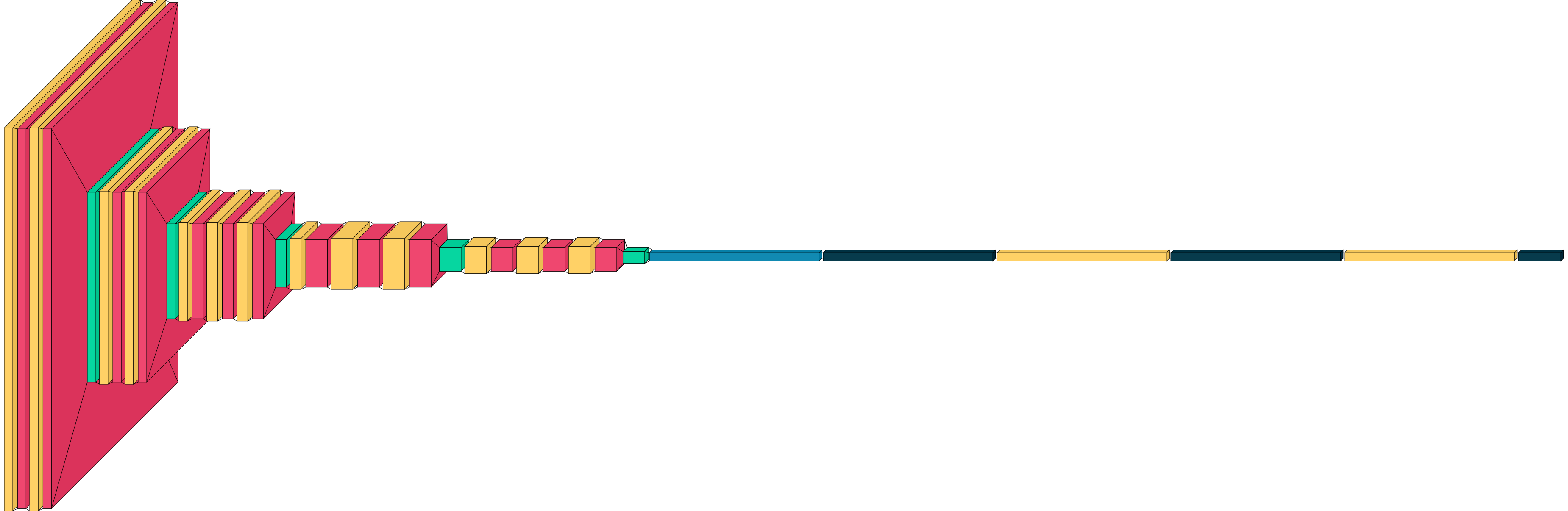
Visualkeras is a Python package to help visualize Keras (either standalone or included in TensorFlow) neural network architectures. It allows easy styling to fit most needs. This module supports layered style architecture generation which is great for CNNs (Convolutional Neural Networks), and a graph style architecture, which works great for most models including plain feed-forward networks.
Install / Use
/learn @paulgavrikov/VisualkerasREADME
visualkeras for Keras / TensorFlow


-brightgreen)


Visualkeras is a Python package for visualizing Keras and TensorFlow model architectures. It supports several rendering styles, such as classic layered CNN diagrams, node-based visualizations, and LeNet-style visualizations. It is very easy to get started with visualkeras (see Quickstart), but also highly customizable for advanced users. For help in citing this project, refer here.
Installation
Install the latest published release:
pip install visualkeras
Install the latest master branch (potentially unstable):
pip install git+https://github.com/paulgavrikov/visualkeras
Quick Start
import visualkeras

model = ...

visualkeras.layered_view(model).show()
visualkeras.layered_view(model, to_file="model.png")
The recommended high-level API is show(...), which selects a renderer by mode:
import visualkeras
from tensorflow.keras import layers
from visualkeras.options import FunctionalOptions

img = visualkeras.show(
    model,
    mode="functional",
    options=FunctionalOptions(
        collapse_enabled=True,
        collapse_rules=[
            {"kind": "layer", "selector": layers.Dense, "repeat_count": 4},
            {
                "kind": "block",
                "selector": [layers.Dense, layers.Dropout],
                "repeat_count": 2,
                "annotation_position": "below",
            },
        ],
    ),
)
show(...) supports these modes:
layeredgraphfunctionallenet
Renderers
| Renderer | Best for | Entry point |
|---|---|---|
| Layered view | Sequential CNN-style diagrams | visualkeras.layered_view(model) |
| Graph view | General node-based visualizations | visualkeras.graph_view(model) |
| Functional view | Functional Keras models with multiple modalities, inputs, outputs, streams, etc.; this is the most flexible option | visualkeras.functional_view(model) |
| LeNet view | Classic feature map stack diagrams; inspired by LeNet | visualkeras.lenet_view(model) |
Examples
We provide basic examples here. Explamples with various options and customizations are covered in the documentation: https://visualkeras.readthedocs.io/.
Layered view
import tensorflow as tf
from tensorflow import keras
import visualkeras

model = keras.Sequential([
    keras.layers.Input(shape=(28, 28, 1)),
    keras.layers.Conv2D(32, (3, 3), activation="relu"),
    keras.layers.MaxPooling2D((2, 2)),
    keras.layers.Conv2D(64, (3, 3), activation="relu"),
    keras.layers.Flatten(),
    keras.layers.Dense(10, activation="softmax"),
])

visualkeras.layered_view(model).show()
Graph view
import tensorflow as tf
from tensorflow import keras
import visualkeras

model = Sequential([
    Conv2D(32, (3, 3), activation='relu', input_shape=(28, 28, 1)),
    MaxPooling2D((2, 2)),
    Dense(10, activation='softmax')
])

visualkeras.graph_view(model)

Functional view
import tensorflow as tf
from tensorflow import keras
import visualkeras

inputs = keras.Input(shape=(16,))
x = keras.layers.Dense(32, activation='relu')(inputs)
x = keras.layers.Dense(32, activation='relu')(x)
outputs = keras.layers.Dense(10, activation='softmax')(x)

model = keras.Model(inputs=inputs, outputs=outputs)

visualkeras.functional_view(model)

LeNet view
import tensorflow as tf
from tensorflow import keras
import visualkeras

model = keras.Sequential([
    keras.layers.Input(shape=(28, 28, 1)),
    keras.layers.Conv2D(6, (5, 5), activation='tanh'),
    keras.layers.MaxPooling2D((2, 2)),
    keras.layers.Conv2D(16, (5, 5), activation='tanh'),
    keras.layers.MaxPooling2D((2, 2)),
    keras.layers.Flatten(),
    keras.layers.Dense(120, activation='tanh'),
    keras.layers.Dense(84, activation='tanh'),
    keras.layers.Dense(10, activation='softmax')
])

visualkeras.lenet_view(model)

Documentation
Detailed documentation can be found in the documentation website: https://visualkeras.readthedocs.io/.
Particularly useful sections include:
- Quickstart: https://visualkeras.readthedocs.io/en/latest/quickstart.html
- Tutorials: https://visualkeras.readthedocs.io/en/latest/tutorials/index.html
- Examples: https://visualkeras.readthedocs.io/en/latest/examples/index.html
- API reference: https://visualkeras.readthedocs.io/en/latest/api/index.html
- Architecture guide: ARCHITECTURE.md
Compatibility
| Scope | Status | Notes |
|---|---|---|
| Core package | Supported | Python 3.9+ |
| tf.keras workflows | Supported | Suggested usage |
| Standalone keras | Mostly supported | May vary by backend setup; fully supported with TensorFlow backend |
Citation
If you find this project helpful for your research, please cite it:
@misc{Gavrikov2020VisualKeras,
  author = {Gavrikov, Paul and Patapati, Santosh},
  title = {visualkeras},
  year = {2020},
  publisher = {GitHub},
  journal = {GitHub repository},
  howpublished = {\url{https://github.com/paulgavrikov/visualkeras}},
}
Contributing
- Issues: https://github.com/paulgavrikov/visualkeras/issues
- Contributing guide:
CONTRIBUTING.MD - Architecture guide:
ARCHITECTURE.md
Stay Updated
Sign up for the visualkeras mailing list here: https://forms.gle/7eBZ1jCJ7Xsm6RvA7
License
Visualkeras is licensed under the MIT License. See LICENSE.
Related Skills
openhue
332.9kControl Philips Hue lights and scenes via the OpenHue CLI.
sag
332.9kElevenLabs text-to-speech with mac-style say UX.
weather
332.9kGet current weather and forecasts via wttr.in or Open-Meteo
tweakcc
1.4kCustomize Claude Code's system prompts, create custom toolsets, input pattern highlighters, themes/thinking verbs/spinners, customize input box & user message styling, support AGENTS.md, unlock private/unreleased features, and much more. Supports both native/npm installs on all platforms.
