
Editor.md
The open source embeddable online markdown editor (component).
Install / Use
/learn @pandao/Editor.mdREADME
Editor.md





Editor.md : The open source embeddable online markdown editor (component), based on CodeMirror & jQuery & Marked.
Features
- Support Standard Markdown / CommonMark and GFM (GitHub Flavored Markdown);
- Full-featured: Real-time Preview, Image (cross-domain) upload, Preformatted text/Code blocks/Tables insert, Code fold, Search replace, Read only, Themes, Multi-languages, L18n, HTML entities, Code syntax highlighting...;
- Markdown Extras : Support ToC (Table of Contents), Emoji, Task lists, @Links...;
- Compatible with all major browsers (IE8+), compatible Zepto.js and iPad;
- Support decode & fliter of the HTML tags & attributes;
- Support TeX (LaTeX expressions, Based on KaTeX), Flowchart and Sequence Diagram of Markdown extended syntax;
- Support AMD/CMD (Require.js & Sea.js) Module Loader, and Custom/define editor plugins;
Editor.md 是一款开源的、可嵌入的 Markdown 在线编辑器(组件),基于 CodeMirror、jQuery 和 Marked 构建。
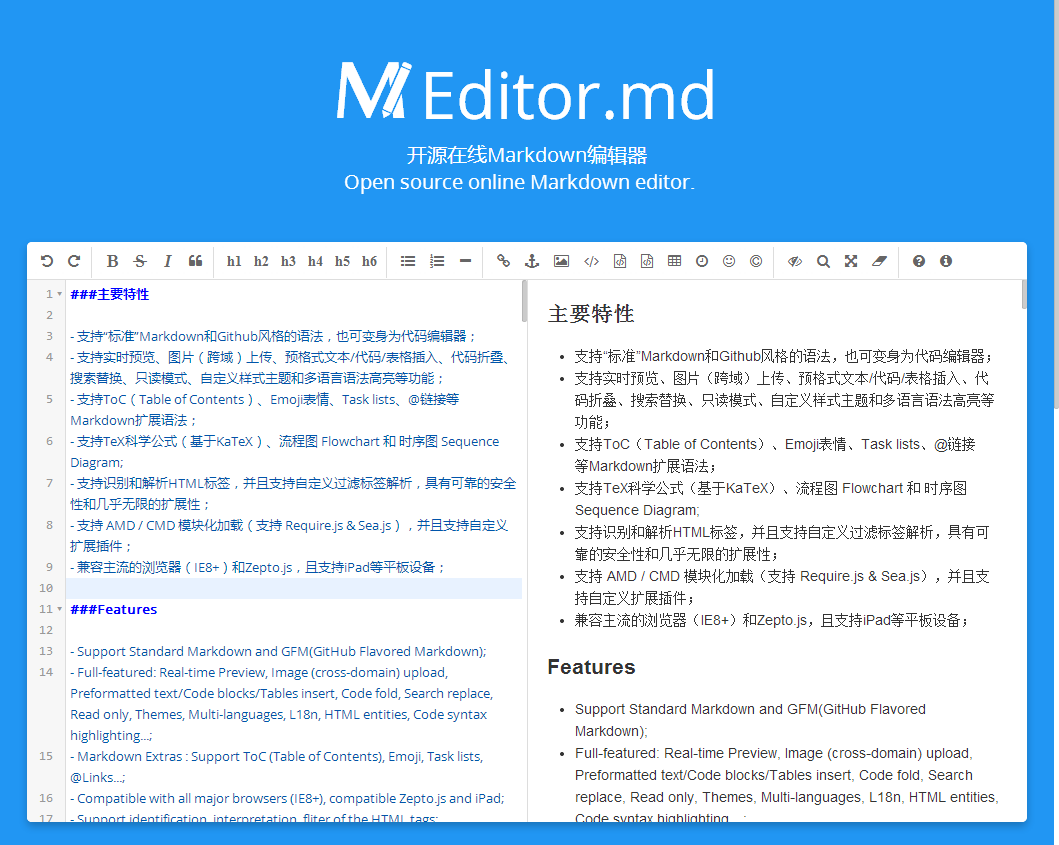
主要特性
- 支持通用 Markdown / CommonMark 和 GFM (GitHub Flavored Markdown) 风格的语法,也可变身为代码编辑器;
- 支持实时预览、图片(跨域)上传、预格式文本/代码/表格插入、代码折叠、跳转到行、搜索替换、只读模式、自定义样式主题和多语言语法高亮等功能;
- 支持 ToC(Table of Contents)、Emoji表情、Task lists、@链接等 Markdown 扩展语法;
- 支持 TeX 科学公式(基于 KaTeX)、流程图 Flowchart 和 时序图 Sequence Diagram;
- 支持识别和解析 HTML 标签,并且支持自定义过滤标签及属性解析,具有可靠的安全性和几乎无限的扩展性;
- 支持 AMD / CMD 模块化加载(支持 Require.js & Sea.js),并且支持自定义扩展插件;
- 兼容主流的浏览器(IE8+)和 Zepto.js,且支持 iPad 等平板设备;
Download & install
Download:
NPM install :
npm install editor.md
Bower install :
bower install editor.md
Usages
Create a Markdown editor
<link rel="stylesheet" href="editor.md/css/editormd.min.css" />
<div id="editor">
    <!-- Tips: Editor.md can auto append a `<textarea>` tag -->
    <textarea style="display:none;">### Hello Editor.md !</textarea>
</div>
<script src="jquery.min.js"></script>
<script src="editor.md/editormd.min.js"></script>
<script type="text/javascript">
    $(function() {
        var editor = editormd("editor", {
            // width: "100%",
            // height: "100%",
            // markdown: "xxxx",     // dynamic set Markdown text
            path : "editor.md/lib/"  // Autoload modules mode, codemirror, marked... dependents libs path
        });
    });
</script>
If you using modular script loader:
Markdown to HTML
<link rel="stylesheet" href="editormd/css/editormd.preview.css" />
<div id="test-markdown-view">
    <!-- Server-side output Markdown text -->
    <textarea style="display:none;">### Hello world!</textarea>
</div>
<script src="jquery.min.js"></script>
<script src="editormd/editormd.js"></script>
<script src="editormd/lib/marked.min.js"></script>
<script src="editormd/lib/prettify.min.js"></script>
<script type="text/javascript">
    $(function() {
	    var testView = editormd.markdownToHTML("test-markdown-view", {
            // markdown : "[TOC]\n### Hello world!\n## Heading 2", // Also, you can dynamic set Markdown text
            // htmlDecode : true,  // Enable / disable HTML tag encode.
            // htmlDecode : "style,script,iframe",  // Note: If enabled, you should filter some dangerous HTML tags for website security.
        });
    });
</script>
See the full example: http://editor.md.ipandao.com/examples/html-preview-markdown-to-html.html
HTML to Markdown?
Sorry, Editor.md not support HTML to Markdown parsing, Maybe In the future.
Examples
https://pandao.github.io/editor.md/examples/index.html
Options
Editor.md options and default values:
{
    mode                 : "gfm",          // gfm or markdown
    name                 : "",             // Form element name for post
    value                : "",             // value for CodeMirror, if mode not gfm/markdown
    theme                : "",             // Editor.md self themes, before v1.5.0 is CodeMirror theme, default empty
    editorTheme          : "default",      // Editor area, this is CodeMirror theme at v1.5.0
    previewTheme         : "",             // Preview area theme, default empty
    markdown             : "",             // Markdown source code
    appendMarkdown       : "",             // if in init textarea value not empty, append markdown to textarea
    width                : "100%",
    height               : "100%",
    path                 : "./lib/",       // Dependents module file directory
    pluginPath           : "",             // If this empty, default use settings.path + "../plugins/"
    delay                : 300,            // Delay parse markdown to html, Uint : ms
    autoLoadModules      : true,           // Automatic load dependent module files
    watch                : true,
    placeholder          : "Enjoy Markdown! coding now...",
    gotoLine             : true,           // Enable / disable goto a line
    codeFold             : false,
    autoHeight           : false,
    autoFocus            : true,           // Enable / disable auto focus editor left input area
    autoCloseTags        : true,
    searchReplace        : true,           // Enable / disable (CodeMirror) search and replace function
    syncScrolling        : true,           // options: true | false | "single", default true
    readOnly             : false,          // Enable / disable readonly mode
    tabSize              : 4,
    indentUnit           : 4,
    lineNumbers          : true,           // Display editor line numbers
    lineWrapping         : true,
    autoCloseBrackets    : true,
    showTrailingSpace    : true,
    matchBrackets        : true,
    indentWithTabs       : true,
    styleSelectedText    : true,
    matchWordHighlight   : true,           // options: true, false, "onselected"
    styleActiveLine      : true,           // Highlight the current line
    dialogLockScreen     : true,
    dialogShowMask       : true,
    dialogDraggable      : true,
    dialogMaskBgColor    : "#fff",
    dialogMaskOpacity    : 0.1,
    fontSize             : "13px",
    saveHTMLToTextarea   : false,          // If enable, Editor will create a <textarea name="{editor-id}-html-code"> tag save HTML code for form post to server-side.
    disabledKeyMaps      : [],

    onload               : function() {},
    onresize             : function() {},
    onchange             : function() {},
    onwatch              : null,
    onunwatch            : null,
    onpreviewing         : function() {},
    onpreviewed          : function() {},
    onfullscreen         : function() {},
    onfullscreenExit     : function() {},
    onscroll             : function() {},
    onpreviewscroll      : function() {},

    imageUpload          : false,          // Enable/disable upload
    imageFormats         : ["jpg", "jpeg", "gif", "png", "bmp", "webp"],
    imageUploadURL       : "",             // Upload url
    crossDomainUpload    : false,          // Enable/disable Cross-domain upload
    uploadCallbackURL    : "",             // Cross-domain upload callback url

    toc                  : true,           // Table of contents
    tocm                 : false,          // Using [TOCM], auto create ToC dropdown menu
    tocTitle             : "",             // for ToC dropdown menu button
    tocDropdown          : false,          // Enable/disable Table Of Contents dropdown menu
    tocContainer         : "",             // Custom Table Of Contents Container Selector
    tocStartLevel        : 1,              // Said
