Zengarden
This Project has the goal to provide an easy to use meditation timer.
Install / Use
/learn @p0wen/ZengardenREADME
Zen Garden
"Zen Garden is a minimalistic Meditation-Timer to help you find your zen moment fast"

UX
Purpose
The purpose of this Web-App is to allow people to track their meditation habits and have reliable timer to take the desired time off. Meditation is an effective method to relieve stress and increase well being. In our busy and stressful everday life it is often hard to find time to sit still and just take a deep breath. Due to my own experiences of meditating everyday and using various timers i had the motivation to build something that i can use myself and enable others to get the chance to benefit from a daily meditation.
Who?
The WebApp is targeted to users who now basic principles or practices of meditation and who are looking for a solution to track their meditation time and have a motivation to keep up the day-to-day sessions by tracking their streak.
Why?
Even though it would be great to have unlimited time for meditation like a zen monk, everyday life has its demands and we can often only slice a couple of minutes out of the day. Therefore the timer helps to enjoy the meditation sitting without worrying about meditating too long or too short. Since phone timers often have awkward timer sounds that are not sensitive the use of compelling gong sounds start and end the session itself.
What?
The core functionaly of this WebApp is to provide an meditation timer. It allows the user to start a session, which is signaled by a gentle gong sound. Furthermore the user has the option to activate/deactive an ambient sound, choose the prefered meditation time (5, 10, 15, 20 Minutes) and a background image. Additionally the WebApp tracks the day-to-day interactions and allows the user to track his/her meditation streak.
User Stories
The following user stories where defined before the development:
- As a meditator i want to choose between longer and shorter sessions, so that i can adjust my practice to my liking.
- As a mediator i want to have a countdown button after starting the mediation, so that i have time to close my eyes and adjust my seating before the "real" practice starts.
- As a meditator i want to be able to start / stop the timer, so that i can react to interruptions.
- As a meditator i want to be informed when a session is done, so that i know when my time is up.
- As a meditator i want to be able to activate / deactivate whitenoise, so that i have the chance to focus on my meditation in noisy surroundings.
- As a mediator i want to keep track of my day-to-day practice, so i keep being motivated even on days where my energy is low.
- As a meditator i want to see inspiration quotes, so that my mind has something to ponder on during my day.
- As a meditator i want to have beautiful backgrounds, so that my mind is in a positive state.
Wireframes
The wireframes were sketched in Balsamiq Mockups and can be found here or following the direct links:


Wireframes vs Finished project
| | Planned | Result | Reasoning |
|-----------------|-------------------|-------------------|-------------|
| Web Landing | 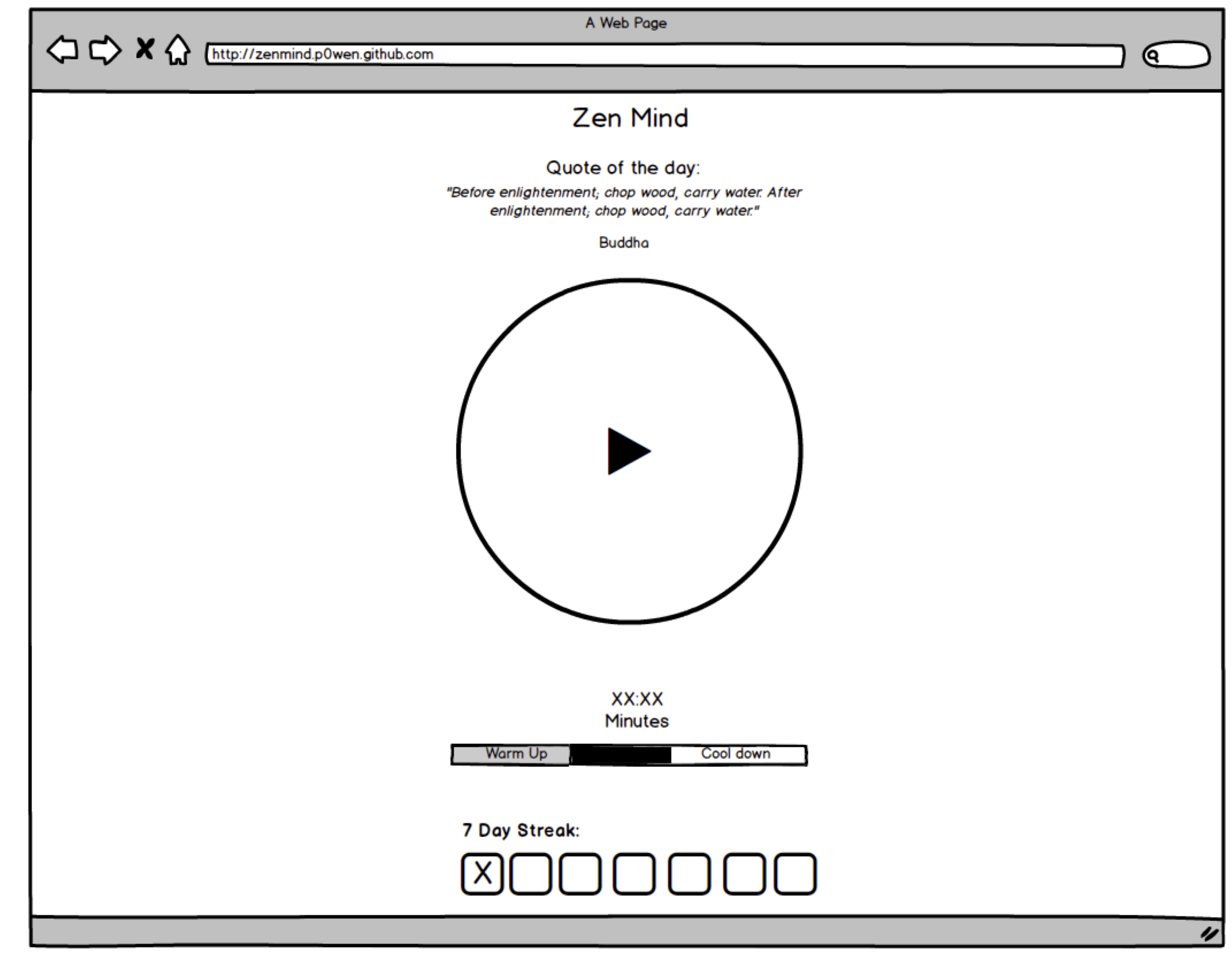 |
|  | * progressbar exchanged for animated outline * left out warmup/cooldown options * included settingsbutton |
| Mobile Landing |
| * progressbar exchanged for animated outline * left out warmup/cooldown options * included settingsbutton |
| Mobile Landing |  |
|  | * exchanged progressbar for animated circle to track progress |
| Web Settings |
| * exchanged progressbar for animated circle to track progress |
| Web Settings |  |
|  | * left out warm-up/cool-down option * only provided on/off switch for white noise and used bell as a default * reminder bell was excluded * added option for a random background * used morning/afternoon background |
| Mobile Settings |
| * left out warm-up/cool-down option * only provided on/off switch for white noise and used bell as a default * reminder bell was excluded * added option for a random background * used morning/afternoon background |
| Mobile Settings |  |
| 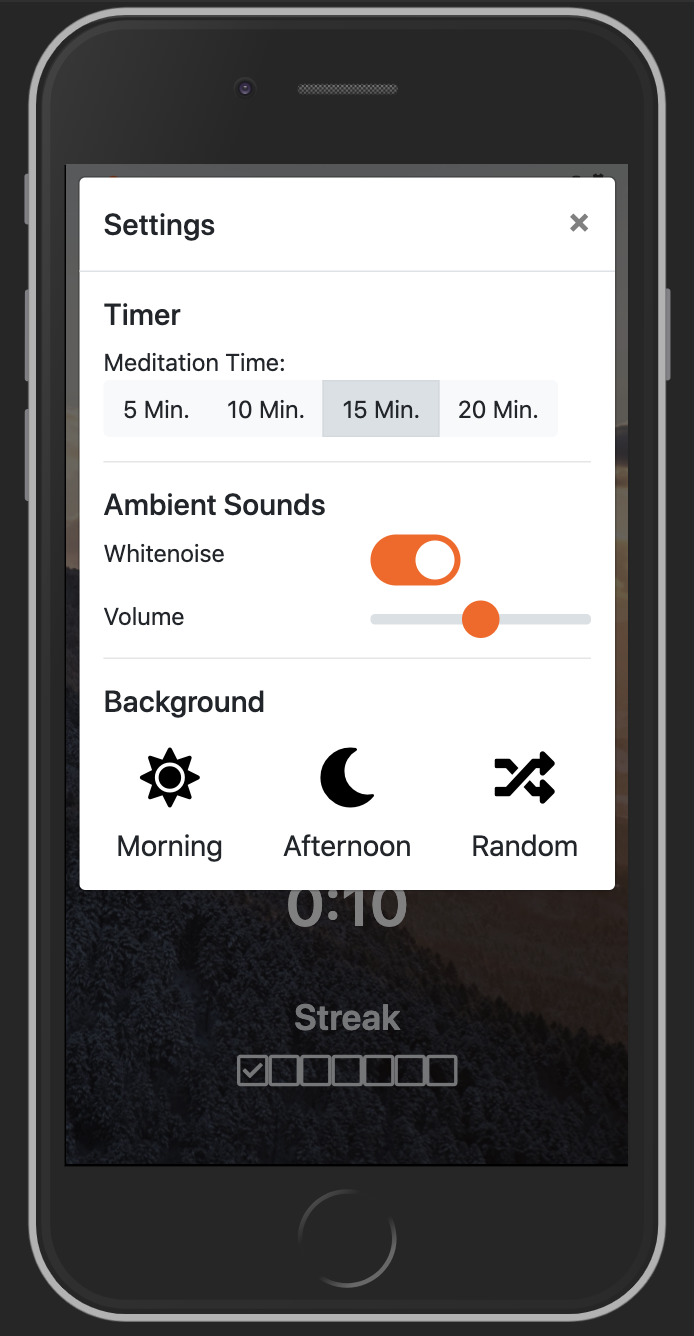 | (see websettings) |
UI-Design
Structure
The Web App is designed to be a single page application. It basically contains 4 different size sections. On top is the title bar which holds the Logo/Application Name and the Settings-Button. The section that follows provides space to display random Quotes from type.fit. The third section holds the core functionality of the app - the meditation timer. It displays a circle that gets filled as time progresses. Additionally the time is printed below the circle. The user has the option to interact with a single button which controls play, pause and reset. At the bottom of the page the Streakbar is being displayed. It contains of 7 squares which get exchanged for squares with a checkmark after a completed meditation.
Colour scheme
The App backgrounds with a light greyfilter on top of it to reach a standardized look. Orange is used as a highlighting color and the font is white.
Font
Roboto was used due to its "dual nature". On the one hand its clean and geometric and on the other hand it signals friendliness and openness, which is believed to also effect the user when seeing the font.
Features
- Timer incl. Control, Start / Finish Sound
- Random Inspirational Quotes
- Ambient Sound can be activated/deactivated incl. volume controle
- 7-Day-Streak
- Background-Image can be switched (Morning, Afternoon, Random)
- Offline support
- Progress Web App support
- Warm Up & Cool-Down Time can be activated
Finished Features
-
Timer inkl. Control
Interactive countdown timer with animated circle created through the use of html, css, javascript
countdown time can be adjusted (5, 10, 15, 20 Minutes) countdown can be restored after finishing a session
countdown can be started, stopped and resumed
default meditation duration is 15 minutes -
Inspirational Quotes
Quotes are fetched from type.fit/api/
Function calculates random number between 1 and 100 which is then used to choose the quoate from the array
quotes get fetched on every page reload -
Ambient Sound can be activated/deactivated incl. volume controle
integrated ~soundManager2~ howler.js library (ADD LINK) to handle playing of songs and support different browser
integrated start- and endbell sound
integrated option to play ambient sound (river sound) -
7-Day-Streak
day to day activities are tracked through 2 localstorage variables (Number of Sessions & Date last session completed)
if one day of meditation is missed the streak is broken and all values are reset
after 7 days in a row a congratz popup will show -
Background can be switched (Morning, Afternoon, Random)
depending on the time of the day the user gets a different image
in the setting modal the user has the chance to manually switch between morning, afternoon or a random background image.
random background image is pulled from unsplash (https://source.unsplash.com) -
Offline support
Service Worker has been integrated to store core files in the users storage CacheName + CacheVersion can be used to control cacheUsage after Updates by increasing the version number -
PWA support
manifest was set up, so that it also allows the user to save the url to the homescreen and start it as an app from the homescreen necessary logos in demanded sizes where designed and created can be used as a standalone app
How to use it as an standalone App on iPhone Devices?
- Open Safari
- Call https://p0wen.github.io/zengarden/
- Press "Share"-Button
- Choose "Add to Homescreen"
- Close Safari
- Look on Homescreen for an orange app icon called "Zen"
Features/Changes for the Future
- Warm Up & Cool-Down Time can be activated
- Reduce amount of global variables
- Increase amount of Jasmine tests
- Refactor code to increase testability
- Track amount of completed streaks (e.g. 4 x 7-Day-Streaks)
- Integrate reward program for multiple completed streaks
- As user accaptance increases it could be interesting to store the user activities to a server to provide cross device support
- in order to support cross device support a user data base would also be a helpful feature
- Integrate End-to-End Testing Framework (e.g. Cypress) to increase quality
Technologies Used
Languages
- HTML5
- CSS3
- JavaScript
Frameworks & Libraries
- Bootstrap 4.5.0
To make use of a responsive css-framework and to ensure mobile first approach. - Font Awesome 5.13.0
Using Icons within the page - ~SoundManager2~
- Howler.js
How
Related Skills
node-connect
346.4kDiagnose OpenClaw node connection and pairing failures for Android, iOS, and macOS companion apps
frontend-design
107.2kCreate distinctive, production-grade frontend interfaces with high design quality. Use this skill when the user asks to build web components, pages, or applications. Generates creative, polished code that avoids generic AI aesthetics.
openai-whisper-api
346.4kTranscribe audio via OpenAI Audio Transcriptions API (Whisper).
qqbot-media
346.4kQQBot 富媒体收发能力。使用 <qqmedia> 标签,系统根据文件扩展名自动识别类型(图片/语音/视频/文件)。