
News
:newspaper: News app for ownCloud
Install / Use
/learn @owncloud-archive/NewsREADME
ownCloud News app




The News app is an RSS/Atom feed aggregator. It offers a RESTful API for app developers. The source code is available on GitHub

For further developer and user documentation please visit the wiki
Sync Clients
are listed on the ownCloud apps overview
Dependencies
- 64bit operating system and PHP
- PHP >= 5.6
- ownCloud >= 9.0
- libxml >= 2.7.8 (2.9 recommended)
- php-curl
- iconv
- SimpleXML
Build Dependencies
These Dependencies are only relevant if you want to build the source code:
- make
- which
- Node.js >= 6
- npm
- composer
Supported Browsers
- Newest Firefox (Desktop, Android, Firefox OS)
- Newest Chrome/Chromium (Desktop, Android)
Supported Databases
- PostgreSQL >= 9.4 (recommended)
- MariaDb >= 5.5
- SQLite (discouraged)
Bugs
Please read the appropriate section in the contributing notices
Installation/Update
Before you install/update the News app
Before you install the app do the following:
- Check that your owncloud/data/ directory is owned by your webserver user and that it is write/readable
- Check that your installation fullfills the requirements listed in the README section
- Set up ownCloud Background Jobs to enable feed updates. A recommended timespan for feed updates is 15-30 Minutes.
Then proceed to install the app either from an archive (zip/tar.gz) or clone it from the repository using git
Installing from the app store
This is the easiest solution: Simply go the the apps page and enable the News app
Installing from archive
-
Go to the ownCloud News GitHub releases page and download the latest release/archive to your server
-
Starting with 8.0.0, there are two different releases: news.tar.gz and Source code. The first one requires no additional steps, the second one requires you to install the dependencies and compile the JavaScript. Choose the first one if you don't want to work on the code. If you want to install a version prior to 8.0.0, choose the Source code download.
-
On your server, check if there is a folder called owncloud/apps/news. If there is one, delete it.
-
Extract the downloaded archive to the owncloud/apps/ folder.
-
Remove the version from the extracted folder (e.g. rename owncloud/apps/news-4.0.3/ to owncloud/apps/news/
-
If you are a version greater than or equal to 8.0.0 and downloaded the Source code zip or tar.gz, you need to install the JavaScript and PHP dependencies and compile the JavaScript first. On your terminal, change into the owncloud/apps/news/ directory and run the following command (requires node >5.6, npm, curl, make and which):
sudo -u www-data make # www-data might vary depending on your distribution -
Finally make sure that the owncloud/apps/news directory is owned by the web server user
sudo chown -R www-data:www-data owncloud/apps/news # www-data:www-data might vary depending on your distribution -
Activate the News app in the apps menu
Installing from Git (development version)
-
The master branch will always be stable in conjunction with the latest master branch from ownCloud
-
JavaScript and PHP libraries are not included anymore since 8.0.0 and will require you to run make after updating/installing the app
-
In your terminal go into the owncloud/apps/ directory and then run the following command:
git clone https://github.com/owncloud/news.git cd news make -
If you are using a stable ownCloud release, stay with the latest git tag release which is running on your version. To get an overview over all existing tags run:
git tag
You can switch to a release which will be supported on your installation by running:
  git checkout tags/TAG
  make  # if News version >= 8.0.0
For instance to use the 5.2.8 release, run:
git checkout tags/5.2.8
- Activate the News app in the apps menu
To update the News app use change into the owncloud/apps/news/ directory using your terminal and then run:
git pull --rebase origin master
make
Performance Notices
- Use MySQL or PostgreSQL for better database performance
- Use the updater script to thread and speed up the update
Updating Notices
To receive notifications when a new News app version was released, simply add the following Atom feed in your currently installed News app:
https://github.com/owncloud/news/releases.atom
FAQ
My browser shows a mixed content warning (Connection is Not Secure)
If you are serving your ownCloud over HTTPS your browser will very likely warn you with a yellow warnings sign about your connection not being secure.
Chrome will show no green HTTPS lock sign, Firefox will show you the following image

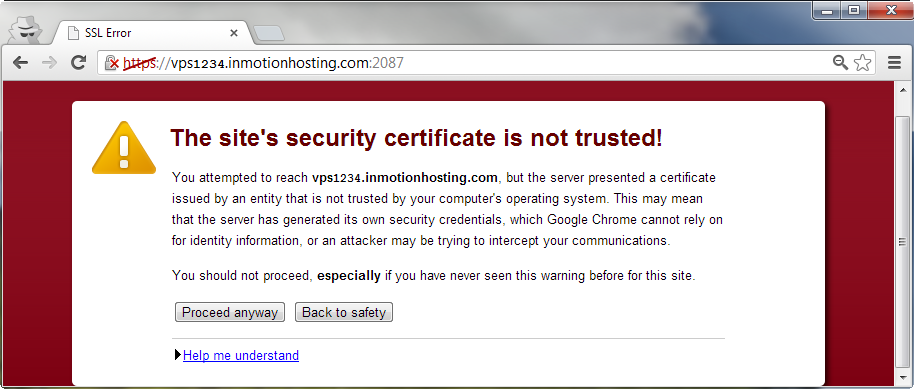
Note that this warning is not red and won't block the page like the following images which signal a serious issue:

What is the cause of the (yellow) error message
This warning is caused by mixed passive content and means that your page loads passive resources from non HTTPS resources, such as:
- Images
- Video/Audio
This allows a possible attacker to perform a MITM (man-in-the-middle) attack by serving you different images or audio/video.
Why doesn't the News app fix it
The News app fully prevents mixed active content by only allowing HTTPS iframes from known locations; other possible mixed active content elements such as <script> are stripped from the feed. Because images and audio/video are an integral part of a feed, we can not simply strip them.
Since an attacker can not execute code in contrast to mixed active content, but only replace images/audio/video in your feed reader, this is not considered to be a security issue. If, for whatever reason (e.g. feed which would allow fishing), this is a security problem for you, contact the specific feed provider and ask him to serve his feed content over HTTPS.
Why don't you simply use an HTTPS image/audio/video proxy
For the same reason that we can't fix non HTTPS websites: It does not fix the underlying issue but only silences it. If you are using an image HTTPS proxy, an attacker can simply attack your image proxy since the proxy fetches insecure content. Even worse: if your image proxy serves these images from the same domain as your ownCloud installation you are vulnerable to XSS via SVG images. In addition people feel save when essentially they are not.
Since most people don't understand mixed content and don't have two domains and a standalone server for the image proxy, it is very likely they will choose to host it under the same domain.
Because we care about our users' security and don't want to hide security warnings, we won't fix (aka silence) this issue.
The only fix for this issue is that feed providers serve their content over HTTPS.
I am getting: Doctrine DBAL Exception InvalidFieldNameException: Column not found: 1054 Unknown column some_column Or BadFunctionCallException: someColumn is not a valid attribute
The exception name itself will give you a hint about what is wrong:
-
BadFunctionCallException: Is usually thrown when there are more columns in the database than in the code, e.g.:
BadFunctionCallException, Message: basicAuthUser is not a valid attributemeans that the attribute basicAuthUser was retrieved from the database but could not be found on the corresponding data object (item.php/feed.php/folder.php) in the db/ folder
-
InvalidFieldNameException: Is usually thrown when there are more columns in the code than the database
One reason for this error could be old files which were not overwritten properly when the app was upgraded. Make sure that all files match the files in the release archive! Most of the time however this is caused by users trying to downgrade (not supported!!!) or by failed/timed out database migrations. To prevent future timeouts use
php -f owncloud/occ upgrade
instead of clicking the upgrade button on the web interface.
If you have made sure that old files are not the cause of this issue, the solution is to either automatically or manually remove or add columns to you
