
Changeit3d
Official pytorch code for "ShapeTalk: A Language Dataset and Framework for 3D Shape Edits and Deformations"
Install / Use
/learn @optas/Changeit3dREADME
ShapeTalk: A Language Dataset and Framework for 3D Shape Edits and Deformations
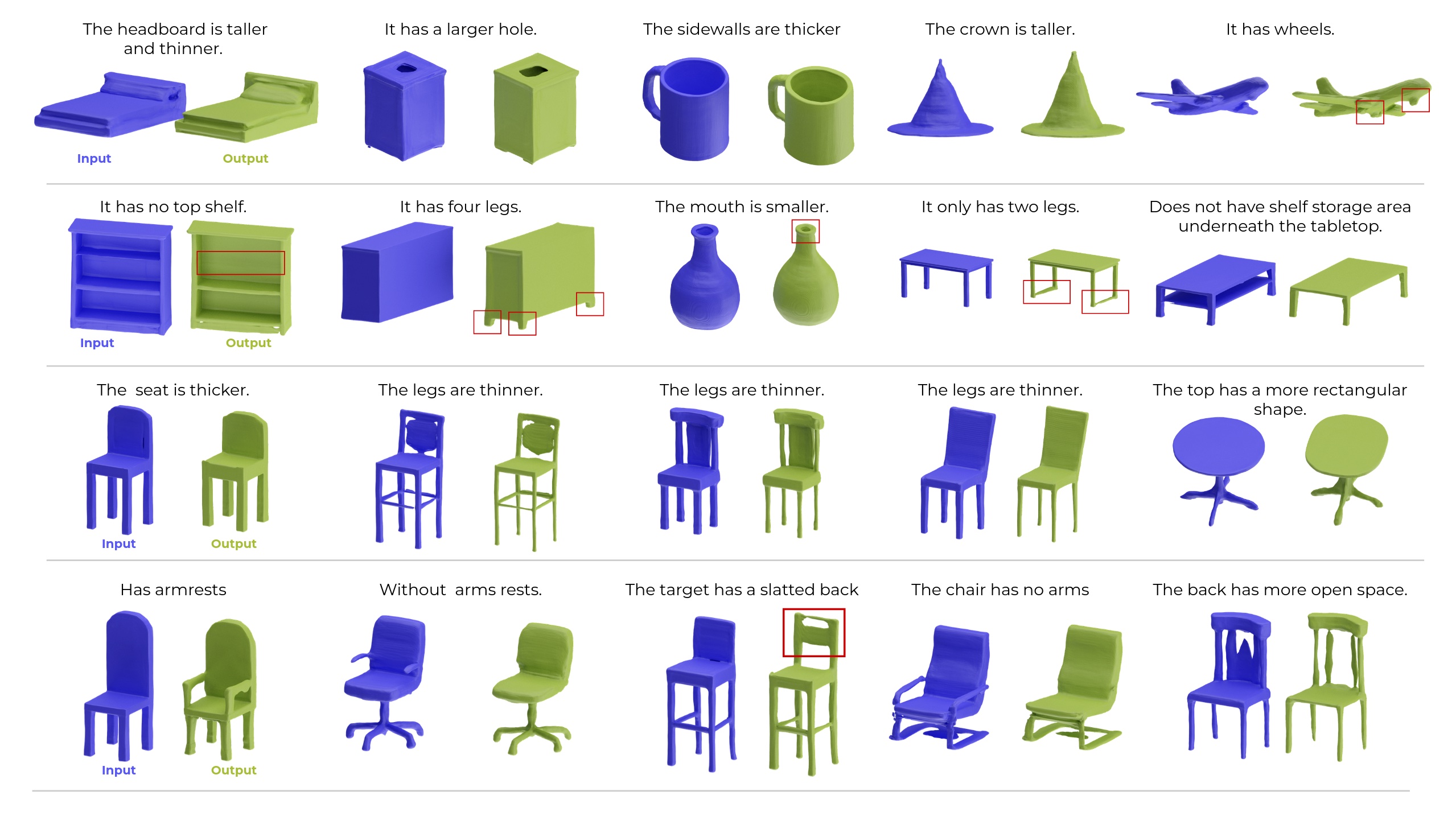
Introduction
This codebase accompamnies our <a href="https://openaccess.thecvf.com/content/CVPR2023/papers/Achlioptas_ShapeTalk_A_Language_Dataset_and_Framework_for_3D_Shape_Edits_CVPR_2023_paper.pdf">CVPR-2023<a> paper.
Related Works
- PartGlot, CVPR22: Discovering the 3D/shape part-structure automatically via referential language.
- LADIS, EMNLP22: Disentangling 3D/shape edits when using ShapeTalk.
- ShapeGlot, ICCV19: Building discriminative listeners and speakers for 3D shapes.
Citation
If you find this work useful in your research, please consider citing:
@inproceedings{achlioptas2023shapetalk,
    title={{ShapeTalk}: A Language Dataset and Framework for 3D Shape Edits and Deformations},
    author={Achlioptas, Panos and Huang, Ian and Sung, Minhyuk and
            Tulyakov, Sergey and Guibas, Leonidas},
    booktitle=Conference on Computer Vision and Pattern Recognition (CVPR)
    year={2023}
}
Installation
Optional, create first a clean environment. E.g.,
 conda create -n changeit3d python=3.8
 conda activate changeit3d
 conda install pytorch==1.11.0 torchvision==0.12.0 cudatoolkit=11.3 -c pytorch
Then,
 git clone https://github.com/optas/changeit3d
 cd changeit3d
 pip install -e .
Last, if you want to train pointcloud autoencoders or run some of our introduced evaluation metrics, consider installing a fast (GPU-based) implementation of Chamfer's Loss:
git submodule add https://github.com/ThibaultGROUEIX/ChamferDistancePytorch changeit3d/losses/ChamferDistancePytorch
- Please see
setup.pyfor all required packages. We left the versions of most of these packages unspecified for an easier and more broadly compatible installation. However, if you want to replicate precisely all our experiments, use the versions indicated in theenvironment.yml(e.g.,conda env create -f environment.yml). - See F.A.Q. at the bottom of this page for suggestions regarding common installation issues.
Basic structure of this repository
./changeit3d
├── evaluation 				# routines for evaluating shape edits via language
├── models 				# neural-network definitions
├── in_out 				# routines related to I/O operations
├── language 				# tools used to process text (tokenization, spell-check, etc.)
├── external_tools 			# utilities to integrate code from other repos (ImNet, SGF, 3D-shape-part-prediction)
├── scripts 				# various Python scripts
│   ├── train_test_pc_ae.py   	        # Python script to train/test a 3D point-cloud shape autoencoder
│   ├── train_test_latent_listener.py   # Python script to train/test a neural listener based on some previously extracted latent shape-representation
│   ├── ...
│   ├── bash_scripts                    # wrappers of the above (python-based) scripts to run in batch mode with a bash terminal
├── notebooks 				# jupyter notebook versions of the above scripts for easier deployment (and more)
ShapeTalk Dataset ( :rocket: )
Our work introduces a large-scale visio-linguistic dataset -- ShapeTalk.
First, consider downloading ShapeTalk and then quickly read its manual to understand its structure.
Exploring ShapeTalk ( :microscope: )
Assuming you downloaded ShapeTalk, you should see at the top the downloaded directory subfolders:
| Subfolder | Content-explanation | |:--------------------------------------|:-----------| |images| 2D renderings used for contrasting 3D shapes and collecting referential language via Amazon Mech. Turk| |pointclouds| pointclouds extracted from the surface of the underlying 3D shapes -- used e.g. for training a PCAE & evaluating edits| |language| files capturing the collected language: see ShapeTalk' manual if you haven't done it yet|
:arrow_right: To familiarize yourself with ShapeTalk you can run this notebook to compute basic statistics about it.
:arrow_right: To make a more fine-grained analysis of ShapeTalk w.r.t. its language please run this notebook.
Neural Listeners ( :ear: )
You can train and evaluate our neural listening architectures with different configurations using this python script or its equivalent notebook.
<!-- You can also [download](./changeit3d/scripts/bash_scripts/download_pretrained_nets.sh) and use our pre-trained neural listeners trained with (also pretrained) latent-space-based shape representations. -->Our attained accuracies are given below:
| Shape Backbone | Modality | Overall | Easy | Hard | First | Last | Multi-utter<br/> Trans. vs. (LSTM) | |:--------------------------------------|:-----------|:----------|:-------|:-------|:------|:-------|:--------| | ImNet-AE | implicit | 68.0% | 72.6% | 63.4% | 72.4% | 64.9% | 73.2% (78.4%) | | SGF-AE | pointcloud | 70.7% | 75.3% | 66.1% | 74.9% | 68.0% | 76.5% (79.9%) | | PC-AE | pointcloud | 71.3% | 75.4% | 67.2% | 75.2% | 70.4% | 75.3% (81.5%) | | ResNet-101 | image | 72.9% | 75.7% | 70.1% | 76.9% | 68.7% | 79.8% (84.3%) | | ViT (L/14/CLIP) | image | 73.4% | 76.6% | 70.2% | 77.0% | 70.7% | 79.6% (84.5%) | | ViT (H/14/OpenCLIP) | image | 75.5% | 78.5% | 72.4% | 79.5% | 72.2% | 82.3% (85.8%) |
For the meaning of the sub-populations (easy, hard, etc.), please see our paper, Table 5.
All reported numbers above concern the transformer-based baseline presented in our paper; the exception is the numbers inside parenthesis ("Multi" (LSTM)) which are based on our LSTM baseline. The LSTM baseline performs better only in this "Multi" scenario, possibly because our transformer struggles to self-attend well to all concatenated input utterances.
If you have new results, please reach out to Panos Achlioptas to include in our competition page.
ChangeIt3DNet ( neural 3D editing via language :hammer: )
The algorithmic approach we propose and follow in this work to train a language/3D-shape editor such as the ChangeIt3DNet is to break down the process into three steps:
- Step1. Train a latent-shape representation network, e.g., a shape AutoEncoder like PC-AE or SGF.
- Step2. Use the derived shape "latent-codes" from Step-1 to train a latent-based neural-listener following the language and listening train/test splits of ShapeTalk.
- Step3. Keep the above two networks frozen; and build a low-complexity editing network that learns to move inside the latent space of Step-1 in a way that changes the shape of an input object that increases its compatibility with the input language, e.g., to make the output have `thinner legs' as the pre-trained neural listener of step 2 understands this text/shape compatibility.
Specific details on how to execute the above steps.
-
Step1. [train a generative pipeline for 3D shapes, e.g., an AE]
- PC-AE. To train a point-cloud-based autoencoder, please take a look at the scripts/train_test_pc_ae.py.
- IMNet-AE. See our customized repo and the instructions there, which will guide you on how to extract implicit fields for shapes of 3D objects like those of ShapeTalk and train from scratch an ImNet-based autoencoder (Imnet-AE), or to save time, re-use our pre-trained IMNet-AE backbone. To integrate an Imnet-AE in this (changeit3d) repo, see further into
external_tools/imnet/loader.py. If you have questions about the ImNet-related utilities, please contact Ian Huang. - Shape-gradient-fields (SGF). See our slightly customized repo and the instructions there, which will help you to download and load the pre-trained weights for an AE architecture based on SGF (SGF-AE), which was also trained with ShapeTalk's shapes and our shape (unary) splits. To integrate an SGF-AE to this (changeit3d) repo, see also
external_tools/sgf/loader.py.
Note: for quickly testing your integration of either ImNet-AE or SGF-AE in the changeit3d repo you can also use these notebooks: IMNet-AE-porting and SGF-AE-porting.
-
Step2. [train neural listeners]
- Given the extracted latent codes of the shapes of an AE system (Step.1) and the data contained in
Related Skills
node-connect
344.1kDiagnose OpenClaw node connection and pairing failures for Android, iOS, and macOS companion apps
frontend-design
96.8kCreate distinctive, production-grade frontend interfaces with high design quality. Use this skill when the user asks to build web components, pages, or applications. Generates creative, polished code that avoids generic AI aesthetics.
openai-whisper-api
344.1kTranscribe audio via OpenAI Audio Transcriptions API (Whisper).
qqbot-media
344.1kQQBot 富媒体收发能力。使用 <qqmedia> 标签,系统根据文件扩展名自动识别类型(图片/语音/视频/文件)。
