
FormToCSS
Form To CSS - jQuery-Plugin form to CSS generator - Create CSS from html form https://rawgit.com/onigetoc/FormToCSS/master/example/demo.html
Install / Use
/learn @onigetoc/FormToCSSREADME
Form to CSS generator Builder | jQuery Plugin
Create your own CSS generator with the form to css generator Builder plugin. Can be usefull to create your own css builder or a Wordpress plugin or any kind of apps you need a real time css generator. For example, you can create a button generator
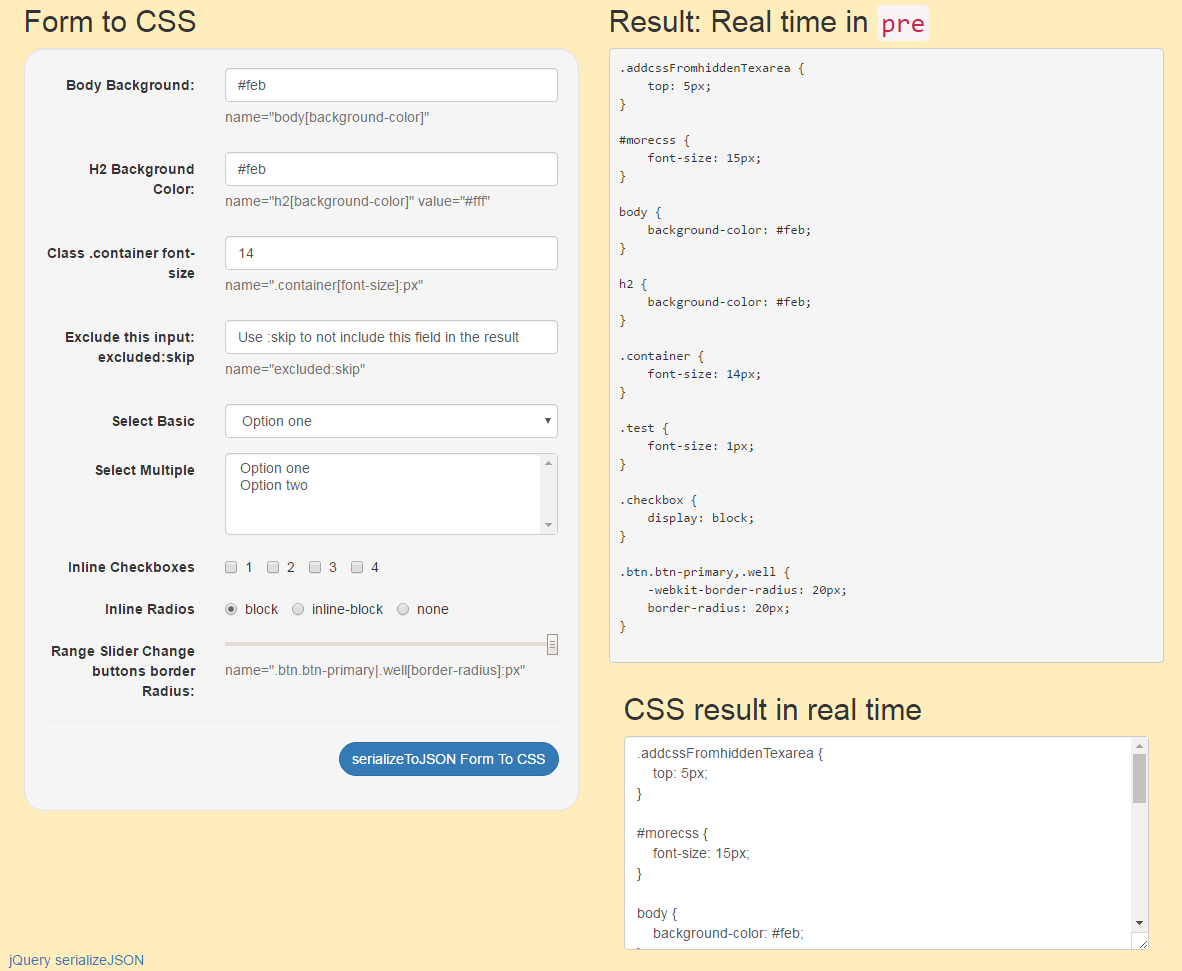
Demo page | build A CSS generator like this in minutes:
Why
I wanted to create my own CSS generator for a project with a form that update dynamically the css. I looked to some other project and i didn't liked the fact to write a lot of codes and i came up with a idea to create a form who automatically convert to CSS.
Usage example
HTML form (input, textarea and select tags supported):
Read the jQuery.serializeJSON for more details.
input name with body[background-color]
<input type="text" name="body[background-color]" value="yellow">
CSS Output:
body {
    background-color: yellow
}
input name with h3[font-size]:px
<input type="text" name="h3[font-size]:px" value="15" />
CSS Output:
h3 {
    font-size: 15px
}
For multiple class or ID since we use jQuery.serializeJSON, you can not separate selector with a comma, instead use | like the following example: input name with multiple selector .firstclass|secondClass[font-size]:px
<input type="text" name=".firstclass|secondClass[font-size]:px" value="15" />
CSS Output:
.firstclass, .secondClass {
    font-size: 15px
}
Multiple input with the same selector will build your CSS:
<input type="number" name=".firstclass[font-size]:px" value="15" min="1" max="20" />
<input type="text" name=".firstclass[color]" value="#cccccc" />
CSS Output:
.firstclass {
    font-size: 15px;
    color: #cccccc;
}
Since jQuery.serializeJSON do not take the : as a selector, we replace : by @ input name with #myID@hover[color] It may change in the futur if i can implement CSS media queries.
<input type="text" name="#myID@hover[color]" value="red" />
CSS Output:
#myID:hover {
    color: red
}
user :skip or anything:skip to exclude input from being converted to CSS (from jQuery.serializeJSON)
Adding units to value
After the value, you can specify units to value
[]:px []:em []:percent []:important []:pximportant []:emimportant []:percentimportant
<input type="text" name=".myclass[padding]:em" value="2" />
OR
<input type="text" name=".myclass[padding]:emimportant" value="2" />
percent for %
important for !important
Using FormtoCSS function
Call the function this way. You can use a Class, ID or form
$(".formClass").formtoCSS();
With all options:
Example call with all options:
$(".formClass").formtoCSS({
    beautify: false, // default true
    prefix: false, // css3 -webkit, -moz: default true
    target: '#targetDIV', // target effected selector, single or multiple selector(s)
    targetShow: true,  // show target selector in css output result ex: #mytargetdiv: default false
    addcss: '#addcss', // add more css from #addcss hidden textarea
    output: 'pre,#result', // output CSS results, single or multiple selector(s)
    header: false // add css to header in realtime: default true
});
Tricks:
Sometime you need to append something to your input and formtoCSS did not update your CSS.
try .keyup():
$("#targetInput").val('#f43').keyup();
You can use hidden input and do create CSS with the right name informations
Dependency
Form to CSS need these javascript and jQuery plugins to work.
The cssparser add css3 prefix like -moz | -webkit
The cssparser need to be rewrite. I found it on the web and it's not perfect.
Demo:
https://jsfiddle.net/onigetoc/92fp0brf
You can fork and help for this project.
Markdown created with Editconvert
Related Skills
node-connect
353.3kDiagnose OpenClaw node connection and pairing failures for Android, iOS, and macOS companion apps
frontend-design
111.7kCreate distinctive, production-grade frontend interfaces with high design quality. Use this skill when the user asks to build web components, pages, or applications. Generates creative, polished code that avoids generic AI aesthetics.
openai-whisper-api
353.3kTranscribe audio via OpenAI Audio Transcriptions API (Whisper).
qqbot-media
353.3kQQBot 富媒体收发能力。使用 <qqmedia> 标签,系统根据文件扩展名自动识别类型(图片/语音/视频/文件)。
