
Rainbow
Delightful console output for Swift developers.
Install / Use
/learn @onevcat/RainbowREADME
Rainbow adds text color, background color and style for console and command
line output in Swift. It is born for cross-platform software logging
in terminals, working in both Apple's platforms and Linux.
Basic Usage
Nifty way, using the String extension, and print the colorized string.
Named Color & Style
import Rainbow

print("Red text".red)
print("Blue background".onBlue)
print("Light green text on white background".lightGreen.onWhite)

print("Underline".underline)
print("Cyan with bold and blinking".cyan.bold.blink)

print("Plain text".red.onYellow.bold.clearColor.clearBackgroundColor.clearStyles)
It gives you something like this:

Installation
Swift Package Manager
If you are developing a cross platform software in Swift,
Swift Package Manager might
be your choice for package management. Just add the url of this repo to your
Package.swift file as a dependency:
import PackageDescription

let package = Package(
    name: "YourAwesomeSoftware",
    dependencies: [
        .package(url: "https://github.com/onevcat/Rainbow", .upToNextMajor(from: "4.0.0"))
    ],
    targets: [
        .target(
            name: "MyApp",
            dependencies: ["Rainbow"]
        )
    ]
)
Then run swift build whenever you get prepared.
You could know more information on how to use Swift Package Manager in Apple's official page.
Running the Demo
Rainbow includes a comprehensive demo that showcases all features. To see it in action:
# Clone the repository
git clone https://github.com/onevcat/Rainbow.git
cd Rainbow

# Run the demo
swift run RainbowPlayground
The demo covers basic colors, background colors, text styles, 8-bit/24-bit colors, hex colors, HSL colors, builder pattern, and practical examples.
<img width="1062" height="1244" alt="rainbow-demo" src="https://github.com/user-attachments/assets/e0f274c0-3a58-40c1-949b-12b0c84eb551" />Performance Optimization
Rainbow v4.2.0+ includes performance optimizations for high-frequency styling operations.
Builder Pattern
For complex styling with multiple chained calls, use the builder pattern:
// Traditional chaining - creates multiple intermediate strings
let traditional = "Hello".red.bold.underline.onBlue

// Optimized builder pattern - lazy evaluation, single string generation
let optimized = "Hello".styled.red.bold.underline.onBlue.build()
Batch Operations
Apply multiple styles in a single operation:
// Traditional - multiple parsing cycles
let traditional = "Warning".red.bold.underline.italic

// Optimized - single parsing cycle
let optimized = "Warning".applyingAll(
    color: .named(.red),
    styles: [.bold, .underline, .italic]
)
Performance Guidelines
- Use builder pattern (
.styled...build()) for complex styling - Use batch operations (
.applyingAll()) for multiple styles - Avoid repeated styling of the same strings in loops
- See PERFORMANCE_GUIDE.md for detailed optimization strategies
Other Usage
String Interpolation & Nested
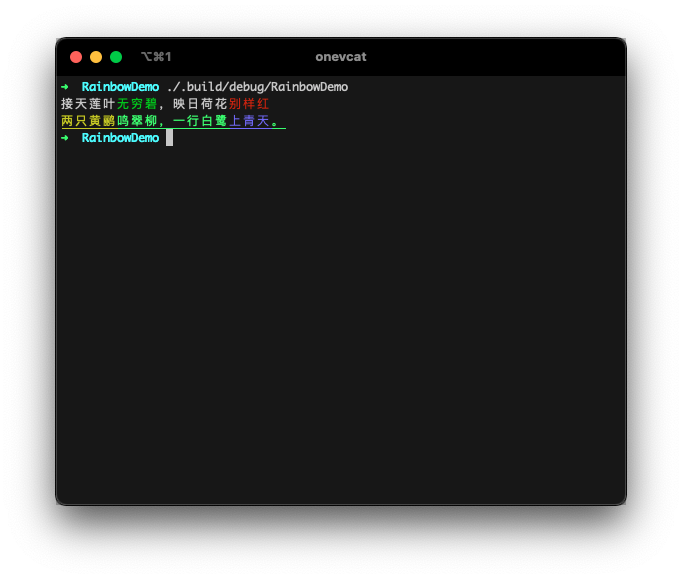
Swift string interpolation is supported. Define the color for part of the string. Or even create nested colorful strings. The inner color style will be kept:
print("接天莲叶\("无穷碧".green),映日荷花\("别样红".red)")
print("\("两只黄鹂".yellow)鸣翠柳,一行白鹭\("上青天".lightBlue)。".lightGreen.underline)
ANSI 256-Color Mode
8-bit color is fully supported, for both text color and background color:
print("停车坐爱\("枫林晚".bit8(31)),\("霜叶".bit8(160))红于\("二月花".bit8(198))。")
print("\("一道残阳".bit8(202))铺水中,\("半江瑟瑟".bit8(30).onBit8(226))半江红。")

Hex Colors (approximated)
It also accepts a Hex color. Rainbow tries to convert it to a most approximate .bit8 color:
print("黑云压城\("城欲摧".hex("#666")),甲光向日\("金鳞开".hex("000000").onHex("#E6B422"))。")
print("日出江花\("红胜火".hex(0xd11a2d)),春来江水\("绿如蓝".hex(0x10aec2))")

Valid format:
"FFF","#FFF","FFFFFF","#FFFFFF",0xFFFFFF
True color
A few terminal emulators supports 24-bit true color. If you are sure the 24-bit colors can be displayed in your user's terminal, Rainbow has no reason to refuse them!
print("疏影横斜\("水清浅".bit24(36,116,181)),暗香浮动\("月黄昏".bit24(254,215,26))")
print("\("春色满园".hex("#ea517f", to: .bit24))关不住,\("一枝红杏".hex("#f43e06", to: .bit24))出墙来。")

HSL Colors
HSL (Hue, Saturation, Lightness) colors are also supported:
print("天街小雨润如酥,草色遥看近却无".hsl(120, 20, 80))
print("最是一年春好处,绝胜烟柳满皇都".hsl(90, 60, 70))
Format:
hue(0-360°),saturation(0-100%),lightness(0-100%)
Conditional Styling
Rainbow supports conditional styling that allows you to apply colors and styles based on runtime conditions, making your code more readable and reducing the need for ternary operators:
// Basic conditional styling
let isError = true
let isWarning = false

print("Error occurred".colorIf(isError, .red).styleIf(isError, .bold))
print("Warning message".colorIf(isWarning, .yellow))

// Log level styling
enum LogLevel { case error, warning, info }
let level = LogLevel.error
let message = "Something happened"

print(message
    .colorIf(level == .error, .red)
    .colorIf(level == .warning, .yellow)
    .colorIf(level == .info, .cyan)
    .styleIf(level == .error, .bold))
Advanced Conditional Builder
For more complex conditional styling scenarios, use the fluent builder interface:
let isActive = true
let isWarning = false
let isError = false

let styledText = "Server Status: Running"
    .conditionalStyled
    .when(isActive).green.bold
    .when(isWarning).yellow
    .when(isError).red.underline
    .build()

print(styledText)

// With closure-based conditions
let progress = 75
let statusMessage = "Processing..."
    .conditionalStyled
    .when { progress < 33 }.red.italic
    .when { progress >= 33 && progress < 67 }.yellow
    .when { progress >= 67 }.green.bold
    .build()

print(statusMessage)
Output Target
By default, Rainbow should be smart enough to detect the output target, to determine if it is a tty. For example, it automatically output plain text if written to a file:
// main.swift
print("Hello Rainbow".red)

$ .build/debug/RainbowDemo > output.txt

// output.txt
Hello Rainbow
This is useful for sharing the same code for logging to console and to a log file.
You can manually change this behavior. Rainbow follows these rules in priority:
- Set the
Rainbow.enabledin your code explicitly. - Pass
FORCE_COLOR=1to enable color even if the output is not a tty. (FORCE_COLORhas a higher priority thanNO_COLOR) - Pass
NO_COLOR=1as environment value when executing your app to disable color. - Set the
Rainbow.outputTargetyourself.
Verbose Way
You can also use the more verbose way if you want:
import Rainbow
let output = "The quick brown fox jumps over the lazy dog"
                .applyingCodes(Color.red, BackgroundColor.yellow, Style.bold)
print(output) // Red text on yellow, bold of course :)
Or even construct everything from scratch:
let entry = Rainbow.Entry(
    segments: [
        .init(text: "Hello ", color: .named(.magenta)),
        .init(text: "Rainbow", color: .bit8(214), backgroundColor: .named(.lightBlue), styles: [.underline]),
    ]
)
print(Rainbow.generateString(for: entry))
Please remember, the string extensions (such as "Hello".red) is O(n). So if you are handling a huge string or very
complex nesting, there might be a performance issue or hard to make things in stream. The manual way is a rescue for these
cases.
Motivation and Compatibility
Thanks to the open source of Swift, developers now could write cross platform programs with the same language. And I believe the command line software would be the next great platform for Swift. Colorful and well-organized output always helps us to understand what happens. It is really a necessary utility to create wonderful software.
Rainbow should work well in both OS X and Linux terminals. It is smart enough
to check whether the output is connected to a valid text terminal or not, to
decide the log should be modified or not. This could be useful when you want to
send your log to a file instead to console.
Contact
Follow and contact me on Twitter or Sina Weibo. If you find an issue, just [open a ticket](https://github.com/onevcat/
Related Skills
node-connect
347.2kDiagnose OpenClaw node connection and pairing failures for Android, iOS, and macOS companion apps
frontend-design
108.0kCreate distinctive, production-grade frontend interfaces with high design quality. Use this skill when the user asks to build web components, pages, or applications. Generates creative, polished code that avoids generic AI aesthetics.
openai-whisper-api
347.2kTranscribe audio via OpenAI Audio Transcriptions API (Whisper).
qqbot-media
347.2kQQBot 富媒体收发能力。使用 <qqmedia> 标签,系统根据文件扩展名自动识别类型(图片/语音/视频/文件)。
