
Ontoweaver
Easy integration of heterogeneous iterable data within Semantic Knowledge Graphs databases.
Install / Use
/learn @oncodash/OntoweaverREADME
OntoWeaver
OntoWeaver is a tool that automatize the creation of knowledge graphs from existing data.
It is made for people who want to easily define their own graph structure. Why having to use a knowledge graph that does not fit the question you are asking when you can easily make one that you perfectly understands? OntoWeaver allows you to do that with just a simple description of the graph you want.
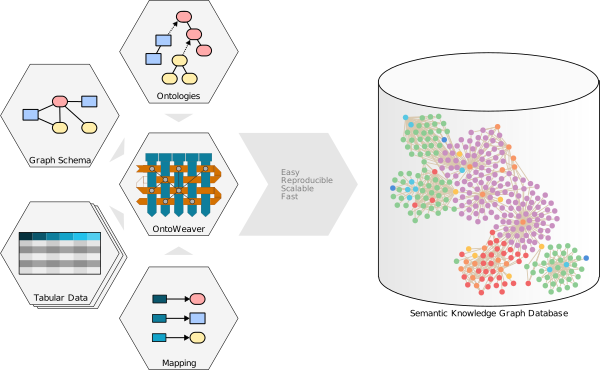
SKG databases allows for an easy integration of very heterogeneous data, and OntoWeaver brings a reproducible approach to building them.
With OntoWeaver, you can very easily implement a script that will allow you to automatically reconfigure a new SKG from the input data, each time you need it.
OntoWeaver has been tested on large scale biomedical use cases (think: millions of nodes), and we can guarantee that it is simple to operate by anyone having a basic knowledge of programming.
Why OntoWeaver and not others?
OntoWeaver "killer features" that make it better than other solutions:
- Reads several data file formats, tables or documents.
- Lets you try various graph structures and contents.
- Exports to several knowkedge graph databases and formats.
- Allows reusing others' database mapping modules easily.
Basics
Mapping data
OntoWeaver provides a simple layer of abstraction on top of BioCypher, which remains responsible for doing the ontology alignment, supporting several graph database backends, and allowing reproducible & configurable builds.
With a pure Biocypher approach, you would have to write a whole adapter by hand, with OntoWeaver, you just have to express a mapping in YAML, looking like:
row: # The meaning of an entry in the input table.
   map:
      column: <column name in your CSV>
      to_subject: <ontology node type to use for representing a row>

transformers: # How to map cells to nodes and edges.
    - map: # Map a column to a node.
        column: <column name>
        to_object: <ontology node type to use for representing a column>
        via_relation: <edge type for linking subject and object nodes>
    - map: # Map a column to a property.
        column: <another name>
        to_property: <property name>
        for_object: <type holding the property>

metadata: # Optional properties added to every node and edge.
    - source: "My OntoWeaver adapter"
    - version: "v1.2.3"
OntoWeaver can read anything that Pandas can load, which means a lot of tabular formats. It can also parse graphs from OWL, and query XML or JSON files.
Usage
In most cases, you will just need to call the ontoweave command to build-up
the SKG you prepared:
ontoweave my_data.csv:my_mapping.yaml --import-script-run --auto-schema
If you're using OntoWeaver from its Git repository, you will have to us UV:
uv run ontoweave data_A.csv:map_A.yaml data_B.tsv:map_B.yaml
The ontoweave command is very configurable, see ontoweave --help for more
details.
Detailed documentation with tutorials and a more detailed installation guide is available on the OntoWeaver website.
Installation
The project is written in Python and is tested with the UV environment manager. You can install the necessary dependencies in a virtual environment like this:
git clone https://github.com/oncodash/ontoweaver.git
cd ontoweaver
uv venv
uv pip install .
UV will create a virtual environment according to your configuration (either centrally or in the project folder).
You can then run any script by calling it directly (.e.g. uv run ontoweave),
and it should just work. If you want to call scripts from anywhere in your
system, you will have to add the …/ontoweaver/src/ontoweaver directory to your PATH:
# Put this in your ~/.bashrc or ~/.zshrc
export PATH="$PATH:$HOME/<your path>/ontoweaver/src/ontoweaver/
The package can also be used in a UV environment. Just run:
uv sync
UV will create a virtual environment according to your configuration, and you can call the CLI with:
uv run ./src/ontoweaver/ontoweave --help
Theoretically, OntoWeaver can export a knowledge graph in any of the formats supported by BioCypher (Neo4j, ArangoDB, CSV, RDF, PostgreSQL, SQLite, NetworkX, … see BioCypher's documentation).
Development
Tests
Tests are located in the tests/ subdirectory and may be a good starting point
to see OntoWeaver in practice. You may start with tests/test_simplest.py which
shows the simplest example of mapping tabular data through BioCypher.
To run tests, use pytest:
uv run pytest
Contributing
In case of any questions or improvements feel free to open an issue or a pull request!
Related Skills
claude-opus-4-5-migration
82.5kMigrate prompts and code from Claude Sonnet 4.0, Sonnet 4.5, or Opus 4.1 to Opus 4.5
model-usage
335.2kUse CodexBar CLI local cost usage to summarize per-model usage for Codex or Claude, including the current (most recent) model or a full model breakdown. Trigger when asked for model-level usage/cost data from codexbar, or when you need a scriptable per-model summary from codexbar cost JSON.
feishu-drive
335.2k|
things-mac
335.2kManage Things 3 via the `things` CLI on macOS (add/update projects+todos via URL scheme; read/search/list from the local Things database)
