
Tablediff
CLI tool for data diffing between two tables
Install / Use
/learn @oleg-agapov/TablediffREADME
tablediff
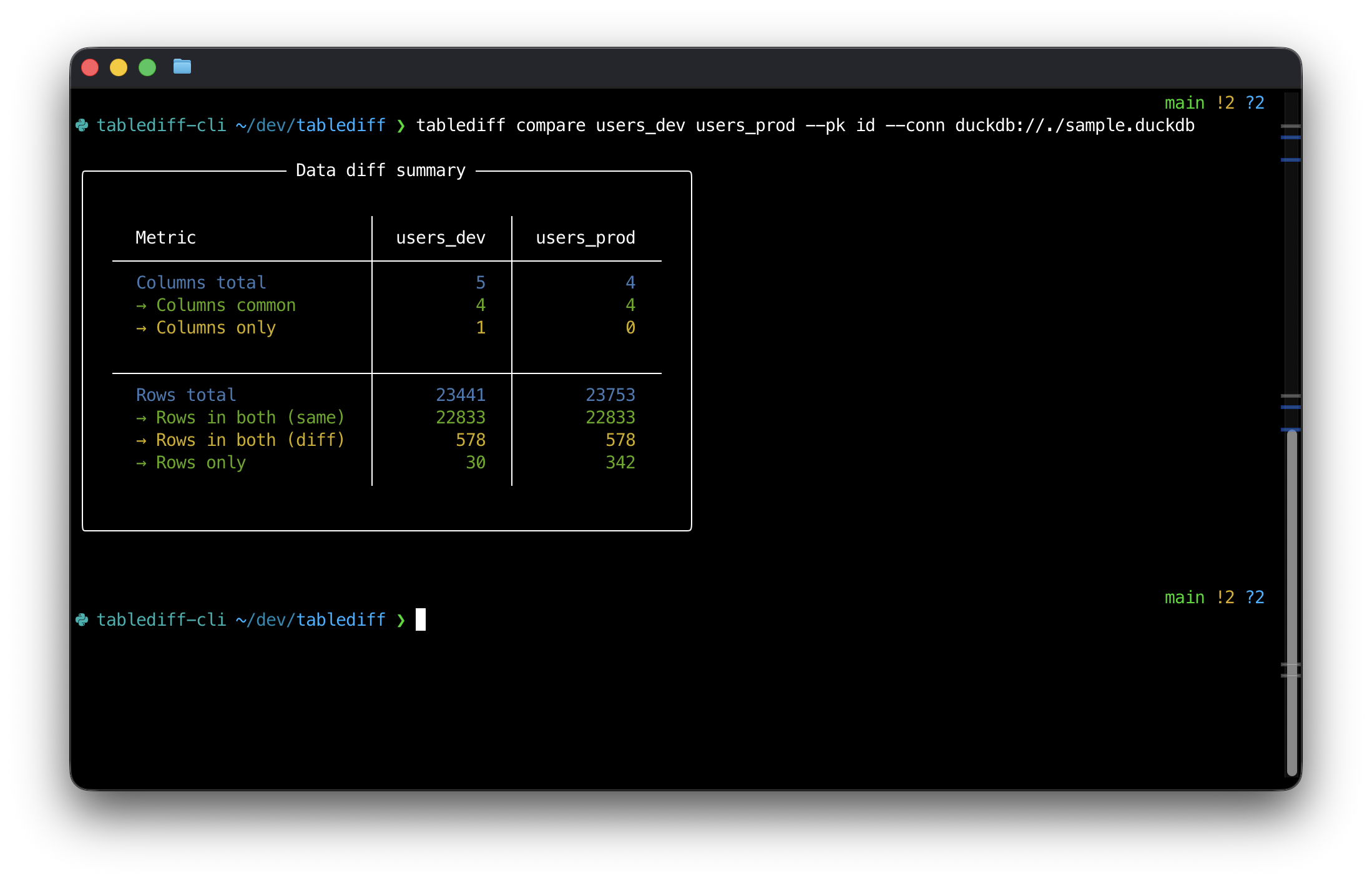
CLI tool for data diffing between two tables:
Installation
The package is available in PyPi and can be installed by specifying the package name and the adapter for your database.
Currently it was tested with DuckDB and Snowflake, but should work with all adapters that reladiff supports:
| Adapter | Command |
|------------|-----------------------------------------------|
| DuckDB | pip install tablediff-cli |
| Snowflake | pip install tablediff-cli[snowflake] |
| MySQL | pip install tablediff-cli[mysql] |
| PostgreSQL | pip install tablediff-cli[postgresql] |
| BigQuery | pip install tablediff-cli[bigquery] |
| Clickhouse | pip install tablediff-cli[clickhouse] |
| Presto | pip install tablediff-cli[presto] |
| Oracle | pip install tablediff-cli[oracle] |
| Trino | pip install tablediff-cli[trino] |
| Vertica | pip install tablediff-cli[vertica] |
To install all available adapters try:
pip install tablediff-cli[all]
Requires Python 3.10+. Technically can be downported to earlier versions, let me know if you need it.
Usage
Once installed, use command-line to run the diffing process:
tablediff compare \
  TABLE_A \
  TABLE_B \
  --pk PRIMARY_KEY \
  --conn CONNECTION_STRING [OPTIONS]
- tables should be in format
table_nameorschema.table_nameordatabase.schema.table_name- for Snowflake use all identifiers in UPPERCASE
--pkis the primary key column (should exist in both tables)--connis the database connection string
Schema-only comparison:
tablediff schema \
  TABLE_A \
  TABLE_B \
  --conn CONNECTION_STRING [--conn2 CONNECTION_STRING]
CSV comparison (same options as for compare):
tablediff files \
  FILE_A \
  FILE_B \
  --pk PRIMARY_KEY [OPTIONS]
Cross-Database Comparison
You can compare tables across different databases using --conn and --conn2:
tablediff compare \
  TABLE_A \
  TABLE_B \
  --pk PRIMARY_KEY \
  --conn CONNECTION_A \
  --conn2 CONNECTION_B [OPTIONS]
--conn- connection string for TABLE_A--conn2- connection string for TABLE_B
Connection strings
Here are a could of examples of connection strings:
-
DuckDB
duckdb://<file_path> -
Snowflake
"snowflake://<user>[:<password>]@<account>/<database>/<SCHEMA>?warehouse=<WAREHOUSE>&role=<role>[&authenticator=externalbrowser]"
For other databases check docs for reladiff.
Examples
Diffing in DuckDB (same database):
tablediff compare \
  users_prod users_dev \
  --pk id --conn duckdb://./sample.duckdb
Diffing across two DuckDB databases:
tablediff compare users users --pk id \
  --conn duckdb://./prod.duckdb \
  --conn2 duckdb://./dev.duckdb
Diffing in Snowflake:
tablediff compare DEV.MART.USERS PROD.MART.USERS \
  --pk USER_ID \
  --conn "snowflake://..."
Cross-database diffing (Snowflake to DuckDB):
tablediff compare PROD.MART.USERS local_users \
  --pk USER_ID \
  --conn "snowflake://..." \
  --conn2 duckdb://./local.duckdb
Additional options
--extended
If you pass --extended flag you'll get an extended output that will show you:
- Common and unique columns in both tables
- For rows, it will return:
- 5 id's that are not matching
- 5 id's that exist only in table A and B
--where
Allows to pass additional WHERE condition that will be applied to both tables (compare/files):
tablediff compare table_a table_b \
  --pk id \
  --conn snowflake://... \
  --where "created_at >= CURRENT_DATE - 7 and status = 'active'"
Package development
Clone the repo:
git clone git@github.com:oleg-agapov/tablediff.git
Now setup the local environment (I'm using uv):
# Setup virtual environment
uv sync --extra dev
source .venv/bin/activate

# Install pre-commit hooks
pre-commit install

# Run tests
pytest
Pre-commit hooks are configured to run automatically on every commit. To run them manually on all files:
pre-commit run --all-files
Generating sample DuckDB for local testing
Use Python script:
python scripts/generate_duckdb_test_data.py \
  --db-path sample.duckdb \
  --prod-rows 23753 \
  --dev-remove-rows 342 \
  --dev-add-rows 30 \
  --dev-null-status-rows 578
And then:
tablediff compare users_dev users_prod --pk id --conn duckdb://./sample.duckdb
Future roadmap
- [x] WHERE conditions
- [x] Add tests
- [x] Cross-database comparison
- [x] Schema-only comparison (with data types)
- [x] Add pre-commit hooks
- [ ] Column-by-column comparison (# of rows that are different)
- [ ] Add dbt support
