
Pspg
Unix pager (with very rich functionality) designed for work with tables. Designed for PostgreSQL, but MySQL is supported too. Works well with pgcli too. Can be used as CSV or TSV viewer too. It supports searching, selecting rows, columns, or block and export selected area to clipboard.
Install / Use
/learn @okbob/PspgREADME

pspg - Postgres Pager
Everybody who uses psql also uses the less pager. Which, while it works well, has no special
support for tabular data. I found a few projects, but none was good enough for this purpose.
Thus I decided to write a small specialized pager to use as a psql pager.

This pager can be used from the following command line clients, too:
mysqlsqlitepgclimonetdbTrino (formerly Presto SQL)usqlsqlcl(for oracle)nushell
Main target
- ability to freeze the first few rows, or first few columns
- ability to sort data by the specified numeric column
- ability to use fancy themes - like
mcvieworFoxPro- http://okbob.blogspot.com/2019/12/pspg-themes-what-you-use-it.html - mouse is supported and used
- ability to copy a selected range to the clipboard
Installation and basic configuration
The pspg can be simply installed from Debian (Ubuntu) repositories. RedHat (Fedora) repositories
contains pspg too:
# Debian (Ubuntu)
sudo apt-get install pspg

# RedHat (Fedora)
sudo dnf install pspg
Basic configuration is very simple - just set system environment variable PSQL_PAGER:
export PSQL_PAGER='pspg'
or with some common options (-b means blackwhite theme, -X preserve content after exit):
export PSQL_PAGER='pspg -X -b'
Attention: options used in command line has higher priority than options specified in configuration file (~/.pspgconf).
Native installation on MS Windows is not supported, but pspg works well inside wsl2.
Inside wsl2 environment, the installation is same like on used Linux system.
Installation on macOS/homebrew is simple by brew install pspg.
Video presentation
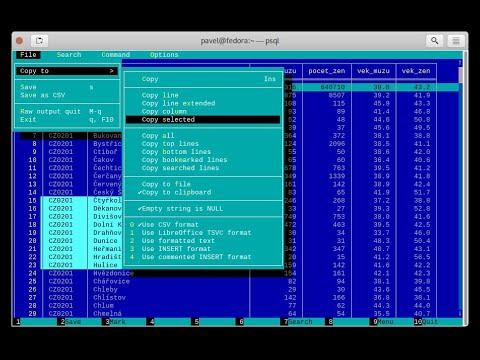
Screenshots


Options
[pavel@localhost ~]$ pspg --help
pspg is a Unix pager designed for table browsing.

Usage:
  pspg [OPTION] [file]

General options:
  --about                  about authors
  --help                   show this help
  -V, --version            show version
  --info                   show info about libraries and system
  --direct-color           force direct-color terminal mode
  -f, --file=FILE          open file
  -F, --quit-if-one-screen
                           quit if content is one screen
  --clipboard-app=NUM      specify app used by copy to clipboard (1, 2, 3, 4)
  --esc-delay=NUM          specify escape delay in ms (-1 inf, 0 not used, )
  --interactive            force interactive mode
  --ignore_file_suffix     don't try to deduce format from file suffix
  --ni                     not interactive mode (only for csv and query)
  --no-watch-file          don't watch inotify event of file
  --no-mouse               don't use own mouse handling
  --no-progressive-load    don't use progressive data load
  --no-sigint-search-reset
                           without reset searching on sigint (CTRL C)
  --no-sleep               without waits against flickering
  --no_xterm_mouse_mode    don't use optional xterm mouse mode
  --only-for-tables        use std pager when content is not table
  --on-sigint-exit         exit on sigint(CTRL C or Escape)
  --pgcli-fix              try to fix some pgcli related issues
  --querystream            read queries from stream forever
  --quit-on-f3             exit on F3 like mc viewers
  --rr=ROWNUM              rows reserved for specific purposes
  --stream                 read input forever
  -X, --reprint-on-exit    preserve content after exit

Output format options:
  -a, --ascii              force ascii
  -b, --blackwhite         black-white style
  -s, --style=N            set color style number (0..22)
  --bold-labels            row, column labels use bold font
  --bold-cursor            cursor use bold font
  --border                 type of borders (0..2)
  --double-header          header separator uses double lines
  --force-uniborder        replace ascii borders by unicode borders
  --highlight-odd-rec      highlights odd records (when it is supported by style)
  --hide-header-line       hides header line (between column names and data)
  --ignore-short-rows        rows with wrong column numbers are ignored
  --null=STRING            STRING used instead NULL

Searching options
  -g --hlite-search, -G --HILITE-SEARCH
                           don't highlight lines for searches
  -i --ignore-case         ignore case in searches that do not contain uppercase
  -I --IGNORE-CASE         ignore case in all searches

Interface options:
  -c, --freezecols=N       freeze N columns (0..9)
  --less-status-bar        status bar like less pager
  --line-numbers           show line number column
  --menu-always            show top bar menu every time
  --no-bars, --no-commandbar, --no-topbar
                           don't show bottom, top bar or both
  --no-cursor              row cursor will be hidden
  --no-last-row-search     don't use the last pattern when starting a new search
  --no-scrollbar           don't show scrollbar
  --no-sound               don't use beep when scroll is not possible
  --tabular-cursor         cursor is visible only when data has table format
  --vertical-cursor        show vertical column cursor

Input format options:
  --csv                    input stream has csv format
  --csv-separator          char used as field separator
  --csv-header [on/off]    specify header line usage
  --skip-columns-like="SPACE SEPARATED STRING LIST"
                           columns with substr in name are ignored
  --csv-trim-width=NUM     trim value after NUM chars
  --csv-trim-rows=NUM      trim value after NUM rows
  --tsv                    input stream has tsv format

On exit options:
  --on-exit-reset          sends reset terminal sequence "\33c"
  --on-exit-clean          sends clean terminal sequence "\033[2J"
  --on-exit-erase-line     sends erase line terminal sequence "\33[2K\r"
  --on-exit-sgr0           sends sgr0 terminal sequence "\033[0;10m"

Watch mode options:
  -q, --query=QUERY        execute query
  -w, --watch time         the query (or read file) is repeated every time (sec)

Connection options:
  -d, --dbname=DBNAME      database name
  -h, --host=HOSTNAME      database server host (default: "local socket")
  -p, --port=PORT          database server port (default: "5432")
  -U, --username=USERNAME  database user name
  -W, --password           force password prompt

Debug options:
  --log=FILE               log debug info to file
  --wait=NUM               wait NUM seconds to allow attach from a debugger
pspg shares a lot of key commands with the less pager or the vi editor.
Options can also be passed within the PSPG environment variable. Configuration
file is processed first. Options from the PSPG variable are processed afterwards
step and command line options are processed at the end. One option can
be processed multiple times, the last value wins.
Environment variables
| Name | Usage |
|---------------|-------------------------------------------|
|PSPG | can hold same options like command line |
|PSPG_CONF | path to configuration file |
|PSPG_HISTORY | path to file pspg's readline history file |
Example of config file
The default path of config file is ~/.pspgconf.
The fields names can be different than from related command line options:
ascii_menu = false
bold_labels = false
bold_cursor = false
ignore_case = false
ignore_lower_case = false
no_cursor = false
no_sound = false
no_mouse = false
less_status_bar = false
no_highlight_search = false
no_highlight_lines = false
force_uniborder = false
show_rownum = false
without_commandbar = false
without_topbar = false
vertical_cursor = false
on_sigint_exit = false
no_sigint_search_reset = false
double_header = false
quit_on_f3 = false
pgcli_fix = false
xterm_mouse_mode = true
show_scrollbar = true
menu_always = false
empty_string_is_null = true
last_row_search = true
progressive_load_mode = true
highlight_odd_rec = false
hide_header_line = false
on_exit_reset = false
on_exit_clean = false
on_exit_erase_line = false
on_exit_sgr0 = false
direct_color = false
theme = 16
border_type = 2
default_clipboard_format = 0
clipboard_app = 0
hist_size = 500
esc_delay = -1
Themes
|Code| Name | |---:|---------------------------------------| | 0 | black & white | | 1 | Midnight Commander like | | 2 | FoxPro like | | 3 | Pdmenu like | | 4 | White theme | | 5 | Mutt like | | 6 | PCFand like | | 7 | Green theme
Related Skills
feishu-drive
328.6k|
things-mac
328.6kManage Things 3 via the `things` CLI on macOS (add/update projects+todos via URL scheme; read/search/list from the local Things database)
clawhub
328.6kUse the ClawHub CLI to search, install, update, and publish agent skills from clawhub.com
asset_management
Amazon Q Developer Guidance for AMBP Quick Start for New Amazon Q Sessions 1. Project Overview AMBP (Asset Management Business Platform) is a modern web-based asset management system bu
