WindowsOEMKeyFinder
Backup Windows Key, Windows Product Key Finder, Windows OEM Find Finder
Install / Use
/learn @oicu/WindowsOEMKeyFinderREADME
使用 vbs、PowerShell 脚本查看并备份 Win7/Win8/Win10 当前系统使用的序列号、主板里内置的 OEM 序列号及描述。
解决预装 OEM 系统的电脑,在重装系统后找不到原来序列号的问题。
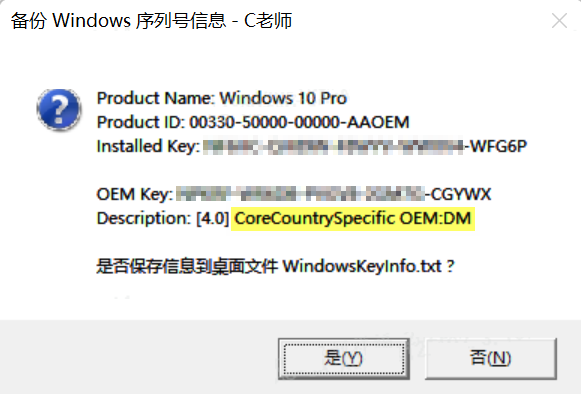
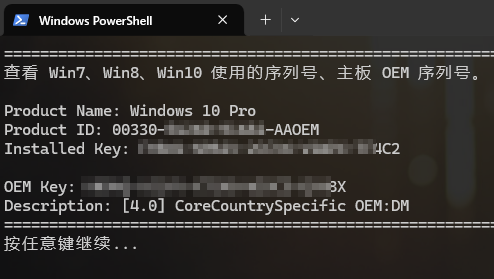
Description 的含义:
- [4.0] CoreCountrySpecific OEM:DM 表示这个序列号可激活家庭中文版。
- [4.0] Professional OEM:DM 表示这个序列号可激活专业版。
- 如果有 OEM 序列号但描述为空,则这个序列号和当前系统不匹配,比如当前系统是 Win10,但 OEM 序列号是用于 Win8 的。
vbs 脚本经过上万台电脑测试,如果安装密钥 Installed Key 是 BBBBB-BBBBB-BBBBB-BBBBB-BBBBB,先用slmgr /ipk导入其他密钥,再导入原来的密钥!直接导入原来密钥不会触发更改。
vbs 脚本部分功能参考:
https://winaero.com/how-to-view-your-product-key-in-windows-10-windows-8-and-windows-7/ https://gist.github.com/craigtp/dda7d0fce891a087a962d29be960f1da
PowerShell 脚本未经过大量测试,可靠性未知。
当如,除了 vbs 脚本,还有更简单的命令行查询 OEM 密钥的方式。
cmd 查询 OEM 序列号的方法:
wmic path SoftwareLicensingService get OA3xOriginalProductKey
PowerShell 查询 OEM 序列号的方法:
Get-WmiObject -query 'select * from SoftwareLicensingService' | Select OA3xOriginalProductKey
(Get-WmiObject -query 'select * from SoftwareLicensingService').OA3xOriginalProductKey
(Get-CimInstance -query 'select * from SoftwareLicensingService').OA3xOriginalProductKey
Related Skills
node-connect
351.4kDiagnose OpenClaw node connection and pairing failures for Android, iOS, and macOS companion apps
frontend-design
110.7kCreate distinctive, production-grade frontend interfaces with high design quality. Use this skill when the user asks to build web components, pages, or applications. Generates creative, polished code that avoids generic AI aesthetics.
openai-whisper-api
351.4kTranscribe audio via OpenAI Audio Transcriptions API (Whisper).
qqbot-media
351.4kQQBot 富媒体收发能力。使用 <qqmedia> 标签,系统根据文件扩展名自动识别类型(图片/语音/视频/文件)。