
FuncToWeb
Type hints → Web UI. Minimal-boilerplate web apps from Python functions.
Install / Use
/learn @offerrall/FuncToWebREADME
Func To Web 0.9.13




Type hints → Web UI. Minimal-boilerplate web apps from Python functions.
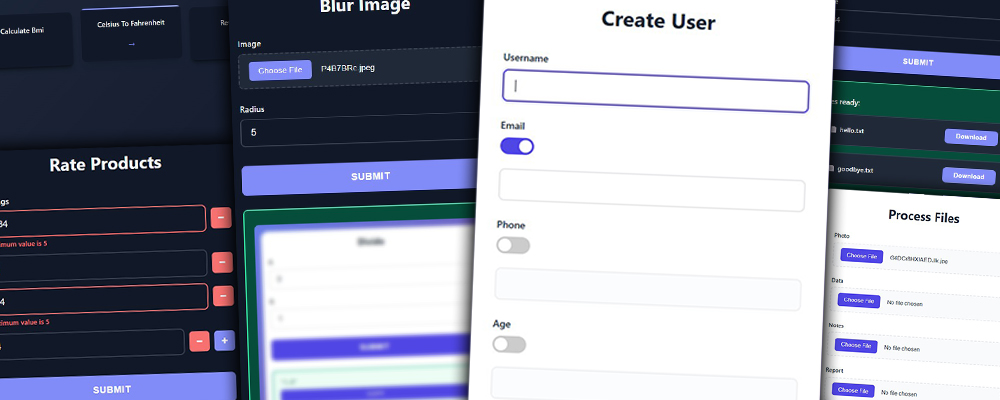
FuncToWeb is actively maintained and used in production by myself and the community (featured in Awesome Python). The current version (0.9.x) is stable and production-ready. Version 1.0.0 is in active development with major improvements including function chaining with shared context and cleaner architecture for long-term maintainability. Until then, only critical bug fixes will be released.
Quick Start (30 seconds)
<table> <tr> <td width="50%">pip install func-to-web
from func_to_web import run

def divide(a: float, b: float):
    return a / b

run(divide)
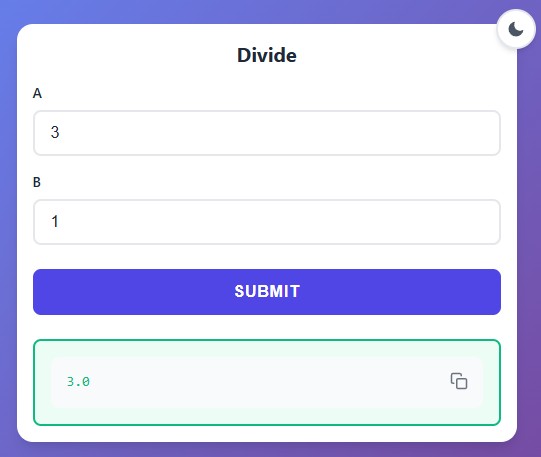
Open http://127.0.0.1:8000 → You have a working web app!
Complete Feature Overview
Complete documentation with examples and screenshots for each feature:
<table> <tr> <td width="50%">Input Types
- Basic Types:
int,float,str,bool,date,time - Special Types:
Color,Email - File Uploads:
File,ImageFile,DataFile,TextFile,DocumentFile - Dynamic Lists:
list[Type]with add/remove buttons - Optional Fields:
Type | Nonewith toggle switches - Dropdowns: Static (
Literal,Enum) or Dynamic (Dropdown(func)) - Validation: Pydantic constraints (min/max, regex, list validation)
Output Types
- Images & Plots: Return PIL Images and Matplotlib figures
- File Downloads: Return
FileResponsefor any file type - Tables: Return
list[dict],list[tuple], Pandas, NumPy, or Polars DataFrames - Multiple Outputs: Return tuples/lists combining text, images, tables, and files
Features
- Authentication: Username/password protection
- Multiple Functions & Groups: Serve multiple functions with index page or organize them into collapsible groups
- Dark Mode: Automatic theme switching
- Server Options: Custom host, port, path and more
- Large Files: Optimized streaming (GB+ files)
- Progress Bars: Real-time upload/download tracking
- Concurrency: Handles multiple heavy requests and users simultaneously.
- Error Handling: Beautiful error messages
Full Documentation API Reference
Perfect For
- ✅ Rapid Prototyping - From pure Python function to usable web interface in seconds.
- ✅ Image Processing - Upload, process, and download images with PIL/Pillow.
- ✅ Data Science & Reporting - Instantly publish Pandas/Polars DataFrames and matplotlib plots without frontend code.
- ✅ High-Performance File Transfer - Stream uploads and downloads at native network/disk speeds. Handles massive files efficiently with minimal memory footprint.
- ✅ Secure Internal Apps - Admin panels, dashboards, and team tools protected by built-in authentication.
Quick Examples
DIY AirDrop / LocalSend (Very Fast File Transfers)
from pathlib import Path
from func_to_web import run
from func_to_web.types import File

desktop_path = Path.home() / "Desktop"

def upload_files(
    files: list[File],
):
    for f in files:
        print(f"Uploaded file: {f}")
    return "Files uploaded successfully!"

run(upload_files, auto_delete_uploads=False, uploads_dir=desktop_path)
Secure Admin Panel
Protect sensitive tools with built-in authentication in one line.
import subprocess
from typing import Literal
from func_to_web import run

# 🔒 MANDATORY: Use HTTPS (Nginx).

def restart_service(service: Literal['nginx', 'gunicorn', 'celery']):
    """Restarts a system service."""
    # check=True raises an error shown in the Web UI if the command fails
    subprocess.run(["sudo", "supervisorctl", "restart", service], check=True)
    return f"✅ Service {service} restarted."

run(restart_service, auth={"admin": "super_secret_password"})
QR Code Generator
Generate QR codes instantly from text.
import qrcode
from func_to_web import run

def make_qr(text: str):
    """Returns a QR code image for the given text."""
    return qrcode.make(text).get_image()

run(make_qr)
PDF Merger
Merge multiple PDF files into a single document instantly.
from io import BytesIO
from pypdf import PdfWriter
from func_to_web import run
from func_to_web.types import DocumentFile, FileResponse

def merge_pdfs(files: list[DocumentFile]):
    """Upload PDFs and get a single merged file back."""
    merger = PdfWriter()
    for pdf in files:
        merger.append(pdf)

    output = BytesIO()
    merger.write(output)

    return FileResponse(data=output.getvalue(), filename="merged.pdf")

run(merge_pdfs)
Check the examples/ folder for +20 complete examples (Covers all features)
Requirements
Core:
- Python 3.10+
- FastAPI, Uvicorn, Pydantic, Jinja2, python-multipart, itsdangerous
Optional (for extended functionality):
- Pillow, Matplotlib, Pandas, NumPy, Polars
Development:
- pytest, mkdocs, mkdocs-material
Run Tests
pytest tests/ -v
MIT License • Made by Beltrán Offerrall • Contributions welcome!
