
MultiMiner
Graphical application for crypto-coin mining
Install / Use
/learn @nwoolls/MultiMinerREADME
MultiMiner
Your coins. Your pools. Your way.
MultiMiner is a graphical application for crypto-coin mining on Windows, OS X and Linux. MultiMiner simplifies switching individual devices (GPUs, ASICs, FPGAs, CPUs) between crypto-currencies such as Bitcoin, Litecoin, Ethereum, Monero, Zcash, and more, while also allowing you to manage any mining appliances on your network (AntMiners, G-Black, Raspberry Pi controllers, Spondoolies and more).
- Installation
- Getting Started
- Local Devices
- Network Devices
- Remote Management
- Contributing
- Tips & Tricks
MultiMiner uses the underlying mining engine (BFGMiner) to detect available mining devices and then presents a user interface for selecting the coins you'd like to mine.

MultiMiner supports mining coins that use the following algorithms out-of-the-box:
- SHA256
- Scrypt
- CryptoNight
- Equihash
- Ethash
- Pascal
- Groestl
- Keccak
- Lyra2RE
- NeoScrypt
- Quark
- Scrypt-Jane
- Scrypt-N
- X11
- X13
- X14
- X15
Additionally, MultiMiner allows the user to add any unsupported algorithm, coin, and miner, as long as there is a CGMiner, BFGMiner or SGMiner fork that supports the algorithm.
See the following topics for more information on adding unsupported algorithms:
MultiMiner ships with a console application (TUI) for low power devices such as ARM-based miners.
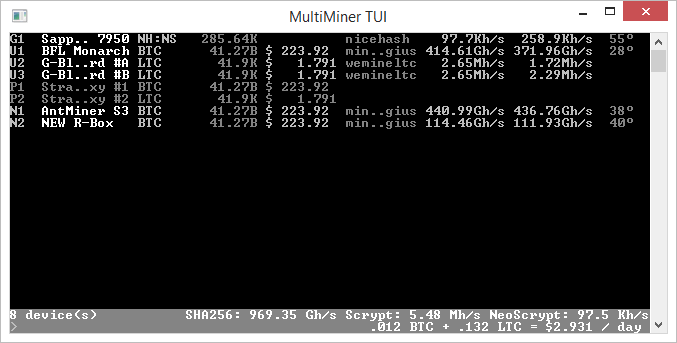
MultiMiner offers several views, allowing you to display as much or as little information as you like.

For new users, MultiMiner includes a Getting Started wizard that walks you through selecting an engine, a coin, and a pool.

MultiMiner will automatically download and install the latest version of [BFGMiner][2], making it simple for the new user to get started.

You can then use the Configure Pools dialog to setup each coin that you would like to mine along with their pools, including support for load balancing.

MultiMiner supports automatically mining the most profitable coins based on a set of configurable strategies. Profitability information is updated regularly from CoinWarz and WhatToMine.

MultiMiner supports features such as relaunching crashed miners, starting with Windows, minimizing to the notification area, and mining on startup.

You can also use the interface provided by MultiMiner to adjust advanced settings such as API white-listing, disabling GPU mining, and automatically adjusting mining intensity based on the computer's idle time.

Downloads
You can download installers and zip files for Windows, OS X, Linux and Mono on the [GitHub Releases page][12].
Drivers
Depending on your OS and the mining devices you plan on using you will need one or more of the following drivers / kernel extensions installed:
Installation
FAQ
- How do I restart the setup wizard? How do I delete all my MultiMiner settings and start over?
- Reset settings by deleting the contents of %appdata%\MultiMiner (type that into the address bar in Windows Explorer). Be sure to quit MultiMiner before you delete the contents. Then, restart MultiMiner.
- Should I modify my GPU settings (overclock, undervolt, etc) with a utility like MSI Afterburner, or via config flags in MultiMiner?
- Utilities like MSI Afterburner are recommended. Relying on BFGMiner (via the config flags in MultiMiner) to do the clocking and fan speed does work, but if the BFGMiner crashes it leaves things over/under-clocked/volted. GPU utilities seems to be more reliable.
- I found a question and answer in the Support thread below (or through gosh darned trial and error) that I wish had been here in the FAQ - how do I save the next visitor all the trouble I went through?
- Simple! Make a pull request to add to the FAQ, or email your Q and A to cooper dot marcus at gmail dot com (Qs without As will be ignored) and he'll add it to the FAQ for you.
Support
Please report bugs and request enhancements at issues.multiminerapp.com. For peer support and discussion, official forums for MultiMiner can be found [here][15].
Source Code
The source code is structured in such a way that it should be fairly easy to use and re-use for other projects:
- MultiMiner.Xgminer is an assembly for controlling the BFGMiner executable - e.g. launching and enumerating devices
- MultiMiner.Xgminer.Api assists in communicating with the underlying miner via the RPC API
- MultiMiner.CoinWarz assists in consuming the cypto-currency information available at CoinWarz.com
- MultiMiner.WhatToMine assists in consuming the cypto-currency information available at WhatToMine.com
- MultiMiner.Engine is an assembly that can be used to interact with all functionality found in MultiMiner, but without a UI - useful for creating front-ends for other OS's
- MultiMiner.Win is the Windows Forms application
Source Code Example
This simple example shows how to use [MultiMiner.Xgminer.dll][16] and [MultiMiner.Xgminer.Api.dll][17] to install BFGMiner, iterate through available mining devices, and launch the miner.
Afterwards the BFGMiner [RPC API][18] is used to output the miner hashrate for a minute before the mining process is stopped. You can try this code out yourself in the [MultiMiner.Example][19] project.
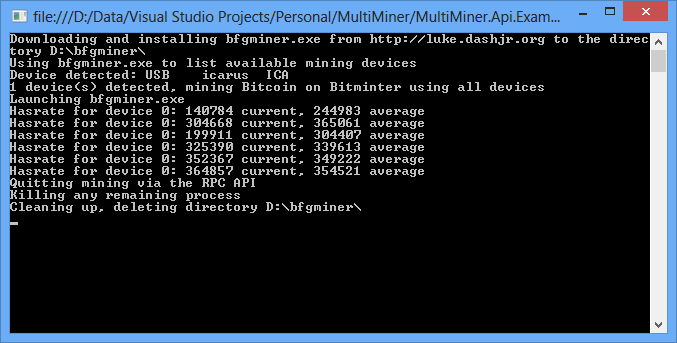
//examples of using MultiMiner.Xgminer.dll and MultiMiner.Xgminer.Api.dll

//download and install the latest version of BFGMiner
const string executablePath = @"D:\bfgminer\";
const string executableName = "bfgminer.exe";

Console.WriteLine("Downloading and installing {0} from {1} to the directory {2}",
    executableName, Xgminer.Installer.GetMinerDownloadRoot(), executablePath);

//download and install BFGMiner from the official website
Xgminer.Installer.InstallMiner(executablePath);
try
{
    //create an instance of Miner with the downloaded executable
    MinerConfiguration minerConfiguration = new MinerConfiguration()
    {
        ExecutablePath = Path.Combine(executablePath, executableName)
    };
    Miner miner = new Miner(minerConfiguration);

    //use it to iterate through devices
    List<Device> deviceList = miner.ListDevices();

    Console.WriteLine("Using {0} to list available mining devices", executableName);

    //output devices
    foreach (Device device in deviceList)
        Console.WriteLine("Device detected: {0}\t{1}\t{2}", device.Kind, device.Driver, device.Name);

    //start mining if there are devices
    if (deviceList.Count > 0)
    {
        Console.WriteLine("{0} device(s) detected, mining Bitcoin on Bitminter using all devices", deviceList.Count);

        //setup a pool
        MiningPool pool = new MiningPool()
        {
            Host = "mint.bitminter.com",
            Port = 3333,
            Username = "nwoolls_deepcore",
            Password = "deepcore"
        };
        minerConfiguration.Pools.Add(pool);

        //specify algorithm
        minerConfiguration.Algorithm = CoinAlgorithm.SHA256;

        //disable GPU mining
        minerConfiguration.DisableGpu = true;

        //specify device indexes to use
        for (int i = 0; i < deviceList.Count; i++)
            minerConfiguration.DeviceDescriptors.Add(deviceList[i]);

        //enable RPC API
