
Xoxo
Auto bash/shell script video play, download, stream, bypass, text to speech
Install / Use
/learn @nurd1n/XoxoREADME
XOXO Version 1.1.8
XOXO merupakan auto bash/shell script yang bisa digunakan untuk play video, download video, download mp3, edit/render video, live stream, play/record tv, text to speech.
Fitur
- [x] Play Video (Local Disk, Youtube, Vidio)
- [x] Download Video (Youtube, Vidio, Facebook, Instagram)
- [x] Download Mp3 Youtube
- [ ] Youtube Content Manager (*belum tersedia)
- [x] Live Stream (Youtube, Facebook)
- [x] Bypass Copyright Video
- [x] Play TV
- [x] Record TV
- [x] Text To Speech
- [x] Cut Video
Alat yang wajib diinstall (khusus windows)
- Git for windows >> https://git-for-windows.github.io/
- Python 3 ke atas (3.4.4 / 3.5.2 / 3.6.0) >> https://www.python.org/downloads/windows/
- Ffmpeg >> https://ffmpeg.org/download.html
Instalasi utama windows
Jalankan command berikut pada git bash, di folder yang diinginkan
git clone -b master https://github.com/nurd1n/Xoxo
Atau bisa juga download file zip langsung : https://github.com/nurd1n/Xoxo/archive/master.zip
Instalasi utama linux ubuntu
Masuk ke root kemudian jalankan command berikut
wget -q --no-check-certificate https://raw.githubusercontent.com/nurd1n/Xoxo/master/bin/linux_ubuntu.sh -O - | bash -
kemudian clone xoxo di folder yang diinginkan
git clone -b master https://github.com/nurd1n/Xoxo && cd Xoxo && chmod 755 *.sh
Video panduan
- Install git bash, python 3.6.0, ffmpeg, clone xoxo

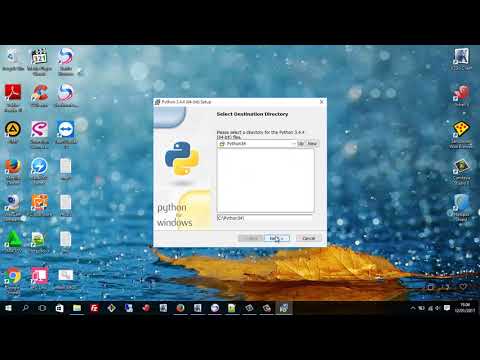
- Jika python 3.6.0 tidak dapat diinstall, ganti ke versi 3.4.4, berikut panduannya
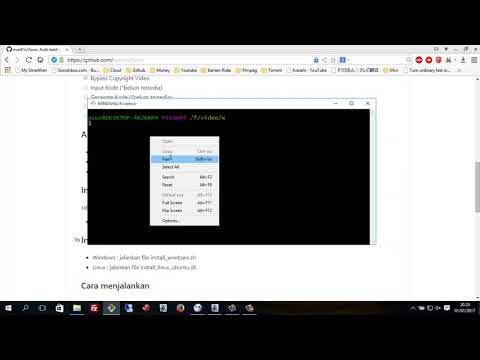
- Git clone xoxo
Instalasi tambahan
- Windows : jalankan file
install_windows.sh - Linux : jalankan command
install_linux_ubuntu.sh
Install khusus linux desktop lxde x2go + xoxo
Jika anda ingin membuat linux (ubuntu 15, 64bit)desktop lxde x2go dan sekaligus clone xoxo, bisa menggunakan command berikut :
wget -q --no-check-certificate https://raw.githubusercontent.com/nurd1n/Xoxo/master/bin/linux_desktop_lxde.sh && chmod 755 * && ./linux_desktop_lxde.sh
Cara menjalankan
Klik 2 kali file xoxo.sh , atau juga bisa masukkan command ./xoxo.sh pada git bash atau terminal jika menggunakan linux
Update
Untuk update, buka git bash here di folder xoxo, kemudian masukkan command berikut pada git bash :
git stashgit pullgit submodule update --init --recursive
Credits
Contributors script
Group support & bugs report
Facebook : https://www.facebook.com/groups/1631160323785934/
Kontak dan saran
Kontak, saran, pendapat dll bisa menghubungi saya di facebook : https://www.facebook.com/nurdiantocyk
Disclaimer
Saya selaku penanggungjawab script menyatakan :
- Tidak ada file, command, virus atau program jahat yang membahayakan di dalam script
- Perangkat editing video berupa ffmpeg, LEGAL dan GRATIS
- Script download video/mp3 dan youtube uploader hanyalah command line bash dan bukan merupakan alat/perangkat utama
Donasi
Berhubung ada beberapa orang yang ingin memberikan donasi, maka bisa dilakukan melalui paypal berikut ini

Related Skills
qqbot-channel
353.1kQQ 频道管理技能。查询频道列表、子频道、成员、发帖、公告、日程等操作。使用 qqbot_channel_api 工具代理 QQ 开放平台 HTTP 接口,自动处理 Token 鉴权。当用户需要查看频道、管理子频道、查询成员、发布帖子/公告/日程时使用。
docs-writer
100.7k`docs-writer` skill instructions As an expert technical writer and editor for the Gemini CLI project, you produce accurate, clear, and consistent documentation. When asked to write, edit, or revie
model-usage
353.1kUse CodexBar CLI local cost usage to summarize per-model usage for Codex or Claude, including the current (most recent) model or a full model breakdown. Trigger when asked for model-level usage/cost data from codexbar, or when you need a scriptable per-model summary from codexbar cost JSON.
arscontexta
3.1kClaude Code plugin that generates individualized knowledge systems from conversation. You describe how you think and work, have a conversation and get a complete second brain as markdown files you own.
