
Novagallery
novaGallery - a beautiful and and ease to use php image gallery for your photos - flat file - no database required - modern responsive design
Install / Use
/learn @novafacile/NovagalleryREADME
novaGallery
novaGallery is a beautiful php image gallery with the focus on your images, trimmed for ease of use and low demands on web space. You just need a webserver with PHP 8.X support. No database is required. Simple to use, easy customizable and beautiful.
Official Product Page: novaGallery.org
Features
Overview
- Albums: Directories are rendered as albums
- Sub-Albums: Can be used for more detailed organisation
- Preview images for albums: Automatically generate an album preview image
- Photo overview: All photos are displayed sorted by creation date or name
- Lightbox: View your photos in large format, hiding everything that is distracting
- Slideshow: All photos in an album, can be displayed and presented via click (or keyboard) in the lightbox view
- Use your own upload method: Simply upload the photos into the gallery folder (e.g. via FTP) and the photos are already online
- Thumbnails: Automatic generation of thumbnails
- File compression: Photos with high file size, are automatically compressed with very little loss.
- Supported Images: JPEG, PNG, GIF, WebP are supported.
- Custom Themes: With just a little knowledge of CSS and HTML, the look can be customized.
- Languages: You can run the gallery in your langauage
- Addons: Addons allow you to extend the features of novaGallery:
- Private Mode: You can set a password to protect your gallery from public access.
- Robots Meta Tag: Set the visibility of your content for bots
- Pro Version: Changes your novaGallery to novaGallery Pro and removes contributions
- more addons coming soon
Screenshots
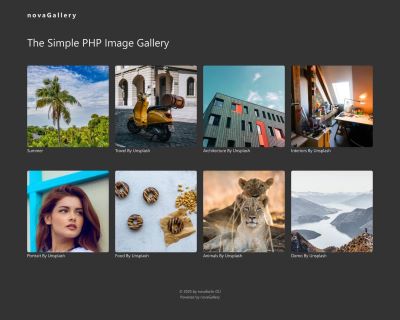
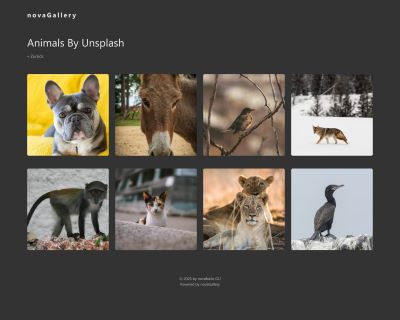
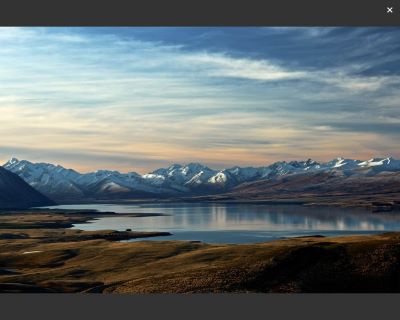
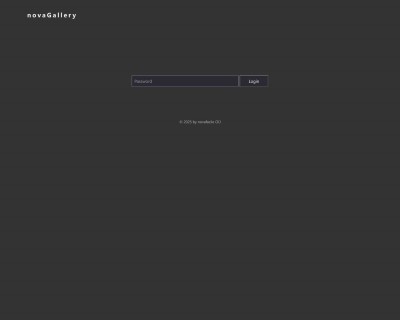
Demo
Requirements
- Apache web server or similar
- Apache: enabled mod_rewrite and .htaccess support
- Other webserver (e.g. nginx): Individual settings in config to route all requests throw index.php
- PHP 8.x
- PHP-GD Extension
- PHP Exif Support
Setup
Installation
- Download latest version: Download novaGallery (latest version)
- Unzip files
- Upload files to your webspace
- Copy
config/site.example.phptoconfig/site.php - Edit the config in
config/site.php- Set URL to novaGallery including http or https
- Upload your photos into galleries
- Enjoy your new photo gallery
Configuration
- Every folder in galleries is a gallery
- In
config/site.phpyou can change some basic informations, image sizes and other settings - That's it :-)
Configuration for Installation in Subdir
- Set RewriteBase in .htaccess:
RewriteBase /subdir/(Be sure, that you set the URL path, without the domain and with starting and trailing slash) - Set url in
config/site.phpwith full subdir path
Manage Images
- Add Photos: Just upload the new photo to the server into the correct album (e.g via FTP)
- Delete a Photos: Just delete the photo at the server. To save web space it's recommended to delete the cached files in cache folder also.
- Delete an Album: Just delete the whole album (directory) at the server. To save web space it's recommended to delete the cached files in cache folder also.
- Reset Cache: Each gallery has its own folder in the cache directory (default: YOUR_PATH/storage/cache), identical to the path in the gallery folder. Simply delete the corresponding gallery folder in the cache directory.
Themes
- Two basic themes are included: novagallery (default, dark) and novagallery-light
- To change the theme, just change the theme name in
config/site.php - Creating a new template is quite simple and works with basic PHP without any extra template engine.
- To create a new template, the basic template (based on Bootstrap 5) can be duplicated, customized and activated in the settings.
Languages
- Some languages are already added (English, German, Spanisch, French, Finnish, Italian, Dutch, Portuguese)
- Set your language in
config/site.php - You can create easily your own language. Just copy one of the language files, translate it and save it with your language code
- It would be nice, if you let us know if you created a new language file. Just send us a message or create a pull request.
Addons
- novaGallery 2 can be extended with addons
- The addon feature is experimental. The functionality including hooks and configuration may still change completely.
- To activate the addons feature, just copy
config/addons.example.phptoconfig/addons.php - Upload your addon to the
addons-directory - Add the config of the addons config-file (
config/addons.php) and activate it:
  "The Addon Name": {
    "enabled": true
  }
- Be careful, the file must contain valid JSON so that the addons config can be loaded
Private Mode
- In novaGallery 2, the private mode is build as addon. This is included as basic addon.
- To activate it, make sure that the Addons functionality is generally activated
- In
config/addons.phpyou can set a PHP password hash:
"Password Protection": {
    "enabled": false,
    "passwordHash": "HERE-YOUR-PASSWORD-HASH"
  },
- The password hash has to be created with the standard PHP function
password_hash() - If you can't generate a password hash by your own, you can use our password hash generator: Password Hash Generator
Nice to Know
- Supported images: JPEG, PNG, GIF, WebP (experimental)
- At the first time an album is opened, the thumbnails are generated. This may take a little time. After that the cached images are used for each visit.
- If you don't use an apache2 web server with .htaccess support (e.g. nginx), you have to set the required rewrite rules from the .htaccess file at the webserver config.
- WebP-Support is experimantal. The basics PHP-GD-Lib currently doesn't support generating thumbnails from WebP-images without additional software on the webserver.
- The thumbnail of animated GIFs is without animation. The animation is available in the lightbox view.
Troubleshooting
- Error 404 when clicking on an album or image:
- On Apache: mod_rewrite is not installed and/or enabled
- On Apache: htacces support is not enabled
- On nginx or other webserver: settings in server config to route all requests throw index.php is not enabled (similar mod_rewrite)
- novaGallery is installed in sub dir, but
RewriteBasein .htaccess is not set (or similar on other webserver)
- If thumbnails and images are not generated, in most cases it's one of the following problems:
- On Apache: mod_rewrite is not installed and/or enabled
- On Apache: htacces support is not enabled
- On nginx or other webserver: settings in server config to route all requests throw index.php is not enabled (similar mod_rewrite)
- PHP GD-Lib is not installed or/and activated
Configuration Details
All settings
| Setting Name | Description | Example |
|----------------------------|-------------------------------------------------------------------------|-------------------------------------------------------------|
| siteName | Name of the gallery | novaGallery |
| siteTitle | Title of the gallery, e.g. shown in the browser tab | The Simple PHP Image Gallery |
| metaTitle | Title used for meta tags (SEO purposes) | novaGallery |
| metaDescription | Description used for meta tags (SEO purposes) | novaGallery - beautiful php photo gallery... |
| footerText | HTML content for the footer area | © 2025 by novafacile OÜ |
| theme | Name of the theme to be used | novagallery |
| url | Base URL of the gallery | https://demo.novagallery.org |
| language | Language code (ISO 639-1) | en |
| imagesDirName | Directory name containing the image albums | galleries |
| storageDirName | Directory name used for cached/generated files | storage |
| imageCache | Enables or disables image caching (true, false) | true |
| cacheFileListMaxAge | Maximum age (in seconds) of cached file lists | 60 |
| imageSizes.thumbnail | Size of the thumbnail images (width x height, or largest side) | 400x400 |
| imageSizes.large | Maximum width for the large image ve
Related Skills
healthcheck
346.8kHost security hardening and risk-tolerance configuration for OpenClaw deployments
imsg
346.8kiMessage/SMS CLI for listing chats, history, and sending messages via Messages.app.
xurl
346.8kA CLI tool for making authenticated requests to the X (Twitter) API. Use this skill when you need to post tweets, reply, quote, search, read posts, manage followers, send DMs, upload media, or interact with any X API v2 endpoint.
qqbot-channel
346.8kQQ 频道管理技能。查询频道列表、子频道、成员、发帖、公告、日程等操作。使用 qqbot_channel_api 工具代理 QQ 开放平台 HTTP 接口,自动处理 Token 鉴权。当用户需要查看频道、管理子频道、查询成员、发布帖子/公告/日程时使用。
