
KV4Jetbrains
Syntax highlighting and auto-completion for Kivy/KivyMD .kv files in PyCharm/Intellij IDEA
Install / Use
/learn @noembryo/KV4JetbrainsREADME
KV4Jetbrains
Syntax highlighting and auto-completion for Kivy/KivyMD .kv files in PyCharm/Intellij IDEA
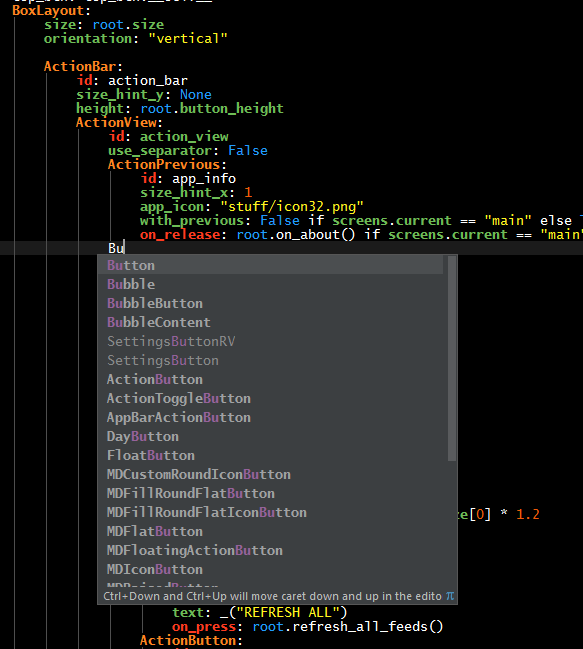
This settings file is based on the one that is located at the
"Setting Up Kivy with various popular IDE's" page of Kivy@GitHub.
It's updated and has also support for the KivyMD modules and properties.
There are 4 categories of keywords:
- Modules (e.g.
FloatLayout,Button,Image..) - Properties (e.g.
text,source,size_hint_x..) - Actions (e.g.
on_release,on_text,on_parent..) - Special (The
app,cls,root,self,False,None,Truekeywords)
The colors of these categories can be changed in
Settings>Editor>Color Scheme>Custom.
You can Add/Remove keywords by going to the
Settings>Editor>File Types and double click (edit) the Kv Language entry.
Also, feel free to inform me about missing keywords so that I can update the settings file.
Installation instructions for PyCharm/Intellij IDEA:
- Click
File> [Manage IDE Settings] >Export Settingsand save a backup of your current settings (in case something goes wrong) - Download the
JetBrains.kvMD.completion.v0.x.jarfrom the releases - Click
File> [Manage IDE Settings] >Import Settings - Select the
.jarfile and a dialog will open. - Click OK and restart PyCharm ;o)
Semi-Language Injection to String Literals
Added in v0.3
PyCharm, IDEA (and all the JetBrains IDE's) support "Language Injection", a way to have
syntax highlighting inside the Python's string literals.
Unfortunately, only the supported languages are supported (!)
There is a workaround (better than nothing, but not by much), to have something like this:
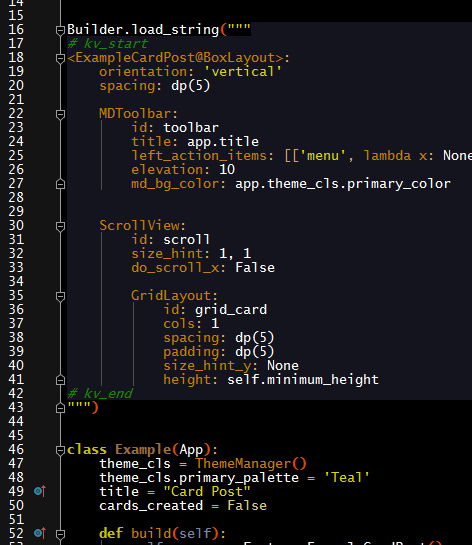
You can read about it here.
To use it, just select all the kv code in the string, press Ctrl+Alt+T ("Surround
With...") and select the KV. Surround for kv injection entry.
Related Skills
node-connect
348.2kDiagnose OpenClaw node connection and pairing failures for Android, iOS, and macOS companion apps
frontend-design
108.9kCreate distinctive, production-grade frontend interfaces with high design quality. Use this skill when the user asks to build web components, pages, or applications. Generates creative, polished code that avoids generic AI aesthetics.
openai-whisper-api
348.2kTranscribe audio via OpenAI Audio Transcriptions API (Whisper).
qqbot-media
348.2kQQBot 富媒体收发能力。使用 <qqmedia> 标签,系统根据文件扩展名自动识别类型(图片/语音/视频/文件)。

Security Score
Audited on Feb 3, 2026