
Morphism
⚡ Type-safe data transformer for JavaScript, TypeScript & Node.js.
Install / Use
/learn @nobrainr/MorphismREADME
Morphism
<!-- <div style="text-align:center"> <img src="https://i.imgur.com/4muW6u2.jpg" width="800px"> </div> --> [
[ ][npm-url]
 [
[ ][trends-url]
[
][trends-url]
[ ][circleci-url]
[
][circleci-url]
[ ][deps-url]
In many fields of mathematics, morphism refers to a structure-preserving map from one mathematical structure to another. A morphism f with source X and target Y is written f : X → Y. Thus a morphism is represented by an arrow from its source to its target.
https://en.wikipedia.org/wiki/Morphism
- ⚛️ Write your schema once, Transform your data everywhere
- 0️⃣ Zero dependencies
- 💪🏽 Typescript Support
- Morphism
Getting started
Installation
npm install --save morphism
or in the browser
<script src="https://unpkg.com/morphism/dist/morphism.js"></script>
<script>
  const { morphism, createSchema } = Morphism
</script>
Usage
The entry point of a morphism is the schema. The keys represent the shape of your target object, and the values represents one of the several ways to access the properties of the incoming source.
const schema = {
  targetProperty: 'sourceProperty'
};
Then use the morphism function along with the schema to transform any source to your desired target
import { morphism } from 'morphism';

const source = {
  _firstName: 'Mirza'
};

const schema = {
  name: '_firstName'
};

morphism(schema, source);
➡
{
  "name": "Mirza"
}
You may specify properties deep within the source object to be copied to your desired target by using dot notation in the mapping value.
This is one of the actions available to transform the source data
const schema = {
  foo: 'deep.foo',
  bar: {
    baz: 'deep.foo'
  }
};

const source = {
  deep: {
    foo: 'value'
  }
};

morphism(schema, source);
➡
{
  "foo": "value",
  "bar": {
    "baz": "value"
  }
}
One important rule of Morphism is that it will always return a result respecting the dimension of the source data. If the source data is an array, morphism will outputs an array, if the source data is an object you'll have an object
const schema = {
  foo: 'bar'
};

// The source is a single object
const object = {
  bar: 'value'
};

morphism(schema, object);
➡
{
  "foo": "value"
}

// The source is a collection of objects
const multipleObjects = [{
  bar: 'value'
}];

morphism(schema, multipleObjects);
➡
[{
  "foo": "value"
}]
Example (TypeScript)
import { morphism, StrictSchema } from 'morphism';

// What we have
interface Source {
  ugly_field: string;
}

// What we want
interface Destination {
  field: string;
}

const source: Source = {
  ugly_field: 'field value'
};

// Destination and Source types are optional
morphism<StrictSchema<Destination, Source>>({ field: 'ugly_field' }, source);
// => {field: "field value"}

// Or
const sources = [source];
const schema: StrictSchema<Destination, Source> = { field: 'ugly_field' };
morphism(schema, sources);
// => [{field: "field value"}]
Motivation
We live in a era where we deal with mutiple data contracts coming from several sources (Rest API, Services, Raw JSON...). When it comes to transform multiple data contracts to match with your domain objects, it's common to create your objects with Object.assign, new Object(sourceProperty1, sourceProperty2) or by simply assigning each source properties to your destination. This can result in your business logic being spread all over the place.
Morphism allows you to keep this business logic centralized and brings you a top-down view of your data transformation. When a contract change occurs, it helps to track the bug since you just need to refer to your schema
TypeScript integration
When you type your schema, this library will require you to specify each transformation for your required fields.
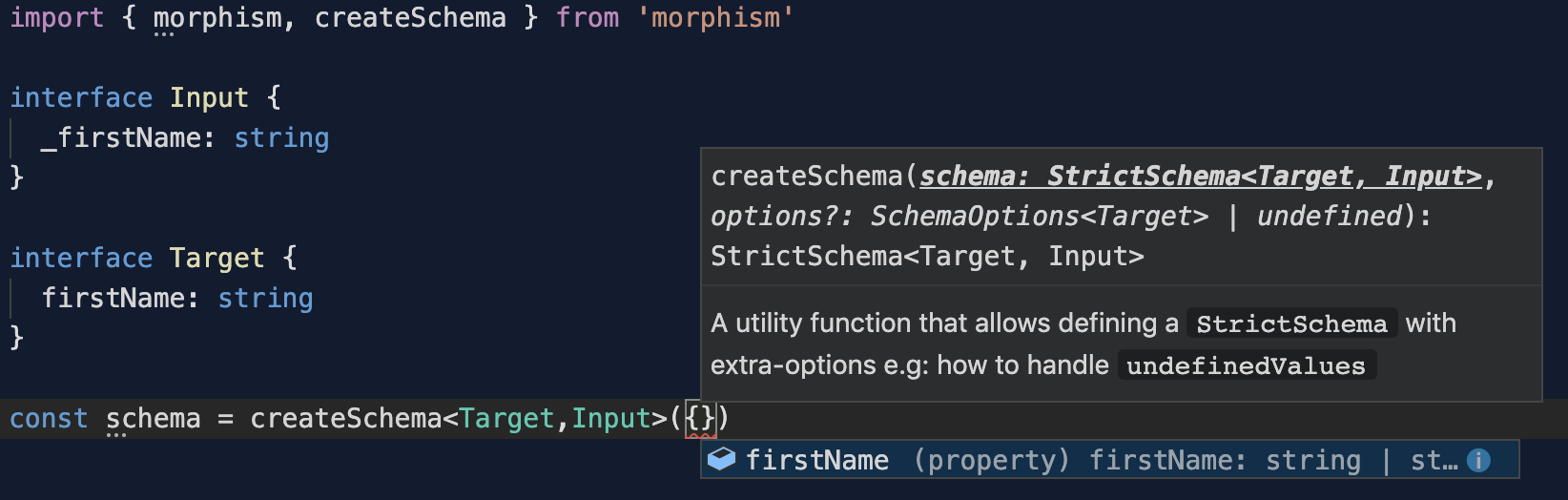
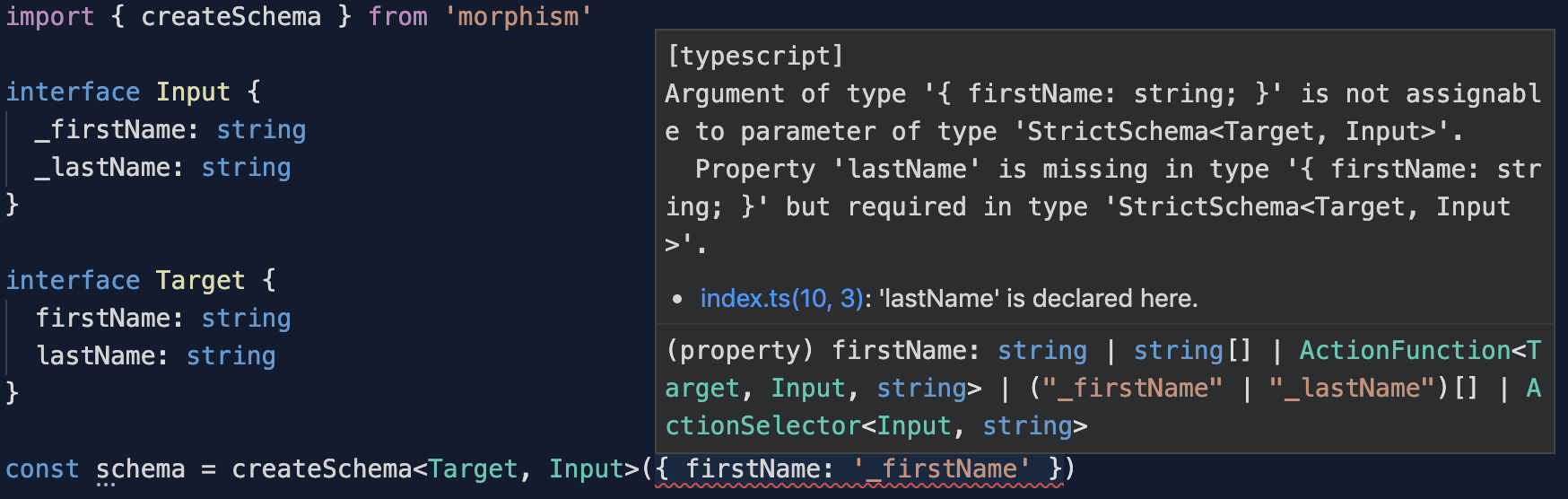
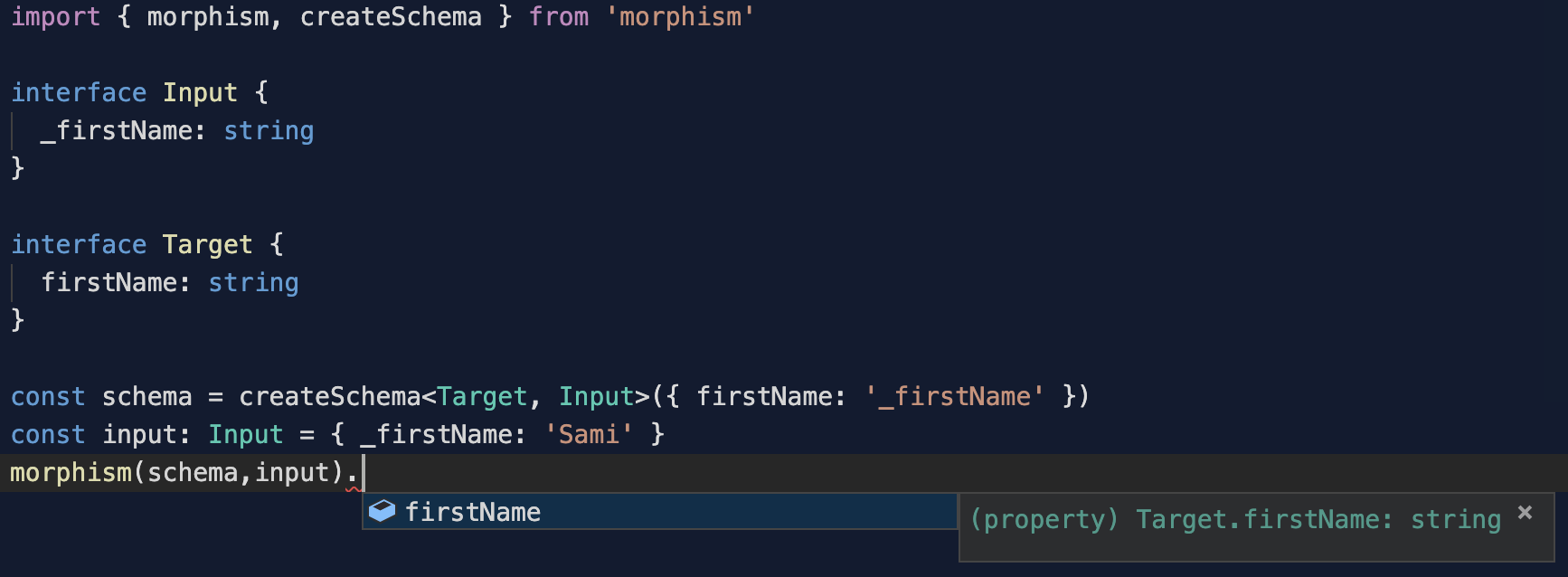
This library uses TypeScript extensively. The target type will be inferred from the defined schema.
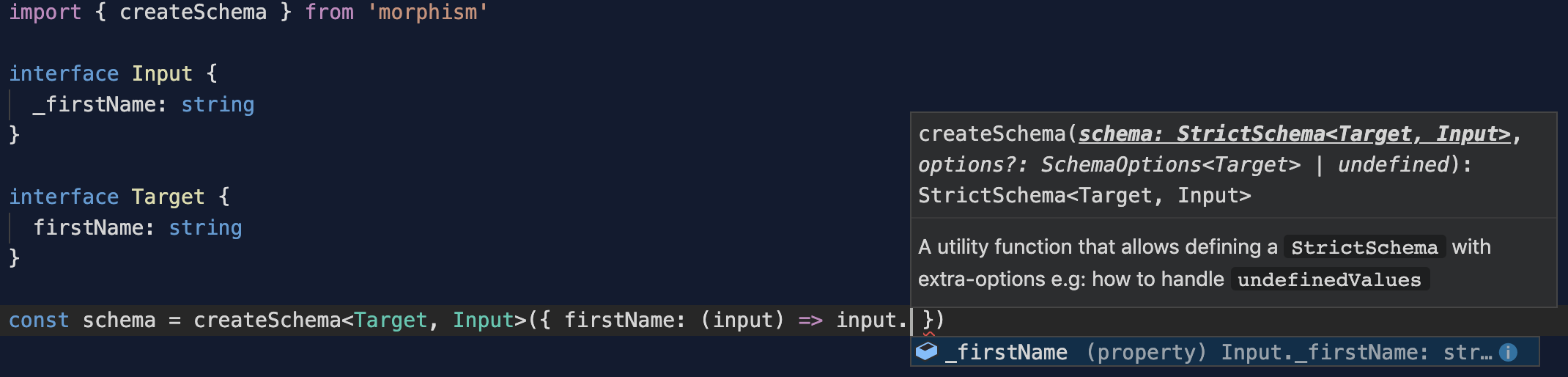
When using an ActionFunction the input type is also inferred to enforce your transformations
See below the different options you have for the schema.
Docs
Morphism comes with 3 artifacts to achieve your transformations:
1. The Schema
A schema is an object-preserving map from one data structure to another.
The keys of the schema match the desired destination structure. Each value corresponds to an Action applied by Morphism when iterating over the input data.
Schema actions
You can use 4 kind of values for the keys of your schema:
ActionString: A string that allows to perform a projection from a propertyActionSelector: An Object that allows to perform a function over a source property's valueActionFunction: A Function that allows to perform a function over source propertyActionAggregator: An Array of Strings that allows to perform a function over source property
Schema Example
import { morphism } from 'morphism';

const input = {
  foo: {
    baz: 'value1'
  }
};

const schema = {
  bar: 'foo', // ActionString: Allows to perform a projection from a property
  qux: ['foo', 'foo.baz'], // ActionAggregator: Allows to aggregate multiple properties
  quux: (iteratee, source, destination) => {
    // ActionFunction: Allows to perform a function over source property
    return iteratee.foo;
  },
  corge: {
    // ActionSelector: Allows to perform a function over a source property's value
    path: 'foo.baz',
    fn: (propertyValue, source) => {
      return propertyValue;
    }
  }
};

morphism(schema, input);
// {
//   "bar": {
//     "baz": "value1"
//   },
//   "qux": {
//     "foo": {
//       "baz": "value1"
//     }
//   },
//   "quux": {
//     "baz": "value1"
//   },
//   "corge": "value1"
// }
1.1 Using a strict Schema
You might want to enforce the keys provided in your schema using Typescript. This is possible using a StrictSchema. Doing so will require to map every field of the Target type provided.
interface IFoo {
  foo: string;
  bar: number;
}
const schema: StrictSchema<IFoo> = { foo: 'qux', bar: () => 'test' };
const source = { qux: 'foo' };
const target = morphism(schema, source);
// {
//   "foo": "qux",
//   "bar": "test"
// }
2. Morphism as Currying Function
The simplest way to use morphism is to import the currying function:
import { morphism } from 'morphism';
morphism either outputs a mapping function or the transformed data depending on the usage:
API
morphism(schema: Schema, items?: any, type?: any): any
Related Skills
node-connect
337.4kDiagnose OpenClaw node connection and pairing failures for Android, iOS, and macOS companion apps
frontend-design
83.2kCreate distinctive, production-grade frontend interfaces with high design quality. Use this skill when the user asks to build web components, pages, or applications. Generates creative, polished code that avoids generic AI aesthetics.
Writing Hookify Rules
83.2kThis skill should be used when the user asks to "create a hookify rule", "write a hook rule", "configure hookify", "add a hookify rule", or needs guidance on hookify rule syntax and patterns.
review-duplication
99.2kUse this skill during code reviews to proactively investigate the codebase for duplicated functionality, reinvented wheels, or failure to reuse existing project best practices and shared utilities.
